
1. Úvod
The Radiomaster XR1 Nano Multi-Frequency ExpressLRS Receiver is a compact and versatile receiver designed for remote control applications. It utilizes the advanced Semtech LR1121 transceiver, supporting both 2.4GHz and Sub-G 900MHz frequency bands. This receiver offers exceptional range and sensitivity, making it suitable for various builds requiring reliable link quality with ExpressLRS systems.
This manual provides detailed instructions for the setup, operation, and maintenance of your XR1 receiver to ensure optimal performance and longevity.
2. Co je v krabici

Image: Package contents including the XR1 receiver, T-Antenna, CRSF wire, and heat-shrinkable tubes.
- 1 x XR1 Nano Multi-Frequency ExpressLRS Receiver
- 1 x T Antenna (Either 2.4GHz, 900MHz, or Dual-band, depending on the selected package)
- 1 x drát CRSF
- 3 x Heat-Shrinkable Tube
- 1 x Manual Card (This document)
3. Klíčové vlastnosti
Obrázek: Overview of the XR1 receiver's main features.
- Dvoupásmový provoz: Supports both 2.4GHz and Sub-G 900MHz frequency bands using the Semtech LR1121 transceiver.
- Kompaktní velikost: Ultra-compact design, measuring 20mm x 13mm.
- Vysoký výkon: Equipped with an ESP32C3 high-performance MCU.
- Telemetrie: Provides 100mW telemetry RF power.
- Snadná konfigurace: Built-in Wi-Fi for effortless configuration and firmware updates via an intuitive WebUI.
- Flexibilní konektivita: Features a secondary UART port and castled pads for easy soldering.
- Kompatibilita s ExpressLRS: Pre-installed with ExpressLRS v3.5.1 firmware.
4. Pokyny k nastavení
4.1. Schéma zapojení
Connect the XR1 receiver to your flight controller or compatible device using the provided CRSF wire. Ensure correct polarity for power (5V) and ground (GND), and proper connection for RX and TX data lines.

Obrázek: Podrobný view of the XR1 receiver's connection pads.
- 5V: Power input (5 Volts DC)
- GND: Země
- TX: Transmit data (connect to RX on flight controller)
- RX: Receive data (connect to TX on flight controller)
4.2. Instalace antény
Attach the T-Antenna to the IPEX-1 connector on the receiver. Ensure the antenna is securely connected and positioned away from carbon fiber or other conductive materials for optimal signal reception.

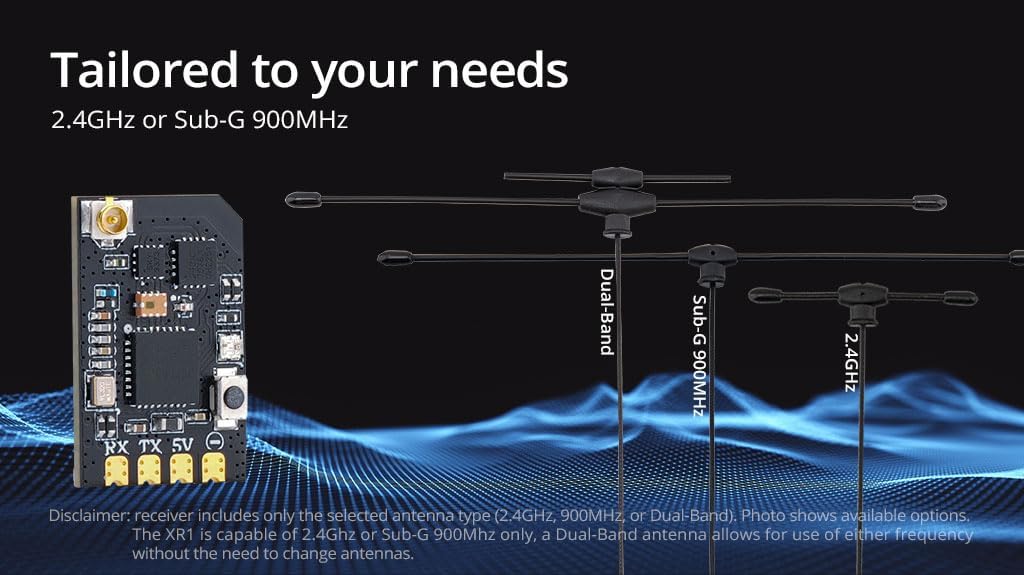
Image: Various antenna options for the XR1 receiver.
The XR1 receiver supports 2.4GHz or Sub-G 900MHz. If you have a Dual-Band antenna, it allows for use of either frequency without needing to change antennas.
4.3. Závazný postup
The XR1 receiver comes with ExpressLRS v3.5.1 pre-installed. To bind the receiver to your ExpressLRS transmitter:
- Power on the receiver three times, cycling power quickly between each power-on. The LED on the receiver should flash rapidly, indicating it is in binding mode.
- On your ExpressLRS compatible transmitter, navigate to the ExpressLRS LUA script or menu and select the "Bind" option.
- Once bound, the LED on the receiver will turn solid, indicating a successful connection.
For detailed binding instructions specific to your transmitter, refer to your transmitter's user manual or the official ExpressLRS documentation.
4.4. Firmware Updates and Configuration (Wi-Fi)
The XR1 features built-in Wi-Fi for convenient firmware updates and configuration. To access the Webuživatelské rozhraní:
- Zapněte přijímač.
- Connect to the Wi-Fi network broadcast by the receiver (usually named "ExpressLRS_RX" followed by a unique identifier).
- Otevřete a web prohlížeč a přejděte do http://10.0.0.1.
- z WebUI, you can update firmware, change settings, and configure your receiver.
5. Návod k obsluze
5.1. Powering On and Initial Check
After successful setup and binding, power on your model. The receiver's LED should illuminate solid, indicating a stable connection to your transmitter. Perform a range check and verify all control surfaces respond correctly before flight.
5.2. Telemetrie
The XR1 receiver provides 100mW telemetry RF power, allowing your transmitter to receive real-time data from your model, such as RSSI (Received Signal Strength Indicator), link quality, and battery voltage (if configured). Refer to your flight controller and transmitter documentation for telemetry setup and display.
5.3. Kompatibilita
The XR1 receiver is compatible with all existing Radiomaster ExpressLRS radios and modules. Ensure your transmitter module is also running a compatible ExpressLRS firmware version.

Image: Compatibility chart for Radiomaster ExpressLRS radios and modules.
6. Údržba
- Udržujte v čistotě: Pravidelně kontrolujte přijímač, zda není znečištěný, prach nebo úlomky. K čištění použijte měkký, suchý kartáč nebo stlačený vzduch.
- Chraňte před vlhkostí: The XR1 is not water-resistant. Avoid exposure to moisture or extreme humidity. If exposed, ensure it is completely dry before powering on.
- Kontrola antény: Periodically check the antenna for any damage or loose connections. A damaged antenna can significantly reduce range and signal quality.
- Aktualizace firmwaru: Keep the receiver's firmware updated to the latest version to benefit from performance improvements and new features. Use the Wi-Fi WebUI for updates.
7. Řešení problémů
| Problém | Možná příčina | Řešení |
|---|---|---|
| LED dioda přijímače nesvítí trvale po pokusu o spárování. | Not successfully bound; incorrect binding procedure; incompatible firmware. | Ensure correct binding steps (power cycle 3 times). Verify transmitter and receiver are on compatible ExpressLRS firmware versions. Try binding again. |
| Žádná kontrolní odezva. | Receiver not powered; incorrect wiring; binding lost; flight controller not configured. | Check power connections to the receiver. Verify RX/TX wiring to the flight controller. Re-bind the receiver. Ensure flight controller UART and receiver protocol (CRSF) are correctly configured. |
| Špatný dosah nebo ztráta signálu. | Damaged or poorly positioned antenna; interference; low RF power setting. | Inspect antenna for damage and ensure it is positioned optimally, away from carbon fiber. Check for local interference sources. Verify RF power settings on your transmitter. |
| Cannot connect to Wi-Fi for updates. | Receiver not in Wi-Fi mode; incorrect Wi-Fi password (if set); network conflict. | Ensure the receiver is powered on and broadcasting its Wi-Fi network. Try restarting the receiver. If a password was set, ensure it is correct. |
8. Specifikace

Image: Physical dimensions of the XR1 receiver.

Image: Weight of the XR1 receiver.
| Funkce | Detail |
|---|---|
| Položka | XR1 Nano Multi-Frequency ExpressLRS Receiver |
| Typ | ISM2.4 or FCC915 |
| MCU | ESP32C3 |
| RF čip | Semtech LR1121 |
| RF konektor | IPEX-1 |
| Anténa | 1x T-Antenna (2.4GHz, 900MHz, or Dual-band) |
| Frekvenční rozsah | 2.4 GHz nebo Sub-G 900 MHz |
| Telemetrický výkon | 100 mW |
| Maximum Packet Rate | DK500Hz / K1000Hz |
| Minimum Packet Refresh Rate | 50 Hz |
| Pracovní svtage | 5V |
| Hmotnost | 1.0g (bez antény) |
| Rozměry | 20 mm x 13 mm x 3 mm |
| Verze firmwaru | Předinstalovaný ExpressLRS v3.5.1 |
| Cíl předběžného nastavení | RadioMaster XR1 2.4/900 RX |
| Rozhraní sběrnice 1 | CRSF |
| Rozhraní sběrnice 2 | UART |

Image: LR1121 Receiver Frequency Compatibility Chart.
9. Podpora a záruka
For technical assistance, troubleshooting beyond this manual, or warranty inquiries, please contact Radiomaster customer support through their official webwebu nebo prodejce, od kterého jste produkt zakoupili.
Uschovejte si prosím doklad o koupi pro případné reklamace. Záruční podmínky se mohou lišit v závislosti na regionu a prodejci.
Official Radiomaster Store: Radiomaster Store on Amazon