
PAKRYS DM58
Uživatelská příručka k chytrým hodinkám PAKRYS Military
Model: DM58
1. Úvod
The PAKRYS Military Smart Watch is a rugged and versatile device designed for active lifestyles, offering advanced features such as precision GPS tracking, comprehensive fitness monitoring, and robust military-grade durability. This manual provides detailed instructions to help you set up, operate, and maintain your smartwatch.
Klíčové vlastnosti:
- 1.43'' HD AMOLED Always-On Display (466*466 pixels)
- Precision Dual-Frequency GPS, Compass, Altimeter, and Barometer
- 5ATM Water Resistance and Military-Grade Durability
- 500mAh Long-Lasting Battery (5-10 days normal use)
- Volání přes Bluetooth a chytrá upozornění
- 170+ Sport Modes and Comprehensive Fitness Tracking
- Heart Rate, Sleep, Stress, and Blood Oxygen Monitoring

Image 1.1: The PAKRYS Military Smart Watch, showcasinjeho robustní design a jasný displej.
2. Začínáme
2.1 Co je v krabici
Upon unboxing your PAKRYS Military Smart Watch, please ensure all the following items are present:
- 1 x Pakrys Smart Watch
- 1 x řemínek na hodinky
- 1 x magnetický nabíjecí kabel
- 1 x Uživatelská příručka (tento dokument)
- 1 x Dárková krabička
2.2 Nabíjení chytrých hodinek
Před prvním použitím chytré hodinky plně nabijte. Připojte magnetický nabíjecí kabel k nabíjecím kontaktům na zadní straně hodinek a zapojte USB konec do standardního USB napájecího adaptéru (není součástí balení).
- Doba nabíjení: Přibližně 2-3 hodiny pro plné nabití.
- Battery Indicator: The watch display will show the charging status.

Image 2.1: The smartwatch connected to its magnetic charging cable.
2.3 Instalace a párování aplikace
Chcete-li plně využít potenciál svých chytrých hodinek, stáhněte si a nainstalujte GloryFitPro aplikace na vašem smartphonu.
- Stáhnout aplikaci: Hledat "GloryFitPro" in the Apple App Store (for iOS) or Google Play Store (for Android), or scan the QR code provided in the quick start guide (if applicable).
- Vytvořit účet: Otevřete aplikaci a podle pokynů na obrazovce vytvořte účet nebo se přihlaste.
- Povolit Bluetooth: Ujistěte se, že je na vašem smartphonu povoleno Bluetooth.
- Spárovat zařízení: In the GloryFitPro app, navigate to the "Device" or "Add Device" section. The app will search for nearby smartwatches. Select "DM58" or the corresponding device name when it appears.
- Potvrdit spárování: Na hodinkách a telefonu se může zobrazit požadavek na spárování. Potvrďte párování na obou zařízeních.
Once paired, the watch will synchronize time and data with your phone, and you can customize settings through the app.
3. Ovládání chytrých hodinek
3.1 Zobrazení a navigace
The 1.43-inch AMOLED display provides clear visuals. Navigate through menus by swiping left, right, up, or down, and tap to select. The physical buttons on the side provide quick access to specific functions (e.g., Sport, Select, Back, GPS).
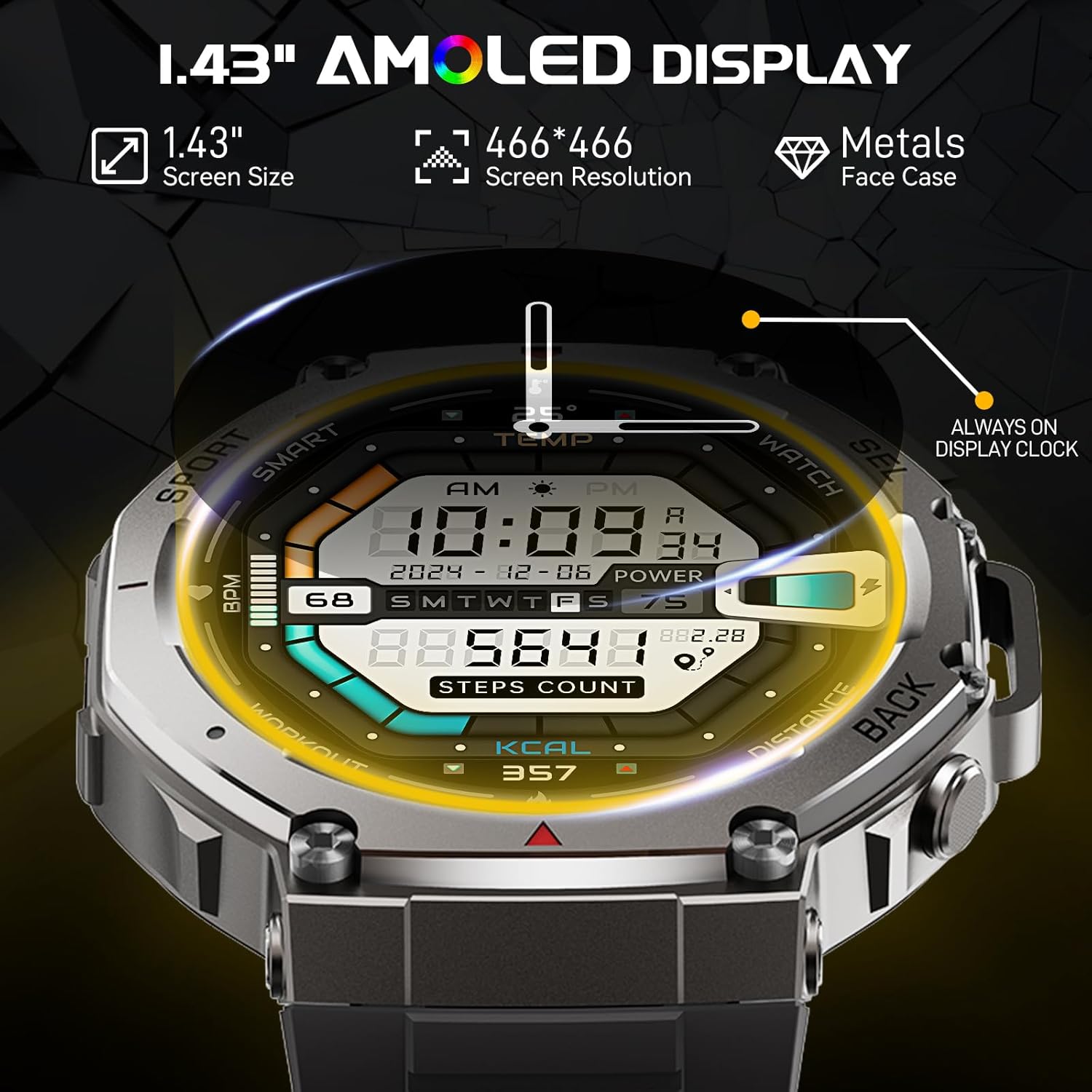
Image 3.1: Details of the 1.43" AMOLED display and its features.
3.2 GPS a venkovní funkce
The smartwatch features advanced dual-frequency GPS for accurate location tracking, along with a built-in compass, altimeter, and barometer for outdoor activities.
- GPS sledování: Activate GPS for outdoor activities like running or hiking to record your route, distance, and pace.
- Kompas: Access the compass feature to determine your current heading.
- Výškoměr a barometr: Monitor altitude and air pressure changes, useful for mountaineering and weather awareness.

Image 3.2: Visual representation of the smartwatch's outdoor features including GPS, compass, altitude, and air pressure.
3.3 Communication: Calls and Notifications
Stay connected by receiving calls and notifications directly on your wrist.
- Bluetooth volání: With high-quality speakers and microphones, you can answer or make calls directly from the watch when connected to your phone via Bluetooth.
- Chytrá upozornění: Receive alerts for incoming calls, text messages, and notifications from various apps (e.g., Facebook, WhatsApp, Twitter) configured through the GloryFitPro app.

Image 3.3: The smartwatch's Bluetooth calling and smart notification capabilities.
3.4 Comprehensive Fitness Tracking
The smartwatch supports over 170 sport modes and offers automatic recognition for 5 common activities (walking, running, cycling, elliptical machine, rowing machine).
- Sportovní režimy: Select your activity from the extensive list to track specific metrics like duration, distance, calories burned, and heart rate zones.
- Údaje o činnosti: All workout data is seamlessly uploaded to the GloryFitPro app for in-depth analysis and progress tracking.

Image 3.4: The smartwatch's extensive sport modes and activity tracking.
3.5 Monitorování zdraví
Monitor your health with integrated sensors for various vital signs.
- Monitorování srdeční frekvence: Continuously track your heart rate throughout the day and during workouts.
- Sledování spánku: Analyze your sleep patterns, including light, deep, and REM sleep stages.
- Sledování stresu: Understand your stress levels and manage them effectively.
- Kyslík v krvi (SpO2): Změřte si hladinu saturace krve kyslíkem.
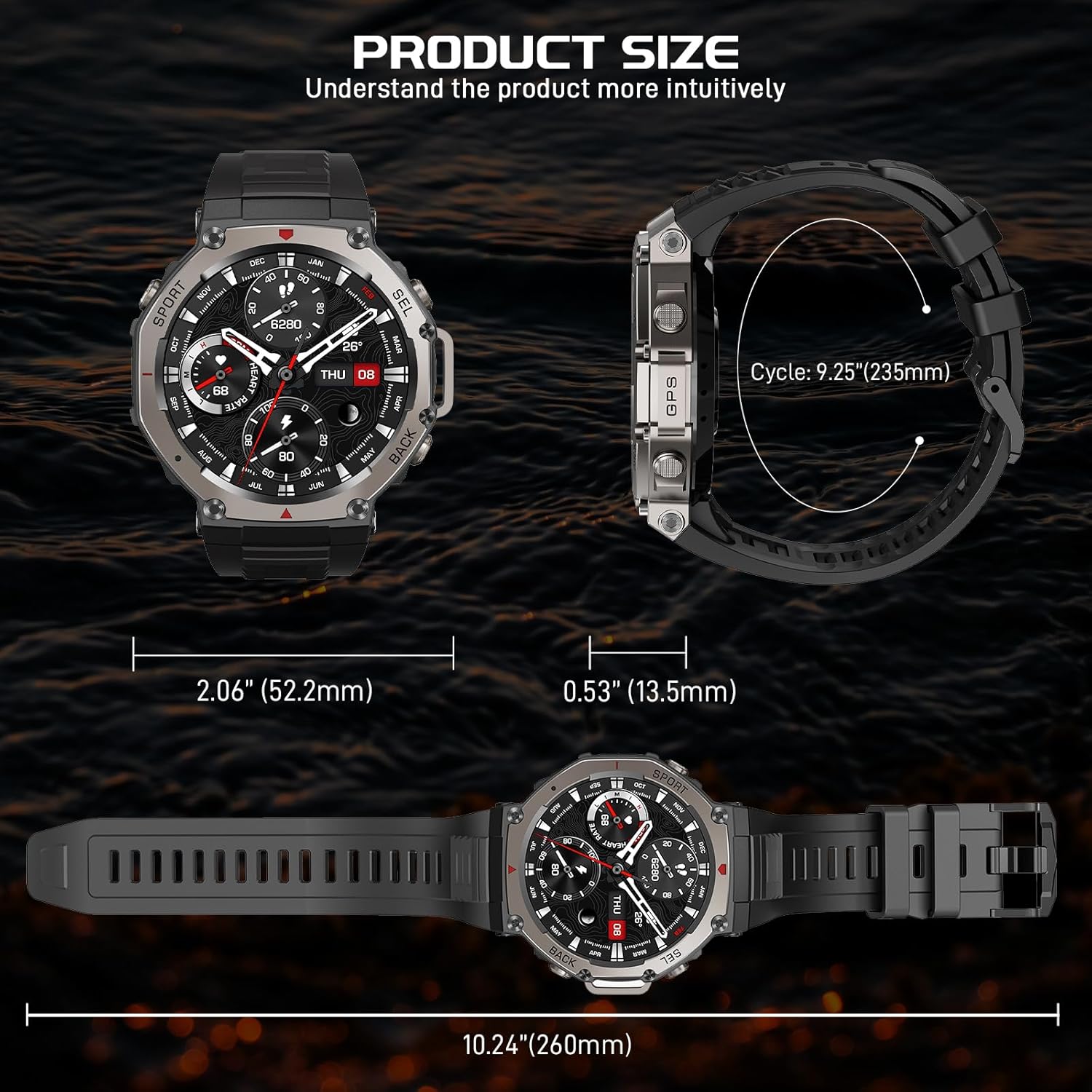
Obrázek 3.5: Konecview schopností chytrých hodinek sledovat zdraví.
4. Péče a údržba
4.1 Čištění chytrých hodinek
Pravidelné čištění pomáhá udržovat vzhled a funkčnost hodinek.
- Otřete obrazovku a tělo měkkým hadříkem, který nepouští vlákna.
- Pro odolnou špínu lehceamphadřík vodou. Nepoužívejte agresivní chemikálie ani abrazivní materiály.
- Pravidelně čistěte nabíjecí kontakty, aby se zajistilo správné nabíjení.
4.2 Vodotěsnost (5 ATM)
The PAKRYS Military Smart Watch has a 5ATM water resistance rating, meaning it can withstand pressures equivalent to a depth of 50 meters. This makes it suitable for:
- Daily use and hand washing
- Déšť a cákance
- Showering (cold water recommended, avoid hot water and steam)
- Plavání v mělké vodě
Poznámka:
- Nestiskávejte tlačítka pod vodou.
- Avoid exposure to hot water, steam, or strong jets of water.
- The 5ATM rating does not mean the watch can be used for scuba diving or high-speed water sports.

Image 4.1: The smartwatch's 5ATM water resistance and military-grade durability.
4.3 Skladování
When not in use for extended periods, store the smartwatch in a cool, dry place away from direct sunlight and extreme temperatures. It is recommended to charge the watch to about 50% before long-term storage.
5. Řešení problémů
Pokud se s chytrými hodinkami setkáte s problémy, podívejte se na následující běžné problémy a jejich řešení:
| Problém | Možné řešení |
|---|---|
| Hodinky se nezapínají | Ujistěte se, že jsou hodinky plně nabité. Stiskněte a několik sekund podržte tlačítko napájení. |
| Cannot connect to the GloryFitPro app | Ensure Bluetooth is enabled on your phone. Restart both the watch and your phone. Make sure the app is updated to the latest version. Forget the device in your phone's Bluetooth settings and try pairing again. |
| Inaccurate heart rate/sleep data | Ujistěte se, že hodinky máte pevně na zápěstí, ne příliš těsně ani příliš volně. Vyčistěte senzor na zadní straně hodinek. Během měření se vyvarujte nadměrného pohybu. |
| GPS signal is weak or inaccurate | Ujistěte se, že se nacházíte v otevřeném venkovním prostoru s volným view of the sky. Wait for the watch to acquire a stable GPS signal before starting an activity. |
| Oznámení se nezobrazují | Check notification permissions for the GloryFitPro app in your phone's settings. Ensure notifications are enabled within the GloryFitPro app for specific applications. Keep the watch connected to your phone via Bluetooth. |
6. Technické specifikace
| Funkce | Specifikace |
|---|---|
| Název produktu | AMOLED Smart Watch |
| Číslo modelu | DM58 |
| Velikost obrazovky | 1.43 palců |
| Typ obrazovky | AMOLED |
| Rezoluce | 466*466 pixelů |
| Kapacita baterie | 500 XNUMX mAh |
| Vodotěsná úroveň | 5 ATM |
| Pracovní doba | About 7-10 days (normal use) |
| Pohotovostní doba | Cca 25-30 dní |
| Typ nabíjení | Magnetické nabíjení |
| Doba nabíjení | Asi 2-3 hodin |
| Watch Hmotnost | About 0.6lb / 244g |
| Název APP | GloryFitPro |
| Verze Bluetooth | BLE 5.3 |
| Kompatibilní systém | Android 5.0 nebo vyšší; iOS 12.0 nebo vyšší |
7. Záruka a podpora
PAKRYS offers a 1-year after-sales replacement service for your smartwatch. This warranty covers manufacturing defects and ensures that you receive a functional product.
For any inquiries, technical assistance, or to claim warranty service, please contact PAKRYS customer support through the platform where you purchased the product or refer to the contact information provided in the product packaging.
Please have your purchase details and product model number (DM58) ready when contacting support to facilitate a quicker resolution.
Ask a question about this manual
Ask about setup, troubleshooting, compatibility, parts, safety, or missing instructions. Manuals+ will review the question and use this page’s manual context to help answer it.