
1. Úvod
This manual provides detailed instructions for the assembly, operation, and maintenance of your AutoFull G7 Ergonomic Office Chair. Please read this manual thoroughly before assembly and use to ensure proper function and safety.
2. Konec produktuview
The AutoFull G7 Ergonomic Office Chair is designed for optimal comfort and support during long periods of sitting. It features a 3-Zone Dynamic Lumbar system, 720° Dual-Axis Armrests, a T-Lock Support System with 4D Headrest, CloudTech Mesh for breathability, and a 140° Zero-Gravity Recline with a retractable footrest.

Figure 2.1: AutoFull G7 Ergonomic Office Chair (White variant).
3. Montážní návod
For a visual guide, please refer to the official installation video below. It is recommended to have two people for assembly.
Video 3.1: AutoFull G7 Installation Guide. This video demonstrates the step-by-step assembly process for the AutoFull G7 chair, including attaching the base, armrests, and backrest.
3.1. Komponenty přesview
Ensure all components are present before beginning assembly. Refer to the accessories diagram in the installation video for a complete list.
- Opěradlo
- Sedák
- Backrest Decorative Cover
- Opěrka hlavy
- Loketní opěrky (levá a pravá)
- Armrest Brackets
- Plynový výtah
- Kolečka (5x)
- 5hvězdičková základna
- Chair Legs (x5)
- Screws (Type-1, Type-2, Type-3, Type-4)
- L-shaped Hexagon Wrench
- Šroubovák
3.2. Sestavení krok za krokem
- Assemble the 5-Star Base:
- Insert each chair leg into the 5-star base.
- Flip the 5-star base upside down.
- Secure chair legs to the 5-star base using five Type-4 screws.
- Insert each caster into the mounting hole of the chair legs.
- Flip the 5-star base upright (casters touching the ground).
- Align and insert the gas lift into the central hole of the 5-star base.
- Připevněte područky:
- Place the backrest flat on the floor.
- Identify left/right armrests and align with backrest mounting holes.
- Secure one armrest bracket to the backrest using two Type-1 screws.
- Repeat the same process for the other armrest bracket.
- Position armrests with side buttons facing outward.
- Secure one armrest to the bracket with one Type-2 screw.
- Repeat the same process for the other armrest.
- Install Wire Controller:
- Remove pre-installed wire controller screws located on the side of the seat cushion.
- Align and position the wire controller over the mounting holes.
- Secure the wire controller using the screws removed earlier.
- Attach Backrest to Chassis:
- Align the backrest with the chassis mounting holes.
- Secure the backrest to the chassis using three Type-2 screws.
- Insert the assembled 5-star base and gas lift into the chassis mounting holes.
- Set the chair upright.
- Instalace opěrky hlavy:
- Align the headrest with the top backrest mounting holes.
- Secure the headrest to the backrest using two Type-3 screws.
- Attach Back Armor:
- Align the bottom buckle of the back armor with the corresponding buckle slot on the backrest.
- Engage two mounting posts on the split part of the back armor into the upper backrest holes.
4. Pokyny k obsluze a nastavení
Your AutoFull G7 chair offers multiple adjustment points for personalized comfort. Refer to the user guide video and instructions below.
Video 4.1: AutoFull G7 User Guide. This video demonstrates how to use the various adjustment features of the AutoFull G7 chair.
4.1. Nastavení výšky sedadla
- To raise the seat height: Stand up from the chair and lift the control lever on the right side of the seat cushion. The seat will rise automatically.
- To lower the seat height: Sit on the chair and lift the control lever on the right side of the seat cushion. The seat will lower.
- Uvolněním páky zajistěte sedadlo v požadované výšce.
4.2. Nastavení loketní opěrky
The 720° Dual-Axis Armrests offer extensive customization:
- Nastavení výšky: Flip the outer armrest paddle upward to lift, or press the armrest for height adjustment.
- Position Adjustment (Forward/Backward): Press and hold the armrest while pushing it forward or backward.
- Nastavení úhlu: Lift the front edge of the armrest surface.
- Rotation (360° Swivel): Rotate the armrest handle for 360° rotation. Rotate the armrest surface for 360° swivel.
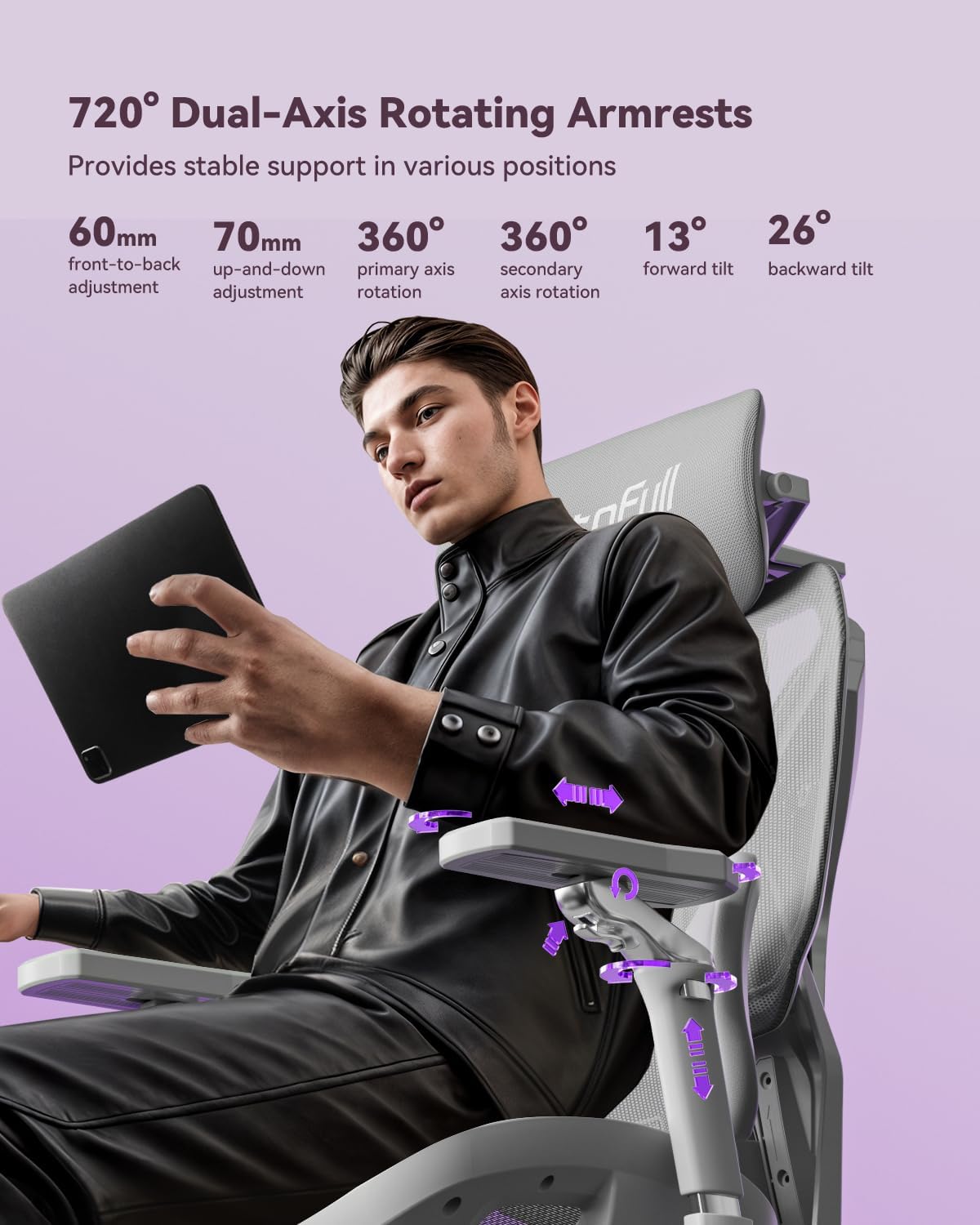
Figure 4.2: Illustration of 720° Dual-Axis Rotating Armrests.
4.3. Headrest Adjustments
The 4D Dual-Axis Headrest provides comprehensive neck support:
- Nastavení výšky: Pull the headrest up/down.
- Front-Back Position Control: Pull the headrest forward for front-back position control.
- Nastavení sklonu: Rotate the primary axis at the headrest base.
- Nastavení úhlu rotace: Grip the upper part of the headrest mesh on both sides and move it up/down.
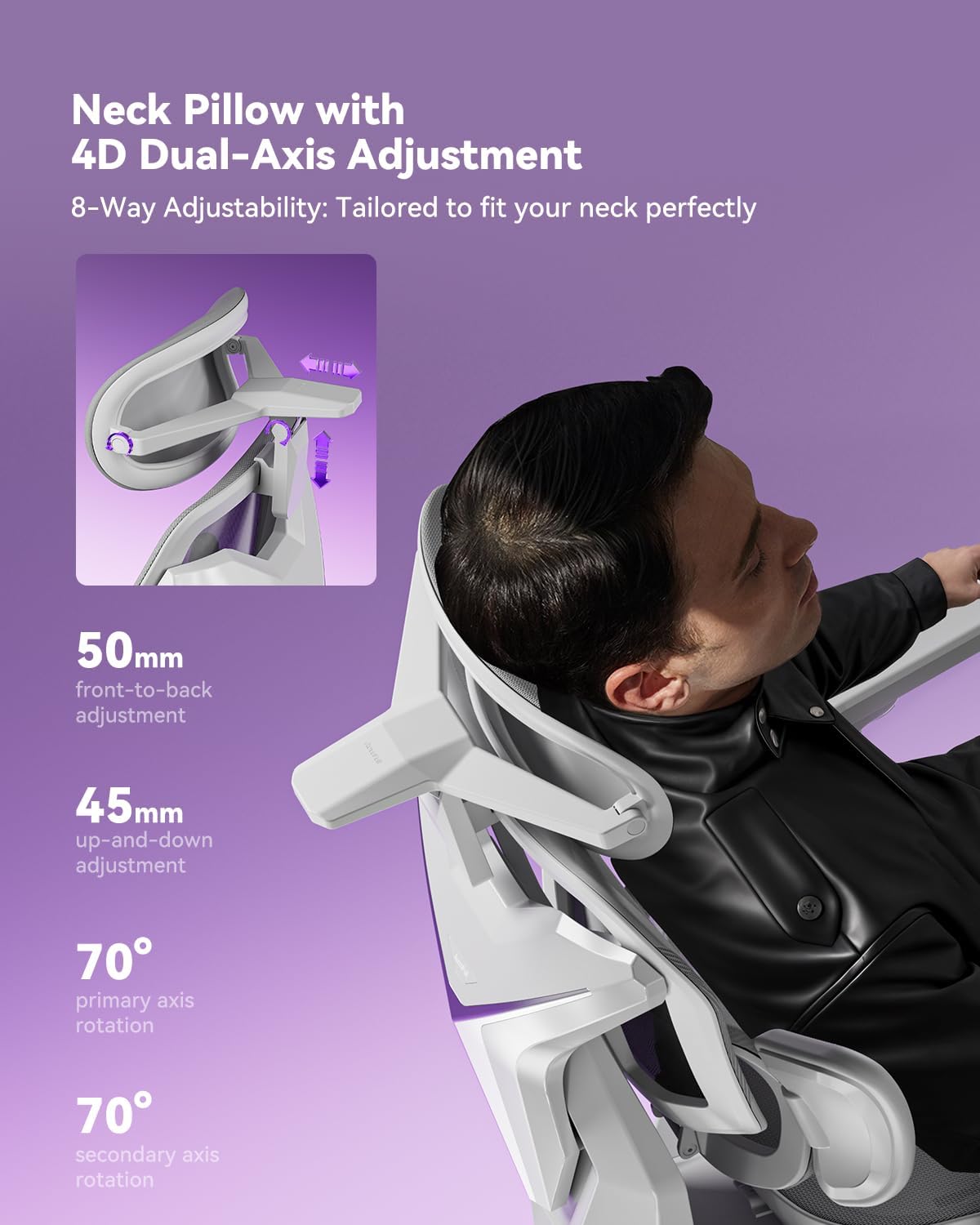
Figure 4.3: Illustration of 4D Dual-Axis Headrest Adjustment.
4.4. Lumbar Support Adjustments
The 3-Zone Dynamic Lumbar support adapts to your body:
- Vertikální umístění: Grip both sides of the lumbar support bracket and press to adjust its vertical position.
- Side Wing Tilt: The side cushioning offers 40° side wing tilt.
- Side Cushioning: The side cushioning provides 14° side cushioning that actively wraps around your lower back.
- Lumbar Rotation: The lumbar support allows for 12° rotation.
- Recline Tracking: Features stepless 0.8" recline tracking.
- Locking Lumbar Support: Lift the control lever to lock the lumbar support in place. When the control lever is in the lower position, the lumbar support will automatically adjust forward/backward to follow your waist.

Figure 4.4: Illustration of Auto Dynamic Lumbar Support.
4.5. Nastavení hloubky sedadla
- Push the adjustment lever forward to adjust the seat depth. The seat can be adjusted by 2 inches.

Figure 4.5: Illustration of 50mm Seat Depth Adjustment.
4.6. Recline Function and Footrest
- Sklopit: Pull the adjustment lever backward and lean back to activate the recline function. The chair reclines up to 140°.
- Lock Recline: Return the adjustment lever to its original position to lock the reclining angle.
- Opěrka nohou: Pull out the footrest and flip it outward to activate the footrest function. Retract the footrest when not in use.
5. Údržba
To ensure the longevity and optimal performance of your AutoFull G7 chair, follow these maintenance guidelines:
- Čištění: Otřete dočista s reklamouamp hadříkem. Nepoužívejte agresivní chemikálie, které by mohly poškodit síťovinu nebo rám.
- Pravidelné kontroly: Pravidelně kontrolujte všechny šrouby a vruty, zda jsou pevně utažené. V případě potřeby je dotáhněte.
- Péče o síťovinu: The CloudTech mesh is designed for durability and breathability. Avoid sharp objects that could tear the mesh.
- Plynový výtah: The TUV/SGS Class-4 gas lift is designed for long-term use. Do not attempt to disassemble or repair it yourself.
6. Řešení problémů
If you encounter any issues with your AutoFull G7 chair, please refer to the following common solutions:
| Problém | Možná příčina | Řešení |
|---|---|---|
| Židle se nedá nastavit na výšku | Plynový zvedák není zapojený nebo je vadný. | Ensure the control lever is fully lifted. If the issue persists, contact customer support. |
| Židle se kymácí | Uvolněné šrouby nebo nesprávná montáž. | Check and tighten all assembly screws, especially those connecting the base, chassis, and backrest. |
| Armrests are loose or difficult to adjust | Locking mechanism not engaged or debris. | Ensure adjustment paddles/buttons are fully engaged. Clean any debris from the mechanism. |
| Opěradlo se nedá sklopit ani zablokovat | Recline lever not properly engaged. | Ensure the recline adjustment lever is pulled backward to recline and returned to its original position to lock. |
If these solutions do not resolve the issue, please contact AutoFull customer support.
7. Specifikace
| Funkce | Detail |
|---|---|
| Značka | AutoFull |
| Název modelu | AFG701 |
| Barva | Bílý |
| Materiál | Kov, Polyester |
| Rozměry produktu (D x Š x V) | 28"H x 25"Š x 43"V |
| Hmotnost položky | 66 libry |
| Doporučená maximální hmotnost | 330 liber (150 kg) |
| Třída plynového výtahu | TUV/SGS Class-4 |
| Úhel sklonu | Až 140° |
| Doporučená výška | 155–195 cm (61–76.8 palce) |
| Certifikace | IGR ergonomic certified, Bifma certified (120,000+ cycle tested) |
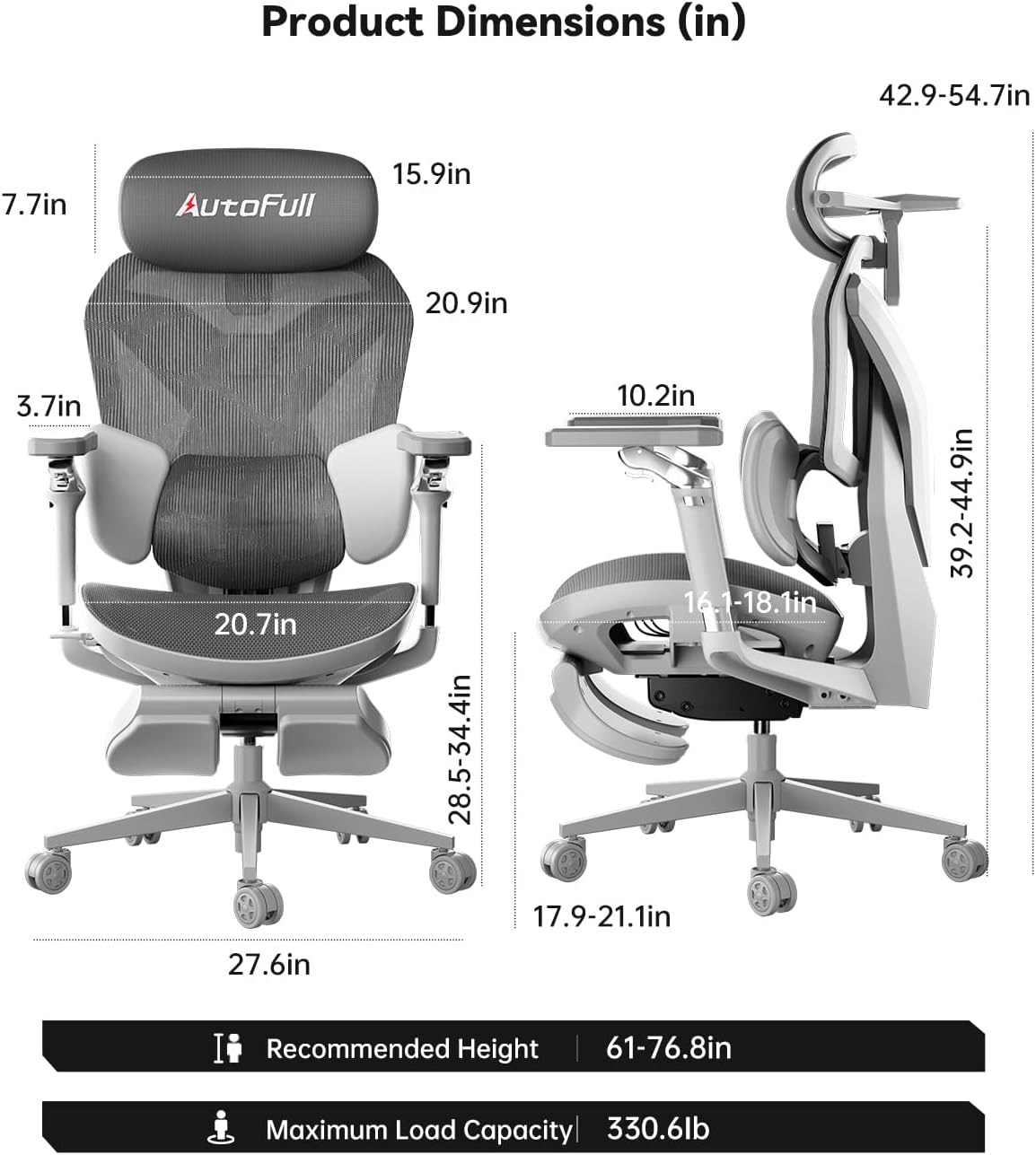
Figure 7.1: Product Dimensions (in inches) and Recommended Height/Load Capacity.

Figure 7.2: AutoFull G7 Certifications.
8. Záruka a podpora
- Záruka: The AutoFull G7 chair comes with a 3-year warranty and a lifetime warranty on the frame.
- Vrácení: Využijte snadné vrácení do 30 dnů.
- Zákaznická podpora: 24/7 support is available. For assistance, please visit the AutoFull Store on Amazon nebo kontaktujte přímo jejich zákaznický servis.

Figure 8.1: AutoFull After-Sales Service Information.