
1. Úvod
Thank you for choosing the JUNJIEUNVO Q16 PRO Wireless Translation Earbuds. These earbuds are designed to provide a versatile audio experience, featuring real-time language translation, high-definition sound, and an open-ear design for comfort. This manual provides essential information for setting up, operating, and maintaining your device.
2. Obsah balení
- JUNJIEUNVO Q16 PRO Wireless Translation Earbuds (Left and Right)
- Nabíjecí pouzdro s chytrou dotykovou obrazovkou
- Uživatelská příručka
- Nabíjecí kabel (USB-C)
3. Konec produktuview

Obrázek 3.1: JUNJIEUNVO Q16 PRO Wireless Translation Earbuds and Charging Case. This image displays the white and silver earbuds with their unique ear-hook design, alongside the charging case which features a digital display showing time and battery levels.
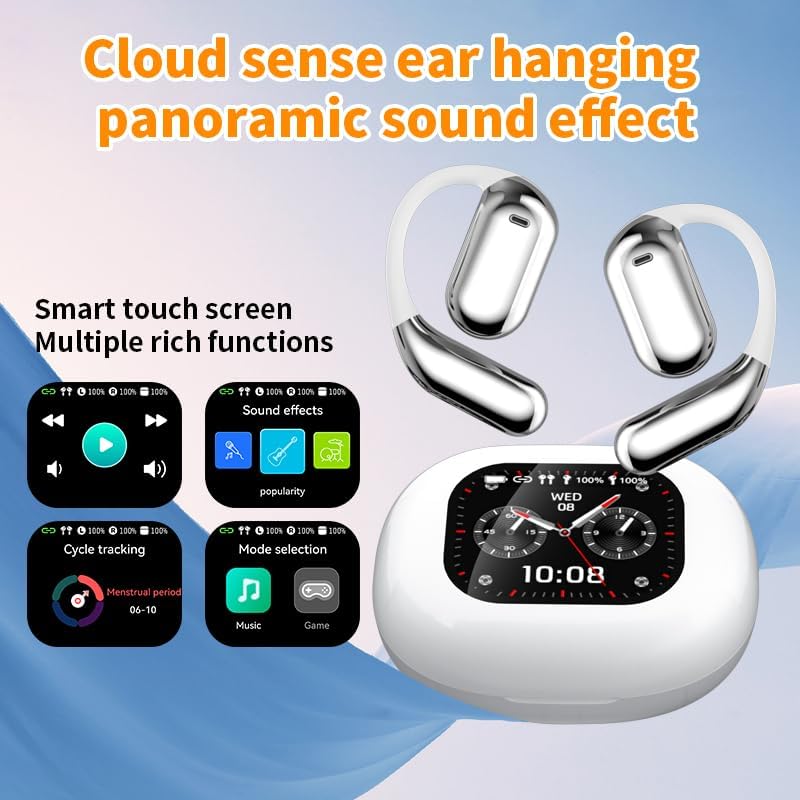
Obrázek 3.2: Smart Touch Screen Functions. This image highlights the charging case's smart touch screen, illustrating various functions such as media playback controls, sound effects, cycle tracking, and mode selection (music/game).

Obrázek 3.3: Environmental Noise Cancellation (ENC). This image depicts a person wearing the earbuds, with an overlay illustrating how the ENC technology reduces ambient noise by up to 99.44%, providing a clearer audio experience.

Obrázek 3.4: Open-Ear Design for Comfort. This image shows a person wearing the earbuds, emphasizing the open-ear design that offers comfort and allows for awareness of external sounds, protecting ear canal health.

Obrázek 3.5: Multiple Sound Adjustment Modes. This image displays the charging case's screen showing "Sound effects" with options for various music genres, indicating the ability to customize audio preferences.

Obrázek 3.6: Extended Battery Life and Rich Functions. This image showcases the earbuds and charging case, highlighting a 40-hour endurance with a 500mAh charging case capacity, along with a mention of multiple functions.

Obrázek 3.7: Earbuds and Charging Case (Open View). A detailed view of both earbuds and the open charging case, showing the internal design and charging contacts.

Obrázek 3.8: Earbuds in Charging Case. This image shows the earbuds securely placed within their charging case, ready for charging or storage.

Obrázek 3.9: Earbuds and Charging Case (Angled View). Another perspective of the earbuds and charging case, emphasizing their sleek design and compact form factor.
4. Nastavení
4.1 Nabíjení sluchátek a pouzdra
Před prvním použitím sluchátka a nabíjecí pouzdro plně nabijte.
- Vložte sluchátka do nabíjecího pouzdra. Ujistěte se, že jsou správně usazena v příslušných slotech (L pro levé, R pro pravé).
- Connect the charging cable to the USB-C port on the charging case and to a power source.
- Digitální displej na nabíjecím pouzdře bude indikovat stav nabíjení.
A full charge for the earbuds takes approximately 1.5 hours. The charging case has a 500mAh battery, providing extended use.
4.2 Spárování se zařízením
Sluchátka využívají Bluetooth 5.4 pro stabilní připojení až do vzdálenosti 10 metrů.
- Otevřete nabíjecí pouzdro. Sluchátka se automaticky přepnou do režimu párování.
- Na svém zařízení (chytrém telefonu, tabletu atd.) povolte Bluetooth.
- Hledat available Bluetooth devices and select "Q16 PRO" from the list.
- Po připojení sluchátka signalizují úspěšné spárování a zařízení je zobrazí jako připojená.
Sluchátka se po vyjmutí z pouzdra automaticky znovu připojí k poslednímu spárovanému zařízení, pokud je na zařízení povoleno Bluetooth.
5. Návod k obsluze
5.1 Smart Touch Screen Functions
The charging case features a smart touch screen for easy control of various functions. Navigate through options by swiping or tapping on the screen.
- Přehrávání médií: Control music (play, pause, skip tracks) directly from the screen.
- Zvukové efekty: Select from various sound modes.
- Výběr režimu: Switch between music and game modes.
- Sledování cyklů: Access additional features if supported by the connected application.
5.2 Dotykové ovládání (sluchátka)
The earbuds themselves also feature touch-sensitive areas for basic controls:
- Jedno klepnutí: Přehrát/Pozastavit hudbu, Přijmout/Ukončit hovor.
- Dvojité klepnutí (vlevo): Předchozí skladba.
- Dvojité klepnutí (vpravo): Další skladba.
- Dlouhé stisknutí: Aktivace hlasového asistenta, Odmítnutí hovoru.
5.3 Funkce překladu
The Q16 PRO earbuds support real-time translation for up to 144 languages. This feature typically requires a dedicated application on your connected smartphone.
- Download and install the companion translation application (refer to the app store or product packaging for details).
- Open the application and follow the on-screen instructions to connect your earbuds.
- Select the desired source and target languages within the application.
- Use the earbuds as instructed by the application for real-time translation during conversations or audio playback.
5.4 Sound Adjustment Modes
Customize your audio experience through the charging case's smart touch screen. Available sound modes include:
- Normální
- Pop
- Rock
- Jazz
- Klasický
- Lidové
- Custom (user-defined equalizer settings)
Vodotěsnost 5.5 IPX5
The earbuds are rated IPX5 waterproof, meaning they are resistant to splashes and sweat. They are suitable for sports and outdoor activities but should not be submerged in water.
6. Údržba
- Čištění: K čištění sluchátek a nabíjecího pouzdra používejte měkký, suchý hadřík. Nepoužívejte abrazivní materiály ani agresivní chemikálie.
- Skladování: Když sluchátka nepoužíváte, uložte je do jejich nabíjecího pouzdra, abyste je ochránili a udrželi nabitá.
- Vyhněte se extrémním teplotám: Do not expose the device to extreme heat or cold, as this can damage the battery and internal components.
- Vystavení vodě: While IPX5 rated, avoid prolonged exposure to water or high humidity. Ensure the charging port is dry before charging.
7. Řešení problémů
| Problém | Možné řešení |
|---|---|
| Sluchátka se nespárují | Ensure earbuds are charged. Turn off and on Bluetooth on your device. Forget "Q16 PRO" from your device's Bluetooth list and re-pair. |
| Žádný zvuk z jednoho sluchátka | Check battery level of both earbuds. Place both earbuds back in the case, close it, then reopen to reset. Re-pair with your device. |
| Nabíjecí pouzdro se nenabíjí | Ensure the charging cable is securely connected. Try a different USB-C cable and power adapter. |
| Translation function not working | Ensure the companion app is installed and updated. Check app permissions (microphone, internet). Verify a stable internet connection. |
| Špatná kvalita zvuku | Ensure earbuds are clean. Check the distance to your device (within 10m). Avoid obstacles between earbuds and device. |
8. Specifikace
| Funkce | Detail |
|---|---|
| Název modelu | YYK-Q16 PRO |
| Verze Bluetooth | V5.4 + EDR |
| Čip | Blue Flood |
| Podporované protokoly | AVRCP V1.6, A2DP V1.3, HFP V1.7, Simultaneous LE and BR / EDR |
| Usage/Playback Time | Přibližně 8 hodiny (při 80% hlasitosti) |
| Pohotovostní doba | 80 hodin |
| Doba nabíjení | Přibližně 1.5 hodiny |
| Bezdrátová vzdálenost | 10 metrů |
| Kapacita baterie do uší | 40mAh (každé sluchátko) |
| Kapacita baterie nabíjecího pouzdra | 500 XNUMX mAh |
| Hodnocení voděodolnosti | IPX5 |
| Hmotnost položky | 6.4 unce (celkem) |
| UPC | 884613749637 |
| Výrobce | UNVO |
| Barva | Bílá + stříbrná |
| Umístění uší | On Ear (Open-wear design) |
| Form Factor | Skutečné bezdrátové |
9. Záruka a podpora
Informace o záruce a zákaznické podpoře naleznete v dokumentaci dodané s vaším nákupem nebo se obraťte přímo na prodejce/výrobce. Uschovejte si doklad o koupi pro případné reklamace.


