
ARENTI AIK8-510B4-MRUS
Bezpečnostní kamerový systém ARENTI PoE (5MP kamery + 8CH NVR) Návod k použití
Model: AIK8-510B4-MRUS
Značka: ARENTI
1. Úvod
This manual provides detailed instructions for the installation, operation, and maintenance of your ARENTI PoE Security Camera System. This system includes 5MP cameras and an 8-channel Network Video Recorder (NVR) designed for comprehensive home and business surveillance.
Please read this manual thoroughly before using the product to ensure proper setup and functionality.
2. Co je v krabici
Ověřte, zda jsou v balení přítomny všechny komponenty:
- 4 x 5MP PoE kamery
- 1 x NVR (Network Video Recorder) with pre-installed 2TB HDD
- 1 x napájecí kabel pro NVR
- 1 x HDD Data Cable
- 1 x HDD Power Cable
- 1 x RJ45 Cat5e UTP Network Cable (1m, for NVR to Switch connection)
- 1x Myš
- 1 x Manual (Quick Guide)
- 2 packs of Screw Pack
- 4 x Waterproof Terminals
- 1 x napájecí adaptér pro NVR
- 1 x HDMI kabel
- 1 x šablona pro vrtání
- 4 x výstražné samolepky
Popis: An image displaying all the components included in the ARENTI PoE Security Camera System package, neatly arranged. This includes the NVR, four cameras, various cables, power adapters, a mouse, and installation accessories.
3. Nastavení
3.1. Konec systémuview a Připojení
The ARENTI PoE Security Camera System is designed for plug-and-play installation. A single Ethernet cable provides both power and data to each camera.

Popis: A detailed diagram illustrating the rear panel of the NVR with labeled ports (PoE ports for cameras, Audio out, VGA, HDMI, WAN, USB, Power) and a connected camera showing its PoE port. This image helps users identify where to connect each component.
3.2. Instalace kamery
- Místo montáže: Vyberte si místo, které poskytuje optimální viewing angles and is within the cable length from the NVR. The cameras are IP66 weatherproof, suitable for both indoor and outdoor use.
- Vrtání: Use the provided drill template to mark screw holes. Drill pilot holes as needed.
- Bezpečná kamera: Attach the camera base securely to the mounting surface using the provided screws.
- Kabelové připojení: Connect the Ethernet cable from the camera to one of the PoE ports on the NVR. Use the waterproof terminal for outdoor connections to protect the RJ45 connector.

Popis: An image showing an ARENTI security camera mounted on an exterior wall, demonstrating a typical installation scenario. The camera is white and blends with the wall color.
3.3. Připojení k NVR
- Připojení kamer: Plug the Ethernet cables from your cameras into the PoE ports (1-8) on the back of the NVR.
- Připojení k displeji: Připojte NVR k monitoru nebo televizoru pomocí kabelu HDMI nebo VGA.
- Připojit k síti: Connect the NVR's WAN port to your router using the provided network cable for remote access features.
- Připojení myši: Zapojte USB myš do jednoho z USB portů NVR.
- Zapnutí: Connect the NVR power adapter and plug it into an electrical outlet. The system will power on automatically.
Popis: An official ARENTI video demonstrating the setup process for the NVR security camera system, including connecting cameras, display, network, and power. This video provides a visual guide for installation.
3.4. Počáteční konfigurace
Při prvním spuštění vás NVR provede průvodcem počátečním nastavením. Postupujte podle pokynů na obrazovce:
- Set language and time zone.
- Create an administrator password (highly recommended for security).
- Nakonfigurujte síťová nastavení (obvykle postačí DHCP).
- Format the pre-installed 2TB HDD if prompted.
The cameras should automatically connect to the NVR via PoE. If not, refer to the troubleshooting section.
4. Obsluha systému
4.1. Živě View
After initial setup, you will see the live feed from all connected cameras on your display. Use the mouse to navigate the NVR interface.
- Jeden fotoaparát View: Double-click on any camera feed to view it in full screen. Double-click again to return to multi-camera view.
- Multi-Camera View: The NVR supports simultaneous live viewnatáčení z více kamer.
4.2. Nahrávání
The NVR comes with a pre-installed 2TB HDD for continuous 24/7 recording. It uses H.265 video compression for efficient storage.
- Nepřetržité nahrávání: Systém je ve výchozím nastavení nakonfigurován pro nahrávání 24 hodin denně, 7 dní v týdnu.
- Nahrávání spouštěné pohybem: You can configure specific channels to record only when motion is detected, saving storage space.
- Rozšíření úložiště: The system supports HDD expansion up to 10TB.
4.3. Přehrávání
Přístup zaznamenán footage through the NVR interface. You can search by date, time, and event type (e.g., motion detection).
4.4. Smart AI Detection
The ARENTI system features advanced AI detection to minimize false alarms.
- Typy detekce: Intelligently identifies people, vehicles, pets, and packages.
- Upozornění v reálném čase: Each detection is outlined with a real-time frame on the live view a spouští upozornění.
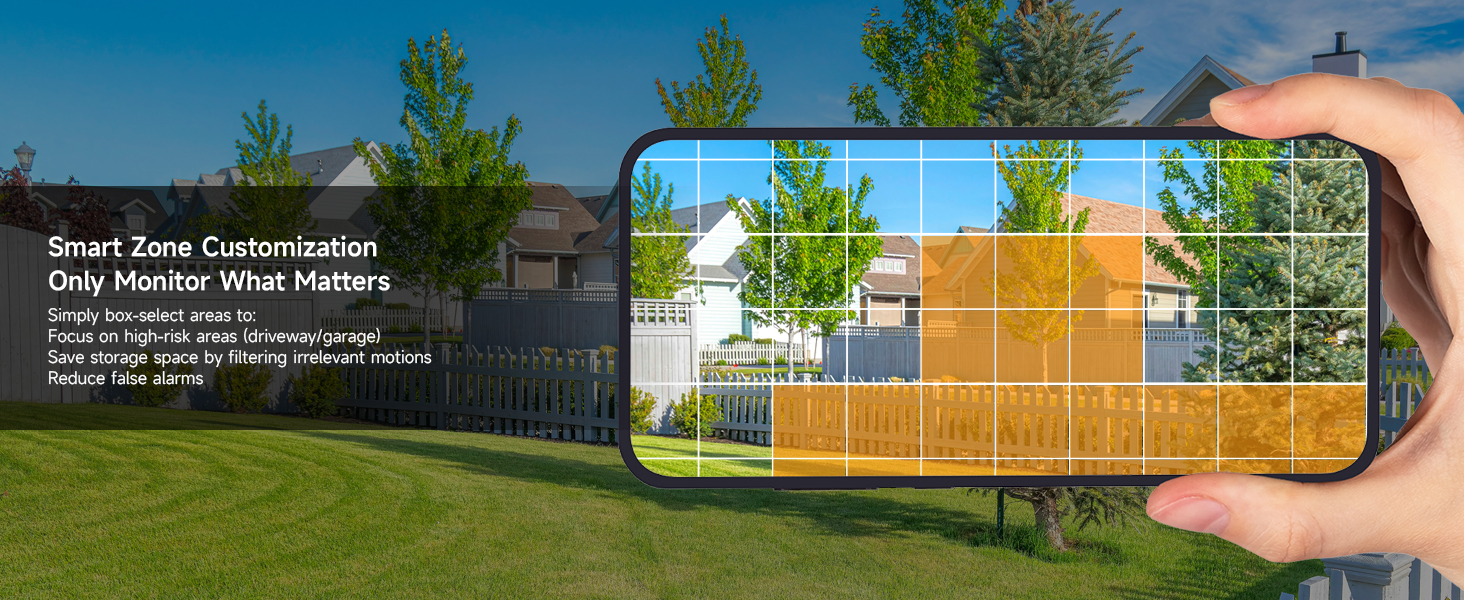
- Přizpůsobení: Configure detection zones and sensitivity settings to focus on specific areas and reduce irrelevant alerts.

Popis: An image showing a house driveway with a car, a person, a pet, and a package, each highlighted with a bounding box and a label indicating AI detection (Person, Car, Pet, Package). This illustrates the system's smart detection capabilities.
4.5. Obousměrný zvuk
Each 5MP camera supports two-way audio, allowing you to communicate with individuals near the camera.
- Aktivace: Use the mobile app or NVR interface to activate the microphone and speaker functions.
- Aplikace: Useful for greeting visitors, instructing delivery personnel, or deterring intruders.
4.6. Vzdálený přístup (mobilní aplikace)
Monitor your property anytime, anywhere using the free ARENTI mobile app.
- Stáhnout aplikaci: Stáhněte si aplikaci ARENTI z obchodu s aplikacemi ve vašem chytrém telefonu.
- Nastavení účtu: Vytvořte si účet a přidejte svůj systém NVR naskenováním QR kódu nebo zadáním ID zařízení.
- Vlastnosti: Přístup živě view, playback recordings, receive push notifications for events, and utilize two-way audio.

Popis: A hand holding a smartphone displaying the ARENTI app interface, showing a live camera feed of a person handling a package. Smaller screens in the background show other devices (laptop, tablet) also monitoring the feed, illustrating remote access capabilities.
4.7. Intelligent Color Night Vision
The 5MP cameras provide clear footagve dne i v noci.
- Plně barevné noční vidění: Equipped with powerful IR sensors and spotlights, cameras support full-color night vision up to 32 ft in darkness or ambient light.
- Jasnost: Capture every detail with 5MP Ultra HD clarity at 25fps.

Popis: A split image comparing infrared night vision (monochrome) and color night vision from an ARENTI camera, showcasing the enhanced detail and color provided by the intelligent color night vision feature in low-light conditions.
5. Údržba
5.1. Ochrana proti povětrnostním vlivům
The cameras feature an IP66 weatherproof rating and durable metal housing, designed to withstand various weather conditions.
- Rozsah teplot: Operates effectively from -4°F to 122°F (-20°C to 50°C).
- Trvanlivost: Resistant to rust, rain, and dust.

Popis: An ARENTI camera mounted outdoors, with rain falling, illustrating its IP66 weatherproof rating and ability to withstand extreme weather conditions from -4°F to 122°F.
5.2. Zabezpečení dat
The NVR system uses AES-128 encryption to safeguard every data stream. All footage is stored locally on the NVR's HDD, ensuring no cloud involvement or external access.
6. Řešení problémů
| Problém | Možná příčina | Řešení |
|---|---|---|
| No camera feed | Loose cable connection, no power to NVR/camera, network issue. | Check all cable connections (Ethernet, power). Ensure NVR is powered on. Verify network connectivity. |
| Falešné poplachy pohybu | High sensitivity, environmental factors (e.g., moving leaves, shadows). | Adjust AI detection sensitivity. Configure specific detection zones to exclude irrelevant areas. |
| Žádný vzdálený přístup | NVR not connected to network, incorrect app settings, firewall issues. | Ensure NVR WAN port is connected to router. Check router settings. Verify app login and device addition. |
| Špatné noční vidění | Obstruction in front of camera, insufficient ambient light for color mode. | Clear any obstructions. Ensure camera lens is clean. Adjust camera position or add external lighting if needed. |
7. Specifikace
| Funkce | Detail |
|---|---|
| Číslo modelu | AIK8-510B4-MRUS |
| Rozlišení záznamu videa | 5MP (2880 × 1600) |
| Snímková frekvence | 25 snímků za sekundu |
| Rozsah nočního vidění | Up to 100 Feet (32 ft for full-color) |
| Vnitřní/venkovní použití | Uvnitř, venku |
| Hodnocení odolnosti vůči povětrnostním vlivům | IP66 |
| Provozní teplota | -4 °F až 122 °F (-20 °C až 50 °C) |
| Kapacita úložiště | 2TB HDD (expandable up to 10TB) |
| Komprese videa | H.265 |
| Speciální funkce | 2-Way Audio, 24/7 Recording, Human/Vehicle/Pet/Package AI Detection, Plug and Play PoE |
| Technologie připojení | Wired (Ethernet, ONVIF) |
| Zdroj napájení | Kabelové elektrické napájení (PoE) |
| Rozměry produktu | 16.68 x 16.22 x 6.1 palce |
| Hmotnost položky | 12.89 libry |
8. Záruka a podpora
ARENTI offers a 2-Year Protection Plan for this product. For technical support or warranty claims, please contact ARENTI customer service:
- Telefonická podpora: 1-866-799-7868
- E-mailová podpora: podpora@arenti.com
Additional support resources and FAQs may be available on the official ARENTI webmísto.
Ask a question about this manual
Ask about setup, troubleshooting, compatibility, parts, safety, or missing instructions. Manuals+ will review the question and use this page’s manual context to help answer it.