
KEFEYA S5 PRO
KEFEYA 15.6" Portable Monitor S5 PRO Instruction Manual
Model: S5 PRO
Zavedení
This manual provides detailed instructions for the KEFEYA 15.6" Portable Monitor S5 PRO. This device is designed to expand your laptop's display capabilities, offering a versatile multi-screen setup for enhanced productivity and entertainment. It features a 1080P FHD IPS display with 120% sRGB color gamut, a magnetic 10,000 mAh power bank, and broad compatibility with various operating systems and devices.
Co je v krabici
Po vybalení zkontrolujte obsah balení:
- Monitor (SS Monitor) *1
- Power banka *1
- Napájecí adaptér *1
- Kabel Type-C to Type-C *2
- HDMI to Type-C Cable *1
- USB-A to Type-C Cable *1
- USB Flash Disk *1 (Contains drivers and user manual)
- Přepravní taška *1
- Uživatelská příručka *1 (Tento dokument)
- Stručný průvodce *1
- Krabice *1

Figure 1: Contents of the KEFEYA Portable Monitor package.
Nastavení
Follow these steps to set up your KEFEYA Portable Monitor:
- Rozbalte monitor: Opatrně vyjměte všechny součásti z obalu.
- Umístění: The monitor features an autonomous stand. For laptops between 13 and 17 inches, the monitor attaches securely. Laptops under 14.2 inches can be used without additional clamps. The chassis pivots 180° for flexible positioning.
- Připojte powerbanku: The magnetic 10,000 mAh power bank attaches to the back of the stand. Ensure the POGO PIN male and female connectors are perfectly aligned for proper power delivery. This provides 5-6 hours of wireless dual-screen operation. The power bank can also be removed for separate charging of mobile phones or tablets.
- Připojte se k vašemu zařízení:
- Připojení USB-C: For devices with a full-featured USB-C port (supporting video and power), use one of the provided Type-C to Type-C cables. This single cable can transmit video, audio, and power.
- Připojení HDMI: For devices with an HDMI output, use the provided HDMI to Type-C cable. You may also need to connect a USB-A to Type-C cable for power if your HDMI port does not supply sufficient power.
- Instalace ovladače: The monitor is designed for plug-and-play convenience. However, if you encounter any display issues, especially with specific operating systems or older devices, use the provided USB flash disk to install necessary drivers.
- Počáteční zapnutí: Press the multi-function button to power on the monitor.
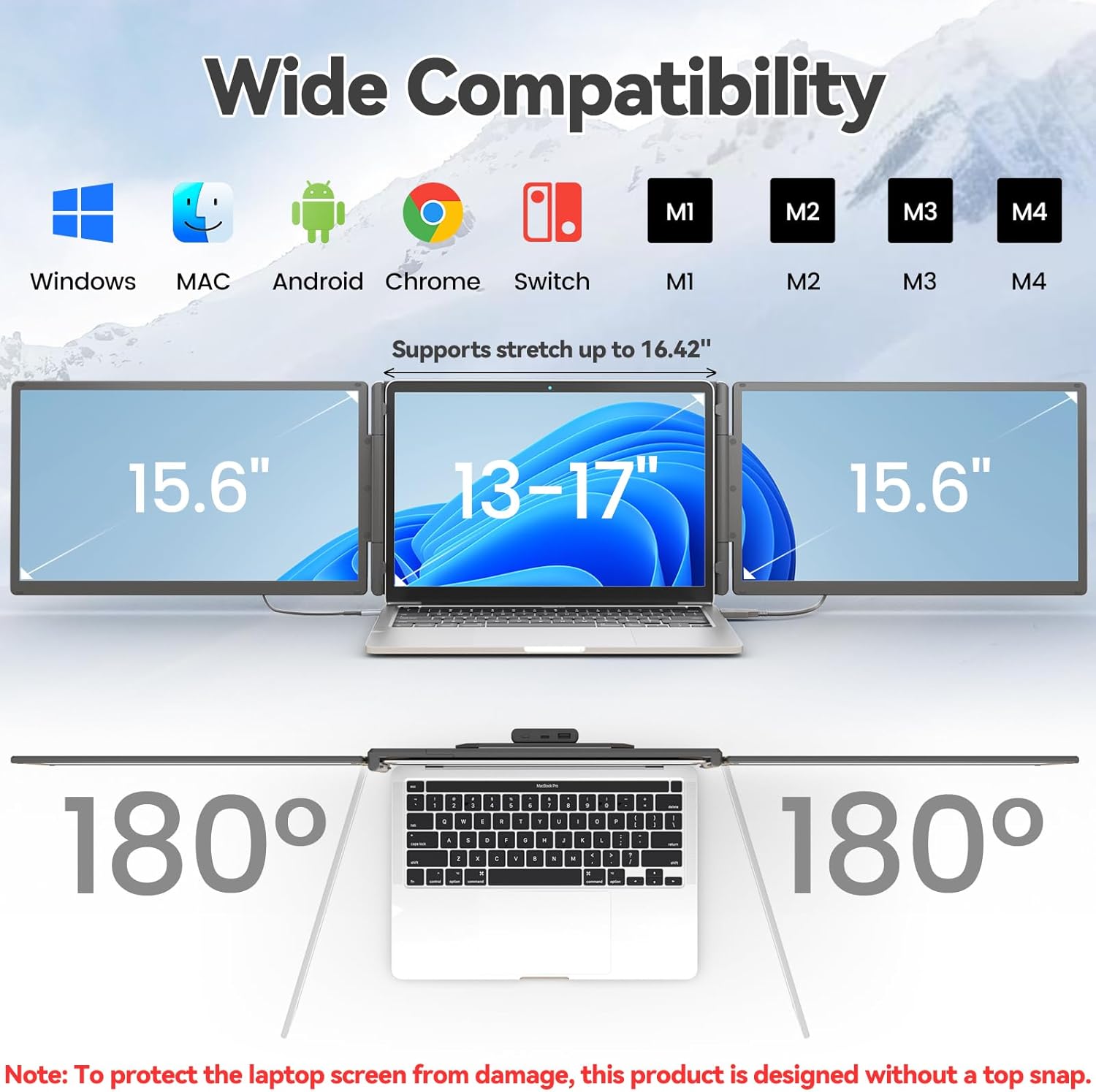
Figure 2: The monitor supports various devices and offers 180° rotation for flexible viewing úhly.

Figure 3: Attaching the magnetic power bank to the monitor stand.

Obrázek 4: Přesview of the ports (Type-C1, Type-C2, USB-C with PD) and multi-function button on the monitor.
Návod k obsluze
The KEFEYA Portable Monitor offers various display modes and adjustable settings to optimize your viewzkušenosti.
Režimy zobrazení
The monitor supports the following display configurations:
- Režim rozšíření: Extends your laptop's desktop across multiple screens, allowing for increased workspace and multitasking.
- Duplication (Mirror) Mode: Duplicates your laptop's display onto the portable monitor, ideal for presentations or sharing content.
- Režim Portrét: The monitor can be rotated 180° to be used in portrait orientation, beneficial for coding, document viewing, or specific creative tasks.
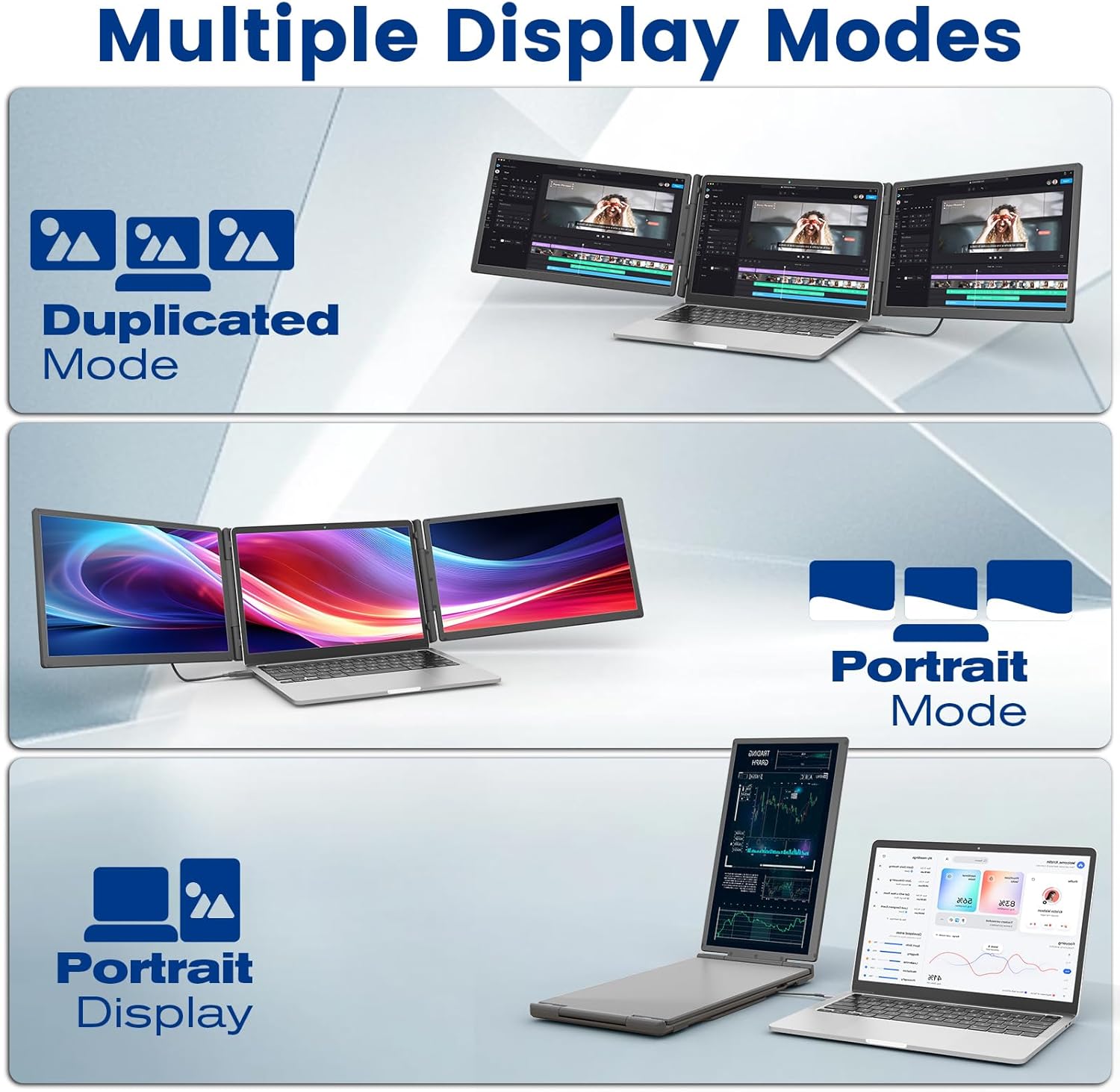
Figure 5: Illustration of Duplicated, Extended, and Portrait display modes.

Obrázek 6: Přamples of using the monitor for multiple tasks like web programming, video conferencing, and online shopping.
Úprava nastavení
The multi-function buttons on the monitor allow for precise control over display parameters:
- Jas: Adjust the screen brightness to suit your environment.
- Tint/Color: Fine-tune color settings for optimal visual accuracy.
- Objem: Ovládejte hlasitost integrovaných reproduktorů.
The monitor also features advanced low blue light technology, anti-glare design, and flicker-free operation for a comfortable viewzkušenosti.
Použití powerbanky
The integrated 10,000 mAh power bank provides 5-6 hours of battery life for the monitor, reducing reliance on your laptop's battery. It can also be detached and used as a standalone power source for other USB-powered devices.

Figure 7: Details of the power bank, including its capacity display and ports (Type-C, USB-A).
Údržba
To ensure the longevity and optimal performance of your KEFEYA Portable Monitor, follow these maintenance guidelines:
- Čištění obrazovky: Použijte měkký hadřík bez žmolků, speciálně určený pro elektroniku. Lehceampen the cloth with water or a screen-cleaning solution. Avoid harsh chemicals, alcohol, or abrasive materials.
- Čištění Casing: Vnější povrch otřete měkkým suchým hadříkem.
- Skladování: When not in use, store the monitor in its provided carrying bag to protect it from dust and scratches. Avoid placing heavy objects on top of the monitor.
- Podmínky prostředí: Chraňte monitor před extrémními teplotami, přímým slunečním zářením a vysokou vlhkostí.
- Péče o kabely: Handle cables gently. Avoid bending or twisting them sharply, which can damage the internal wires.
Odstraňování problémů
If you encounter issues with your KEFEYA Portable Monitor, refer to the following common problems and solutions:
| Problém | Možná příčina / řešení |
|---|---|
| Žádný displej / Černá obrazovka |
|
| Unstable Connection / Screen Flickering |
|
| Drivers Not Working / System Bugs |
|
| Monitor Does Not Stay Firmly Attached |
|
| Špatná kvalita obrazu / nesprávné barvy |
|
Specifikace
| Funkce | Detail |
|---|---|
| Značka | KEFEYA |
| Číslo modelu | S5 PRO |
| Velikost obrazovky | 15.6 palce |
| Typ zobrazení | IPS |
| Rezoluce | 1920 x 1080 pixelů (FHD 1080p) |
| Poměr stran | 16:9 |
| Barevný gamut | 120% sRGB |
| Jas | 300 nitů (cd/m²) |
| Kontrastní poměr | 1000:1 |
| Doba odezvy | 2 milisekund |
| Obnovovací frekvence | 60 Hz |
| Povrch obrazovky | Matný, Antireflexní |
| Konektivita | USB Type C (x2), USB Type A, HDMI |
| Speciální funkce | 120% sRGB, Anti-glare screen, Energy efficiency, Blue light filter, Built-in speakers, Magnetic 10,000 mAh Power Bank |
| Rozměry (D x Š x V) | 39.1 x 21.5 x 3.3 centimetrů |
| Kompatibilita | Windows, Chrome, Android, Mac (M1/M2/M3/M4), Linux, Dex, PS4/5, Xbox |
Záruka a podpora
KEFEYA offers a one-year warranty for this product. Our customer service team is available 24 hours a day, 7 days a week, 365 days a year to assist you.
For questions regarding compatibility, installation assistance, or if you find any missing accessories, please contact us using the contact information provided inside the product packaging. Our professional team will provide prompt assistance.
For the latest information and support resources, please visit our official website or refer to the contact details in your Quick Start Guide.
Ask a question about this manual
Ask about setup, troubleshooting, compatibility, parts, safety, or missing instructions. Manuals+ will review the question and use this page’s manual context to help answer it.