1. Konec produktuview
The TABWEE T20 is a versatile 10-inch Android tablet designed for both productivity and entertainment. It features a high-resolution Incell display, a powerful Octa-Core processor, and ample memory and storage, making it suitable for a wide range of applications from content creation to multimedia consumption.
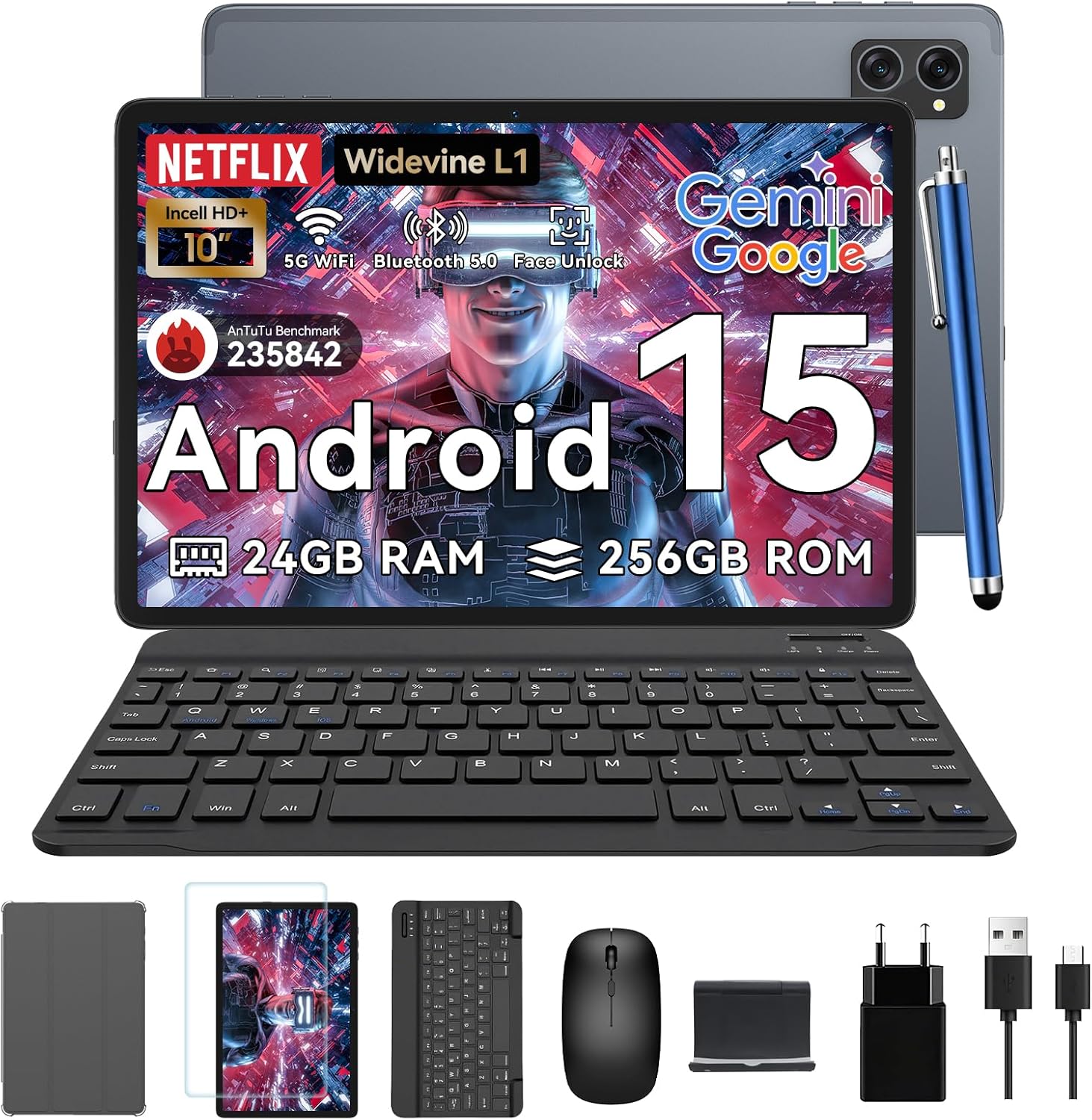
Figure 1.1: TABWEE T20 Tablet and its complete accessory package, including a Bluetooth keyboard, mouse, stylus, protective case, screen protector, charger, and USB cable.
Co je v krabici
Upon unboxing your TABWEE T20 Tablet, verify that all components are present:

Figure 1.2: Contents of the TABWEE T20 Tablet retail package.
- 1x TABWEE T20 Tablet
- 1x Bluetooth klávesnice
- 1x Myš
- 1x stylus
- 1x Ochranné pouzdro
- 1x Chránič obrazovky
- 1x Stojan na tablet
- 1x Nabíječka
- 1x USB kabel
2. Nastavení a první použití
Nabíjení tabletu
Before first use, fully charge the tablet using the provided charger and USB cable. Connect the charger to a power outlet and the USB cable to the tablet's charging port. The charging indicator will illuminate.
Zapnutí/vypnutí
- Zapnutí: Press and hold the Power button until the TABWEE logo appears on the screen.
- Vypnutí: Press and hold the Power button until the power options menu appears. Select "Power Off" and confirm.
- Restartovat: V nabídce možností napájení vyberte „Restartovat“ a potvrďte.
Průvodce počátečním nastavením
Po prvním zapnutí vás tablet provede průvodcem počátečním nastavením. Postupujte podle pokynů na obrazovce:
- Vyberte svůj jazyk.
- Připojte se k síti Wi-Fi.
- Přihlaste se pomocí svého účtu Google nebo si vytvořte nový.
- Nastavte zámek obrazovky (PIN, vzorec, heslo nebo odemknutí obličejem).
- Review a přijměte obchodní podmínky.
Připojení příslušenství
The TABWEE T20 comes with a Bluetooth keyboard and mouse for enhanced productivity.
- Bluetooth klávesnice:
- Ujistěte se, že je klávesnice nabitá a zapnutá.
- Na tabletu přejděte na Nastavení > Připojená zařízení > Bluetooth.
- Zapněte Bluetooth a klepněte na „Spárovat nové zařízení“.
- Select the keyboard from the list of available devices and follow pairing instructions.
- Bluetooth myš:
- Ujistěte se, že je myš zapnutá a v režimu párování.
- Na tabletu přejděte na Nastavení > Připojená zařízení > Bluetooth.
- Tap "Pair new device" and select the mouse from the list.
- Stylus: The included stylus can be used directly on the screen for navigation, drawing, and note-taking. It features palm-rejection precision.
3. Ovládání tabletu
Operační systém Android 15
The TABWEE T20 runs on Android 15, offering enhanced privacy controls, seamless cross-device collaboration, and improved multitasking capabilities.

Obrázek 3.1: Klíčové vlastnosti operačního systému Android 15.
Gemini AI Integration
The tablet integrates Google Gemini AI, which intelligently optimizes tasks, from photo editing to document formatting, while prioritizing security with a dedicated encrypted privacy space.

Obrázek 3.2: Přesview schopností umělé inteligence Gemini na tabletu.
Display and Multimedia
The 10.1-inch Incell HD+ display (1280x800 resolution) provides vivid colors and crisp details. With Widevine L1 certification, you can enjoy 1080P streaming on platforms like Netflix, Disney+, and Hulu.

Figure 3.3: Display features and eye-friendly modes.
The tablet also features Dual Smart-K Box Speakers for an immersive audio experience.

Figure 3.4: Dual Smart-K Box Speakers for enhanced audio.
Vlastnosti fotoaparátu
Equipped with an 8MP rear camera and a 5MP front camera, the tablet supports Google Lens integration for smart scanning and object recognition. Face Unlock is also supported for convenient security.

Figure 3.5: Camera specifications and features.

Figure 3.6: Smart Google Lens functionalities.
Konektivita
The TABWEE T20 supports dual-band 5G WiFi and Bluetooth 5.0 for fast and stable connections.
- Wi-Fi: Connect to 2.4GHz or 5GHz networks for seamless streaming and quick downloads.
- Bluetooth 5.0: Pair with wireless earbuds, speakers, or other Bluetooth-enabled devices with 20% faster data transfer speed.
- Podpora OTG: Allows for easy transfer of files to and from external storage devices.

Figure 3.7: Advanced Bluetooth 5.0 connectivity.

Figure 3.8: Lightning Fast WiFi 5 Technology.
4. Údržba a péče
Proper maintenance ensures the longevity and optimal performance of your TABWEE T20 Tablet.
Správa baterie
The 5000mAh battery provides extended usage times. To maximize battery life:
- Vyhněte se extrémním teplotám.
- Použijte dodanou nabíječku.
- Enable smart power-saving modes in settings.
- Zavřete nepoužívané aplikace běžící na pozadí.

Figure 4.1: 5000mAh Mega Battery performance metrics.
Čištění tabletu
- K čištění obrazovky a těla používejte měkký hadřík, který nepouští vlákna.
- Na odolné šmouhy lehce otřeteamphadřík vodou nebo čističem obrazovek.
- Vyhněte se používání agresivních chemikálií nebo abrazivních materiálů.
Správa úložiště a paměti
The tablet comes with 256GB of internal storage and supports up to 2TB TF card expansion. It also features 24GB RAM (8GB physical + 16GB virtual) for smooth multitasking.

Figure 4.2: Storage and RAM expansion capabilities.
To optimize performance and storage:
- Regularly clear cache and temporary files.
- Odinstalujte nepoužívané aplikace.
- Utilize the 2TB TF card slot for large files like 4K videos and design documents.
5. Řešení problémů
This section addresses common issues you might encounter with your TABWEE T20 Tablet.
| Problém | Možná příčina | Řešení |
|---|
| Tablet se nezapne. | Slabá baterie; havárie systému. | Nabíjejte tablet alespoň 30 minut. Pokud stále nereaguje, stiskněte a podržte tlačítko napájení po dobu 10–15 sekund, abyste vynutili restart. |
| Problémy s připojením k Wi-Fi. | Incorrect password; router issues; out of range. | Verify Wi-Fi password. Restart your router. Ensure tablet is within Wi-Fi range. Forget the network and reconnect. |
| Příslušenství Bluetooth se nespáruje. | Accessory not in pairing mode; Bluetooth off on tablet. | Ensure accessory is in pairing mode. Turn Bluetooth off and on again on the tablet. Restart both devices. |
| Pomalý výkon nebo pády aplikace. | Příliš mnoho spuštěných aplikací; málo úložiště; zastaralý software. | Close background apps. Clear app caches. Free up storage space. Check for system updates in Nastavení > Systém > Aktualizace systému. |
| Obrazovka nereaguje. | Dočasná softwarová závada. | Vynuťte restart tabletu podržením tlačítka napájení po dobu 10–15 sekund. |
Pokud problém přetrvává i po vyzkoušení těchto řešení, kontaktujte zákaznickou podporu.
7. Záruka a podpora
TABWEE is committed to providing excellent customer service and support for your T20 Tablet.
Informace o záruce
Your TABWEE T20 Tablet is covered by a 2-letá záruka from the date of purchase. This warranty covers manufacturing defects and ensures risk-free ownership.
Zákaznická podpora
V případě potřeby technické pomoci, řešení problémů nebo reklamací se prosím obraťte na náš tým podpory:
- E-mailová podpora: serviceplus.linda@gmail.com
- Online Call Support: Available 24/7 for US/CA customers.
- Repair Support: 2-Year Repair Support is provided.

Figure 7.1: TABWEE Customer Support Services.
Please have your purchase details and tablet model number ready when contacting support to expedite the process.

