
MONODEAL 8818
MONODEAL CD Player Model 8818 User Manual
Desktop Portable CD Player with Bluetooth, Wireless Charging, Alarm Clock, and FM Radio
Zavedení
The MONODEAL Model 8818 is a versatile desktop portable CD player designed to provide a comprehensive audio experience. It integrates multiple functions including a CD player, Bluetooth 5.0 HiFi speaker, FM radio, USB flash drive player, and 3.5mm audio player. Additionally, it features wireless charging, an intelligent dual alarm clock, and a sleep timer, making it an ideal companion for various settings from home to office.

Image: The MONODEAL Model 8818 CD Player, showcasing its sleek black design, digital display, control buttons, and included remote control. A CD is visible in the player, and two vinyl records are placed next to it.
Co je v krabici
- CD přehrávač
- Uživatelská příručka
- Dálkové ovládání
- Napájecí kabel
Konec produktuview
Familiarize yourself with the various components and controls of your MONODEAL CD Player.
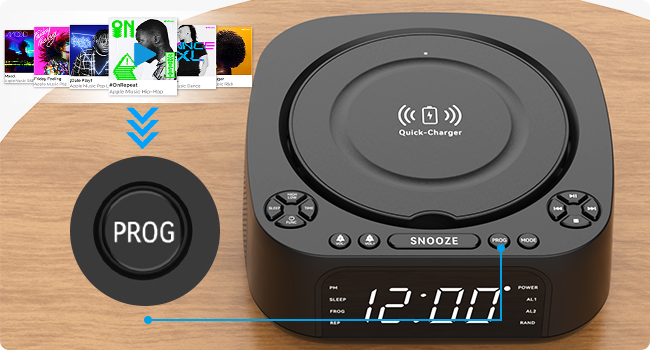
Image: A detailed diagram of the MONODEAL CD Player, highlighting its various buttons, ports, and features with corresponding numbers for easy identification.
| Žádný. | Funkce | Popis |
|---|---|---|
| 1 | High/Low Brightness | Upravuje jas displeje. |
| 2 | Tlačítko spánku | Activates/sets sleep timer. |
| 3 | Nastavení času | Nastaví aktuální čas. |
| 4 | Function/Shutdown | Switches modes or powers off. |
| 5 | Alarm Clock 1 / Volume - | Sets Alarm 1 or decreases volume. |
| 6 | Alarm Clock 2 / Volume + | Sets Alarm 2 or increases volume. |
| 7 | Nabíjecí základna | Bezdrátová nabíjecí podložka. |
| 8 | Tlačítko "Odložit | Snoozes active alarm. |
| 9 | PROG (Program) | Programs CD tracks or FM presets. |
| 10 | Tlačítko režimu | Switches between playback modes (CD, Bluetooth, FM, USB, AUX). |
| 11 | Přehrát / Pozastavit | Spustí nebo pozastaví přehrávání. |
| 12 | Další / Rychle vpřed | Skips to next track or fast forwards. |
| 13 | Předchozí / Přetočit zpět | Skips to previous track or rewinds. |
| 14 | Tlačítko Stop | Zastaví přehrávání. |
| 15 | USB Port (Data/Playback) | Pro přehrávání z USB flash disku. |
| 16 | USB port (nabíjení) | For charging external devices (5V/1A). |
| 17 | Vstup 3.5 mm | Audio input jack. |
| 18 | Port AUX | Pomocný audio vstup. |
| 19 | Obrazovka displeje | Shows time, mode, and playback information. |
Nastavení
1. Připojení napájení
Connect the provided power cord to the DC IN port on the back of the CD player and plug the other end into a standard wall outlet. The display will light up.
2. Nastavení času
- Stiskněte tlačítko ČAS button (3) on the unit.
- Použijte Předchozí / Přetočit zpět (13) a Další / Rychle vpřed (12) buttons to adjust the hour.
- Stiskněte ČAS znovu pro potvrzení hodiny a přechod na minuty.
- Použijte Předchozí / Přetočit zpět (13) a Další / Rychle vpřed (12) buttons to adjust the minutes.
- Stiskněte ČAS once more to save the time setting.
3. Nastavení jasu displeje
Stiskněte tlačítko High/Low Brightness button (1) to toggle between high and low brightness modes for the display screen (19).

Image: Comparison of the display screen's brightness in daylight and night settings, demonstrating the high and low brightness modes.
Návod k obsluze
Přehrávání CD
- Otevřete kryt přihrádky na CD.
- Insert a CD (compatible with CD, CD-R, CD-RW, MP3, WMA formats) with the label side facing up.
- Zavřete kryt prostoru pro CD.
- Stiskněte tlačítko Function/Shutdown button (4) to power on the unit, then press the Režim button (10) until "CD" mode is selected.
- Stiskněte tlačítko Přehrát / Pozastavit tlačítko (11) pro spuštění přehrávání.
- Použití Předchozí / Přetočit zpět (13) a Další / Rychle vpřed (12) to navigate tracks.
- Stiskněte Zastávka (14) to stop playback.

Image: The MONODEAL CD Player with a CD being inserted, illustrating the CD playback function.
Bluetooth Function (RX & TX)
The unit supports both Bluetooth reception (RX) to play audio from your phone/tablet and Bluetooth transmission (TX) to send audio to Bluetooth headphones/speakers.

Image: A visual representation of the two Bluetooth modes (RX and TX), showing the CD player receiving audio from a laptop and transmitting audio to headphones and a portable speaker.
Bluetooth Reception (RX Mode)
- Stiskněte tlačítko Režim button (10) until "BT" (Bluetooth) mode is selected. The display will show "BT" and flash, indicating pairing mode.
- On your smartphone or tablet, enable Bluetooth and search for "MONODEAL 8818".
- Select the device to pair. Once connected, "BT" will stop flashing.
- You can now play audio from your device through the CD player's speakers.

Image: A user connecting their smartphone to the MONODEAL CD Player via Bluetooth reception, illustrating how to stream music from a mobile device.
Bluetooth Transmission (TX Mode)
This feature allows you to transmit audio from the CD player (e.g., CD playback, FM radio) to external Bluetooth headphones or speakers.
- Ujistěte se, že vaše Bluetooth sluchátka/reproduktor jsou v režimu párování.
- On the CD player, while in CD, FM, or USB mode, press and hold the Režim button (10) for a few seconds to activate TX mode. The display will show "TX" and flash.
- The CD player will automatically search for and connect to nearby Bluetooth audio devices.
- Once connected, audio will be routed to your external Bluetooth device.
Note: This device does not support car Bluetooth connections.

Image: A user wearing Bluetooth headphones, connected wirelessly to the MONODEAL CD Player, demonstrating the Bluetooth transmission feature for private listening.
FM rádio
- Stiskněte tlačítko Režim button (10) until "FM" mode is selected.
- Pro lepší příjem vytáhněte anténu.
- Stiskněte a podržte Přehrát / Pozastavit button (11) to auto-scan and save available stations. The unit can store up to 40 stations.
- Použijte Předchozí / Přetočit zpět (13) a Další / Rychle vpřed (12) buttons to cycle through saved stations.
- To manually tune, briefly press Předchozí / Přetočit zpět (13) popř Další / Rychle vpřed (12).
- The unit supports FM stereo/mono switching.

Image: A woman and a child listening to the FM radio on the MONODEAL CD Player, with icons indicating various FM frequencies for different environments.
USB přehrávání
- Vložte USB flash disk s audio soubory MP3/WMA files into the USB data port (15).
- Stiskněte tlačítko Režim button (10) until "USB" mode is selected.
- Přehrávání se spustí automaticky.
- Použití Předchozí / Přetočit zpět (13) a Další / Rychle vpřed (12) to navigate tracks.

Image: The MONODEAL CD Player with a USB flash drive inserted for music playback and a tablet connected to the charging USB port, demonstrating simultaneous charging and playback.
Vstup AUX
- Connect an external audio device (e.g., MP3 player, mobile phone) to the AUX port (18) or 3.5mm input (17) using a 3.5mm audio cable.
- Stiskněte tlačítko Režim button (10) until "AUX" mode is selected.
- Audio from your connected device will now play through the CD player's speakers. Control playback from your external device.

Image: A smartphone connected to the MONODEAL CD Player via a 3.5mm audio cable, demonstrating the AUX-IN mode for playing audio from external devices.
Bezdrátové nabíjení
The top of the CD player features a built-in wireless charging panel (7) for compatible smartphones.
- Place your wireless charging compatible smartphone directly on the charger base (7) on top of the unit.
- Ensure the phone is centered on the charging area.
- The phone should indicate that it is charging.
Note: For optimal charging, remove any thick phone cases. Charging time may vary (3-8 hours).

Image: A smartphone wirelessly charging on top of the MONODEAL CD Player, with an indicator showing the charging process and estimated time.
Funkce budíku
The unit features a dual alarm clock function, allowing you to set two separate alarms.
- Stiskněte a podržte Budík 1 (5) popř Budík 2 (6) button. The hour will flash.
- Použití Předchozí / Přetočit zpět (13) a Další / Rychle vpřed (12) to adjust the hour, then press the corresponding alarm button again to confirm.
- Adjust the minutes similarly and press the alarm button to confirm.
- Select the alarm source (CD, FM radio, USB, Bluetooth) using the Režim button (10) and confirm with the alarm button.
- To activate/deactivate an alarm, briefly press the corresponding alarm button. An alarm icon will appear/disappear on the display.
- Když zazní alarm, stiskněte tlačítko Podřimovat button (8) for a temporary pause, or press any other button to turn off the alarm.

Image: Two scenes depicting the sleep timer and morning alarm clock functions. One shows a person sleeping with the display showing 23:58, and the other shows a person waking up with the display showing 08:00.
Časovač vypnutí funkce
The sleep timer allows the unit to play music for a set duration before automatically turning off.
- While playing audio (CD, FM, USB, Bluetooth), press the Spát button (2) repeatedly to cycle through sleep timer options (e.g., 15, 30, 45, 60, 90, 120 minutes).
- Jednotka se po uplynutí zvoleného času automaticky vypne.
Provoz dálkového ovládání
The included remote control allows convenient operation from a distance of up to 5 meters.
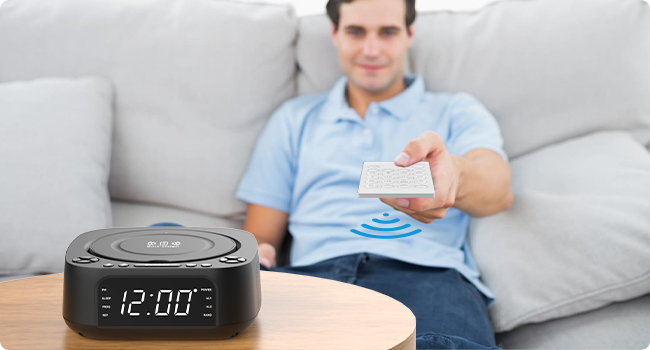
Image: A person using the remote control to operate the MONODEAL CD Player from a distance, highlighting the convenience of remote operation.
Most functions available on the unit's control panel are also accessible via the remote control. Refer to the remote control's button labels for specific functions (e.g., Mute, EQ, Repeat, etc.).
Údržba
- Čištění: K čištění vnější strany jednotky používejte měkký, suchý hadřík. Nepoužívejte abrazivní čisticí prostředky ani rozpouštědla.
- Péče o CD: CD držte za okraje. Udržujte je čisté a bez škrábanců. CD otírejte měkkým hadříkem, který nepouští vlákna, od středu směrem ven.
- Skladování: Pokud přístroj delší dobu nepoužíváte, odpojte jej ze zásuvky a uložte jej na chladném a suchém místě.
- Větrání: Zajistěte dostatečné větrání kolem jednotky, abyste zabránili přehřátí. Neblokujte větrací otvory.
Odstraňování problémů
| Problém | Možná příčina | Řešení |
|---|---|---|
| Jednotka se nezapne. | Žádné připojení k napájení. | Ujistěte se, že je napájecí kabel bezpečně zapojený do jednotky a do funkční zásuvky. |
| Žádný zvuk z reproduktorů. | Volume too low; incorrect mode; mute activated. | Increase volume; ensure correct mode (CD, BT, FM, USB, AUX); check if mute is on (remote). |
| CD přeskakuje nebo se nepřehrává. | CD je špinavé, poškrábané nebo nesprávně vložené. | Clean CD; try a different CD; ensure CD is inserted label-side up. |
| Párování Bluetooth selhalo. | Zařízení je příliš daleko; není v režimu párování; rušení. | Ensure unit is in BT mode and flashing; bring devices closer; restart both devices. |
| Špatný příjem FM rádia. | Anténa není vysunutá; slabý signál. | Fully extend the FM antenna; try repositioning the unit. |
| Bezdrátové nabíjení nefunguje. | Phone not compatible; phone case too thick; phone not centered. | Ensure phone supports wireless charging; remove thick cases; reposition phone on the charging pad. |
Specifikace
| Funkce | Detail |
|---|---|
| Číslo modelu | 8818 |
| Rozměry produktu (D x Š x V) | 7.32 x 7.32 x 2.89 palce (186 x 186.5 x 73.5 mm) |
| Hmotnost položky | 2.4 libry |
| Technologie připojení | Bluetooth, Auxiliary, USB |
| Typ reproduktoru | Stereo (2 x 1W speakers) |
| Podporované formáty disků | CD, CD-R, CD-RW, MP3, WMA |
| Frekvence rádia FM | 87.5-108 MHz (up to 40 presets) |
| USB přehrávání | Supports MP3/WMA from USB flash drives |
| Bezdrátový nabíjecí výstup | 5W/10W |
| USB nabíjecí výstup | 5V/1A |
| Funkce budíku | Dual alarm, 4 wake-up modes (CD, FM, USB, Bluetooth) |
| Časovač spánku | 15-120 minut |
| Rozsah dálkového ovládání | Až 5 metrů |
| Výrobce | MONODEAL |
| Země původu | Čína |

Image: The MONODEAL CD Player with its dimensions (length, width, height) indicated in millimeters, showcasinjeho kompaktní design.
Záruka a podpora
MONODEAL is committed to providing quality products and customer satisfaction.
- 12měsíční výměna: Your product is covered by a 12-month replacement policy for manufacturing defects.
- Doživotní podpora: MONODEAL offers lifetime technical support for this product.
For any questions or problems, please contact MONODEAL customer support. Contact information can typically be found on the product packaging or the official MONODEAL webmísto.
Ask a question about this manual
Ask about setup, troubleshooting, compatibility, parts, safety, or missing instructions. Manuals+ will review the question and use this page’s manual context to help answer it.