
Westcott Bi-Color with AC Power
Westcott Ice Light 3 Bi-Color LED Instruction Manual
Model: Bi-Color with AC Power
Zavedení
Thank you for choosing the Westcott Ice Light 3 Bi-Color LED. This versatile and portable lighting solution is designed for photographers and videographers seeking high-quality, controllable illumination. This manual provides essential information for setting up, operating, maintaining, and troubleshooting your Ice Light 3 to ensure optimal performance and longevity.

Image: The Westcott Ice Light 3 Bi-Color LED, a sleek, cylindrical light tube with a power cable connected to one end.
Co je v krabici
Carefully unpack your Westcott Ice Light 3 and ensure all components are present:
- (1) Ice Light 3 Bi-Color LED
- (1) Ice Light 3 Removable End Cap
- (1) 16' USB-C Cable
- (1) Ice Light 3 AC Power Adapter
- (1) Ice Light 3 Carry Case

Image: All included components of the Westcott Ice Light 3, including the light tube, USB-C cable, AC adapter, and carry case.
Nastavení
Follow these steps to set up your Ice Light 3 for use:
- Připojení napájení: Connect the provided 16' USB-C cable to the USB-C port on the Ice Light 3. Plug the other end of the USB-C cable into the Ice Light 3 AC Power Adapter, and then plug the adapter into a standard wall outlet. Ensure a compatible 30W or higher power adapter is used for continuous operation.
-
Možnosti montáže: The Ice Light 3 offers versatile mounting. It features 9 mounting points, including a NATO rail, six 1/4"-20 threads, and two anti-twist 3/8"-16 threads. Choose the appropriate mounting accessory (not included) such as a light stand, clamp, or articulating arm, and secure the Ice Light 3 using one of the available mounting points.

Image: A person's hands securing the Westcott Ice Light 3 to a mounting clamp, demonstrating its versatile mounting options.
- Počáteční zapnutí: Once connected to power, press the power button located on the control panel to turn on the Ice Light 3. The OLED display will illuminate.
Návod k obsluze
The Ice Light 3 features intuitive onboard controls and can also be controlled via the Westcott StudioLink mobile app.
Palubní ovládací prvky
Use the buttons and OLED display to adjust settings directly on the device:
- Vypínač: Zapíná/vypíná jednotku.
- Navigační tlačítka: Use the directional buttons (up, down, left, right) and the center select button to navigate menus and confirm selections.
- Nastavení jasu: Adjust the light intensity from 0-100% using the appropriate controls.
- Nastavení teploty barev (CCT): Change the color temperature from 2700K (warm) to 6500K (cool) to match your environment or creative needs.
- Creative FX & Gel Presets: Access and apply over 10 customizable bi-color lighting effects and 10+ CCT color gels for dynamic lighting scenarios.

Obrázek: Detailní záběr view of the Westcott Ice Light 3's control panel, showing the OLED display and navigation buttons.
Westcott StudioLink Mobile App
For enhanced control, download the free Westcott StudioLink mobile app from your device's app store. The app allows for remote adjustment of all settings, including brightness, color temperature, and effects, providing greater flexibility during shoots.
Klíčové vlastnosti v provozu
- Výjimečná přesnost barev: Achieve natural skin tones and true-to-life colors with 87 SSI, 98 CRI, and 99 TLCI ratings.
- Silent & Flicker-Free Performance: The passive cooling system ensures quiet operation, and consistent lighting up to 4,000 FPS makes it ideal for video and live production without flicker.
- Provozní režimy:
- Režim CCT: Široký rozsah teploty barev od 2700K do 6500K.
- Režim zatemnění: Turns off the display for long-exposure light painting.
- Pohotovostní režim: Saves battery by powering off the light while keeping the display active (relevant if using an external battery grip, not included with this model).

Image: A graphic illustrating the CCT Mode, Blackout Mode, and Standby Mode features of the Ice Light 3.
Údržba
Proper care and maintenance will extend the life of your Ice Light 3:
- Čištění: Use a soft, dry cloth to wipe down the light tube and body. Avoid abrasive cleaners or solvents that could damage the finish or optical surfaces.
- Skladování: When not in use, store the Ice Light 3 in its included hardshell travel case to protect it from dust, moisture, and physical damage. Store in a cool, dry place.
- Péče o kabely: Avoid kinking or sharply bending the USB-C cable. Always grasp the plug, not the cable, when disconnecting.
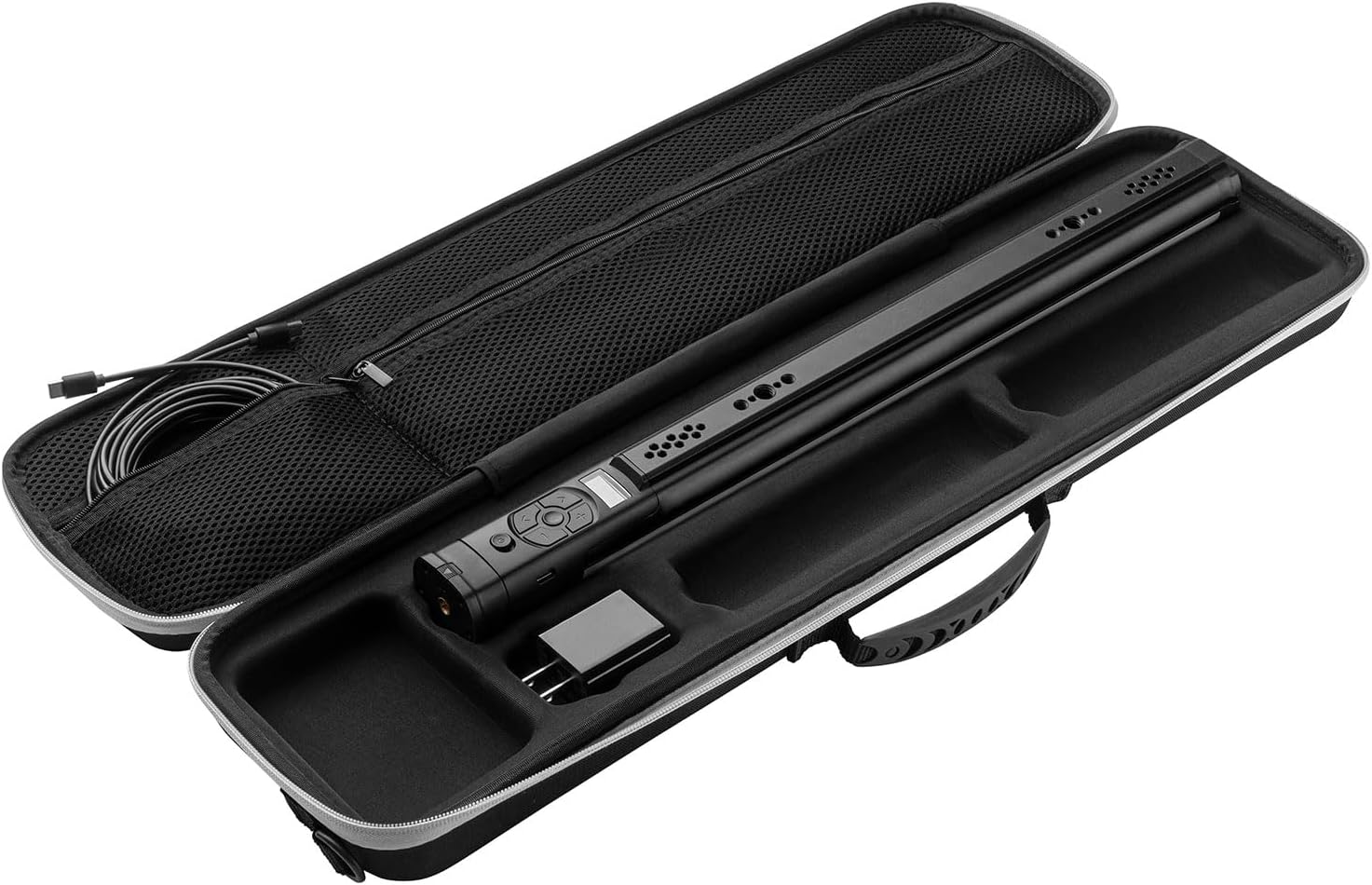
Image: The Westcott Ice Light 3 securely stored inside its custom-fitted hardshell carry case, demonstrating proper storage.
Odstraňování problémů
If you encounter issues with your Ice Light 3, refer to the following common problems and solutions:
| Problém | Možná příčina | Řešení |
|---|---|---|
| Světlo se nerozsvítí. | No power, faulty cable/adapter, or unit malfunction. | Ensure AC adapter is securely plugged into a working outlet and the USB-C cable is firmly connected to the light. Try a different outlet. Verify the power adapter is 30W or higher. |
| Světlo nečekaně bliká nebo ztlumuje. | Insufficient power, loose connection, or extreme temperature. | Check power connections. Ensure the power adapter meets the minimum wattage requirement. Operate the light within recommended environmental temperatures. |
| Ovládací prvky nereagují. | Dočasná softwarová závada nebo fyzické poškození. | Turn the unit off and then on again. If using the app, ensure Bluetooth is enabled and the app is connected. If the issue persists, contact customer support. |
| Cannot connect to Westcott StudioLink app. | Bluetooth není povoleno, aplikace není aktualizována nebo dochází k rušení. | Ensure Bluetooth is active on your mobile device. Update the app to the latest version. Try restarting both the light and your mobile device. Move closer to the light to reduce interference. |
If the problem persists after attempting these solutions, please contact Westcott customer service for further assistance.
Specifikace
| Funkce | Detail |
|---|---|
| Značka | Westcott |
| Model | Bi-Color with AC Power |
| Hmotnost položky | 1 libra (0.45 kg) |
| Rozměry produktu | 18.7 x 1.73 x 1.73 palce (47.5 x 4.4 x 4.4 cm) |
| Technologie připojení | Bluetooth |
| Teplota barev | 2700K–6500K (Bi-Color) |
| Jas | Up to 600 Lux at 3.3' (1m) |
| Přesnost barev | 87 SSI, 98 CRI, 99 TLCI |
| Zdroj napájení | AC Power (via 16' USB-C cable and 30W+ adapter) |
| Montážní body | NATO rail, six 1/4"-20 threads, two anti-twist 3/8"-16 threads |
| Úroveň odolnosti proti vodě | Není odolný vůči vodě |
| UPC | 810164330635 |
| Výrobce | F.J. Westcott |
| Datum první dostupnosti | 17. března 2025 |
Záruka a podpora
The Westcott Ice Light 3 Bi-Color LED is backed by Westcott's 1-year pledge, ensuring quality and reliability. Additionally, lifetime US-based customer service is available to assist you with any questions or issues you may encounter.
For warranty claims, technical support, or general inquiries, please visit the official Westcott webnebo se obraťte přímo na jejich zákaznický servis. Uschovejte si doklad o koupi pro ověření záruky.
Standard return policy for this product is 30 days for refund/replacement, as per Amazon's policy at the time of purchase.
Aplikace
The Westcott Ice Light 3 is a versatile tool suitable for a wide range of creative applications, including:
- Portréty
- Produktová fotografie
- Filmová tvorba
- Streamování
- Malování světlem
- On-location lighting

Image: A photographer using the Ice Light 3 to illuminate a subject for a portrait shot, showcasing its use in filmmaking and photography.

Image: The Ice Light 3 being used to light a flat lay of wedding invitations and flowers, demonstrating its utility in product photography.
Ask a question about this manual
Ask about setup, troubleshooting, compatibility, parts, safety, or missing instructions. Manuals+ will review the question and use this page’s manual context to help answer it.