
TABWEE TABWEE T20 Tablet
TABWEE T20 Android Tablet User Manual
Model: TABWEE T20 Tablet | Brand: TABWEE
1. Úvod
This user manual provides comprehensive instructions for the TABWEE T20 Android Tablet. It covers setup, operation, maintenance, and troubleshooting to help you maximize your device's performance and ensure a smooth user experience. Please read this manual thoroughly before using your tablet.
2. Obsah balení
Ověřte, zda jsou v balení přítomny všechny níže uvedené položky:
- TABWEE T20 Android Tablet
- Odnímatelná klávesnice
- Stylus Pen
- Myš
- Ochranné pouzdro
- Stojan na tablet
- Ochranná fólie na displej (předem nalepená nebo samostatná)
- Nabíjecí kabel USB typu C.
- Napájecí adaptér (5V/2A)
- Uživatelská příručka (tento dokument)
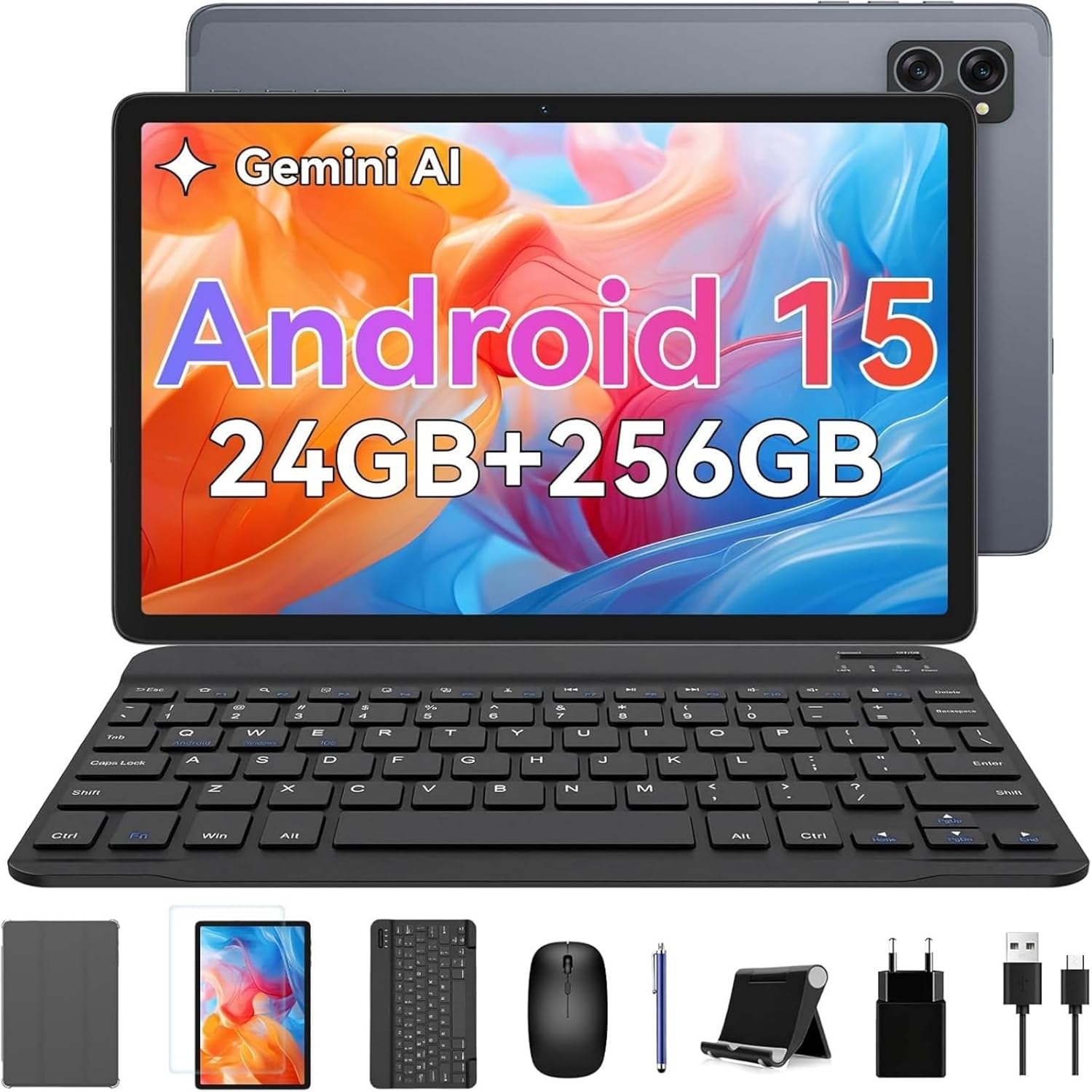
Image: The TABWEE T20 tablet displayed with its full set of accessories, including the detachable keyboard, mouse, stylus, protective case, tablet stand, charging cable, and power adapter.
3. Konec produktuview
3.1 Klíčové vlastnosti
- Operační systém: Android 15 with Gemini AI 2.0
- Procesor: Octa-Core Unisoc T606, 1.6 GHz
- Paměť (RAM): 24 GB (8GB built-in + up to 16GB expansion)
- Úložiště (ROM): 256 GB internal, expandable up to 2 TB via TF card
- Zobrazit: 10.1-inch HD+ IPS (1280 x 800 pixels), Widevine L1 support, 350 nits brightness
- Kamery: 5 MP Front Camera, 8 MP Rear Camera
- Baterie: 5000 mAh, providing extended usage times
- Konektivita: Dual-band 2.4G/5G Wi-Fi (802.11ac/b/g/n), Bluetooth 5, GPS
- Zvuk: Dual smart speakers for stereo sound, 3.5mm headphone jack
- Zabezpečení: ID obličeje
- Rozměry: 24.64 x 15.49 x 0.76 cm (d x š x v)
- Hmotnost: Přibližně 412 gramů
3.2 Tablet Layout
Familiarize yourself with the physical components of your TABWEE T20 Tablet.


Image: Left: Rear view of the TABWEE T20 tablet, highlighting its camera array and slim profile. Right: Front view of the tablet in use, demonstrating the vibrant display.
- Přední kamera: Při svislém držení se nachází uprostřed nahoře a používá se pro videohovory a selfie.
- Zadní kamera: Nachází se na zadní straně, slouží k pořizování fotografií a videí.
- Vypínač: Typically on the side, used to turn the tablet on/off or wake/sleep the screen.
- Tlačítka hlasitosti: Vedle tlačítka napájení se používá k nastavení hlasitosti zvuku.
- Port USB Type-C: Pro nabíjení a přenos dat.
- 3.5mm konektor pro sluchátka: Pro připojení drátových sluchátek.
- Mřížky reproduktorů: Dual speakers for enhanced audio output.
- Slot pro microSD kartu: For expanding storage with a TF card.
4. Nastavení
4.1 Počáteční nabíjení
Before first use, fully charge your tablet. Connect the USB Type-C cable to the tablet's charging port and the other end to the power adapter. Plug the adapter into a wall outlet. The charging indicator will show the charging status. A full charge typically takes a few hours.
4.2 Zapnutí/vypnutí
- Zapnutí: Press and hold the Power button until the TABWEE logo appears on the screen.
- Vypnutí: Press and hold the Power button until a power menu appears. Select "Power off" and confirm.
- Spánek/probuzení: Briefly press the Power button to turn the screen off/on without powering down the tablet.
4.3 Průvodce počátečním nastavením
Po prvním zapnutí vás tablet provede procesem počátečního nastavení:
- Vyberte preferovaný Jazyk.
- Připojte se k a Wi-Fi síť to enable internet access.
- Přihlaste se pomocí svého účet Google or create a new one. This is essential for downloading apps from the Google Play Store and syncing data.
- Nastavit ID obličeje for convenient and secure unlocking.
- Review a přijměte obchodní podmínky.
- Complete the setup to access the Android home screen.
4.4 Inserting a TF (MicroSD) Card
To expand the tablet's storage up to 2TB:
- Vyhledejte slot pro TF kartu na boku tabletu.
- Opatrně vložte TF kartu do slotu zlatými kontakty směrem dolů, dokud nezacvakne na místo.
- The tablet will detect the new storage. You may be prompted to format it for internal or portable storage.
4.5 Připojení příslušenství (klávesnice, myš, stylus)
The included keyboard and mouse connect via Bluetooth. The stylus may connect via Bluetooth or be passive, depending on its type.
Bluetooth klávesnice a myš:
- Ensure the keyboard/mouse are charged and powered on.
- Na tabletu přejděte na Nastavení > Připojená zařízení > Bluetooth.
- Zapněte Bluetooth. Tablet vyhledá dostupná zařízení.
- Select the keyboard or mouse from the list of available devices (e.g., "Bluetooth Keyboard", "Bluetooth Mouse").
- Dokončete párování podle pokynů na obrazovce.
Stylus Pen:
If your stylus is Bluetooth-enabled, follow the same Bluetooth pairing steps as for the keyboard/mouse. If it's a passive stylus, no pairing is required; simply use it directly on the screen.
5. Ovládání tabletu
5.1 Základní navigace
- Klepněte na: Vyberte položku nebo otevřete aplikaci.
- Dotkněte se a podržte: Přístup k kontextovým nabídkám nebo přesun ikon.
- Výpad: Scroll through pages, home screens, or menus.
- Přiblížení/zvětšení prsty: Zoom in or out on photos, maps, or web stránky.
5.2 Funkce Androidu 15
Your TABWEE T20 runs on Android 15, offering enhanced performance and features:
- Umělá inteligence Gemini 2.0: Utilize the integrated AI for smart suggestions, personalized settings, and intelligent automation.
- Režim rozdělené obrazovky: Run two apps simultaneously side-by-side for improved multitasking. To activate, open an app, swipe up from the bottom to view recent apps, tap the app icon at the top of its card, and select "Split screen".
- Multi-User Modes: Vytvořte samostatného uživatele profiles for different family members or work/personal use, ensuring data privacy and customized experiences. Access via Nastavení > Systém > Více uživatelů.
- Enhanced Privacy & Security: Benefit from advanced encryption, granular permission management, and private notification modes.
5.3 Wi-Fi připojení
Připojení k síti Wi-Fi:
- Přejít na Nastavení > Síť a internet > Internet.
- Ujistěte se, že je Wi-Fi zapnutá.
- Vyberte požadovanou síť ze seznamu.
- Zadejte heslo, pokud se zobrazí výzva, a klepněte na Připojit.
5.4 Použití kamery
Tablet je vybaven 5MP předním fotoaparátem a 8MP zadním fotoaparátem.
- Otevřete Fotoaparát aplikace
- Klepnutím na ikonu přepínače fotoaparátu přepínáte mezi předním a zadním fotoaparátem.
- Klepnutím na tlačítko spouště pořídíte fotografii nebo spustíte/zastavíte nahrávání videa.
- Access settings within the camera app to adjust modes, resolution, and other parameters.
5.5 Media Playback and Widevine L1
The TABWEE T20 supports Widevine L1, allowing you to stream high-definition content from popular streaming services like Netflix, Amazon Prime Video, and Disney+ in full HD resolution.
- Download your preferred streaming apps from the Google Play Store.
- Pro optimální kvalitu streamování zajistěte stabilní připojení k internetu.
- Utilize the dual smart speakers for an immersive audio experience, or connect headphones via the 3.5mm jack or Bluetooth.
6. Údržba
6.1 Čištění tabletu
- K čištění obrazovky a těla použijte měkký hadřík, který nepouští vlákna (např. z mikrovlákna).
- Na odolné šmouhy lehce otřeteampOtřete hadřík vodou nebo čističem obrazovek určeným pro elektroniku.
- Vyhněte se používání agresivních chemikálií, abrazivních materiálů nebo nadměrné vlhkosti.
6.2 Aktualizace softwaru
Pravidelně kontrolujte a instalujte aktualizace softwaru, abyste zajistili optimální výkon, zabezpečení a přístup k novým funkcím.
- Přejít na Nastavení > Systém > Aktualizace systému.
- Klepněte Zkontrolujte aktualizace.
- Pokud je k dispozici aktualizace, stáhněte a nainstalujte ji podle pokynů na obrazovce. Během aktualizací se ujistěte, že má tablet dostatečnou výdrž baterie nebo je připojen k napájení.
6.3 Správa úložiště
To maintain smooth operation, periodically manage your tablet's storage:
- Přejít na Nastavení > Skladování na view využití úložiště.
- Odinstalujte nepoužívané aplikace.
- Vymazat data mezipaměti aplikací.
- Přesunout velké file(fotografie, videa) na TF kartu nebo do cloudového úložiště.
6.4 Péče o baterii
- Vyhněte se extrémním teplotám, protože mohou snížit životnost baterie.
- Nenechávejte baterii často úplně vybít.
- Použijte originální nabíječku a dodaný kabel.
7. Řešení problémů
| Problém | Možné řešení |
|---|---|
| Tablet se nezapne. | Ensure the tablet is charged. Connect to the charger and wait a few minutes before attempting to power on again. If unresponsive, press and hold the Power button for 10-15 seconds to force a restart. |
| Problémy s připojením k Wi-Fi. | Restart the tablet and your Wi-Fi router. Forget the network in Wi-Fi settings and reconnect. Ensure you are within range of the Wi-Fi signal. |
| Pomalý výkon nebo pády aplikací. | Close unused apps running in the background. Clear app cache (Settings > Apps > [App Name] > Storage & cache > Clear cache). Ensure sufficient free storage space. Restart the tablet. |
| Dotykový displej nereaguje. | Restartujte tablet. Pokud problém přetrvává, ujistěte se, že je obrazovka čistá a bez nečistot. |
| Baterie se rychle vybíjí. | Reduce screen brightness. Close background apps. Disable Wi-Fi/Bluetooth/GPS when not in use. Check battery usage in Settings to identify power-hungry apps. |
| Cannot connect Bluetooth accessories. | Ensure the accessory is in pairing mode and charged. Turn Bluetooth off and on again on the tablet. Restart both devices. |
| Tablet freezes or crashes frequently. | Perform a factory reset as a last resort. Varování: Tímto smažete všechna data v tabletu. Před pokračováním si zálohujte důležitá data. Přejít na Nastavení > Systém > Obnovit možnosti > Vymazat všechna data (obnovení továrního nastavení). |
8. Specifikace
| Funkce | Detail |
|---|---|
| Značka | TABWEE |
| Název modelu | Tabwee Tablet T20 2025 |
| Číslo modelu | TABWEE T20 Tablette |
| Operační systém | Android 15 & Gemini AI 2.0 |
| Procesor | Unisoc Octa-Core, 1.6 GHz |
| BERAN | 24 GB (8GB built-in + 16GB virtual) |
| Interní úložiště | 256 GB |
| Rozšiřitelné úložiště | Up to 2 TB via Micro SD (TF) card |
| Velikost obrazovky | 10.1 palce |
| Rozlišení displeje | 1280 x 800 Pixels (HD+ IPS) |
| Grafický čipset | Unisoc T606 (Integrated) |
| Přední kamera | 5 MP |
| Zadní kamera | 8 MP |
| Kapacita baterie | 5000 mAh (lithium-polymerová) |
| Konektivita | Wi-Fi (802.11a/b/g/n/ac, 2.4G/5G), Bluetooth 5, GPS |
| Porty | USB Type-C, 3.5mm Audio Jack, Micro SD Slot |
| Rozměry (D x Š x V) | 24.64 x 15.49 x 0.76 cm |
| Hmotnost | 412 gramů |
| Speciální funkce | Stereo Speakers, Expandable Storage, USB OTG Support, Detachable Keyboard Support, Stylus Support |
9. Záruka a podpora
9.1 Záruka na produkt
The TABWEE T20 Tablet comes with a Záruka 24 měsíců od data nákupu. Tato záruka se vztahuje na výrobní vady a poruchy při běžném používání. Uschovejte si prosím doklad o koupi pro případ uplatnění záruky.
Záruka se nevztahuje na poškození způsobené:
- Nehody, zneužití nebo zneužití.
- Neoprávněné opravy nebo úpravy.
- Operating the device outside the specified environmental conditions.
- Běžné opotřebení.
9.2 Zákaznická podpora
For technical assistance, troubleshooting, or warranty inquiries, please contact TABWEE customer support:
- E-mail: Refer to the contact information provided on the official TABWEE website or your purchase platform (e.g., Amazon seller contact).
- Online podpora: Visit the official TABWEE webweb s nejčastějšími dotazy, články podpory a kontaktními formuláři.
TABWEE is committed to providing professional technical support and excellent customer service to resolve any issues you may encounter.
Ask a question about this manual
Ask about setup, troubleshooting, compatibility, parts, safety, or missing instructions. Manuals+ will review the question and use this page’s manual context to help answer it.