
Zavedení
This manual provides detailed instructions for the safe and efficient operation of your geonfi 11-inch Camping Fan. Please read this manual thoroughly before first use and retain it for future reference. This multifunctional device combines a high-performance fan, an LED camping lantern, and a power bank, designed for various outdoor and emergency needs.

Image: The geonfi 11-inch Camping Fan, showcasinjeho kompaktní design a integrované funkce.
Důležité bezpečnostní pokyny
Pro zajištění bezpečného provozu a prevenci poškození dodržujte prosím následující:
- Počáteční poplatek: For safety during shipping, the fan comes with a low battery. Fully charge the fan using the included USB-C cable before first use.
- Bezpečnost čepele: The fan blades are designed to automatically stop if obstructed. Avoid intentionally blocking the blades.
- Nabíjení: Use only the provided USB-C charging cable. Do not use damaged cables or chargers.
- Prostředí: Do not expose the fan to extreme temperatures, direct sunlight for prolonged periods, or excessive moisture. While durable, it is not fully waterproof.
- Děti a domácí mazlíčci: Keep the fan out of reach of small children and pets to prevent accidental injury.
- Stabilní montáž: When hanging, ensure the fan is securely mounted to prevent swinging or falling. Avoid leaving excessive slack in any hanging ropes.
- Demontáž: Do not attempt to disassemble or modify the fan. Repairs should only be performed by authorized personnel.
Obsah balení
Ověřte, zda jsou v balení přítomny všechny položky:
- geonfi 11-inch Camping Fan
- Dálkové ovládání
- Nabíjecí kabel USB-C
- Uživatelská příručka (tento dokument)
Konec produktuview
The geonfi camping fan features a compact design with multiple functionalities:
- Jednotka ventilátoru: Equipped with 3 blades for efficient airflow.
- LED světelný prsten: A 360° LED light with adjustable brightness.
- Ovládací panel: Located on the fan body, includes power, fan speed, and light buttons, along with a digital display.
- Háček na zavěšení: Integrated for easy suspension in tents, canopies, or other structures.
- Vstupní port USB-C: Pro nabíjení interní baterie ventilátoru.
- Výstupní port USB-A: Slouží jako powerbanka pro nabíjení externích zařízení.

Image: Diagram showing the compact dimensions of the geonfi camping fan (11.4 inches wide, 5.4 inches high).
Nastavení
1. Počáteční nabíjení
Before first use, connect the fan to a USB power adapter (not included) using the supplied USB-C cable. The digital display will show the charging status. A full charge typically takes 6-8 hours.
2. Instalace čepele
The fan blades may be detached for packaging. To install:
- Align each blade with its corresponding slot on the fan motor hub.
- Gently press down to insert the blade securely.
- Rotate the blade clockwise until it locks into place.
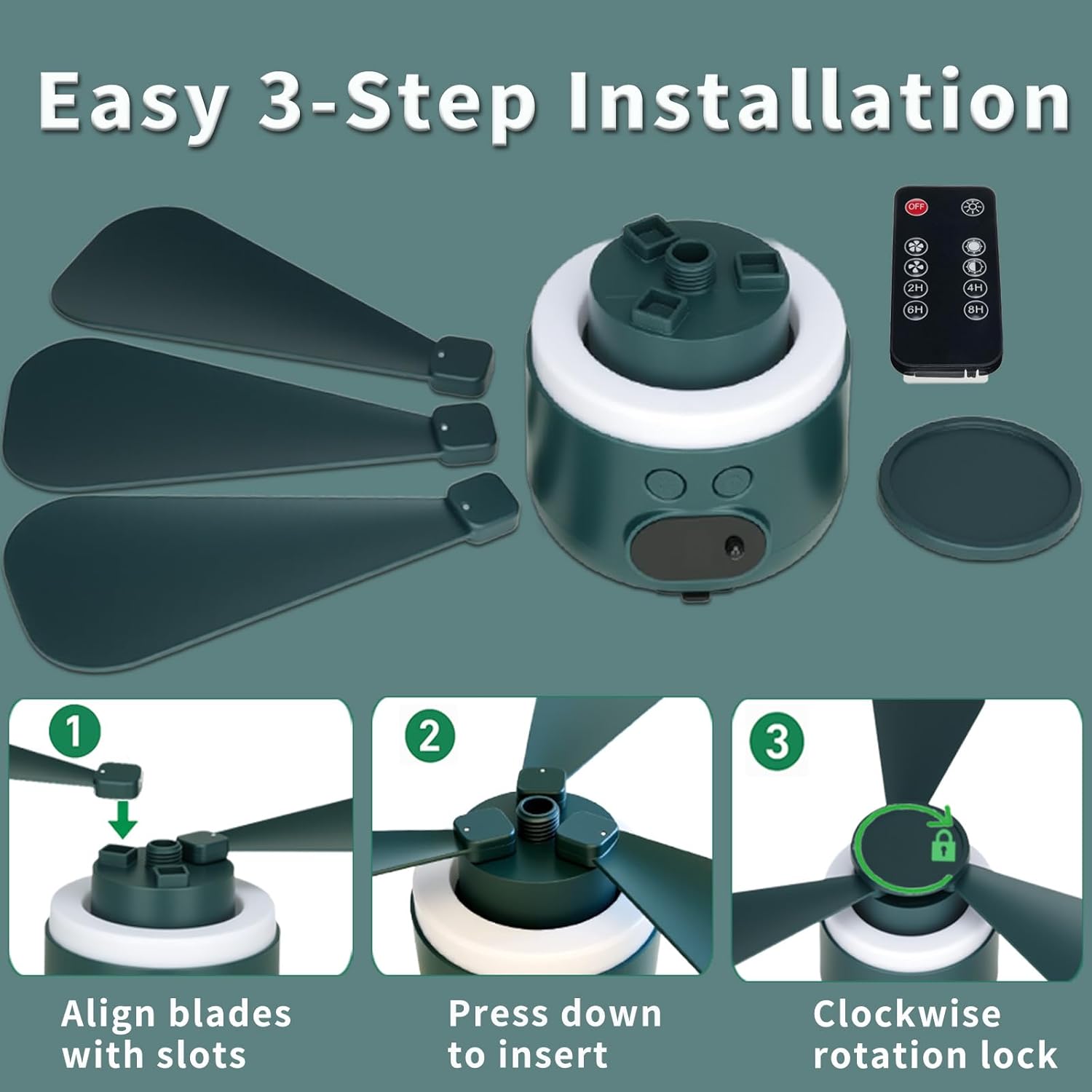
Image: Visual guide for the 3-step blade installation: align, press, and lock clockwise.
3. Příprava dálkového ovladače
Remove the clear plastic battery insulator tab from the remote control's battery compartment before attempting to use it.
4. Montáž ventilátoru
Use the integrated hanging hook to suspend the fan. For optimal stability and safety, ensure the fan is mounted directly to a sturdy point without excessive slack in any hanging material. This prevents unwanted swinging or rotation during operation.

Image: Illustration demonstrating secure installation with no loose rope for maximum stability, compared to an unstable setup with too much slack.
Návod k obsluze
Zapnutí/vypnutí
Stiskněte tlačítko napájení (U) on the fan's control panel or the ON/OFF button on the remote control to turn the fan on or off.
Nastavení rychlosti ventilátoru
Stiskněte tlačítko rychlosti ventilátoru (F) on the fan's control panel or the fan speed buttons (1, 2, 3) on the remote control to cycle through the three available speeds:
- Rychlost 1 (nízká): Provides a gentle breeze for extended use, up to 36 hours.
- Rychlost 2 (střední): Balanced airflow for comfortable cooling, up to 16 hours.
- Rychlost 3 (vysoká): Maximum airflow for quick cooling, up to 8 hours.

Image: The fan operating at Speed 1 (2200 RPM/36H), Speed 2 (3000 RPM/16H), and Speed 3 (4000 RPM/8H).
Ovládání LED světla
Stiskněte tlačítko světla (O) on the fan's control panel or the light brightness buttons on the remote control to adjust the LED light brightness:
- Nízký jas: Ideal for ambient lighting, up to 36 hours.
- Střední jas: Suitable for general illumination, up to 24 hours.
- Vysoký jas: Brightest setting for tasks or increased visibility, up to 12 hours.

Image: The fan's LED light shown at High (12 hours), Medium (24 hours), and Low (36 hours) brightness settings.
Funkce časovače
Use the remote control to set an automatic shutdown timer. Press the 2H, 4H, 6H, or 8H buttons to activate the corresponding timer. The fan and/or light will turn off automatically after the selected duration.

Image: A person relaxing in a tent, operating the geonfi camping fan with the remote control.
Funkce powerbanky
The fan's built-in 10400mAh battery can serve as a power bank. Connect your smartphone, tablet, or other USB-powered devices to the USB-A output port on the fan using your device's charging cable to charge them on the go.
Všestranné použití
The geonfi camping fan is designed for various applications, including camping, hiking, RV travel, backyard BBQs, fishing trips, power outages, and as an emergency kit essential.

Image: Collage showing the fan being used for BBQ, fishing, office, hiking, sleeping, and general campIng.
Údržba
Čištění
To clean the fan, ensure it is turned off and disconnected from any power source. Wipe the exterior and blades with a soft, dry cloth. Do not use liquid cleaners, solvents, or abrasive materials. Do not immerse the fan in water.
Skladování
When storing the fan for an extended period, ensure it is clean and dry. Store it in a cool, dry place away from direct sunlight. It is recommended to charge the battery to about 50% before long-term storage to maintain battery health.
Odstraňování problémů
If you encounter issues with your geonfi camping fan, refer to the following common problems and solutions:
| Problém | Možná příčina | Řešení |
|---|---|---|
| Ventilátor se nezapne | Low battery; Remote control battery insulator still in place; Power button not pressed correctly | Charge the fan fully; Remove the plastic tab from the remote; Press the power button firmly |
| Slabé nebo žádné proudění vzduchu | Low fan speed setting; Obstructed blades; Low battery | Increase fan speed; Ensure blades are clear; Recharge the fan |
| LED light not working or dim | Low battery; Light brightness set to low; Light button not pressed correctly | Recharge the fan; Increase light brightness; Press the light button firmly |
| Dálkové ovládání nereaguje | Battery insulator still in place; Remote battery depleted; Obstruction between remote and fan | Remove insulator; Replace remote battery; Ensure clear line of sight to fan's receiver |
| Fan swings excessively when hung | Loose hanging; Unstable mounting point | Ensure the fan is securely mounted with minimal slack in the hanging mechanism |
Specifikace
| Funkce | Detail |
|---|---|
| Značka | geonfi |
| Číslo modelu | Geonfi-campingfan-10400 |
| Rozměry produktu | 11.4"H x 11.4"Š x 5.4"V |
| Kapacita baterie | 10400 XNUMX mAh |
| Zdroj napájení | Napájení z baterie |
| Wattage | 7 wattů |
| Počet otáček ventilátoru | 3 |
| Počet čepelí | 3 |
| Úrovně světla LED | 3 (Ring Light) |
| Typ ovládání | Ovládání tlačítky, Dálkové ovládání |
| Materiál | Akrylonitrilbutadienstyren (ABS) |
| Speciální funkce | Cordless, Foldable, LED Light, Remote Controlled, Timer, Power Bank Function |
| Certifikace | CE (DL-250114024EC), FCC (DL-250114025EC) |
Produktová videa
Geonfi Wireless Fan Overview
Video: Úředník u konceview from geonfi demonstrating the fan's features and portability, highlighting how it keeps you cool on the go.
Camping Tent Fan Type-C Rechargeable
Video: An official video from geonfi showcasing the fan's Type-C rechargeable feature and its utility as a camping tent fan.
Záruka a podpora
This geonfi product is covered by a standard manufacturer's warranty. For detailed information regarding warranty terms, coverage, and duration, please refer to the warranty card included with your product or visit the official geonfi website. For technical support, troubleshooting assistance, or any product-related inquiries, please contact geonfi customer service through their official channels.