
ATTACK SHARK X68HE
ATTACK SHARK X68PRO HE Rapid Trigger Wireless Keyboard User Manual
Model: X68HE
Zavedení
This manual provides detailed instructions for the setup, operation, and maintenance of your ATTACK SHARK X68PRO HE Rapid Trigger Wireless Keyboard. Designed for high-performance gaming, this keyboard features magnetic switches, adjustable actuation, and multi-mode connectivity.
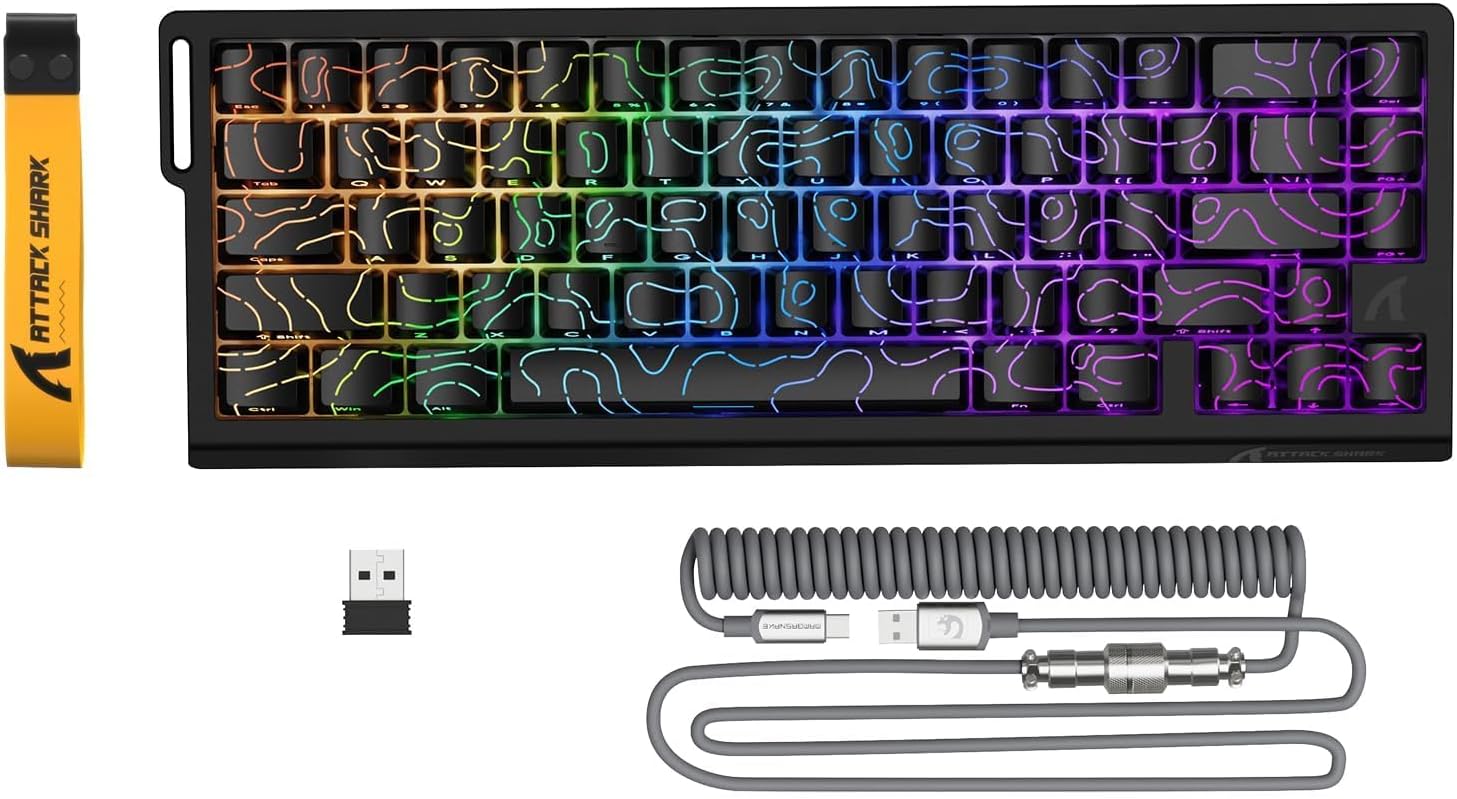
Image: The ATTACK SHARK X68PRO HE keyboard, showing its compact layout, along with the USB receiver and coiled USB-C cable.
Obsah balení
- ATTACK SHARK X68PRO HE Keyboard
- USB-C Coiled Cable
- 2.4 GHz bezdrátový přijímač
- Stahovač klíčů
- Uživatelská příručka (tento dokument)
Nastavení
Možnosti připojení
The X68PRO HE keyboard supports three connectivity modes: 2.4GHz wireless, Bluetooth, and USB-C wired.

Image: The keyboard connected to a laptop via USB-C, with icons indicating 2.4G wireless and Bluetooth connectivity options.
1. Kabelové připojení USB-C
- Connect the provided USB-C coiled cable to the keyboard's USB-C port.
- Připojte druhý konec kabelu k volnému portu USB na počítači.
- The keyboard will automatically be detected and ready for use. This mode supports an 8000Hz polling rate.
2. Bezdrátové připojení 2.4 GHz
- Locate the 2.4GHz wireless receiver (dongle) included in the package.
- Zapojte přijímač do volného USB portu na vašem počítači.
- On the keyboard, switch to 2.4G wireless mode using the side button or by pressing FN + R..
- The keyboard will connect automatically. This mode supports a 1000Hz polling rate.
3. Připojení Bluetooth
- On the keyboard, switch to Bluetooth mode by pressing FN+Q, FN + Wnebo FN + E to select one of three available Bluetooth channels.
- The keyboard's indicator light will flash, indicating it is in pairing mode.
- On your device (computer, tablet, etc.), open Bluetooth settings and search for "ATTACK SHARK X68PRO HE".
- Select the keyboard to pair. Once paired, the indicator light will become solid.
- You can switch between paired Bluetooth devices using FN + Q/W/E. This mode supports a 1000Hz polling rate.
Návod k obsluze
Rychlé spouštění a nastavitelné ovládání
The X68PRO HE features Hall Effect magnetic switches with 0.01mm trigger accuracy and adjustable actuation from 0.1mm to 3.4mm. This allows for precise control and rapid key presses, ideal for gaming.

Image: A visual comparison illustrating the difference between a regular switch and a rapid trigger switch, highlighting the instant reset capability of the latter for improved accuracy in games.

Obrázek: Podrobný view of the adjustable magnetic switch, showing its linear type, 100 million click lifespan, 0.1-3.4mm actuation range, and support for N-pole-down magnetic switches.
Adjustments for Rapid Trigger sensitivity, Dynamic Keystrokes (DKS), Mod-Tap (MT), and Toggle Key (TGL) can be made via the dedicated QMK web driver. Refer to the "Driver Customization" section for more details.
Polling Rate and Latency
The keyboard offers an 8000Hz polling rate in wired mode and 1000Hz in wireless modes, ensuring ultra-low latency of 0.125ms for quick response times.

Image: The keyboard with a graphic illustrating the 8000Hz polling rate and 0.125ms response time, emphasizing its speed.
Ovládání osvětlení RGB
The X68PRO HE features south-facing RGB lighting with 16.8 million color options and over 20 dynamic effects. You can customize these effects using the following key combinations:
- FN + \|Přepnout režim světla
- FN+Backspace: Light on/off
- FN + -/=: Backlit Speed +/-
- FN + EnterPřepnout barvu světla
- FN + Tab: White Light
- FN + ↑/↓: Backlit Brightness +/-

Image: The keyboard displaying its dynamic RGB lighting effects, with a diagram showing the key combinations for controlling light modes, colors, speed, and brightness.
Driver Customization (QMK Web Řidič)
The keyboard supports customization via a QMK web driver, allowing you to adjust key functions, macros, RGB effects, and more without software downloads. The hot-swappable PCB also allows for changing magnetic switches.
To access the driver, visit: bit.ly/X68HESOFT

Image: Screenshots of the QMK web driver interface, demonstrating options for key settings, stroke settings, shaft settings, macros, and RGB lighting customization.
Údržba
- Čištění: Use a soft, dry cloth to wipe down the keyboard. For deeper cleaning, use a keycap puller to remove keycaps and compressed air to clear debris.
- Skladování: Klávesnici skladujte na chladném a suchém místě mimo dosah přímého slunečního záření a extrémních teplot.
- Péče o baterie: The keyboard is powered by a 3000mAh battery. For optimal battery life, avoid fully discharging the battery frequently. Charge it regularly using the provided USB-C cable.
- Výměna spínače: The keyboard is hot-swappable. If a switch needs replacement, gently pull it out using a switch puller and insert a new compatible magnetic switch.
Odstraňování problémů
| Problém | Možná příčina | Řešení |
|---|---|---|
| Klávesnice nereaguje (kabelová) | Volné připojení kabelu; vadný USB port; problém s ovladačem. | Ujistěte se, že je kabel USB-C bezpečně připojen. Zkuste jiný port USB. Restartujte počítač. |
| Klávesnice nereaguje (bezdrátová) | Low battery; Receiver not plugged in; Incorrect mode selected; Pairing issue. | Charge the keyboard. Ensure 2.4GHz receiver is plugged in or Bluetooth is paired. Switch to the correct mode (FN+R for 2.4G, FN+Q/W/E for Bluetooth). Re-pair if necessary. |
| RGB podsvícení nefunguje | Osvětlení vypnuto; Konflikt softwaru. | Stiskněte FN+Backspace to toggle lighting. Check driver settings for RGB customization. |
| Klávesy se neregistrují nebo se píší dvakrát | Debris under keycap; Faulty switch; Software calibration issue. | Clean under the keycap. If hot-swappable, try replacing the switch. Recalibrate actuation points via the QMK web řidič. |
| Poor wireless range/connection | Interference; Distance from receiver. | Move closer to the receiver. Remove obstacles between keyboard and receiver. Avoid placing near other wireless devices. |
Specifikace

Image: The back of the product packaging, displaying key specifications and manufacturer information.
| Funkce | Detail |
|---|---|
| Model | X68PRO HE |
| Rozložení | 60% ANSI, 66 Keys |
| Typ přepínače | Hall Effect Amber Magnetic Switches |
| Rozsah ovládání | 0.1 mm - 3.4 mm (nastavitelné) |
| Trigger Accuracy | 0.01 mm |
| Míra dotazování (kabelová) | 8000 Hz |
| Rychlost dotazování (bezdrátové) | 1000Hz (2.4GHz & Bluetooth) |
| Latence | 0.125 ms |
| Konektivita | USB-C Wired, 2.4GHz Wireless, Bluetooth |
| Kapacita baterie | 3000 XNUMX mAh |
| Podsvícení | RGB (16.8 milionu barev, 20+ efektů) |
| Klíčenky | Subdyle PBT |
| Rozměry | 32.5 x 11.8 x 4 cm |
| Hmotnost | 1.12 kg |
| Kompatibilní OS | Windows, macOS |
Záruka a podpora
ATTACK SHARK products come with a standard manufacturer's warranty. For specific warranty terms and conditions, please refer to the warranty card included with your product or visit the official ATTACK SHARK webmísto.
For technical support, troubleshooting assistance, or warranty claims, please contact ATTACK SHARK customer service through their official channels. You can find contact information on the product packaging or their webmísto.
Manufacturer: ATTACK SHARK
Item Model Number: X68HE
ASIN: B0DZSY3HW4
Ask a question about this manual
Ask about setup, troubleshooting, compatibility, parts, safety, or missing instructions. Manuals+ will review the question and use this page’s manual context to help answer it.