
1. Úvod
This manual provides detailed instructions for the proper use and maintenance of your Oakcastle HIFI500 Remote Control. This remote is designed as a replacement or spare for the Oakcastle HIFI500 audio system, ensuring seamless control over its functions. Please read this manual thoroughly before use to ensure optimal performance and longevity of your remote control.
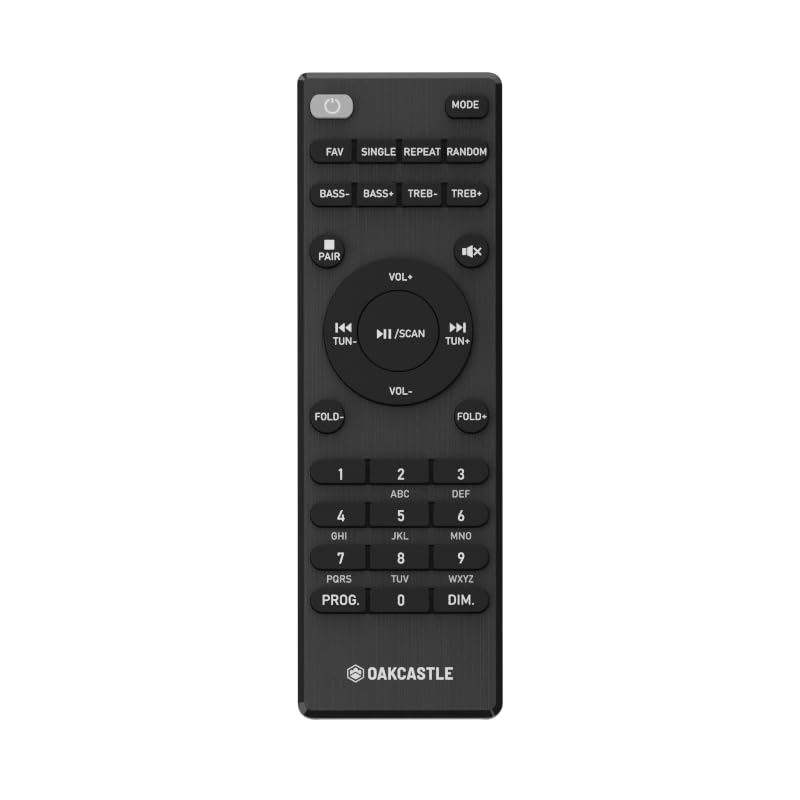
Obrázek 1.1: Přední view of the Oakcastle HIFI500 Remote Control. This image displays the compact design and button layout, including power, volume, source selection, and playback controls, typical for operating the HIFI500 audio system.
2. Nastavení
2.1. Instalace baterie
The Oakcastle HIFI500 Remote Control requires two AAA batteries (not included) for operation. Follow these steps to install the batteries:
- Najděte přihrádku na baterie na zadní straně dálkového ovladače.
- Stiskněte jazýček a posuňte kryt baterie dolů, abyste jej otevřeli.
- Vložte dvě baterie typu AAA a ujistěte se, že kladný (+) a záporný (-) pól správně shodují s označením uvnitř přihrádky.
- Zasuňte kryt baterie zpět na místo, dokud bezpečně nezapadne.
Poznámka: Always use new batteries and dispose of old batteries responsibly. Do not mix old and new batteries, or different types of batteries.
2.2. První použití
Once batteries are installed, the remote control is ready for use with your Oakcastle HIFI500 audio system. Point the remote directly at the infrared (IR) receiver on your HIFI500 system. No additional pairing is typically required for this replacement remote.
3. Ovládání dálkového ovladače
The Oakcastle HIFI500 Remote Control provides full functionality for your HIFI500 audio system. Below is a general guide to common button functions:
- Tlačítko napájení (⏻): Turns the HIFI500 system on or off.
- Zvýšení/snížení hlasitosti (Vol+ / Vol-): Nastavuje výstupní úroveň zvuku.
- Ztlumit (🔇): Dočasně ztlumí zvukový výstup.
- Source/Input (Zdroj): Cycles through available audio inputs (e.g., CD, FM, Bluetooth, AUX).
- Ovládací prvky přehrávání (▶ / ⏸ / ⏹ / ⏪ / ⏩): Controls media playback (Play, Pause, Stop, Rewind, Fast Forward) for compatible sources like CD or USB.
- Navigační tlačítka (▲ / ▼ / ◀ / ▶): Used to navigate menus and selections on the HIFI500 system display.
- Tlačítko OK/Enter: Potvrzuje výběr.
- Numerická klávesnice (0-9): For direct input of radio frequencies, track numbers, or other numerical data.
Refer to your Oakcastle HIFI500 audio system's main user manual for specific functions and advanced operations.
4. Údržba
4.1. Čištění
To clean your remote control, gently wipe the surface with a soft, dry cloth. For stubborn dirt, slightly dampOtřete hadřík vodou nebo jemným neabrazivním čisticím prostředkem. Nepoužívejte agresivní chemikálie, rozpouštědla nebo abrazivní materiály, protože by mohly poškodit povrchovou úpravu dálkového ovladače nebo vnitřní součásti.
4.2. Výměna baterie
Replace batteries when the remote's response becomes sluggish or stops working. Follow the battery installation steps outlined in Section 2.1. Always replace both batteries simultaneously with new ones.
4.3. Skladování
When not in use for extended periods, it is recommended to remove the batteries from the remote control to prevent leakage, which can cause damage. Store the remote in a cool, dry place away from direct sunlight and extreme temperatures.
5. Řešení problémů
If you encounter issues with your Oakcastle HIFI500 Remote Control, please refer to the following common problems and solutions:
- Dálkové ovládání nereaguje:
- Zkontrolujte, zda jsou baterie správně vloženy se správnou polaritou.
- Vyměňte baterie za nové.
- Ensure there are no obstructions between the remote control and the HIFI500 system's IR receiver.
- Make sure you are within the effective range and pointing the remote directly at the HIFI500 system.
- Intermittent function:
- To často signalizuje nízký stav baterie. Vyměňte baterie.
- Ensure the remote's IR emitter is clean and free from dirt or smudges.
If the problem persists after trying these solutions, please contact Oakcastle customer support.
6. Specifikace
| Funkce | Specifikace |
|---|---|
| Model | HIFI500 Remote Control |
| Značka | Oakcastle |
| Technologie připojení | Infračervený (IR) |
| Zdroj napájení | 2 x AAA baterie (nejsou součástí balení) |
| Maximální počet podporovaných zařízení | 1 (Oakcastle HIFI500 Audio System) |
| Speciální funkce | Lehký |
| Hmotnost položky | 2.82 unce (cca 80 gramů) |
| Rozměry balení | 8 x 3.2 x 2.5 palců (přibližně 20.3 x 8.1 x 6.3 cm) |
| Výrobce | VĚTŠINA |
7. Záruka a podpora
7.1. Informace o záruce
This Oakcastle HIFI500 Remote Control is covered by a manufacturer's warranty. Please refer to the warranty card included with your original Oakcastle HIFI500 audio system or visit the official Oakcastle webPodrobné záruční podmínky naleznete na webových stránkách. Uschovejte si doklad o koupi pro případ reklamace.
7.2. Zákaznická podpora
For technical assistance, troubleshooting beyond this manual, or warranty inquiries, please contact Oakcastle customer support. You can typically find contact information, including phone numbers, email addresses, and support portals, on the official Oakcastle webmísto.
Please have your product model (HIFI500 Remote Control) and purchase details ready when contacting support.