1. Úvod
This manual provides detailed instructions for the installation, setup, operation, and maintenance of the Q57H-AD Motherboard. Please read this manual thoroughly before beginning installation to ensure proper functionality and to prevent damage to the components.
The Q57H-AD Motherboard is designed for LGA 1156 processors and supports DDR3 memory, offering a robust foundation for various computing needs.
2. Konec produktuview
The Q57H-AD Motherboard features a standard form factor and includes essential ports and slots for a complete system build.
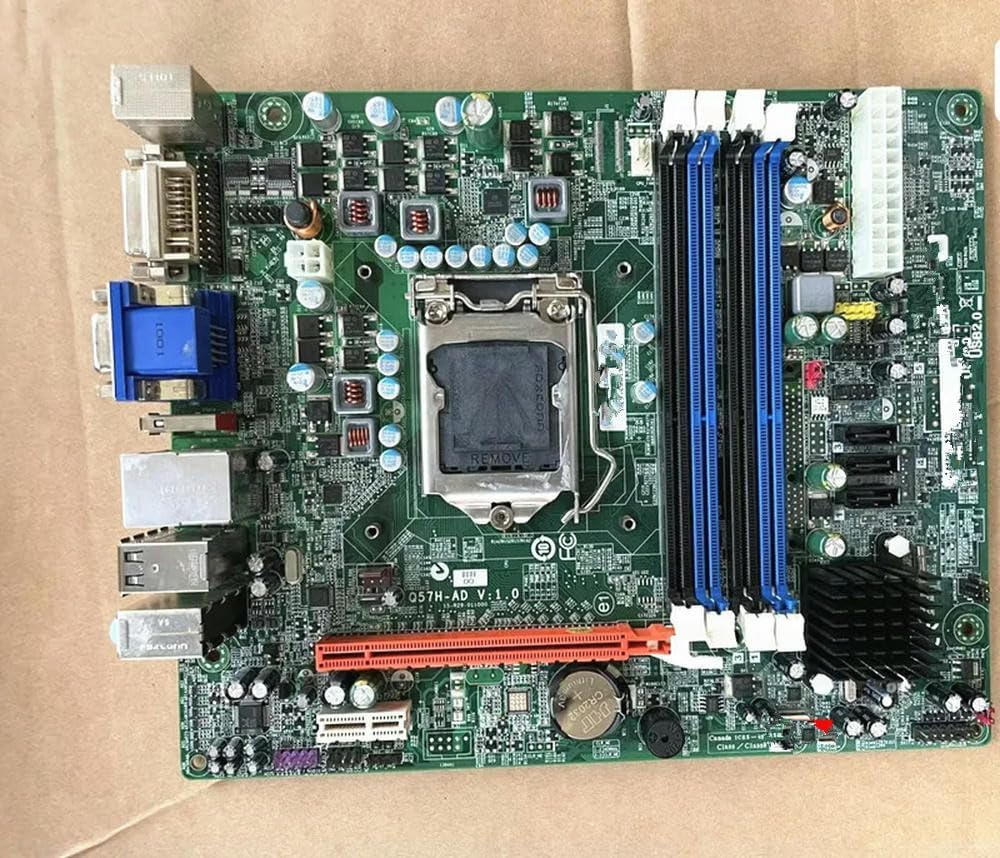
Obrázek 2.1: Q57H-AD Motherboard Layout. This image displays the full layout of the Q57H-AD motherboard, highlighting the central LGA 1156 CPU socket, four DDR3 RAM slots (two blue, two black), multiple PCIe expansion slots, and various I/O ports including VGA, DVI, USB, and Ethernet. Key components like the chipset heatsink and power connectors are also visible.
2.1 klíčové komponenty
- Patice procesoru LGA 1156: For Intel Core i3/i5/i7 (1st Gen) and Xeon 3400 series processors.
- Sloty DDR3 DIMM: Four slots supporting dual-channel DDR3 memory.
- PCIe sloty: Various Peripheral Component Interconnect Express slots for graphics cards and other expansion cards.
- SATA porty: For connecting storage devices like HDDs and SSDs.
- I/O panel: Includes USB ports, audio jacks, Ethernet port, and video outputs (VGA, DVI).
- Baterie CMOS: A CR2032 battery for maintaining BIOS settings and system time.
3. Nastavení a instalace
Before installation, ensure your system is powered off and unplugged. Wear an anti-static wrist strap to prevent electrostatic discharge (ESD) damage.
3.1 Instalace CPU
- Najděte na základní desce patici procesoru LGA 1156.
- Gently push down the load lever and pull it sideways to open the CPU socket retention frame.
- Zarovnejte trojúhelníkovou značku na procesoru s odpovídající značkou na patici. Opatrně vložte procesor do patice, aniž byste jej museli silou zasunout.
- Close the retention frame and secure it by pushing the load lever back into place.
- Naneste tenkou, rovnoměrnou vrstvu teplovodivé pasty na horní část procesoru.
- Nainstalujte chladič CPU podle pokynů výrobce.
Obrázek 3.1: CPU Socket Area. This detailed view focuses on the LGA 1156 CPU socket, showing the
žádné relevantní dokumenty