
Zavedení
The Ruko F11GIM2 4K Drone is an advanced unmanned aerial vehicle designed for capturing high-quality aerial photography and videography. Featuring a 2-axis gimbal with Electronic Image Stabilization (EIS), it delivers stable and clear 4K footage. With extended flight times and robust digital transmission, this drone is suitable for various aerial exploration and content creation needs.
Co je v krabici
- Ruko F11GIM2 Drone
- Dálkový ovladač
- Inteligentní letová baterie (x2)
- Přepravní pouzdro
- Kabel USB typu C
- RC Cables (various types for phone connection)
- Náhradní vrtule
- Spare Joysticks
- Kryt fotoaparátu
- Imbusový klíč
- Uživatelská příručka
- šrouby (12x)
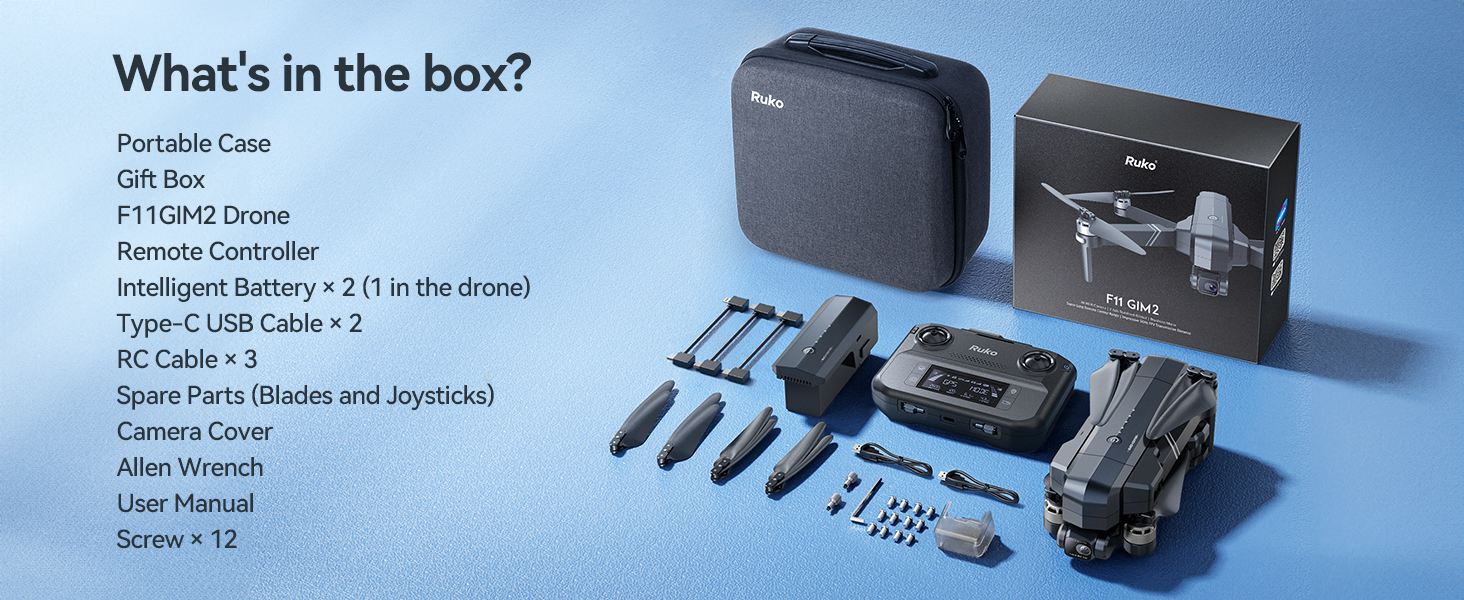
Image: The Ruko F11GIM2 4K drone and its complete set of accessories, including the remote controller, batteries, and various cables, neatly organized within its portable carrying case.
Nastavení
1. Nabíjení baterie
Ensure all intelligent flight batteries are fully charged before first use. Connect the USB Type-C cable to the battery and a compatible 5V/3A wall charger (not included). The LED indicators on the battery will show the charging progress. A full charge typically takes 5 hours.

Image: A Ruko F11GIM2 intelligent flight battery connected to a USB-C cable and a wall charger for recharging. The battery features an on/off button and LED power level indicators.
2. Příprava dronu
- Unfold the drone arms.
- Odstraňte kardanový chránič z kamery.
- Insert a charged Intelligent Flight Battery into the drone until it clicks securely.
- Press and hold the power button on the drone to turn it on. The drone will perform a self-check.
3. Nastavení dálkového ovladače
- Pull up the phone holder on the remote controller.
- Connect your smartphone to the remote controller using the appropriate RC cable (USB-C, Lightning, or Micro-USB).
- Press and hold the power button on the remote controller to turn it on.

Image: A user holding the Ruko F11GIM2 remote controller with a smartphone mounted, displaying the drone's real-time video feed and flight data, set against a scenic mountain backdrop.
4. App Connection & Calibration
Download the Ruko Mini app from your device's app store. Launch the app and follow the on-screen instructions to connect to the drone. Perform compass calibration as instructed by the app before your first flight. This ensures accurate navigation and stable flight.
Ovládání dronu
1 Základní ovládací prvky letu
- Vzlet/Přistání: Use the one-key takeoff/landing button in the app or on the remote.
- Altitude/Direction: Control with the left joystick.
- Forward/Backward/Sideways: Control with the right joystick.
- Rychlostní režimy: Switch between Normal, Cine, and Sport modes using the dedicated switch on the remote.
2. Inteligentní letové režimy
The Ruko F11GIM2 offers several intelligent flight modes for enhanced creativity and ease of use:
- tempomat: Maintain a steady flight speed for smooth cinematic shots.
- Let na trase: Set custom flight paths in the app for precise and repeatable aerial routes.
- Kruhová muška: Easily capture perfect circle shots while keeping your subject centered.
- Následuj mě: Dron automaticky sleduje dálkový ovladač nebo určený objekt.

Image: The Ruko F11GIM2 drone flying over a scenic coastline, illustrating the cruise control feature for stable and effortless aerial photography.

Image: The Ruko F11GIM2 drone executing a pre-programmed waypoint flight along a winding coastal road, demonstrating its precise navigation capabilities.

Image: The Ruko F11GIM2 drone performing a 'Circle Fly' maneuver around two individuals standing on a cliff overlooking the ocean, capturing a dynamic aerial shot.
3. Obsluha kamery
The 4K camera with 2-axis gimbal and EIS ensures stable and clear footage. Use the dedicated buttons on the remote controller or the app interface to:
- Take 4K photos.
- Record 4K/30fps video.
- Adjust the lens angle (80 degrees adjustable).
- Utilize 5x digital zoom.

Image: The Ruko F11GIM2 drone in flight, showcasing its 4K gimbal EIS camera system designed for smooth and stable footage, with mountains in the background.
Video: A tutorial demonstrating the first flight procedures for the Ruko F11PRO 2 drone, covering pre-flight checks, takeoff, and basic maneuvers.
Údržba
- Čištění: Regularly clean the drone body, camera lens, and propellers with a soft, dry cloth.
- Výměna vrtule: If propellers are damaged, replace them immediately using the provided spare propellers and Allen wrench. Ensure correct propeller installation (A and B types).
- Péče o baterie: Baterie skladujte na chladném a suchém místě. Nepřebíjejte ani nevybíjejte.
Odstraňování problémů
- Dron se nezapíná: Ujistěte se, že je baterie plně nabitá a správně vložená.
- Dálkové ovládání se nepřipojuje: Ensure both drone and remote are powered on and within range. Re-pair if necessary.
- Špatný přenos videa: Check USB connection to phone. Ensure no strong interference sources are nearby.
- Nestabilní let: Perform compass calibration again. Check propellers for damage or incorrect installation.
Specifikace
| Funkce | Detail |
|---|---|
| Značka | ruko |
| Název modelu | F11GIM2 |
| Rozlišení záznamu videa | 4K/30fps |
| Efektivní rozlišení | 8.3 MP (4K Photo) |
| Doba letu | Až 32 minut na jednu baterii (64 minut se 2 bateriemi) |
| Dolet | Up to 16404ft (5KM) |
| Odolnost proti větru | Úroveň 6 |
| Speciální funkce | 2-axis Gimbal, EIS Anti-shake, Auto-Landing, 5x Digital Zoom, 80° Adjustable Lens, Brushless Motors, Built-in Remote ID Module (FAA Compliant) |
| Technologie připojení | USB |

Obrázek: Podrobný view of the Ruko F11GIM2 intelligent flight battery, highlighting its dimensions (4.06" L x 1.83" W x 1.89" H) and specifications including 11.1V, 2500mAh, 6.8oz weight, and 27.75Wh capacity.
Záruka a podpora
For warranty information, technical support, or service inquiries, please refer to the contact details provided in your product packaging or visit the official Ruko website. Ruko is dedicated to providing high-value products supported by good customer support.

Image: Ruko customer support contact information, including a phone number (+1 (888) 892-0155) and email (service@rukotoy.com), with operating hours for Monday-Friday and Saturday-Sunday.