
osee GoStream Deck Kit
Uživatelská příručka k sadě Osee GoStream Deck Kit
Model: GoStream Deck Kit
Značka: osee
1. Konec produktuview
The Osee GoStream Deck Kit is an all-in-one professional video switcher and audio mixer designed for multiple live streaming applications. It features 4 HDMI inputs, 2 HDMI outputs, and USB-C I/O, all integrated with a built-in 14-inch monitor. This comprehensive kit provides a streamlined solution for live video production.
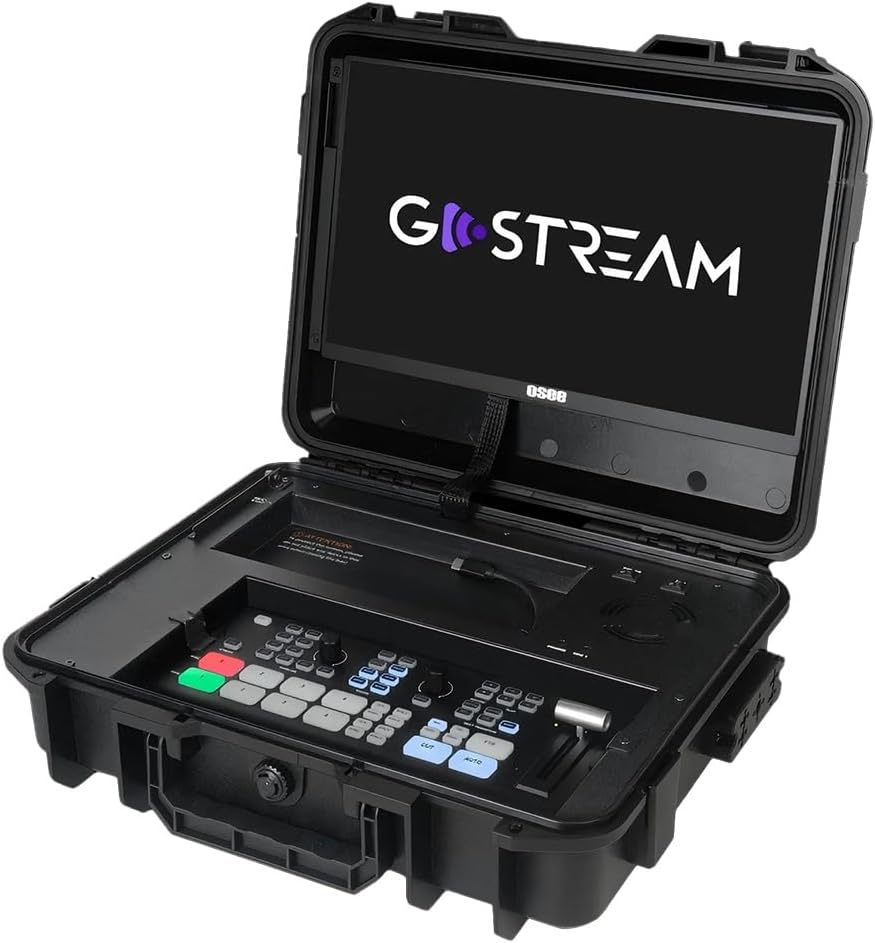
Figure 1.1: The GoStream Deck Kit with its integrated 14-inch monitor and control surface.
Klíčové vlastnosti:
- Balíček vše v jednom: Includes GoStream Deck switcher, 14'' 1080*1920 screen, silent fan, and 3 Cheese Plates with 1/4'' & 3/8'' Thread.
- Rich Connection Ports: 4 HDMI inputs, 2 HDMI outputs, and 2 USB ports for flexible monitoring and streaming.
- Integrovaný ovládací panel: Built-in operation menu eliminates the need for a separate computer.
- High-efficiency Macro Buttons: Up to 8 Macros, import/exportable via SD card for improved workflow.
- Unparalleled Super Source Feature: Advanced composition capabilities for enhanced live streaming.
- Audio Mixer: 2 Channel Analog Audio Inputs, 4 Channel HDMI Embedded Audio Inputs, 1 Channel AUX Embedded Audio Input, 1 Channel PGM Audio Monitoring with selectable On/Off/Audio-Follow-Video and gain control.
2. Nastavení a připojení
This section details the initial setup and various connectivity options for your GoStream Deck Kit.
2.1 Fyzické nastavení
Unpack all components from the GoStream Deck Kit. Ensure the 14-inch monitor is securely positioned. The silent fan is integrated for optimal performance during operation.

Figure 2.1: Components of the Mobile Live Studio All-in-One Kit.
2.2 Vstupní/Výstupní připojení
The GoStream Deck Kit offers a variety of ports for connecting cameras, monitors, and other devices.

Figure 2.2: Rear panel with all available input and output ports.
- HDMI Inputs (IN 1-4): Connect your cameras or other HDMI video sources here.
- HDMI Outputs (OUT 1-2): Use these for program output to external monitors or recorders. One output can be configured for multiview monitoring, while the other provides the program feed.
- USB Ports (USB 1-2): USB 1 is typically used for connecting to a computer for software control and streaming. USB 2 can accommodate a USB-C webcam for an additional input or other USB devices.
- Audio Inputs (MIC 1, MIC 2, AUX): Connect external microphones or audio mixers. The device also supports embedded audio from HDMI inputs.
- Ethernet: For network connectivity, including NDI sources if supported by the firmware.
- Power (DC IN): Připojte dodaný napájecí adaptér.
2.3 Expandable Cheese Plates
The kit includes 3 cheese plates with 1/4'' & 3/8'' threads, allowing for versatile mounting of accessories like cameras, lights, or additional monitors.

Figure 2.3: GoStream Deck Kit with expandable cheese plates for accessory mounting.
3. Návod k obsluze
Learn how to effectively operate your GoStream Deck Kit for live video production.
3.1 Uspořádání ovládacího panelu
The integrated control panel provides intuitive access to all key functions.

Obrázek 3.1: Detailní view of the GoStream Deck control panel.
3.2 Switching and Transitions
Use the program and preview buttons to switch between video sources. The device supports various transition effects.
Video 3.1: Demonstrates the Osee GoStream Deck's switching and transition capabilities, including HDMI inputs, USB connectivity, and audio mixing. (Source: V-feast)
- Program (PGM) Buttons: Select the live output source.
- Předview (PVW) Buttons: Select the next source to go live.
- Transition Buttons (MIX, WIPE, DIP): Apply different visual effects between program and preview.
- T-Bar: Manually control the speed and progression of transitions.
- Tlačítko AUTO: Automatically execute the selected transition.
3.3 Mixování zvuku
Control audio levels for each input source using the dedicated audio mixer section.
- Input Level Knobs: Adjust the volume for each microphone and HDMI input.
- Audio-Follow-Video (AFV): Enable or disable AFV per channel to automatically switch audio with video.
- Sluchátkový jack: Monitor the master audio output.
3.4 Nahrávání a přehrávání
Record your live stream directly to an SD card inserted into the dedicated slot. You can also load graphics and videos for playback during your stream.
- Tlačítko nahrávání: Start and stop recording the program output.
- Slot pro SD kartu: Insert an SD card for recording and media playback.
- Ovládání přehrávání: Manage loaded video clips and graphics.
4. Pokročilé funkce
4.1 Super Source
The Super Source feature allows for advanced multi-layer compositions, enabling you to combine multiple video sources into a single output with customizable layouts.
4.2 Macro Buttons
Program up to 8 macros to automate complex sequences of actions, greatly improving efficiency for live streaming and video production. Macro files can be imported from or exported to an SD card for sharing.
4.3 Multi-Platform Streaming
The GoStream Deck Kit supports direct streaming to multiple platforms simultaneously via its built-in software and Ethernet port. This includes popular services like YouTube, Twitch, and Facebook.
4.4 Přenositelnost
The compact design of the GoStream Deck Kit ensures ultimate portability and durability, making mobile live streaming accessible anywhere.

Figure 4.1: The GoStream Deck Kit is designed for easy transport.
5. Údržba
Regular maintenance ensures the longevity and optimal performance of your GoStream Deck Kit.
- Čištění: Use a soft, dry cloth to clean the exterior surfaces. For the screen, use a screen-specific cleaning solution and microfiber cloth. Avoid abrasive cleaners or solvents.
- Větrání: Ensure the silent fan and ventilation openings are clear of dust and obstructions to prevent overheating.
- Aktualizace firmwaru: Periodically check the osee official website for firmware updates. Updates can improve performance, add new features, and resolve bugs. Follow the provided instructions carefully when updating firmware.
- Skladování: When not in use, store the kit in a cool, dry place, preferably in its original case, to protect it from dust and physical damage.
6. Řešení problémů
Tato část obsahuje řešení běžných problémů, se kterými se můžete setkat.
- Žádný video výstup:
- Zkontrolujte všechna připojení kabelu HDMI.
- Ensure the correct input source is selected on the GoStream Deck.
- Verify that the external monitor is powered on and set to the correct input.
- Confirm that the camera or video source is outputting a compatible signal.
- Žádný zvuk:
- Check microphone connections and ensure they are powered (if required).
- Verify audio levels on the GoStream Deck's audio mixer.
- Ensure Audio-Follow-Video (AFV) is correctly configured for embedded audio.
- Check audio output settings on your streaming software or recording device.
- Problémy se streamováním:
- Ověřte stabilitu internetového připojení.
- Check streaming platform settings (stream key, server URL).
- Ensure sufficient upload bandwidth.
- Reduce video quality settings if experiencing buffering or dropped frames.
- Zařízení nereaguje:
- Perform a power cycle (turn off, unplug, wait 30 seconds, plug back in, turn on).
- If connected to a computer, try restarting the computer and the GoStream Deck.
7. Specifikace
| Funkce | Detail |
|---|---|
| Rozměry balení | 14 x 11 x 5 palce |
| Hmotnost položky | 11 libry |
| Typ konektoru | HDMI |
| Značka | osee |
| Kompatibilní zařízení | Laptop, Television, Digital Camera |
| Typ kabelu | HDMI |
| Počet portů | 6 |
| Výrobce | osee |
| Země původu | Čína |
| Datum první dostupnosti | 7. března 2025 |
8. Záruka a podpora
For warranty information and technical support, please refer to the official osee webnebo se obraťte přímo na jejich zákaznický servis. Uschovejte si účtenku jako doklad o koupi pro případné reklamace.
Online zdroje:
- Navštivte osee Store on Amazon pro informace o produktech a aktualizace.
Ask a question about this manual
Ask about setup, troubleshooting, compatibility, parts, safety, or missing instructions. Manuals+ will review the question and use this page’s manual context to help answer it.