
Zavedení
This manual provides detailed instructions for the assembly, operation, and maintenance of your Hbada P2 Ergonomic Office Chair. Please read this manual thoroughly before assembly and use to ensure proper function and longevity of the product.
Bezpečnostní informace
This product requires assembly. Exercise caution during the assembly process. Always follow the correct usage methods outlined in this manual to prevent injury or damage to the product.
Obsah balení
Before beginning assembly, ensure all components are present. Refer to the assembly diagram for a complete list of parts.

Image: Detailed assembly diagram showing all parts and steps for the Hbada P2 Office Chair.
Nastavení a montáž
Follow these steps carefully to assemble your Hbada P2 Ergonomic Office Chair. Assembly instructions are included with the product.
- Krok 1: Insert the footrest into the seat cushion from the rear. Slide it in until it clicks into place. (This step is not applicable if your model does not include a footrest).
- Krok 2: Place the seat cushion upside down on a soft surface. Align the 6 screw holes and attach the gas lift cover. Then, insert the 6 screws and tighten them 3-4 turns. Do not fully tighten all screws yet.
- Krok 3: Place the chair base onto the seat cushion. Align the 4 screw holes. Insert the 4 screws and tighten them 3-4 turns. Do not fully tighten all screws yet.
- Krok 4: Attach the two screws to connect the backrest and seat base. Secure the backrest to the seat base.
- Krok 5: Attach the backrest to the central hole of the seat base. Insert the 3 D-shaped screws and tighten them 3-4 turns. Do not fully tighten all screws yet.
- Krok 6: After attaching the backrest, insert the gas lift into the base. Ensure the gas lift is securely seated. The gas lift helps support the chair's weight and allows for height adjustment. The gas lift cylinder may require some force to push it firmly into the base.
- Krok 7: Attach the headrest to the backrest. The headrest features a slider for adjustment. If the headrest feels tight, apply some force to push it into position.
- Poslední krok: Once all components are in place, fully tighten all screws. Assembly is complete.
Návod k obsluze a nastavení
Your Hbada P2 chair offers multiple adjustment features for personalized comfort.
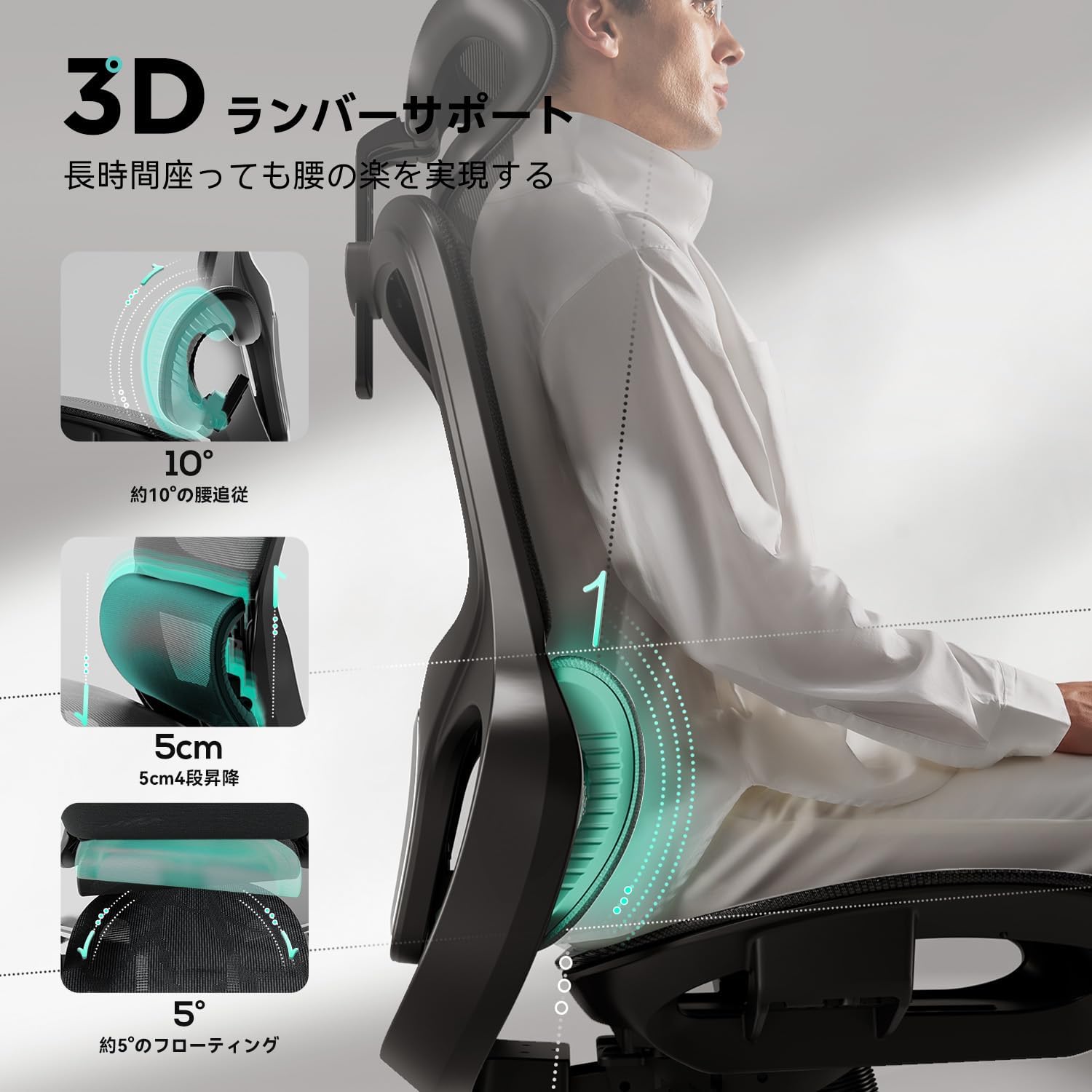
1. 3D Lumbar Support Adjustment
The 3D lumbar support provides targeted lower back protection. It features a 4-stage adjustment with 5cm vertical travel and approximately 5 degrees of floating movement to relieve pressure on your lower back.

Image: Diagram illustrating the 3D lumbar support with 10-degree follow, 5cm 4-stage lift, and 5-degree floating movement.
2. 360° Armrest Adjustment
The armrests can be adjusted for height, depth, and rotation to suit various tasks and preferences.
- Nastavení výšky: Up to 75mm vertical travel.
- Nastavení hloubky: Up to 45mm front-to-back movement.
- Otáčení: 360° rotation for optimal arm positioning.

Image: Diagram showing the 7.5cm height adjustment, 4.2cm front-back adjustment, and 360-degree rotation of the armrests.
3. 3D Headrest Adjustment
The headrest is designed to fit your head and neck, reducing discomfort with multiple adjustment options.
- Nastavení výšky: Up to 13cm vertical travel.
- Surface Rotation: 180° rotation of the headrest surface.
- Frame Rotation: 40° rotation of the headrest frame.
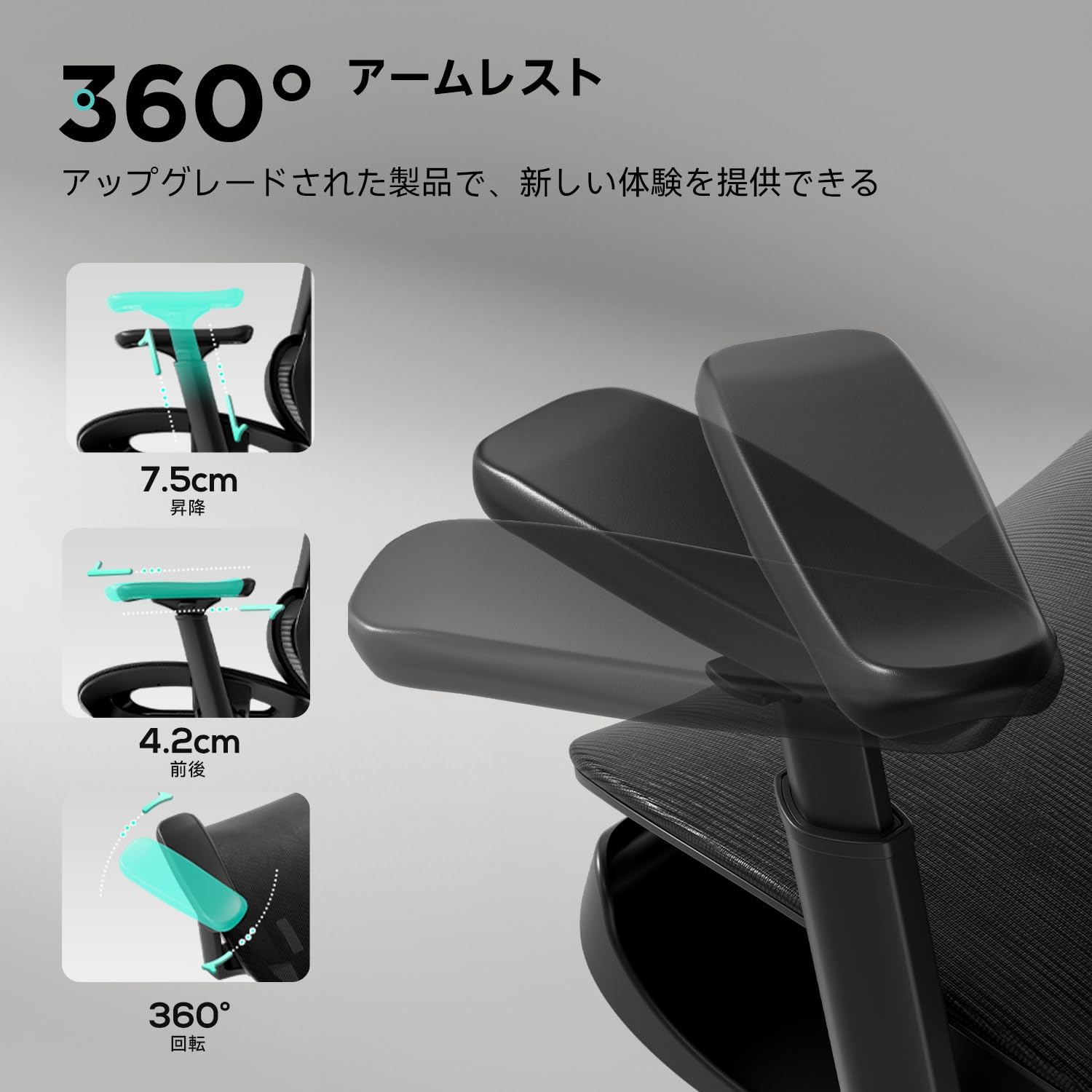
Image: Diagram illustrating the 13cm height adjustment, 180-degree headrest surface rotation, and 40-degree headrest frame rotation.
4. Funkce polohování
The chair features a 135-degree reclining function, allowing for comfortable rest during breaks.

Image: Illustration of the chair reclining at 105°, 120°, and 135° angles.
Údržba
To ensure the longevity and optimal performance of your Hbada P2 office chair, follow these maintenance guidelines:
- Pravidelná kontrola: Pravidelně kontrolujte všechny šrouby a vruty, zda jsou pevně utažené. V případě potřeby je dotáhněte.
- Čisticí síťovina: Clean the mesh fabric with a damp cloth and a mild soap solution. Avoid using harsh chemicals or abrasive cleaners, as these can damage the material.
- Péče o kolečka: Keep the casters free of hair and debris to ensure smooth movement.
- Plynový výtah: Nepokoušejte se rozebírat plynový zvedací válec. V případě poruchy kontaktujte zákaznickou podporu.
Odstraňování problémů
If you encounter any issues with your Hbada P2 office chair, refer to the following common problems and solutions:
- Židle se zdá nestabilní nebo kymácející: Ensure all assembly bolts and screws are fully tightened. Re-check the connections of the base and backrest.
- Nastavení výšky je obtížné nebo nefunguje vůbec: Verify that the gas lift is properly seated in the base and not obstructed. Ensure the lever mechanism is functioning correctly.
- Headrest or armrests are stiff to adjust: Check for any obstructions. Apply gentle, even force during adjustment. If the issue persists, ensure components were assembled correctly.
- Kolečka se neotáčejí hladce: Inspect the casters for any trapped hair, dust, or debris and remove them.
If these troubleshooting steps do not resolve the issue, please contact customer support for further assistance.
Specifikace
| Značka | Hbada |
| Číslo modelu | P216BVC-CB |
| Barva | Black with Ottoman |
| Rozměry produktu (D x Š x V) | 70 x 70 x 115 cm |
| Velikost | Střední |
| Styl zad | Síťovaná záda |
| Materiál sedáku | Pletivo |
| Zahrnuté komponenty | osmanský |
| Montáž Vyžadována | Yes, instructions included |
Obrázek: Přední a boční view of the Hbada P2 Office Chair with detailed dimensions in centimeters.
Záruka a podpora
Hbada is committed to providing high-quality products and customer satisfaction.
- Structural Components Warranty: A 5-year warranty is provided for the structural components of the chair.
- Zásady vrácení: Enjoy a 30-day return policy without specific reason.
- Damage Warranty: Repair or replacement warranty for damages upon arrival.
- Služby zákazníkům: 24-hour customer service is available for assistance.
For any warranty claims, technical support, or inquiries, please contact Hbada customer service through the retailer's platform where you purchased the product.

Image: Graphic indicating a 5-year warranty on structural components, with BIFMA, TUV, EUIPO, IGR, and SGS certifications.