
Zavedení
Thank you for choosing the CHUWI Wireless Mouse S1. This 2.4GHz USB computer mouse is designed for comfort and efficiency, featuring a 1600 DPI optical sensor with 3-level adjustable DPI settings, long battery life, and broad compatibility with various devices. This manual provides essential information for setting up, operating, maintaining, and troubleshooting your new wireless mouse.
Obsah balení
Prosím, ověřte, zda jsou v balení přítomny všechny položky:
- CHUWI Wireless Mouse
- USB přijímač
- Uživatelská dokumentace
- 1 baterie AA (předinstalovaná nebo dodávaná samostatně)
Průvodce nastavením
Follow these steps to set up your CHUWI Wireless Mouse S1:
- Vyhledejte USB přijímač: Gently remove the bottom cover of the mouse by sliding it downward. The USB receiver and the battery compartment are located inside.
- Nainstalujte baterii: Insert the provided AA battery into the battery compartment, ensuring correct polarity.
- Vyzvedněte USB přijímač: Take out the small USB receiver from its storage slot.
- Připojte se k vašemu zařízení: Zapojte USB přijímač do volného USB portu na vašem počítači, notebooku nebo tabletu.
- Zavřete kryt: Replace the bottom cover of the mouse.
- Zapnutí: Slide the power switch at the bottom of the mouse to the "on" position. The mouse should now be ready for use.

Figure 1: Locating the USB receiver and installing the AA battery.
Návod k obsluze
Připojení myši
The CHUWI Wireless Mouse S1 uses 2.4G wireless technology for a stable connection up to 33 feet (10 meters). Once the USB receiver is plugged into your device and the mouse is powered on, it will automatically establish a connection. No complex pairing is required.

Figure 2: Establishing a 2.4G wireless connection.
Úprava DPI
The mouse features three adjustable DPI (Dots Per Inch) settings: 800, 1200, and 1600. To switch between DPI levels, simply press the DPI button located below the scroll wheel. Each press cycles through the available settings, allowing you to adjust cursor sensitivity for different tasks such as general browsing, office work, graphic design, or gaming.

Figure 3: Adjusting DPI settings with the dedicated button.
Navigační tlačítka
The mouse is equipped with convenient forward and back buttons on the side. These buttons allow for quick navigation through web pages, documents, and folders, enhancing your workflow efficiency.
Silent Click Feature
The CHUWI Wireless Mouse S1 is designed with silent click buttons, making it suitable for quiet environments such as libraries, offices, or late-night use. This feature minimizes click noise without compromising tactile feedback.

Figure 4: The silent click feature for quiet operation.
Ergonomický design
The mouse features an ergonomic design that conforms to the natural curve of your hand, providing a comfortable grip for extended use. Its compact and lightweight build, along with rubber-coated side grips, helps reduce hand fatigue. The design is ambidextrous, accommodating both left-handed and right-handed users.

Obrázek 5: Ergonomický design pro pohodlné používání.
Informace o baterii
The CHUWI Wireless Mouse S1 is powered by a single AA battery, offering an approximate battery life of 12-15 months. The mouse is designed for convenience with no on/off switch; simply pick it up and start using it. This design eliminates the need for frequent charging, providing hassle-free use for mobile work and daily tasks.
Údržba
To ensure optimal performance and longevity of your CHUWI Wireless Mouse S1:
- Čištění: K otření povrchu myši použijte měkký, suchý hadřík. V případě odolné nečistoty lehceampOtřete hadřík vodou nebo jemným čisticím roztokem. Nepoužívejte agresivní chemikálie ani abrazivní materiály.
- Údržba senzoru: Periodically clean the optical sensor area at the bottom of the mouse with a cotton swab to prevent dust buildup, which can affect tracking performance.
- Skladování: When not in use for extended periods, consider removing the AA battery to prevent potential leakage. Store the USB receiver in its designated slot within the mouse to prevent loss.
- Ochrana životního prostředí: The mouse features a splash-proof and dust-proof design, contributing to its durability. However, avoid exposing it to excessive moisture or dust.
Odstraňování problémů
If you encounter issues with your CHUWI Wireless Mouse S1, refer to the following common solutions:
- Myš nereaguje:
- Ensure the AA battery is correctly installed and has sufficient charge. Replace the battery if necessary.
- Ověřte, zda je USB přijímač bezpečně zapojený do funkčního USB portu v počítači. Zkuste jiný USB port.
- Make sure the mouse's power switch (if present, though this model is designed to be always on when battery is inserted) is in the 'on' position.
- Restartujte počítač.
- Nepravidelný pohyb kurzoru:
- Vyčistěte optický senzor ve spodní části myši.
- Ujistěte se, že myš používáte na vhodném povrchu. Vysoce reflexní nebo průhledné povrchy mohou ovlivnit snímání pohybu. Doporučuje se podložka pod myš.
- Zkontrolujte, zda nedochází k rušení jinými bezdrátovými zařízeními. Přesuňte myš blíže k USB přijímači.
- Problémy s připojením:
- If the connection is unstable, try plugging the USB receiver into a different USB port, preferably one closer to the mouse.
- Ensure there are no large metal objects between the mouse and the receiver that could block the signal.
- Tlačítka nefungují:
- Check if the mouse is properly connected and powered on.
- Vyzkoušejte myš na jiném počítači, abyste zjistili, zda je problém s myší nebo s nastavením počítače.
Specifikace
Detailed specifications for the CHUWI Wireless Mouse S1:
| Rozměry produktu | 3.89 x 2.36 x 0.04 palce |
| Hmotnost položky | 1.76 unce |
| Číslo modelu položky | CHUWI Wireless Mouse S1 |
| Baterie | 1 AA baterie (součástí balení) |
| Technologie připojení | Bezdrátové 2.4G (USB přijímač) |
| Technologie detekce pohybu | Optický |
| Nastavení DPI | 800, 1200, 1600 (Adjustable) |
| Tlačítka | 4 (Left, Right, Scroll Wheel/Middle, DPI, Forward, Back) |
| Barva | Černý |
| Kompatibilita | PC, Mac, Laptop, Windows Tablets (Universal USB interface) |
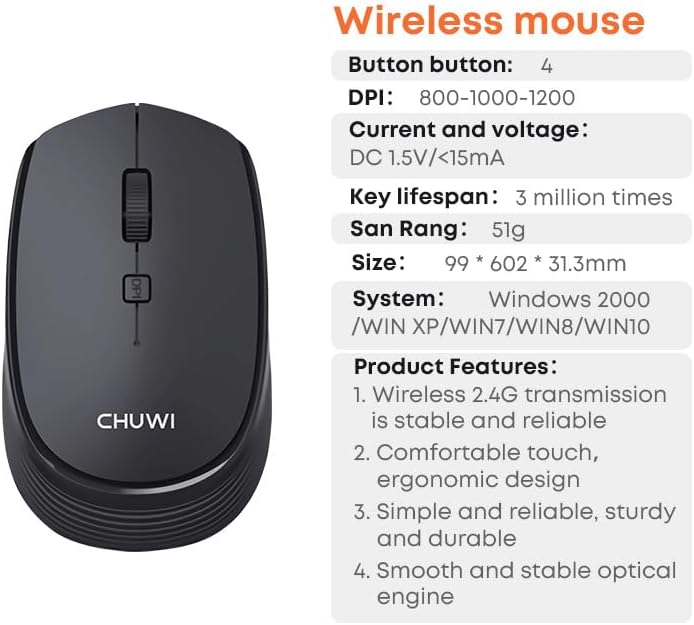
Figure 6: CHUWI Wireless Mouse S1 and its key specifications.
Záruka a podpora
CHUWI is committed to providing high-quality products and excellent customer service. While specific warranty details for this mouse are not provided, CHUWI generally offers professional support for its products.
- Profesionální podpora: CHUWI offers lifetime factory professional support.
- Online podpora: 24 hours of online support is available to assist with any issues or questions you may have.
For further assistance, please visit the official CHUWI webwebu nebo se přímo obraťte na jejich zákaznický servis.