
1. Konec produktuview
The CHOETECH B695 is a versatile 10000mAh magnetic power bank designed for convenient charging of multiple devices. It features both wireless charging capabilities and multiple wired output options, including built-in USB-C and Lightning cables. Its compact design and integrated safety features make it an ideal portable power solution.

Obrázek: Přední a zadní strana view of the CHOETECH B695 Magnetic Power Bank, showcasinjeho kompaktní design a různé porty.
Klíčové vlastnosti:
- 10000mAh kapacita: Poskytuje ampenergie pro více nabití.
- Nabíjení 2 v 1: Supports both magnetic wireless charging and wired charging.
- Vestavěné kabely: Integrated USB-C and Lightning cables for direct device connection.
- Více výstupů: Includes USB-A, Type-C (input/output), and dedicated wireless charging for phones and watches.
- Magnetické zarovnání: Ensures secure and efficient wireless charging for compatible devices.
- LED digitální displej: Clearly indicates remaining battery percentage.
- Komplexní bezpečnostní ochrana: Built-in safeguards against overcharge, overdischarge, overcurrent, overvoltage, temperature, short circuit, overpower, recovery, and electromagnetic field issues.
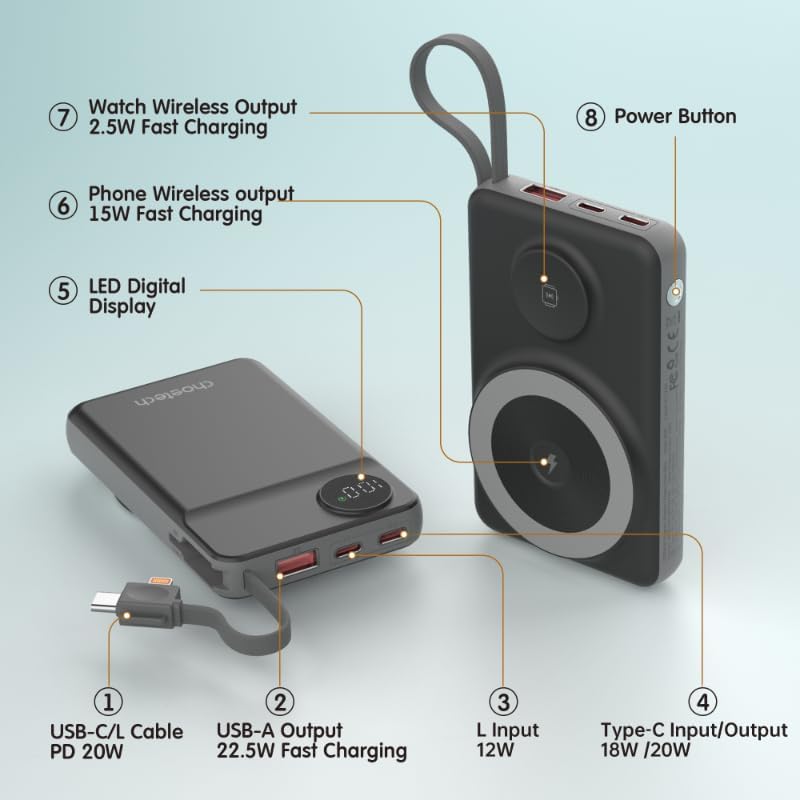
Image: Detailed diagram labeling the ports and features of the CHOETECH B695, including USB-C/L cable, USB-A output, L input, Type-C input/output, LED display, phone wireless output, watch wireless output, and power button.
2. Začínáme: Nastavení
2.1 Nabíjení powerbanky
Before initial use, fully charge your CHOETECH B695 power bank. This ensures optimal performance and battery longevity.
- Connect a compatible USB-C charging cable (not included) to the Type-C Input/Output port (4) on the power bank.
- Connect the other end of the cable to a USB wall adapter (not included).
- The LED Digital Display (5) will show the charging progress. It will display "100" when fully charged.
- Alternatively, you can use the built-in Lightning input (3) to charge the power bank with a Lightning cable and adapter.
Poznámka: For fastest charging of the power bank, use a PD (Power Delivery) compatible wall adapter with the Type-C port.
3. Návod k obsluze
3.1 Kontrola stavu baterie
Press the Power Button (8) once to activate the LED Digital Display (5), which will show the current battery percentage.
3.2 Drátové nabíjení
The CHOETECH B695 offers multiple wired charging options:
- Using Built-in USB-C/L Cable (1):
- Pull out the integrated USB-C or Lightning cable from its storage slot.
- Connect the appropriate cable end to your device's charging port.
- Nabíjení se spustí automaticky.
- Using USB-A Output (2):
- Connect your device's USB charging cable to the USB-A Output port (2).
- Připojte druhý konec kabelu k zařízení.
- Nabíjení bude zahájeno.
- Using Type-C Input/Output (4):
- Connect your device's USB-C charging cable to the Type-C Input/Output port (4).
- Připojte druhý konec kabelu k zařízení.
- Nabíjení bude zahájeno.

Image: The CHOETECH B695 power bank connected to a smartphone via its built-in USB-C cable, demonstrating wired charging.
3.3 Wireless Charging (Phone)
The power bank supports magnetic wireless charging for compatible smartphones (e.g., iPhone 12 series and newer, or Android phones with magnetic cases).
- Ujistěte se, že je powerbanka dostatečně nabitá.
- Align your compatible smartphone with the larger magnetic charging pad (6) on the power bank.
- The phone should snap into place magnetically, and wireless charging will begin.

Image: A smartphone magnetically attached to the larger wireless charging pad and a smartwatch on the smaller pad of the CHOETECH B695, illustrating simultaneous wireless charging.
3.4 Wireless Charging (Watch)
The power bank includes a dedicated smaller magnetic charging pad for smartwatches.
- Ujistěte se, že je powerbanka dostatečně nabitá.
- Place your compatible smartwatch onto the smaller magnetic charging pad (7).
- The watch should align magnetically, and wireless charging will begin.
3.5 Současné nabíjení
The CHOETECH B695 can charge multiple devices simultaneously using a combination of its wired and wireless outputs.

Image: The CHOETECH B695 power bank connected to and wirelessly charging multiple devices, including smartphones and a smartwatch, demonstrating its multi-output capability.
4. Bezpečnostní informace a ochranné prvky
The CHOETECH B695 is equipped with multiple safety mechanisms to protect your devices and the power bank itself.
- Ochrana proti přebití: Zabraňuje nabití baterie nad její kapacitu.
- Ochrana proti přebití: Chrání baterii před úplným vybitím a prodlužuje tak její životnost.
- Nadproudová ochrana: Ochranné prvky proti nadměrnému toku proudu.
- Přepětítage ochrana: Chrání před volným prouděnímtage přepětí.
- Ochrana proti teplotě: Monitoruje a reguluje vnitřní teplotu, aby se zabránilo přehřátí.
- Ochrana proti zkratu: Automaticky se vypne v případě zkratu.
- Ochrana proti přepětí: Prevents power output beyond safe limits.
- Ochrana při obnově: Allows the device to recover from protection states.
- Ochrana před elektromagnetickým polem: Shields against harmful electromagnetic interference.

Image: An infographic detailing the nine safety protection features integrated into the CHOETECH B695 power bank, including overcharge, overdischarge, overcurrent, overvoltage, temperature, short circuit, overpower, recovery, and electromagnetic field protection.
Důležité: Do not expose the power bank to extreme temperatures, direct sunlight, or water. Do not disassemble or attempt to repair the device. Keep out of reach of children.
5. Údržba
- Čištění: Use a soft, dry cloth to clean the power bank. Avoid liquid cleaners.
- Skladování: Powerbanku skladujte na chladném a suchém místě mimo dosah přímého slunečního záření a extrémních teplot.
- Stav baterie: Pro zachování dobrého stavu baterie powerbanku plně nabijte a vybijte alespoň jednou za tři měsíce, pokud ji nepoužíváte pravidelně.
- Péče o kabely: S vestavěnými kabely zacházejte opatrně. Vyhněte se nadměrnému ohýbání nebo tahání, abyste předešli poškození.
6. Řešení problémů
6.1 Powerbanka se nenabíjí
- Ujistěte se, že je nabíjecí kabel bezpečně připojen ke vstupnímu portu powerbanky i k nástěnnému adaptéru.
- Ověřte, zda síťový adaptér funguje správně a je zapojen do zásuvky.
- Try a different USB-C or Lightning charging cable and wall adapter.
6.2 Zařízení se nenabíjí z powerbanky
- Kabelové nabíjení:
- Zkontrolujte, zda je powerbanka dostatečně nabitá (viz LED displej).
- Ujistěte se, že je nabíjecí kabel bezpečně připojen k výstupnímu portu powerbanky i k vašemu zařízení.
- Zkuste jiný nabíjecí kabel nebo jiný výstupní port na powerbankě.
- Press the power button once to activate output if necessary.
- Bezdrátové nabíjení:
- Ujistěte se, že je vaše zařízení kompatibilní s magnetickým bezdrátovým nabíjením.
- Odstraňte ze zařízení veškerá silná pouzdra nebo kovové předměty, které by mohly rušit bezdrátové nabíjení.
- Ensure your device is correctly aligned with the magnetic charging pad on the power bank.
- Zkontrolujte, zda je powerbanka dostatečně nabitá.
6.3 Pomalé nabíjení
- Ensure you are using a fast-charging compatible cable and adapter for both charging the power bank and charging your devices.
- Some devices may limit charging speed when multiple devices are connected simultaneously.
- Environmental factors (e.g., high temperature) can affect charging efficiency.
6.4 LED Display Not Working
- Pevně stiskněte tlačítko napájení.
- Pokud je powerbanka zcela vybitá, displej se nemusí rozsvítit, dokud se nenabije.
7. Specifikace
| Model | B695 |
| Kapacita baterie | 10000 XNUMX mAh |
| Vestavěný kabelový výstup | USB-C/L Cable PD 20W |
| Výstup USB-A | Rychlé nabíjení 22.5W |
| Vstup/výstup typu C | 18W / 20W |
| Vstup blesku | 12W |
| Phone Wireless Output | Rychlé nabíjení 15W |
| Sledujte bezdrátový výstup | Rychlé nabíjení 2.5W |
| Dimensions (L x W x Thickness) | 7.7L x 9.7W x 16.2Th centimeters |
| Hmotnost položky | 0.05 kg (50 g) |
| Barva | Černý |
8. Záruka a podpora
CHOETECH products are designed and manufactured to the highest quality standards. For warranty information and customer support, please refer to the warranty card included with your purchase or visit the official CHOETECH webmísto.
If you encounter any issues or have questions regarding your CHOETECH B695 power bank, please contact CHOETECH customer service for assistance.