
Zavedení
Welcome to the user manual for your AMACOOL Handheld Ice Cooler Fan. This innovative device is engineered to deliver powerful and instant cooling relief, featuring advanced semiconductor technology for an ice-cooling effect. Its portable design and long-lasting battery make it an ideal companion for staying comfortable in various environments, from travel to outdoor activities. Please read this manual thoroughly to ensure safe and optimal use of your fan.
Důležité bezpečnostní informace
Abyste předešli zranění nebo poškození zařízení, dodržujte prosím následující bezpečnostní opatření:
- Neponořujte ventilátor do vody nebo jiných kapalin.
- Uchovávejte mimo dosah dětí a domácích zvířat.
- Do not insert fingers or foreign objects into the fan blades or cooling plate.
- Use only the provided charging cable or a certified 5V charger.
- Vyhněte se extrémním teplotám a přímému slunečnímu záření.
- Nepokoušejte se ventilátor rozebírat ani opravovat sami. Požádejte o pomoc zákaznickou podporu.
- Před připojením nabíjecího kabelu se ujistěte, že je nabíjecí port suchý.
Obsah balení
Zaškrtněte prosím políčko, abyste se ujistili, že jsou přítomny všechny položky:
- 1 x AMACOOL Handheld Ice Cooler Fan
- Nabíjecí kabel 1 x USB-C
- 1 x šňůrka
- 1 x Uživatelská příručka (tento dokument)

Image: The AMACOOL Handheld Ice Cooler Fan shown with its accompanying lanyard and charging cable, illustrating the complete package contents.
Konec produktuview
Familiarize yourself with the key components of your AMACOOL Handheld Ice Cooler Fan:
- Čepele ventilátoru: Located at the top, responsible for airflow.
- Ceramic Cooling Plate: Positioned at the center of the fan head, provides instant ice cooling.
- LED digitální displej: Shows battery level, fan speed, and cooling mode.
- Scroll Switch: Used to adjust fan speed and activate cooling mode.
- Nabíjecí port typu C: Located at the bottom for recharging the internal battery.
- Anti-Lost Lanyard Slot: Pro připevnění přiložené šňůrky.
- Base Anti-Slip Pad: Provides stability when placed on a surface.

Obrázek: Explodoval view diagram of the fan, highlighting its internal components such as aerodynamic blades, ceramic cooling plate, LED digital display, and scroll switch.
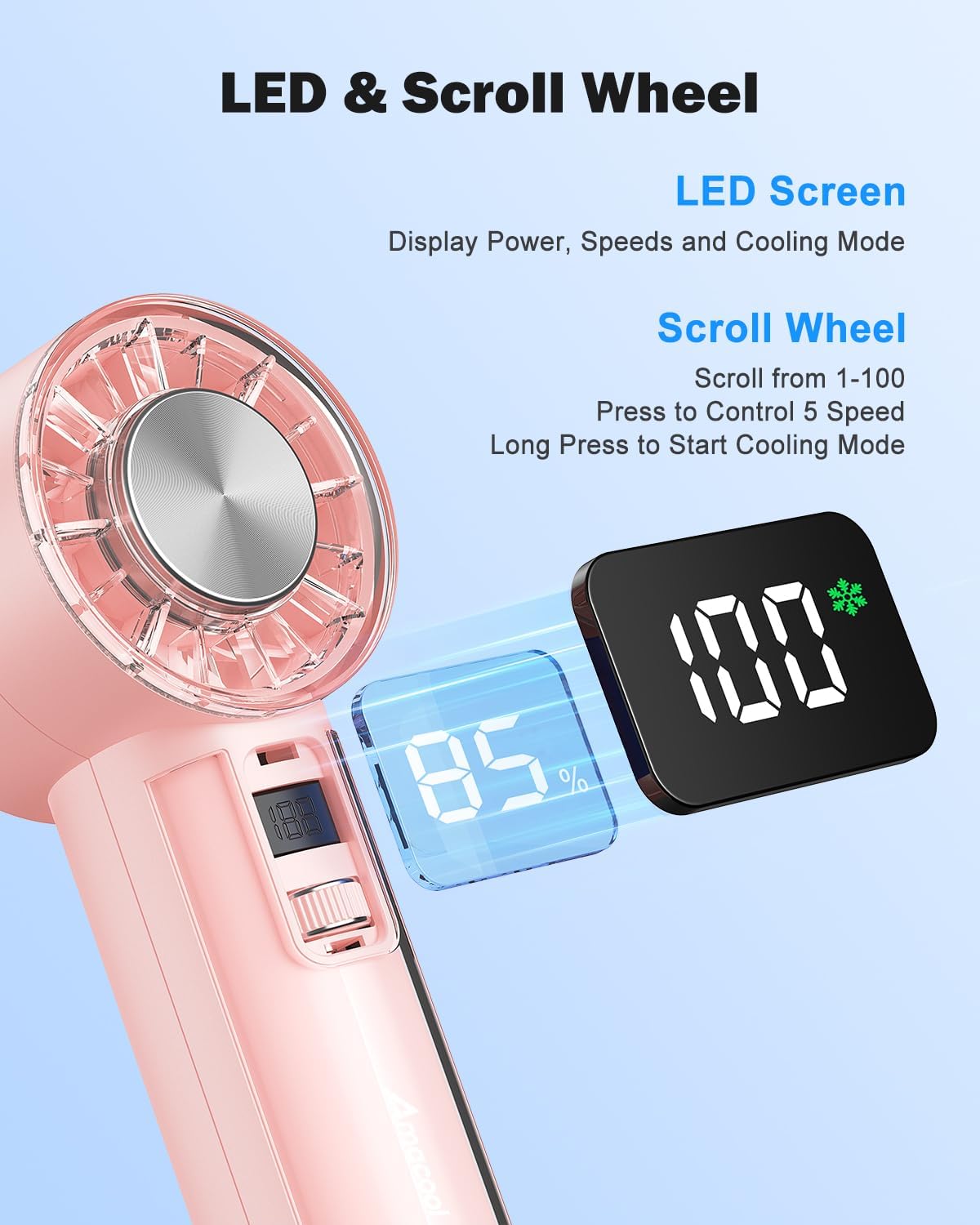
Obrázek: Podrobný view of the fan's LED screen, showing battery percentage and speed settings, along with the scroll wheel for control.

Image: Close-ups of various design details, including the Type-C charging port, sleek body, anti-lost lanyard attachment, and the base anti-slip pad.
Nastavení
Nabíjení ventilátoru
Before first use, fully charge your AMACOOL Handheld Ice Cooler Fan.
- Connect the provided USB-C charging cable to the charging port at the bottom of the fan.
- Plug the other end of the USB-C cable into a 5V USB power adapter (not included) or a computer's USB port.
- The LED digital display will show the charging progress. A full charge typically takes a few hours.
- Po plném nabití se na displeji zobrazí 100 %. Odpojte nabíjecí kabel.
Připevnění šňůrky
For convenient portability, attach the included lanyard:
- Thread the thin loop of the lanyard through the lanyard slot located near the top of the fan handle.
- Pass the main strap of the lanyard through the loop you just created and pull to secure.
Návod k obsluze
Zapnutí/vypnutí
- Zapnutí: Briefly press the scroll switch. The fan will start in Normal mode at a low speed.
- Vypnutí: Briefly press the scroll switch repeatedly until the fan speed reaches 0, or long press the scroll switch for 2 seconds.
Nastavení rychlosti ventilátoru
The fan offers 100 stepless speed settings for precise airflow control.
- To Increase Speed: Scroll the switch upwards.
- To Decrease Speed: Scroll the switch downwards.
- The LED display will show the current speed setting (0-100).

Image: A woman experiencing the strong airflow from the fan, illustrating its powerful cooling capability with 9500 RPM.
Activating Ice Cooling Mode
For an extra layer of heat protection and instant cool relief:
- Aktivovat: Long press the scroll switch for 2 seconds while the fan is on. The LED display will show a snowflake icon, indicating Ice Cooling mode is active.
- Deaktivace: Long press the scroll switch for 2 seconds again. The snowflake icon will disappear.
Note: Ice Cooling mode consumes more power. The fan can operate for up to 2 hours in Ice Cooling mode on a full charge, compared to up to 18 hours in Normal fan mode.

Image: The fan's instant cooling chip is highlighted, with illustrations showing the fan being used to cool the face, neck, and wrist, demonstrating its versatility for personal ice therapy.
Monitoring Battery and Settings
The visual LED screen provides real-time information:
- Úroveň baterie: Zobrazuje se v procentechtage (např. 85 %).
- Rychlost ventilátoru: Displays as a number from 0 to 100.
- Režim chlazení: A snowflake icon indicates Ice Cooling mode is active.
Údržba
Proper care will extend the life of your fan:
- Čištění: Use a soft, dry cloth to wipe the exterior of the fan. For the fan blades, use a cotton swab or a soft brush to gently remove dust. Do not use abrasive cleaners or immerse the fan in water.
- Skladování: When not in use for extended periods, store the fan in a cool, dry place, away from direct sunlight and extreme temperatures. Ensure the battery is partially charged (around 50%) before storage to maintain battery health.
Odstraňování problémů
If you encounter any issues with your fan, please refer to the following table:
| Problém | Možná příčina | Řešení |
|---|---|---|
| Ventilátor se nezapne. | Baterie je vybitá. | Nabíjejte ventilátor pomocí dodaného kabelu USB-C. |
| Proudění vzduchu ventilátorem je slabé. | Fan speed is too low. / Obstruction in fan blades. | Increase fan speed using the scroll switch. / Check for and remove any obstructions from the fan blades. |
| Ice Cooling mode not working. | Not activated. / Battery too low. | Long press the scroll switch for 2 seconds to activate. / Ensure the fan has sufficient battery charge. |
| Ventilátor vydává neobvyklý zvuk. | Cizí předmět ve ventilátoru. | Turn off the fan immediately and check for any foreign objects. If the noise persists, discontinue use and contact support. |
| Displej nefunguje. | Fan is off. / Malfunction. | Turn on the fan. If the issue persists after charging and restarting, contact customer support. |
Specifikace
| Značka | AMACOOL |
| Model | Handheld Ice Cooler Fan |
| Barva | Růžový |
| Rozměry produktu | 5.89 x 5.21 x 15.49 cm |
| Hmotnost položky | 281 g |
| Zdroj napájení | Napájení z baterie (dobíjecí baterie 4,000 mAh) |
| svtage | 5 voltů |
| Maximální rychlost proudění vzduchu | Až 9,500 XNUMX ot./min |
| Nastavení rychlosti ventilátoru | 100 stepless adjustable speeds |
| Technologie chlazení | Instant-cool semiconductor technology |
| Výdrž baterie (přibližně) | Up to 18 hours (Normal mode), Up to 2 hours (Ice Cooling mode) |
| Speciální funkce | Portable, Lightweight, LED Digital Display, Ice Cooling Mode |
Záruka a podpora
Your AMACOOL Handheld Ice Cooler Fan is covered by a manufacturer's warranty. Please refer to the warranty card included in your package for specific terms and conditions. For technical support, troubleshooting assistance, or warranty claims, please contact AMACOOL customer service through the retailer's platform or the contact information provided on the product packaging.
Zavázali jsme se poskytovat vám vysoce kvalitní produkty a vynikající zákaznický servis.