
TOA Electronics BG-2060
TOA Electronics BG-2060 Mixer Amplifier Uživatelská příručka
Model: BG-2060 | Brand: TOA Electronics
1. Úvod
This manual provides detailed instructions for the safe and efficient operation of the TOA Electronics BG-2060 5-Input Mixer Amplifier. The BG-2060 is designed for background music and general announcement applications, suitable for various commercial environments such as bars, retail stores, and banquet rooms. It features multiple inputs, flexible output options, and robust controls for optimal audio management.
2. Bezpečnostní informace
Před použitím jednotky si pečlivě přečtěte tyto bezpečnostní pokyny. Uschovejte si tento návod pro budoucí použití.
- Zdroj napájení: Connect the unit only to the specified power supply (120 V AC, 60 Hz).
- Větrání: Zajistěte dostatečné větrání. Neblokujte větrací otvory.
- vlhkost: Nevystavujte jednotku dešti ani vlhkosti, abyste předešli požáru nebo úrazu elektrickým proudem.
- Servis: Veškerý servis svěřte kvalifikovanému servisnímu personálu. Nepokoušejte se tento výrobek opravovat sami.
- Umístění: Umístěte jednotku na stabilní a rovný povrch. Neumísťujte ji do blízkosti zdrojů tepla nebo na přímé sluneční světlo.
- Základy: Zajistěte správné uzemnění, abyste zabránili úrazu elektrickým proudem.
3. Obsah balení
Ověřte, zda jsou v balení obsaženy všechny níže uvedené položky:
- TOA Electronics BG-2060 Mixer Ampdoživotní
- 5x Volume control cover YA-920
- 4x Removable terminal plug (2 pins)
- 2x Removable terminal plug (3 pins)
- 1x Removable terminal plug (4 pins)
- 1x Removable terminal plug (5 pins)
- Uživatelská příručka (tento dokument)
4. Konec produktuview
4.1 Přední panel

Obrázek 4.1: Ovládací prvky na předním panelu
This image displays the front panel of the TOA BG-2060 Mixer Amplifier. Key features visible include five input volume knobs (Mic, Line 1/Tel, Line 2, Line 3, Module), Bass and Treble tone controls, Signal, Peak, and Power LED indicators, and the main power switch. The overall design is a sleek black chassis.
- Input Volume Controls (MIC, LINE 1/TEL, LINE 2, LINE 3, MODULE): Adjust the volume level for each corresponding input channel.
- Ovládání BASS: Adjusts the low-frequency response of the audio output.
- Ovládání TREBLE: Upravuje vysokofrekvenční odezvu audio výstupu.
- SIGNÁLNÍ LED: Svítí, když je přítomen zvukový signál.
- LED PEAK: Illuminates when the output signal is clipping or nearing distortion.
- LED POWER: Indicates the power status of the unit (blue when ON).
- Vypínač: Zapíná nebo vypíná jednotku.
4.2 Zadní panel
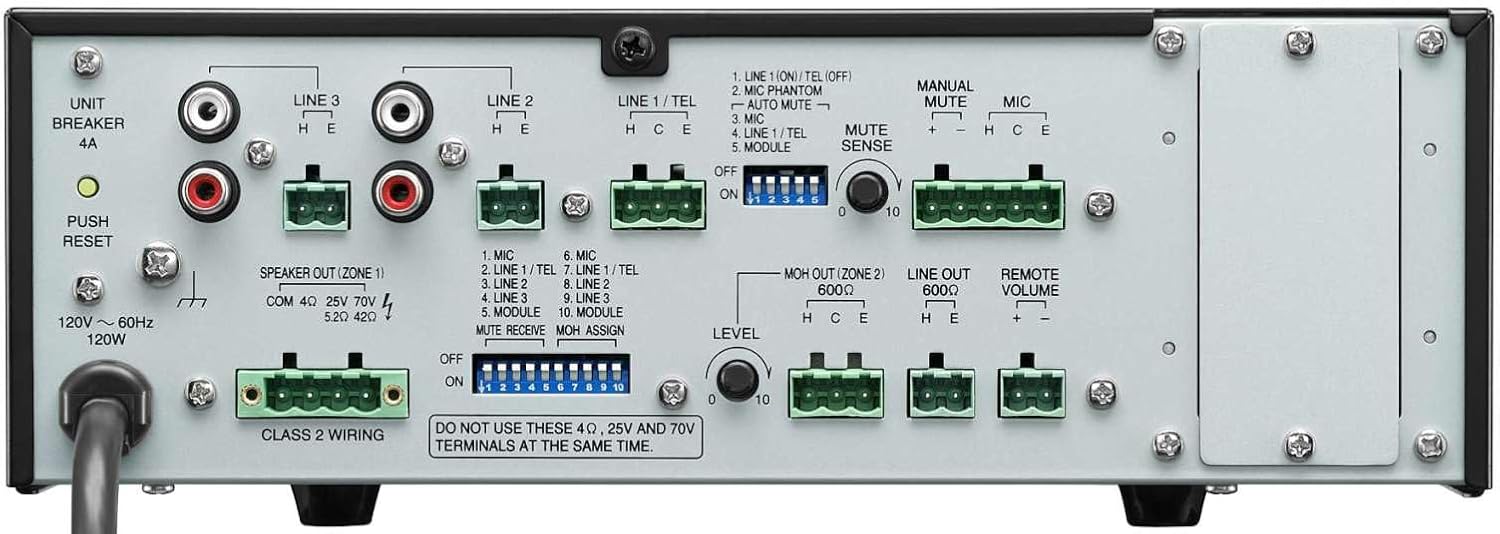
Obrázek 4.2: Připojení na zadním panelu
This image shows the rear panel of the TOA BG-2060 Mixer Amplifier, detailing its connectivity options. Visible are the power input, speaker outputs (4 Ohms, 25V, 70V), various input terminals (Mic, Line 1/Tel, Line 2, Line 3, Module), MOH output, Line output, Remote Volume control, and DIP switches for configuration.
- Příkon: AC power cord connection.
- UNIT BREAKER: Resettable circuit breaker.
- Speaker Output (ZONE 1): Terminals for connecting speakers (4 Ohms, 25V, or 70V). Note: Do not use 4 Ohms, 25V, and 70V terminals at the same time.
- Vstupní terminály:
- MIC: Balanced input for microphones, with +24V DC phantom power option.
- LINE 1/TEL: Selectable input for line-level devices or telephone paging.
- LINE 2, LINE 3: Unbalanced inputs for line-level devices (e.g., CD players, media players).
- MODUL: Input for optional modules.
- MOH OUT (ZONE 2): Music On Hold output, also assignable as a second zone output.
- LINE OUT: Unbalanced line-level output for connecting to external amplifikátory nebo záznamová zařízení.
- DÁLKOVÝ HLASITOST: Terminals for connecting an optional remote volume control.
- DIP přepínače: Configure various settings such as phantom power, input sensitivity, muting functions, and MOH assignment.
5. Nastavení
Follow these steps for initial setup of your BG-2060 Mixer Ampživější.
- Vypnout: Ensure the unit's power switch is in the OFF position and the power cord is disconnected.
- Připojení reproduktorů: Connect your speakers to the appropriate speaker output terminals (4 Ohms, 25V, or 70V) on the rear panel. Ensure correct polarity. Do not connect speakers to multiple output types simultaneously.
- Připojení vstupního zařízení: Connect your audio sources (microphones, music players, etc.) to the desired input terminals (MIC, LINE 1/TEL, LINE 2, LINE 3, MODULE) using appropriate cables and terminal plugs.
- Konfigurace DIP přepínače: Refer to the rear panel diagram and the detailed instructions in the full manual for setting the DIP switches according to your specific needs (e.g., phantom power for microphones, mute settings).
- Volitelná připojení: If using, connect to the MOH OUT, LINE OUT, or REMOTE VOLUME terminals.
- Připojení napájení: Once all connections are secure, plug the power cord into a suitable AC outlet.
6. Provoz
Operating the BG-2060 is straightforward.
- Zapnutí: Turn the POWER switch on the front panel to the ON position. The POWER LED will illuminate blue.
- Input Volume Adjustment: Slowly turn up the volume knob for the input channel you wish to use (MIC, LINE 1/TEL, etc.).
- Hlavní nastavení hlasitosti: Adjust the master volume control (if applicable, or use individual input volumes) to achieve the desired overall output level.
- Tónová kontrola: Use the BASS and TREBLE controls to fine-tune the audio's low and high frequencies to your preference.
- Sledování: Observe the SIGNAL and PEAK LEDs. The SIGNAL LED indicates audio presence. If the PEAK LED illuminates frequently or stays lit, reduce the input volume to prevent distortion.
- Funkce ztlumení: If configured via DIP switches, utilize the manual or automatic mute functions as needed for paging or announcements.
7. Údržba
Proper maintenance ensures the longevity and optimal performance of your mixer ampživější.
- Čištění: Otřete přístroj měkkým, suchým hadříkem. Nepoužívejte abrazivní čisticí prostředky, vosky ani rozpouštědla.
- Větrání: Pravidelně kontrolujte, zda jsou větrací otvory čisté, bez prachu a nečistot.
- Spojení: Ujistěte se, že všechna kabelová spojení jsou bezpečná a bez koroze.
- Skladování: Pokud budete jednotku skladovat delší dobu, odpojte ji od napájení a uložte ji na chladném a suchém místě.
8. Řešení problémů
Běžné problémy a jejich řešení naleznete v tabulce níže.
| Problém | Možná příčina | Řešení |
|---|---|---|
| Žádná síla | Power cord disconnected; Unit breaker tripped; Power outlet issue. | Check power cord connection; Press UNIT BREAKER button on rear panel; Test power outlet with another device. |
| Žádný zvukový výstup | Input volume too low; Speaker connections incorrect; Mute function active; Incorrect input selected. | Increase input and master volumes; Verify speaker wiring and impedance; Check DIP switch settings for mute; Ensure correct input source is active. |
| Zkreslený zvuk | Input signal too high (PEAK LED on); Incorrect impedance matching; Faulty cable. | Reduce input volume; Ensure speaker impedance matches amplifier output; Replace cables. |
| Hučení nebo bzučení | Zemnící smyčka; Volné spojení; Rušení od jiné elektroniky. | Ensure proper grounding; Check all cable connections; Move unit away from other electronic devices. |
9. Specifikace
| Funkce | Detail |
|---|---|
| Zdroj napájení | 120 V AC, 60 Hz |
| Jmenovitý výstup | 60W |
| Vstupy | Mic: -60 dB, 600 Ohms, balanced; Line 1/TEL: -10 dB/-20 dB, 10 kOhms, balanced; Line 2, 3: -10 dB, 10 kOhms, unbalanced; Modules |
| Výstupy | Speaker: 4 Ohms, 25 V (10 Ohms), 70 V (83 Ohms), balanced; MOH: 0 dB, 600 Ohms, balanced; Line: 0 dB, 600 Ohms, unbalanced |
| Regulace výstupu | 2 dB or less, no load to full load (1 kHz) |
| Fantomová síla | On/Off switch for Mic, +24 V DC |
| Ovládání tónu | Bass: +/- 10 dB at 100 Hz; Treble: +/- 10 dB at 10 kHz |
| Ztlumení | Manual mute/Automatic mute |
| Ukazatele | LED napájení, LED úrovně signálu, Peak LED |
| Rozměry (ŠxVxH) | 10.39 x 3.71 x 10.52 palce |
| Hmotnost | 11.68 libry |
10. Záruka a podpora
For warranty information and technical support, please refer to the documentation provided with your purchase or visit the official TOA Electronics webmísto.
Ask a question about this manual
Ask about setup, troubleshooting, compatibility, parts, safety, or missing instructions. Manuals+ will review the question and use this page’s manual context to help answer it.