
NJTY T3
NJTY Digital Multimeter & TDS Meter User Manual
Model: T3
1. Úvod
This manual provides detailed instructions for the safe and effective use of your NJTY Digital Multimeter and TDS Meter. This all-in-one precision tool is designed for both electrical diagnostics and water quality testing, offering comprehensive measurement capabilities for AC/DC voltage, resistance, continuity, Non-Contact Voltage (NCV), Total Dissolved Solids (TDS), Electrical Conductivity (EC), and temperature.
Please read this manual thoroughly before operation to ensure proper usage and to prevent damage to the device or personal injury. Keep this manual for future reference.
2. Bezpečnostní informace
Always adhere to basic safety precautions when using electrical testing equipment and handling water samples. Failure to follow these guidelines may result in electric shock, fire, or damage to the device.
- Elektrická bezpečnost:
- Nepřekračujte maximální vstupní hodnoty specifikované pro každý rozsah měření.
- Při práci s obvody pod napětím buďte mimořádně opatrní. Vysoké napětítages může být nebezpečný.
- Ensure test leads are in good condition, without cracks or damaged insulation.
- Nepoužívejte multimetr, pokud se jeví poškozený nebo nefunguje správně.
- Před měřením odporu nebo vodivosti vždy odpojte napájení obvodu.
- Water Testing Safety:
- Do not immerse the entire TDS meter in water; only the probe section should be submerged.
- Když zařízení nepoužíváte, udržujte jej čisté a suché.
- Zabraňte pádu zařízení na zem nebo jeho vystavení silným nárazům.
3. Obsah balení
Po otevření balíku ověřte, zda jsou všechny položky přítomny a v dobrém stavu:
- NJTY Digital Multimeter (Model T3)
- NJTY TDS & EC Meter
- Měřicí kabely (červený a černý)
- Uživatelská příručka (tento dokument)
- Type-C Charging Cable (for TDS Meter)
4. Konec produktuview
Familiarize yourself with the components of both the Digital Multimeter and the TDS Meter.
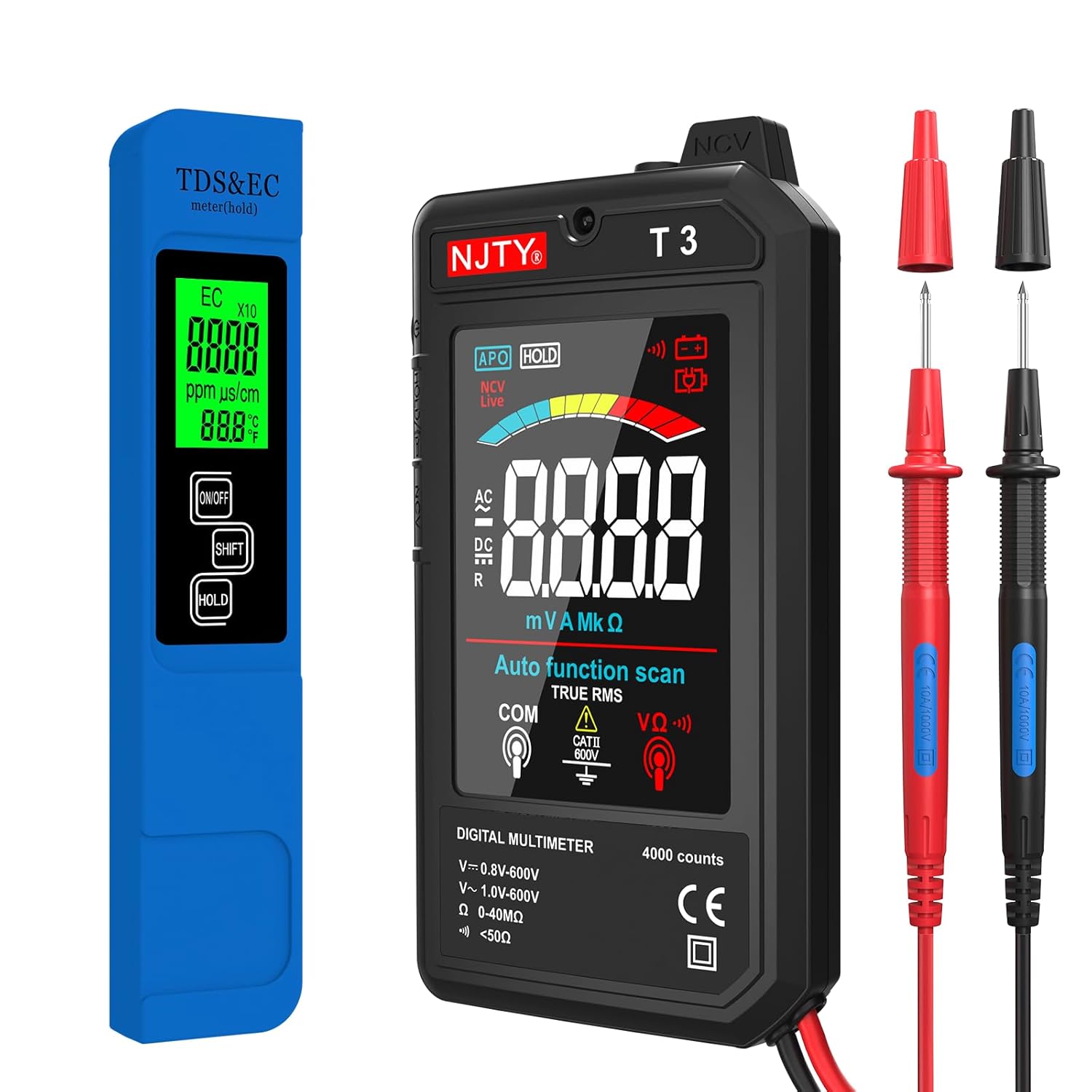
Obrázek 4.1: Nadview of the NJTY Digital Multimeter, TDS Meter, and included test leads.
4.1 Digital Multimeter (Model T3)

Obrázek 4.2: Key features and functions of the Digital Multimeter.
- Zobrazit: 3.19-inch color LCD display for clear readings.
- Funkční tlačítka: Power, HOLD, NCV/Live.
- Vstupní konektory: For connecting test leads (COM, VΩ).
- Snímač NCV: Pro bezkontaktní zvtage detekce.
- Svítilna: Integrované LED světlo pro osvětlení tmavých pracovních prostor.
4.2 TDS & EC Meter

Obrázek 4.3: The TDS Meter highlighting its 4-in-1 measurement capabilities.
- Zobrazit: Backlit LCD screen for easy readability.
- tlačítka: ON/OFF, SHIFT (mode selection), HOLD.
- Sonda: High-sensitivity titanium alloy probe for accurate water testing.
- Nabíjecí port typu C: Pro pohodlné dobíjení.
5. Nastavení
5.1 Digital Multimeter Setup
- Insert the red test lead into the VΩ input jack.
- Zasuňte černý měřicí vodič do vstupní zdířky COM (common).
- Ensure connections are firm before use.
5.2 TDS & EC Meter Setup
- Before first use, or if the battery is low, connect the Type-C charging cable to the meter and a suitable USB power source. The charging indicator will show status.
- Once charged, press the ON/OFF button to power on the device.
6. Návod k obsluze
6.1 Operating the Digital Multimeter
The multimeter features an auto-function scan, simplifying operation by automatically identifying the measurement type.
- Zapnutí/vypnutí: Press the power button on the side to turn the multimeter on or off.
- Měření AC/DC Voltage:

Obrázek 6.1: Exampméně AC a DC objemutagměření pomocí multimetru.
- Connect the test leads to the circuit in parallel for voltage měření.
- Multimetr automaticky detekuje střídavé nebo stejnosměrné napětí.tage a zobrazte naměřenou hodnotu.
- Zajistěte zvtage je v daném rozsahu (0–600 V).
- Measuring Resistance/Continuity:
- Před připojením měřicích vodičů se ujistěte, že je obvod bez napětí.
- Pro měření odporu připojte měřicí vodiče k součástce.
- For continuity, if the resistance is below 50Ω, the buzzer will sound, indicating continuity.
- Bezkontaktní svtagDetekce e (NCV):

Obrázek 6.2: NCV function indicating voltagpřítomnost bez přímého kontaktu.
- Press the NCV/Live button.
- Place the NCV sensor (top of the multimeter) near the wire or outlet.
- The device will beep and the NCV indicator will light up if voltage is detected, with increasing frequency/intensity as you get closer to the source.
- Svítilna a podsvícení:

Obrázek 6.3: The integrated flashlight for improved visibility in low-light conditions.
- Press the flashlight button (usually integrated with the power button or a separate button) to turn on the LED flashlight.
- The display backlight automatically activates when the device is on.
- Pozastavení dat: Stiskněte tlačítko HOLD pro zmrazení aktuální hodnoty na displeji. Dalším stisknutím jej uvolníte.
- Automatické vypnutí: Multimetr se po určité době nečinnosti automaticky vypne, aby se šetřila baterie.
6.2 Operating the TDS & EC Meter
This meter provides quick and accurate measurements for water quality.

Obrázek 6.4: Common applications for the TDS & EC Meter.
- Zapnutí/vypnutí: Press the ON/OFF button to turn the meter on or off.
- Provedení měření:
- Immerse the probe section of the meter into the water sample (do not immerse the entire device).
- Wait for the reading to stabilize on the display. The meter will automatically measure TDS, EC, and temperature.
- Switching Modes (TDS/EC/Temperature):

Obrázek 6.5: Switching between different measurement modes on the TDS Meter.
- Press the SHIFT button to cycle through the different display modes: TDS (ppm), EC (µs/cm), Temperature (°C), and Temperature (°F).
- Pozastavení dat: Stiskněte tlačítko HOLD pro zmrazení aktuální hodnoty na displeji. Dalším stisknutím jej uvolníte.
- Automatické vypnutí: The TDS meter will automatically power off after a period of inactivity to conserve battery life.
7. Údržba
7.1 Čištění
- Digitální multimetr: Vnější povrch otřete čistým, damp tkanina. Nepoužívejte abrazivní čisticí prostředky nebo rozpouštědla.
- TDS & EC Meter: After each use, rinse the probe section with distilled water to prevent mineral buildup. Gently wipe the probe dry with a soft cloth.
7.2 Skladování
- Store both devices in a cool, dry place, away from direct sunlight and extreme temperatures.
- Uchovávejte mimo dosah dětí.
7.3 Battery Care (TDS Meter)
- Recharge the TDS meter when the battery indicator shows low power.
- Abyste prodloužili životnost baterie, vyhněte se jejímu delšímu úplnému vybíjení.
8. Řešení problémů
Pokud se se zařízením setkáte s problémy, podívejte se na následující běžné problémy a jejich řešení:
| Problém | Možná příčina | Řešení |
|---|---|---|
| Multimeter/TDS Meter does not turn on. | Low or depleted battery (TDS Meter); device off. | Charge the TDS Meter. Ensure the power button is pressed firmly. |
| Inaccurate readings on Multimeter. | Incorrect connection; test leads damaged; exceeding range. | Check test lead connections. Inspect leads for damage. Ensure measurement is within device limits. |
| Inaccurate readings on TDS Meter. | Dirty probe; air bubbles on probe; calibration needed (rarely). | Clean the probe with distilled water. Gently shake the meter to remove air bubbles. |
| Funkce NCV nedetekuje objemtage. | Not close enough to source; NCV function not activated. | Ensure the NCV sensor is very close to the live wire. Press the NCV/Live button to activate. |
9. Specifikace
9.1 Digital Multimeter (Model T3)
- Zobrazit: 4000 Counts, 3.19-inch Color LCD
- AC svtage Rozsah: 0.8 V - 600 V
- DC svtage Rozsah: 1.0 V - 600 V
- Rozsah odporu: 0 - 40 MΩ
- Kontinuita: Buzzer alert for < 50Ω
- Vlastnosti: Auto Function Scan, NCV (Non-Contact Voltage) Detection, Data Hold, Flashlight, Backlight, Automatic Shutdown
- Hodnocení bezpečnosti: CATII 600V (implied from image)
9.2 TDS & EC Meter
- Funkce: 4-in-1 (TDS, EC, Temperature in °C/°F)
- Rozsah TDS: 0–9999 ppm
- Rozsah EC: 0 - 9999 µs/cm
- Rozsah teplot: 0.1–80.0 °C (32.0–176.0 °F)
- Přesnost: ±0.5°F (for temperature)
- Sonda: High-sensitivity Titanium Alloy
- Zdroj napájení: Rechargeable Battery (Type-C charging port)
- Vlastnosti: Backlit Screen, Data Hold, Automatic Shutdown
10. Záruka a podpora
For information regarding warranty coverage, technical support, or service, please refer to the warranty card included with your purchase or contact the manufacturer/seller directly through their official channels. Keep your purchase receipt as proof of purchase.
Ask a question about this manual
Ask about setup, troubleshooting, compatibility, parts, safety, or missing instructions. Manuals+ will review the question and use this page’s manual context to help answer it.