
Konec produktuview
The GOBOULT Y1 Pro Wireless Earbuds are designed to provide a high-quality audio experience with features like extended playtime, clear calling, and low-latency gaming. This manual provides detailed instructions for setting up, operating, and maintaining your earbuds.

Obrázek: Výstava kolážíasing key features of the GOBOULT Y1 Pro Earbuds, including 60 hours playtime, Zen Quad Mic ENC, 45ms low latency gaming, 13mm bass drivers, Type-C fast charging, and Bluetooth 5.3.
Obsah balení
- GOBOULT Y1 Pro Wireless Earbuds
- Nabíjecí pouzdro
- Nabíjecí kabel USB typu C.
- Náušníky (různé velikosti)
- Ušní nástavce (různé velikosti)
- Záruční list
Nastavení
1. Nabíjení sluchátek a pouzdra
Before initial use, ensure both the earbuds and the charging case are fully charged. This optimizes battery life and performance.
- Connect the provided USB Type-C charging cable to the charging port on the case and to a compatible USB power adapter (not included).
- LED indikátor na nabíjecím pouzdře se rozsvítí, aby signalizoval stav nabíjení.
- A full charge typically takes a few hours. A quick 10-minute charge can provide approximately 120 minutes of playtime.

Image: The GOBOULT Y1 Pro earbuds and charging case, illustrating the Type-C fast charging capability, where 10 minutes of charge provides 120 minutes of playtime.
2. Počáteční párování
Pro první spárování sluchátek se zařízením postupujte takto:
- Remove any protective film from the charging contacts on the earbuds.
- Place both earbuds into the charging case and close the lid for a few seconds.
- Open the charging case lid. The earbuds will automatically power on and enter pairing mode, indicated by flashing LED lights.
- Na smartphonu nebo jiném zařízení s podporou Bluetooth přejděte do nastavení Bluetooth.
- Hledat dostupná zařízení a vyberte „GOBOULT Y1 Pro“ ze seznamu.
- Po připojení hlasový pokyn potvrdí úspěšné spárování.

Image: A diagram illustrating the initial setup steps, including removing protective film and opening the case, along with a detailed guide to the touch controls for both left and right earbuds.
3. Automatické opětovné připojení
After initial pairing, the earbuds will automatically connect to the last paired device when removed from the charging case and Bluetooth is enabled on the device.

Image: GOBOULT Y1 Pro earbuds and charging case, demonstrating Bluetooth 5.3 for stable, efficient, and fast pairing with a connected smartphone.
Návod k obsluze
Zapnutí/vypnutí
- Zapnutí: Open the charging case lid. The earbuds will power on automatically. Alternatively, if outside the case, long press the touch area on both earbuds for 3 seconds.
- Vypnout: Place both earbuds back into the charging case and close the lid. They will power off automatically. Alternatively, long press the touch area on both earbuds for 5 seconds.
Dotykové ovládání
The GOBOULT Y1 Pro earbuds feature intuitive touch controls for managing music, calls, and other functions. Refer to the diagram below and the following list for specific actions:
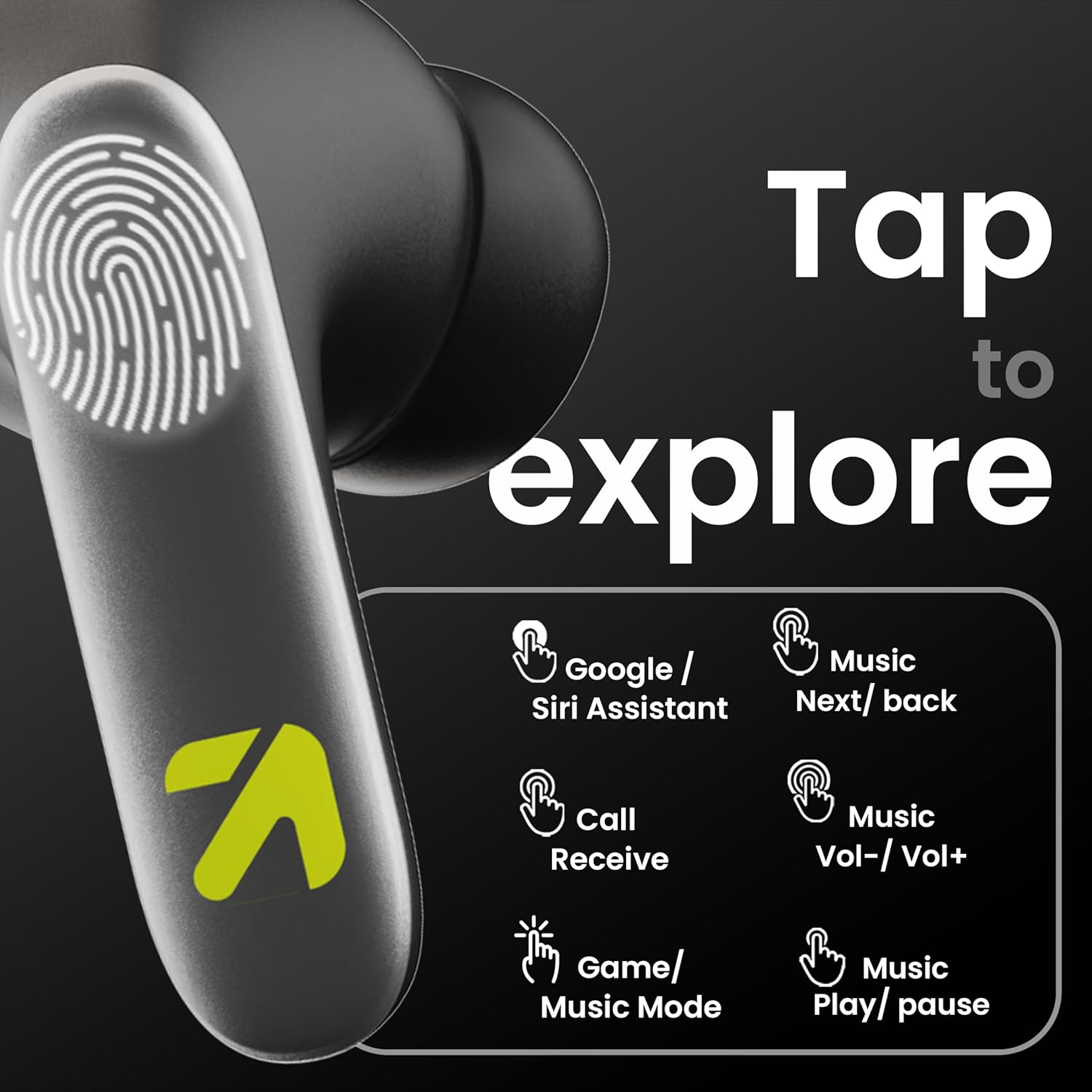
Image: A visual guide to the touch controls on the GOBOULT Y1 Pro earbuds, detailing actions for Google/Siri Assistant, music navigation, call management, volume control, and game/music mode switching.
- Single Tap (Left/Right): Přehrát/Pozastavit hudbu, Přijmout/Ukončit hovor.
- Dvojité klepnutí (levé sluchátko): Předchozí skladba.
- Dvojité klepnutí (pravé sluchátko): Další píseň.
- Trojité klepnutí (levé sluchátko): Snížit hlasitost.
- Trojité klepnutí (pravé sluchátko): Zvýšení hlasitosti.
- Long Press (2 seconds, Left/Right): Reject incoming call, Activate Voice Assistant (Google/Siri).
- Four Taps (Left/Right): Activate/Deactivate Gaming Mode.
Herní režim
For an enhanced gaming experience, activate the ultra-low latency Gaming Mode:
- Aktivace: Tap the touch area four times on either earbud.
- Deaktivace: Tap the touch area four times again.

Image: GOBOULT Y1 Pro earbuds and charging case, highlighting the 45ms low latency gaming mode for real-time audio synchronization, activated by four taps.
Hlasový asistent
Quickly access your device's voice assistant (Siri or Google Assistant) for hands-free control:
- Aktivace: Perform a long tap on the touch area of either earbud.

Image: Illustration showing how to access Siri or Google Assistant with a long tap on the earbud's touch sensor.
Potlačení okolního hluku (ENC)
The GOBOULT Y1 Pro features Zen Quad Mic ENC technology, ensuring crystal-clear calls by effectively filtering out ambient noise from your surroundings.

Image: A diagram explaining how Environmental Noise Cancellation (ENC) works by isolating your voice from environmental noise, ensuring clear communication during calls.
Údržba
Čištění
- Pravidelně čistěte sluchátka a nabíjecí pouzdro měkkým, suchým hadříkem, který nepouští vlákna.
- Ensure the charging contacts on both the earbuds and inside the case are free from dust and debris to maintain proper charging.
- Nepoužívejte abrazivní čisticí prostředky, rozpouštědla ani agresivní chemikálie, protože by mohly výrobek poškodit.
Voděodolnost
The GOBOULT Y1 Pro earbuds are rated IPX5 water-resistant. This means they are protected against low-pressure water jets from any direction, making them suitable for workouts and light splashes.
- Neponořujte sluchátka do vody.
- Avoid exposing them to heavy rain or extreme moisture.
- Před vložením sluchátek zpět do nabíjecího pouzdra se ujistěte, že jsou suchá, abyste předešli jejich poškození.

Image: GOBOULT Y1 Pro earbuds with water droplets, illustrating their IPX5 water resistance, providing protection against sweat and splashes.
Odstraňování problémů
If you encounter any issues with your GOBOULT Y1 Pro earbuds, refer to the following common troubleshooting steps:
Sluchátka se nepárují ani nepřipojují
- Ensure both earbuds and the charging case have sufficient battery.
- Turn off Bluetooth on your device, wait 5 seconds, then turn it back on.
- On your device, "Forget" or "Unpair" "GOBOULT Y1 Pro" from the Bluetooth list, then attempt the pairing process again.
- Place both earbuds back into the charging case, close the lid, wait 10 seconds, then open the lid to re-enter pairing mode.
Funkční pouze jedno sluchátko
- Ujistěte se, že jsou obě sluchátka nabitá.
- Vložte obě sluchátka zpět do nabíjecího pouzdra, zavřete víko a poté ho znovu otevřete. Často se tak sluchátka znovu synchronizují.
- Pokud problém přetrvává, zkuste resetovat sluchátka (viz pokyny výrobce webkonkrétní pokyny k resetování, pokud zde nejsou uvedeny).
Špatná kvalita zvuku nebo nízká hlasitost
- Ensure the earbuds are properly seated in your ears to create a good seal. Try different sized eartips.
- Očistěte mřížky sluchátek od nečistot.
- Zkontrolujte nastavení hlasitosti a zvuku na zdrojovém audio zařízení.
- Přesuňte se blíže k připojenému zařízení, abyste zabránili rušení signálu.
Problémy s nabíjením
- Ujistěte se, že je nabíjecí kabel bezpečně připojen k pouzdru i ke zdroji napájení.
- Try a different USB Type-C charging cable or power adapter.
- Očistěte nabíjecí kontakty na sluchátkách i uvnitř pouzdra suchým vatovým tamponem.
Specifikace
| Funkce | Detail |
|---|---|
| Značka | GOBOULT |
| Název modelu | AirBass |
| Verze Bluetooth | 5.3 |
| Umístění uší | V uchu |
| Kontrola hluku | Potlačení okolního hluku (ENC) |
| Velikost zvukového ovladače | 13 milimetrů |
| Celková doba hraní | Až 60 hodin (s nabíjecím pouzdrem) |
| Nízká latence | 45 ms (herní režim) |
| Typ nabíjení | Rychlé nabíjení typu C |
| Voděodolnost | IPX5 |
| Kontrolní metoda | Dotek |
| Kompatibilní zařízení | Chytré telefony, tablety, notebooky, stolní počítače, chytré reproduktory |
| Hmotnost položky | 50 gramů |
| Země původu | Čína |
Informace o záruce
The GOBOULT Y1 Pro Wireless Earbuds are covered by a 1letá záruka výrobce od data nákupu.
This warranty covers manufacturing defects. Please retain your proof of purchase for any warranty claims. The warranty does not cover damage caused by misuse, accidents, unauthorized modifications, or normal wear and tear.
Podpora
For further assistance, technical support, or warranty inquiries, please contact:
- Výrobce: Exotic Mile Private Limited, B-67 Wazirpur Industrial Area, New Delhi 110052
- Dovozce: Exotic Mile Pvt. Ltd. , B67 Wazirpur Industrial Area , New Delhi 110052
- For customer service contact details, please refer to the GOBOULT official webweb nebo platforma, kde jste produkt zakoupili.