
VicoSafe CG6
Uživatelská příručka k venkovní bezpečnostní kameře VicoHome CG6
Model: CG6
Značka: VicoSafe
Zavedení
This user manual provides comprehensive instructions for the installation, operation, and maintenance of your VicoHome CG6 Outdoor Security Camera. The VicoHome CG6 is a wireless, battery-powered security camera designed for both indoor and outdoor use, featuring 2K HD video, color night vision, AI motion detection, two-way audio, and IP65 weatherproof rating. Please read this manual thoroughly before using the product to ensure proper setup and functionality.
Co je v krabici
Ověřte, zda jsou v balení přítomny všechny komponenty:
- 1 × VicoHome CG6 Wireless Security Camera
- 1 × Mounting Bracket & Screws
- 1 × nabíjecí kabel USB
- 1 × Stručný průvodce
Konec produktuview
Familiarize yourself with the VicoHome CG6 camera's components and features.
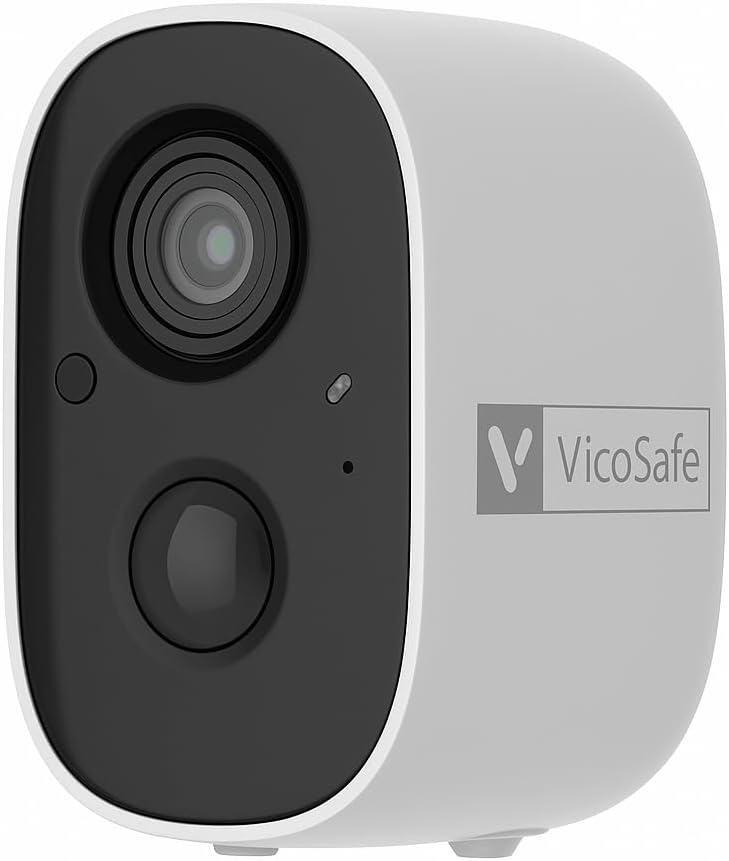
Obrázek 1: Přední view of the VicoHome CG6 camera, showing the lens, infrared sensor, and motion sensor.

Obrázek 2: The VicoHome CG6 camera mounted on an exterior wall, demonstrating its outdoor placement capability.
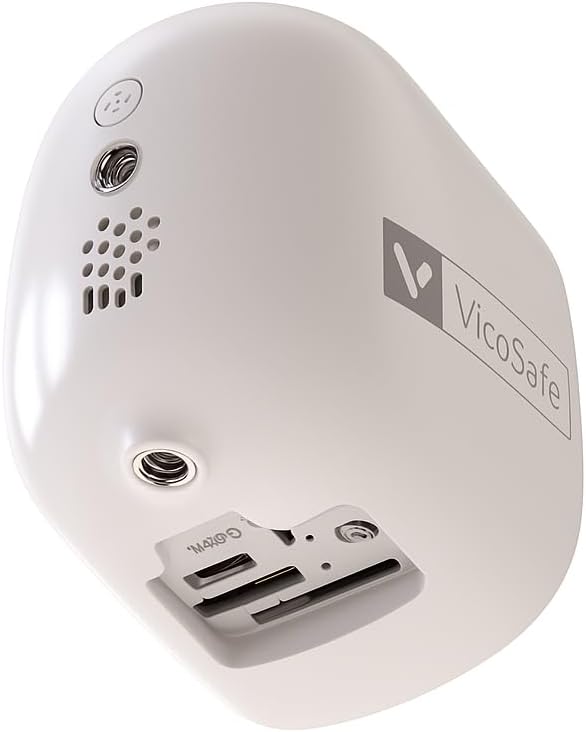
Obrázek 3: Dno view of the camera, revealing the charging port and Micro SD card slot.

Obrázek 4: Explodoval view illustrating the internal rechargeable battery, highlighting the camera's wireless design.

Obrázek 5: Diagram detailing the flexible storage options: free 3-day rolling cloud storage and local Micro SD card support (up to 128GB, not included).
Průvodce nastavením
Follow these steps to set up your VicoHome CG6 camera:
- Nabijte kameru: Before first use, fully charge the camera using the provided USB charging cable. The charging port is located on the bottom of the camera.
- Download the VicoHome App: Hledat "VicoHome" in your smartphone's app store (iOS or Android) and download the official application.
- Vytvořit účet: Open the VicoHome App and follow the on-screen instructions to create a new user account or log in if you already have one.
- Přidat zařízení: In the app, tap the "+" icon to add a new device. Select the VicoHome CG6 camera model.
- Spárování fotoaparátu: Follow the app's instructions to pair your camera. This typically involves scanning a QR code displayed on your phone with the camera's lens or pressing a button on the camera. Ensure your Wi-Fi network is 2.4GHz, as the camera does not support 5GHz Wi-Fi.
- Montáž kamery:
- Choose a suitable location for mounting, ensuring good Wi-Fi signal strength.
- Use the included mounting bracket and screws to securely attach the bracket to the desired surface (wall, ceiling, etc.).
- Attach the camera to the mounted bracket. The wireless design allows flexible placement.
- Upravit úhel kamery: Once mounted, adjust the camera's angle to cover your desired surveillance area.
Návod k obsluze
The VicoHome CG6 camera is primarily operated through the VicoHome App. Here are its key functions:
- Žít View: Open the VicoHome App and select your camera to view live 2K HD video footage z vašeho zařízení.
- Obousměrný zvuk: Use the microphone and speaker icons in the app to communicate with visitors or deter intruders in real-time.
- Detekce pohybu a upozornění: The camera features AI-powered PIR motion detection. When motion is detected (people, pets, vehicles), you will receive instant push notifications on your smartphone. You can customize activity zones and sensitivity settings within the app to minimize false alarms.
- Noční vidění: The camera automatically switches to night vision in low-light conditions, offering both full-color and infrared options for clear visibility up to 33 feet.
- Bodové světlo a siréna: In the event of suspicious activity, you can manually activate the built-in spotlight and siren alarm via the app to deter intruders. These can also be set to trigger automatically upon motion detection.
- Video Playback & Storage:
- Cloudové úložiště: Enjoy free rolling cloud storage for the past 3 days of video history.
- Úložiště SD karty: Vložte kartu Micro SD (až 128 GB, není součástí balení) do slotu kamery pro lokální ukládání videa.
- Přístup zaznamenán footage through the playback feature in the VicoHome App.
Údržba
- Nabíjení baterie: Monitor the battery level via the VicoHome App. Recharge the camera using the provided USB cable when the battery is low. The low power consumption design allows for extended use between charges.
- Čištění: Pravidelně otírejte objektiv a tělo fotoaparátu měkkým hadříkemamp cloth to remove dust and dirt. Avoid using harsh chemicals or abrasive materials that could damage the camera.
- Aktualizace firmwaru: Ensure your camera's firmware is up-to-date through the VicoHome App to benefit from the latest features and security enhancements.
- Správa úložiště: Pravidelně znovuview vaše nahrané footage. If using an SD card, ensure it has sufficient space or back up important recordings. Cloud storage automatically manages the 3-day rolling history.
Odstraňování problémů
| Problém | Možná příčina | Řešení |
|---|---|---|
| Fotoaparát se nepřipojí k Wi-Fi. | Nesprávné pásmo Wi-Fi; slabý signál; nesprávné heslo. | Ensure your Wi-Fi is 2.4GHz (5GHz is not supported). Move the camera closer to the router. Double-check your Wi-Fi password. |
| Špatná kvalita videa. | Slabý signál Wi-Fi; špinavý objektiv. | Zlepšete sílu signálu Wi-Fi. Očistěte objektiv fotoaparátu měkkým hadříkem. |
| Upozornění na detekci pohybu jsou příliš častá nebo se vůbec nespouštějí. | Sensitivity settings; activity zones. | Adjust motion detection sensitivity in the VicoHome App. Configure activity zones to focus on specific areas and reduce false alarms. |
| Baterie se rychle vybíjí. | Frequent motion events; continuous live viewextrémní teploty. | Reduce motion detection sensitivity or frequency. Limit continuous live viewing. Ensure camera is not exposed to extreme temperatures for prolonged periods. |
| Obousměrný zvuk nefunguje. | Mikrofon/reproduktor ztlumený v aplikaci; oprávnění aplikace. | Check if microphone or speaker is muted in the VicoHome App. Verify app permissions for microphone access on your smartphone. |
Specifikace
| Funkce | Detail |
|---|---|
| Název modelu | CG6 VicoHome Security Camera Wireless Outdoor |
| Značka | VicoSafe |
| Rozlišení záznamu videa | 1296p (2K HD) |
| Efektivní rozlišení | 3 MP |
| Technologie připojení | Bezdrátové (Wi-Fi) |
| Wi-Fi kompatibilita | Pouze 2.4 GHz (není kompatibilní s 5 GHz) |
| Zdroj napájení | Battery Powered (5000 mAh Lithium Polymer battery included) |
| Rozsah nočního vidění | Až 33 stop |
| Viewúhel | 110 stupňů |
| Odolnost vůči povětrnostním vlivům | IP65 odolný proti povětrnostním vlivům |
| Možnosti úložiště | Free 3-Day Rolling Cloud Storage, Micro SD Card (up to 128GB, not included) |
| Detekce pohybu | AI-powered PIR Motion Detection (People, Pets, Vehicles) |
| Zvuk | Two-Way Talk (Built-in speaker and microphone) |
| Funkce alarmu | Bodové světlo, sirénový alarm |
| Kontrolní metoda | VicoHome APP (iOS, Android) |
| Rozměry (D x Š x V) | 5.3 x 2.6 x 3.8 palce |
| Hmotnost položky | 12.6 unce |
| Vnitřní/venkovní použití | Venkovní, Vnitřní |
Záruka a podpora
For detailed warranty information, please refer to the warranty card included with your product or visit the official VicoSafe website. If you encounter any issues or require technical assistance, please contact VicoSafe customer support through their official channels, typically found on their website or in the VicoHome App's help section.
Online zdroje:
- VicoHome App: Available on iOS App Store and Android Google Play Store.
- Official VicoSafe Webmísto: www.vicosafe.com
Ask a question about this manual
Ask about setup, troubleshooting, compatibility, parts, safety, or missing instructions. Manuals+ will review the question and use this page’s manual context to help answer it.