
1. Úvod
This manual provides essential information for the safe and efficient use of your Motorola Razr 60 Ultra smartphone. Please read this guide thoroughly before operating your device to ensure optimal performance and longevity. The Motorola Razr 60 Ultra is a foldable smartphone designed for advanced mobile computing and communication.
2. Co je v krabici
Ověřte, zda jsou v balení produktu přítomny všechny položky:
- Motorola Razr 60 Ultra Smartphone
- USB kabel
- Pouzdro na telefon
- Nástroj pro vysunutí SIM karty
3. Zařízení skončiloview
The Motorola Razr 60 Ultra features an iconic foldable design with premium materials and advanced technology.
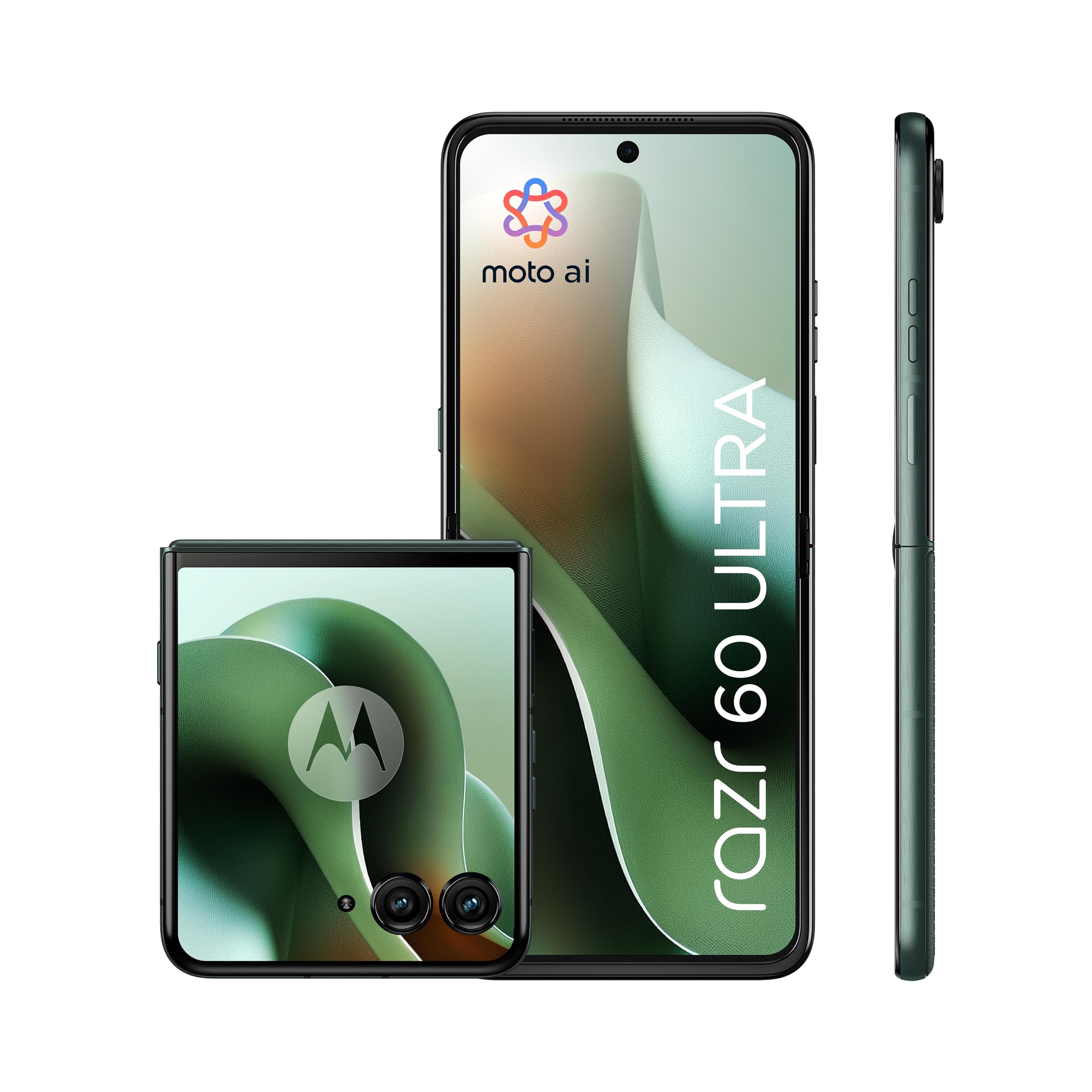
Figure 3.1: Motorola Razr 60 Ultra, folded view.
3.1 Displeje
- Externí displej: A 4.0-inch pOLED display with up to 165Hz refresh rate, allowing access to functions without unfolding the phone.
- Interní displej: A 7.0-inch Super HD pOLED display with 165Hz refresh rate, Dolby Vision, and HDR10+ for an immersive visual experience.

Figure 3.2: External display functionality.

Figure 3.3: Internal display view.
3.2 Konstrukce a trvanlivost
The device features a high-quality Alcantara finish and a durable titanium hinge. It is rated IP48 for dust and water resistance.

Figure 3.4: Design elements and durability features.
4. Nastavení
4.1 Vložení SIM karty
- Vyhledejte držák SIM karty na boku zařízení.
- Vložte nástroj pro vysunutí SIM karty do malého otvoru vedle zásobníku a jemně zatlačte, dokud zásobník nevyskočí.
- Place your Nano SIM card(s) into the tray with the gold contacts facing down. This device supports Dual SIM.
- Opatrně zatlačte zásobník zpět do slotu, dokud nezacvakne na místo.
4.2 Počáteční zapnutí a nastavení
- Stiskněte a podržte tlačítko Napájení, dokud se nezobrazí logo Motorola.
- Postupujte podle pokynů na obrazovce a vyberte jazyk, připojte se k síti Wi-Fi a nastavte si účet Google.
- You will be guided through setting up security features such as fingerprint recognition and a screen lock (PIN, pattern, or password).
5. Obsluha vašeho zařízení
5.1 Základní navigace
- Rozkládání/skládání: Gently unfold the device to access the main internal display. Fold it to use the external display for quick interactions.
- External Display Usage: The 4.0-inch external display allows you to check notifications, control media, take quick photos, and interact with certain apps without opening the phone.
5.2 Moto AI Features
Your Motorola Razr 60 Ultra is enhanced with Moto AI, offering intelligent assistance and optimized performance. This includes features like Google Gemini for content creation and personalized smartphone experiences.

Figure 5.1: Interacting with Moto AI (Google Gemini) on the external display.
5.3 Quick Gestures
- Rychlé zachycení: Twist your wrist twice quickly to open the camera from any screen.
- Rychlá svítilna: Make two chopping motions with your phone to turn the flashlight on or off.
6. Funkce fotoaparátu
The Motorola Razr 60 Ultra is equipped with a versatile camera system for high-quality photography and videography.

Obrázek 6.1: Přesview of the camera system.
- Duální zadní fotoaparáty: Two 50MP sensors, including a main camera with OIS (Optical Image Stabilization) and an ultrawide/macro lens.
- Přední kamera: A 50MP selfie camera with Quad Pixel technology for enhanced low-light performance.
- Moto AI Integration: Utilizes AI for improved image processing, dynamic range, and detail capture, even in challenging lighting conditions.
- Flex View & Camcorder: Use the foldable design to position the phone for unique shooting angles and hands-free video recording.
7. Baterie a nabíjení
The device is powered by a 4700mAh battery, supporting multiple charging methods.

Obrázek 7.1: Baterie a možnosti nabíjení.
- Kapacita baterie: 4700 miliamper-hour (mAh).
- TurboPower Charging: Supports ultra-fast 68W wired charging, providing significant power in minutes.
- Bezdrátové nabíjení: Supports 30W wireless charging.
- Reverzní bezdrátové nabíjení: Capable of 5W reverse wireless charging to power compatible accessories.
- Průměrná životnost baterie: Up to 36 hours of usage on a single charge, depending on usage patterns.
8. Výkon
The Motorola Razr 60 Ultra delivers robust performance for demanding applications and multitasking.

Figure 8.1: Performance specifications.
- Procesor: Qualcomm Snapdragon 8 Elite, providing high-speed processing and intelligent performance.
- BERAN: 16GB installed RAM for smooth multitasking.
- Interní úložiště: 512GB of internal memory for applications, media, and files.
- Operační systém: Android 15.0, offering the latest features and security updates.
- Konektivita: Supports 5G for fast downloads and seamless streaming.
9. Údržba a péče
9.1 Čištění vašeho zařízení
- K čištění obrazovky a těla telefonu používejte měkký hadřík, který nepouští vlákna.
- Avoid using harsh chemicals or abrasive materials, which can damage the finish or screen.
- Na odolné šmouhy lehceamphadřík vodou nebo čisticím prostředkem určeným pro obrazovky.
9.2 Screen Care for Foldable Display
- Avoid pressing hard on the screen, especially near the crease.
- Keep the screen free from sharp objects or debris when folding the device.
- Do not apply screen protectors not specifically designed for foldable displays.
9.3 Odolnost proti vodě a prachu
The device has an IP48 rating, indicating resistance to dust and splashes. It is not designed for submersion in water. Avoid exposing the device to pressurized water or liquids.
9.4 Aktualizace softwaru
Regularly check for and install software updates to ensure your device has the latest features, security patches, and performance improvements. You can usually find this option in the device's Settings menu under "System" or "Software Update."
10. Řešení problémů
10.1 Běžné problémy a řešení
- Zařízení se nezapne: Ensure the battery is charged. Connect the device to the charger for at least 15 minutes, then try powering it on.
- Obrazovka nereaguje: Restartujte zařízení stisknutím a podržením tlačítka napájení po dobu přibližně 10-15 sekund, dokud se zařízení nerestartuje.
- Rychlé vybíjení baterie: Check background app usage, reduce screen brightness, disable unnecessary features like GPS or Bluetooth when not in use. Ensure software is up to date.
- Problémy s připojením (Wi-Fi/5G): Toggle Wi-Fi or mobile data off and on. Restart the device. For Wi-Fi, try forgetting the network and reconnecting.
- Pády aplikací: Vymažte mezipaměť a data problematické aplikace v Nastavení > Aplikace. Pokud problém přetrvává, odinstalujte a znovu nainstalujte aplikaci.
10.2 Obnovení továrního nastavení
If persistent software issues occur, a factory reset may be necessary. Varování: This will erase all data on your device. Back up important data before proceeding. Navigate to Settings > System > Reset options > Erase all data (factory reset).
11. Specifikace
Key technical specifications for the Motorola Razr 60 Ultra:
| Funkce | Specifikace |
|---|---|
| Značka | Motorola |
| Název modelu | Razr 60 Ultra |
| Operační systém | Android 15.0 |
| Typ procesoru | Qualcomm Snapdragon 8 Elite |
| Rychlost CPU | 4320 MHz |
| Nainstalovaná RAM | 16 GB |
| Úložná kapacita dat | 512 GB |
| Velikost hlavní obrazovky | 7.0 palce |
| Velikost externí obrazovky | 4.0 palce |
| Typ obrazovky | pOLED |
| Obnovovací frekvence | 165 Hz |
| Kapacita baterie | 4700 XNUMX mAh |
| Rychlé nabíjení | 68W TurboPower |
| Bezdrátové nabíjení | 30W |
| Reverzní bezdrátové nabíjení | 5W |
| Rozlišení zadní kamery | 50 MP (Main) + 50 MP (Ultrawide/Macro) |
| Rozlišení předního fotoaparátu | 50 MP |
| Sloty pro SIM karty | Duální SIM |
| Technologie připojení | 5G, GSM, LTE, Wi-Fi |
| Úroveň odolnosti proti vodě | IP48 (voděodolné) |
| Biometrická identifikace | Rozpoznávání otisků prstů |
| Hmotnost položky | 200 gramů |
| Rozměry položky | 17.1 x 0.7 x 7.4 cm (rozložené) |
12. Záruka a podpora
12.1 Záruka na produkt
The Motorola Razr 60 Ultra comes with a 2letá záruka výrobceTato záruka se vztahuje na vady materiálu a zpracování při běžném používání. Uschovejte si prosím doklad o koupi pro případ uplatnění záruky.
12.2 Dostupnost náhradních dílů
Spare parts for this device are available for a duration of 3 roky within the EU, ensuring long-term support for repairs and maintenance.
12.3 Zákaznická podpora
Pro další pomoc, technickou podporu nebo reklamace navštivte oficiální stránky podpory společnosti Motorola. website or contact their customer service. Refer to the documentation included with your device for specific contact details in your region.
You can also visit the Motorola store on Amazon for additional product information and support resources: Obchod Motorola