
HP GT22-3000t
HP OMEN 45L GT22 AI Gaming Desktop User Manual
Model: GT22-3000t
Zavedení
Welcome to the HP OMEN 45L GT22 AI Gaming Desktop user manual. This document provides essential information for setting up, operating, maintaining, and troubleshooting your new gaming desktop. Please read this manual thoroughly before using your device to ensure optimal performance and safety.

Image: The HP OMEN 45L GT22 AI Gaming Desktop, featuring its distinctive black chassis with RGB lighting, shown alongside the bundled Machenike K500B RGB Mechanical Gaming Keyboard.
Průvodce nastavením
Follow these steps to set up your HP OMEN 45L GT22 AI Gaming Desktop.
- Rozbalení: Carefully remove the desktop and all accessories from the packaging. Ensure all components listed in the "What's in the Box" section are present. The box includes the HP OMEN 45L GT22 Gaming Desktop.
- Umístění: Place the desktop on a stable, flat surface with adequate ventilation. Ensure there is sufficient space around the air vents for proper airflow to prevent overheating.
- Připojení periferií:
- Connect your monitor(s) to the graphics card ports (HDMI, DisplayPort) located on the rear of the desktop.
- Connect the included Machenike K500B RGB Gaming Keyboard and your mouse to the available USB ports.
- Connect any other peripherals such as speakers or headphones to the appropriate audio jacks or USB ports.
- Připojení napájení: Connect the power cable to the desktop's power supply unit (PSU) input and then to a grounded electrical outlet.
- Internetové připojení:
- Pro kabelové připojení připojte ethernetový kabel z routeru nebo modemu k portu RJ-45 na zadní straně stolního počítače.
- For a wireless connection, the desktop supports Wi-Fi 6. You will configure the wireless connection during the initial Windows setup.
- První spuštění: Press the power button on the front of the desktop. Follow the on-screen instructions to complete the Windows 11 Home operating system setup.

Obrázek: Detailní zadek view of the HP OMEN 45L GT22 AI Gaming Desktop, illustrating the arrangement of its various input/output ports, including USB, Ethernet, and audio connections.
Návod k obsluze
This section covers basic operation and features of your HP OMEN 45L GT22 AI Gaming Desktop.
Zapnutí/vypnutí
- Zapnutí: Stiskněte tlačítko napájení, které se nachází na přední straně stolního počítače.
- Vypnout: Click the Start button in Windows, then select Moc > Vypněte.
- Restartovat: Click the Start button in Windows, then select Moc > Restartujte.
Konektivita
Your desktop offers extensive connectivity options:
- Přední porty:
- 2x USB typu A (rychlost signálu 5 Gb/s)
- 2x USB 2.0 Type-A
- 1x kombinovaný konektor pro sluchátka/mikrofon
- 1x Microphone jack
- Zadní porty:
- 1x USB Type-C (Thunderbolt 4 - 40Gbps signaling rate)
- 1x USB Type-C (10Gbps signaling rate)
- 2x USB typu A (rychlost signálu 5 Gb/s)
- 4x USB 2.0 Type-A
- 1x Microphone jack
- 1x RJ-45 (Ethernet)
- 1x Audio-in jack
- 1x Audio-out jack
- Bezdrátový: Integrated Wi-Fi 6 and Bluetooth for wireless network and peripheral connections.
Herní centrum OMEN
The OMEN Gaming Hub software provides tools for system performance monitoring, customization of RGB lighting, and optimization settings to enhance your gaming experience. Access it via the Windows Start menu.

Image: An internal perspective of the HP OMEN 45L GT22 AI Gaming Desktop, showcasing the Intel Core Ultra 9 processor, NVIDIA GeForce RTX 4080 Super graphics card, DDR5 RAM, and M.2 SSD slots.
Údržba
Pravidelná údržba pomáhá zajistit dlouhou životnost a optimální výkon vašeho stolního počítače.
- Čištění prachu: Periodically clean dust from the exterior vents and surfaces using a soft, dry cloth. For internal cleaning, use compressed air to gently clear dust from fans and heatsinks. Always ensure the system is powered off and unplugged before performing any internal cleaning.
- Aktualizace softwaru: Regularly update your operating system (Windows 11 Home), drivers (especially graphics drivers), and other installed software to ensure security, stability, and performance.
- Sledování systému: Utilize the OMEN Gaming Hub or other system monitoring tools to keep track of component temperatures and usage, especially during intensive tasks, to prevent overheating.
- Správa kabelů: Ensure internal and external cables are neatly organized to prevent obstruction of airflow and accidental disconnections.
- Možnost vylepšení: The OMEN 45L is designed for toolless access, allowing for easy upgrades of components like RAM and storage. Refer to the specifications for maximum supported capacities.
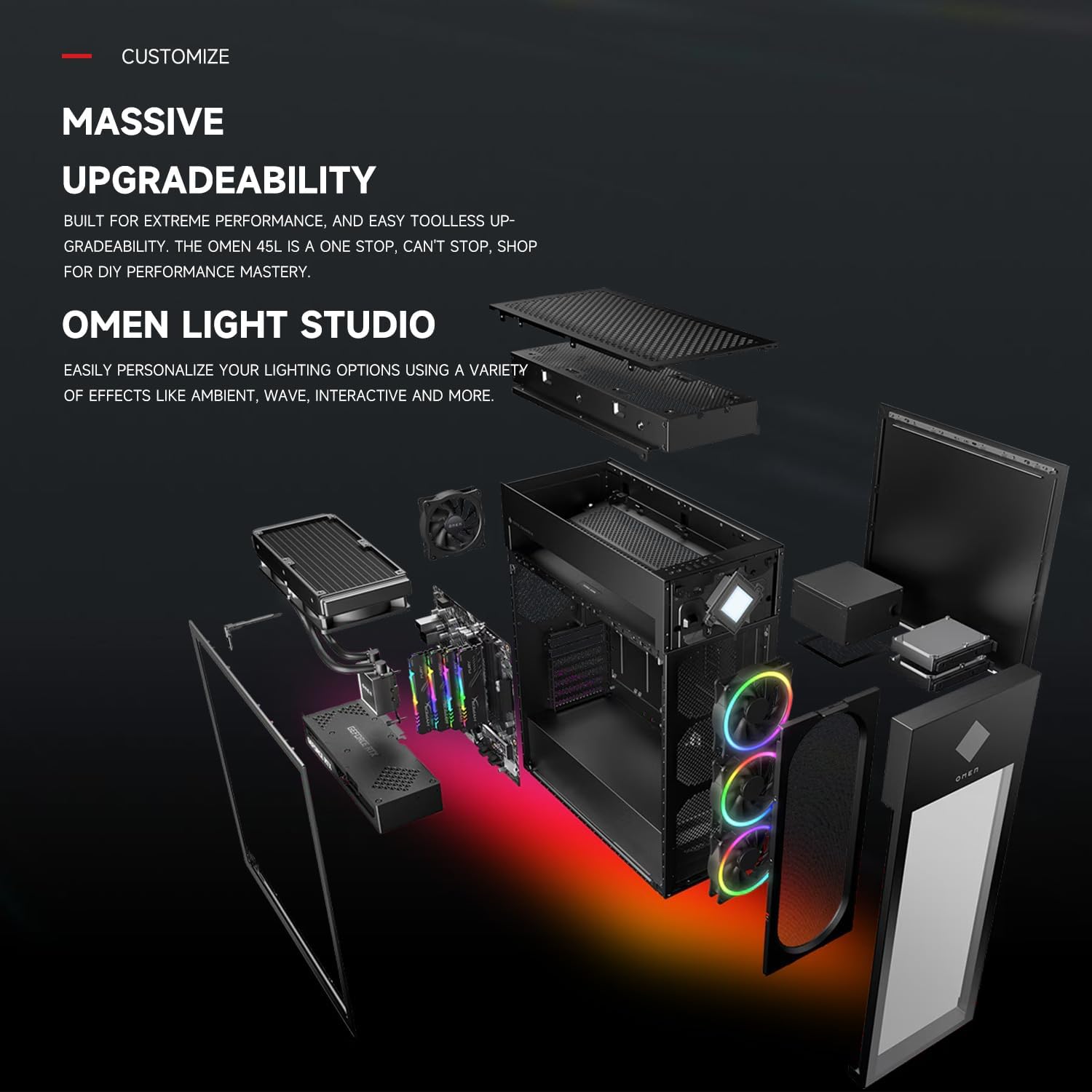
Image: An exploded diagram of the HP OMEN 45L GT22 AI Gaming Desktop, demonstrating its modular design and the accessibility of components for maintenance and future upgrades.
Odstraňování problémů
This section provides solutions to common issues you might encounter with your desktop.
- Bez napájení:
- Check if the power cable is securely connected to both the desktop's power supply unit and a functional electrical outlet.
- Ověřte funkčnost elektrické zásuvky zapojením jiného zařízení.
- Ensure the power supply switch (if present on the PSU) is in the 'On' position.
- Bez displeje:
- Ensure the monitor is powered on and the video cable (HDMI/DisplayPort) is securely connected to both the graphics card on the desktop and the monitor.
- Zkuste připojit monitor k jinému výstupnímu portu videa na grafické kartě, pokud je k dispozici.
- Confirm the monitor's input source is correctly selected via its OSD (On-Screen Display) menu.
- Periferní zařízení nereaguje:
- Try connecting the peripheral (e.g., keyboard, mouse) to a different USB port on the desktop.
- Ujistěte se, že jsou ovladače periferního zařízení nainstalovány a aktuální.
- Restart the desktop to refresh USB connections.
- Zpomalení systému/problémy s výkonem:
- Check for background applications consuming significant resources using Task Manager (Ctrl+Shift+Esc). Close unnecessary programs.
- Ujistěte se, že všechny ovladače, zejména ovladače grafické karty, jsou aktuální.
- Verify that the system has adequate cooling and is not overheating. Monitor temperatures using OMEN Gaming Hub.
- Run a disk cleanup and ensure sufficient free space on your storage drives.
Specifikace
Detailed technical specifications for the HP OMEN 45L GT22 AI Gaming Desktop (Model: GT22-3000t).
| Komponent | Specifikace |
|---|---|
| Procesor | Intel Core Ultra 9 285K (up to 5.70 GHz, 24 cores, 24 threads, 36 MB cache) |
| Grafická karta | NVIDIA GeForce RTX 4080 Super (16 GB GDDR6X dedicated) |
| BERAN | 32GB DDR5-5600MHz (Upgradable to 128GB) |
| Skladování | 1TB PCIe M.2 SSD (Supports up to 4TB PCIe M.2 SSD + 4TB 3.5” HDD) |
| Operační systém | Windows 11 Home |
| Chladicí systém | Liquid Cooling (OMEN Cryo Chamber) |
| Bezdrátové připojení | Wi-Fi 6, Bluetooth |
| Napájení | 1000W 80+ Gold PSU |
| Rozměry (DxŠxV) | 21.85 x 8.03 x 18.5 palce |
| Hmotnost | 49.8 libry |
| Zahrnuté příslušenství | Machenike K500B Mechanical RGB Gaming Keyboard |

Image: The HP OMEN 45L GT22 AI Gaming Desktop positioned next to a monitor displaying the OMEN Gaming Hub software, which provides tools for system performance monitoring and customization.
Záruka a podpora
Your HP OMEN 45L GT22 AI Gaming Desktop comes with specific warranty coverage:
- Záruka výrobce: The original components of the desktop are covered by a 1-year manufacturer's warranty from HP.
- Upgraded Components Warranty: For any upgraded RAM/SSD components, a separate 1-year warranty is provided by PCOnline US.
- Technická podpora: For technical assistance, please refer to the official HP support website or contact their customer service. Keep your purchase receipt and product serial number readily available.
- Online zdroje: Navštivte Obchod HP na Amazonu for additional product information and support links.
Ask a question about this manual
Ask about setup, troubleshooting, compatibility, parts, safety, or missing instructions. Manuals+ will review the question and use this page’s manual context to help answer it.