
Masajoy Spark 06
Masajoy Wireless Headset User Manual
Model: Spark 06
Zavedení
The Masajoy Wireless Headset with Mic for Work (Model: Spark 06) is designed to provide clear and reliable audio communication for various professional and personal uses. Featuring multiple connection modes, AI noise cancellation, and a comfortable design, this headset is ideal for business video conferencing, online courses, and call center environments.

Figure 1: Masajoy Wireless Headset and included accessories.
Co je v krabici
Zkontrolujte prosím, zda jsou v balení přítomny všechny komponenty:
- Wireless Headset with Mic for Work
- USB A / C Dongle
- USB C to 3.5MM Cable
- Nabíjecí kabel typu C
- Uživatelská příručka
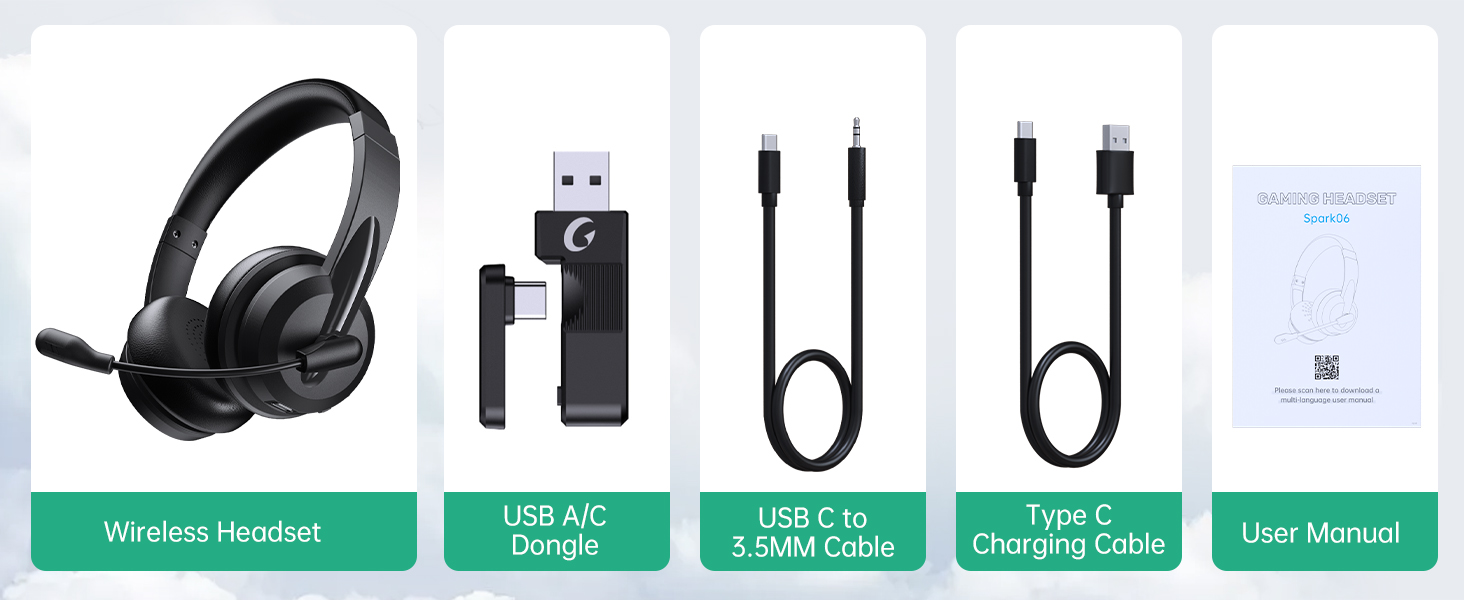
Obrázek 2: Obsah balení.
Nastavení
Nabíjení náhlavní soupravy
Before first use, fully charge the headset. Connect the Type C Charging Cable to the headset's charging port and the other end to a USB power source (e.g., computer USB port, wall adapter). The charging indicator light will show the charging status.
- Doba plného nabití: Přibližně 2.5 hodiny
- Doba hovoru: až 30 hodiny
- Doba přehrávání hudby: Až 25 hodin

Figure 3: Long Battery Life for Extended Use.
Režimy připojení
The Masajoy headset supports three connection modes:
-
Připojení Bluetooth V5.3:
For wireless connection to Bluetooth-enabled devices (e.g., smartphones, laptops). Ensure the headset is in pairing mode (refer to operating instructions for details). Hledat "Spark 06" in your device's Bluetooth settings and connect.
-
2.4G Wireless (USB A/C Dongle):
For wireless connection to computers without Bluetooth or for a dedicated connection. Plug the USB A or USB C dongle into an available USB port on your computer. The headset will automatically connect to the dongle.
-
Wired 3.5mm Audio Cable:
For a wired connection to devices with a 3.5mm audio jack. Connect one end of the USB C to 3.5MM Cable to the headset's USB-C port and the other end to your device's 3.5mm audio jack. This mode is useful when battery is low or for devices that do not support wireless connections.

Figure 4: Dual Connection Options (Bluetooth & 2.4G Wireless).
NOTE: This headset does not support dual device connection simultaneously.
Návod k obsluze
Zapnutí/vypnutí
- To Power On: Press and hold the Power button until you hear a voice prompt.
- To Power Off: Press and hold the Power button until you hear a voice prompt.
Ovládání hlasitosti
Use the volume control buttons located on the headset to adjust the listening volume.
Mikrofon s potlačením hluku s umělou inteligencí
The headset features advanced AI noise cancellation to reduce background noise during calls. This feature enhances clarity for the listener.
NOTE: This AI Noise Cancelling feature is only available when connected via Bluetooth.

Figure 5: AI Noise Cancelling in action.
Funkce ztlumení mikrofonu
To mute the microphone, simply rotate the microphone boom to the upright position. A voice prompt will confirm "MIC mute". To unmute, rotate the microphone boom back down.

Figure 6: Microphone Mute Control by Rotation.
Pohodlí a design
The headset is designed for all-day wear with protein memory foam ear cups that are soft and breathable, preventing overheating. The adjustable and expandable headband ensures a comfortable fit for most head shapes.

Figure 7: Comfortable and Breathable Design.
Specifikace
| Funkce | Detail |
|---|---|
| Název modelu | Jiskra 06 |
| Technologie připojení | Wireless (Bluetooth V5.3, 2.4G), Wired (3.5mm) |
| Kontrola hluku | AI Noise Cancellation (Bluetooth mode only), Passive Noise Cancellation |
| Výdrž baterie (doba hovoru) | Až 30 hodin |
| Výdrž baterie (přehrávání hudby) | Až 25 hodin |
| Doba nabíjení | Přibl. 2.5 hodin |
| Bezdrátové Dosah | Up to 36 feet (11 meters) for Bluetooth |
| Velikost zvukového ovladače | 40 milimetrů |
| Citlivost mikrofonu | 43 dB |
| Jack pro sluchátka | USB-C (for charging/wired audio) |
| Kompatibilní zařízení | PC, Mac, Laptop, Chromebook, tablet, smartphones, MP3 players, PS5, PS4, Xbox one, gaming systems with an aux port |
| Materiál | Faux Leather, Polycarbonate (PC), Metal, Acrylonitrile Butadiene Styrene (ABS) |
| Hmotnost položky | 10.2 unce |
| Barva | Černý |
Údržba
- Čištění: K čištění sluchátek s mikrofonem používejte měkký, suchý hadřík. Nepoužívejte abrazivní čisticí prostředky ani rozpouštědla.
- Skladování: Sluchátka skladujte na chladném a suchém místě mimo dosah přímého slunečního záření a extrémních teplot.
- Péče o baterie: Chcete-li prodloužit životnost baterie, vyvarujte se častého úplného vybíjení sluchátek. Pravidelně je nabíjejte, i když je delší dobu nepoužíváte.
- Zacházení: Avoid dropping the headset or subjecting it to strong impacts. Do not twist or bend the microphone boom excessively beyond its intended rotation.
Odstraňování problémů
| Problém | Možná příčina | Řešení |
|---|---|---|
| Sluchátka se nezapínají. | Slabá baterie. | Charge the headset fully using the provided Type C charging cable. |
| Nelze se připojit přes Bluetooth. | Headset not in pairing mode; device Bluetooth off; out of range. | Ensure headset is in pairing mode. Turn Bluetooth on your device. Move headset closer to the device (within 36 feet). |
| Žádný zvuk z náhlavní soupravy. | Volume too low; incorrect audio output selected on device; headset not connected. | Increase headset volume. Check device's audio output settings. Re-establish connection. |
| Mikrofon nefunguje. | Microphone muted; incorrect input device selected; AI Noise Cancellation issue. | Ensure microphone boom is not in the upright (muted) position. Check device's microphone input settings. Note that AI Noise Cancellation is only active in Bluetooth mode. |
| Špatná kvalita zvuku / statický šum. | Rušení; mimo dosah; slabá baterie. | Move away from other wireless devices. Move closer to the connected device. Charge the headset. |
Záruka a podpora
Masajoy products are designed for reliability and performance. For warranty information and technical support, please refer to the official Masajoy website or contact customer service using the details provided in the original product packaging or purchase receipt.
Můžete také navštívit Masajoy Store on Amazon pro více informací o produktu a zdroje podpory.
Ask a question about this manual
Ask about setup, troubleshooting, compatibility, parts, safety, or missing instructions. Manuals+ will review the question and use this page’s manual context to help answer it.