
Zavedení
The Desview A5 is a versatile 5.5-inch touch screen camera field monitor designed to enhance your filmmaking and photography experience. It features a vibrant Full HD 1920x1080 IPS panel with 600nits brightness, ensuring clear and color-accurate visuals in various lighting conditions. Supporting 4K/60Hz HDMI 2.0 input and output, this monitor provides real-time monitoring and advanced tools like HDR, waveform, histogram, and custom 3D LUT support for precise exposure and color control. Its lightweight design and flexible power options make it suitable for both studio and on-location use.
Co je v krabici
Upon unboxing your Desview A5 monitor, please ensure all the following items are present:
- 1x Desview Monitor A5
- 1x držák monitoru
- 1x slunečník
- 1x HDMI kabel
- 1x kabel micro HDMI
- 1x U disk (for LUTs)
- 1x Instalační nástroj
- 1x Dust Cloth
- 1x Uživatelská příručka
- 1x Přepravní pouzdro

Nastavení
Montáž monitoru
Attach the included monitor mount to the 1/4" screw hole located on the bottom or side of the Desview A5 monitor. Secure the mount firmly using the installation tool. Then, attach the monitor to your camera's cold shoe mount or any compatible rig.

Connecting HDMI Cables
Connect your camera's HDMI output to the HDMI-IN port on the Desview A5 monitor using the provided HDMI or Micro HDMI cable. If you need to output the video signal to another monitor, use the HDMI-OUT port.
Napájení monitoru
The Desview A5 offers multiple power options:
- Baterie řady NP-F: Insert a compatible NP-F series battery (NP-F550/F750/F970) into the battery compartment on the back of the monitor. (Battery not included).
- Vstup typu C: Connect a Type-C cable to the Type-C port for power.
- Vstup DC 12V: Use a DC 12V power adapter (not included) with the DC-IN port.

Obsluha monitoru
Touch Screen & Control Knob
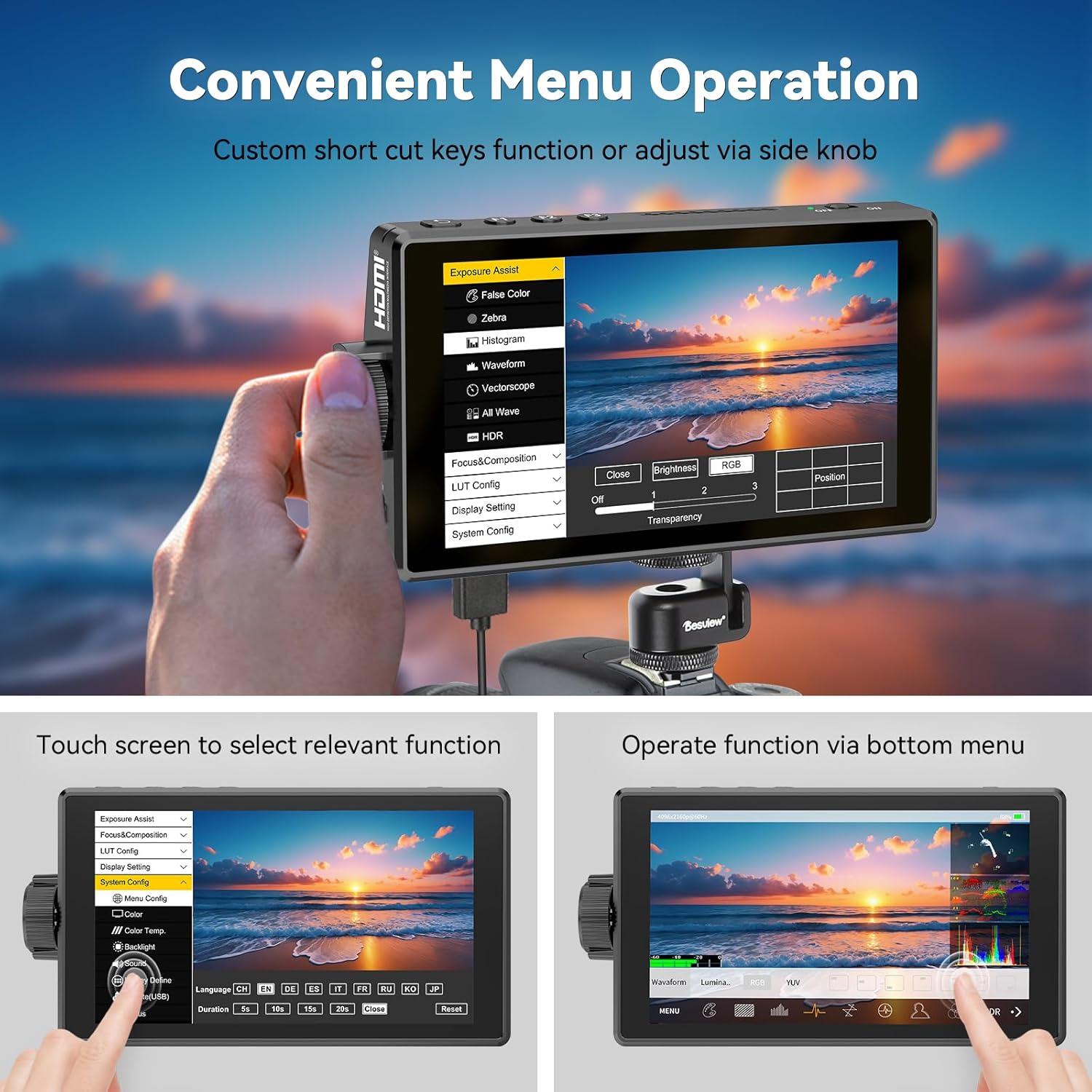
The Desview A5 features a responsive touch screen for intuitive menu navigation. You can also use the side scroll knob to adjust settings. User-customizable shortcut keys (F1, F2, F3) are available for quick access to frequently used functions. A touch-lock key prevents accidental changes during filming.

Advanced Monitoring Tools
The monitor includes a suite of professional tools to assist with accurate exposure and focus:
- HDR: High Dynamic Range support for improved contrast and color.
- Křivka: Visual representation of video signal luminance.
- histogram: Zobrazuje tonální rozložení obrázku.
- Focus Peaking: Zvýrazňuje zaostřené oblasti pro přesné manuální ostření.
- Falešná barva: Helps in setting correct exposure levels.
- Zebra: Označuje přeexponované oblasti.
- Vektoroskop: Analyzes color saturation and hue.
- Čáry mřížky: Pomáhá s kompozicí.
- Měřiče zvuku: Monitors audio input levels.
- Safe Area & Mark Ratio: Ensures content is within broadcast-safe zones.

Custom 3D LUT Support
The Desview A5 allows you to upload custom 3D LUTs (Look Up Tables) via the included U disk. This feature is invaluable for on-set color grading, enabling you to preview tvůj footage with desired color profiles for a cinematic look.

Nastavení zobrazení
Adjust various display settings to suit your needs, including aspect ratio, display flip, zoom, pixel-to-pixel mapping, HV delay, freeze frame, and anamorphic de-squeeze.
Údržba
To ensure the longevity and optimal performance of your Desview A5 monitor, follow these maintenance guidelines:
- Čištění: Use the provided dust cloth to gently wipe the screen and body of the monitor. Avoid using harsh chemicals or abrasive materials.
- Skladování: When not in use, store the monitor in its carry case to protect it from dust, scratches, and impacts.
- Slunečník: Utilize the detachable sunshade to protect the screen from direct sunlight and reduce glare, especially during outdoor shoots.

Odstraňování problémů
If you encounter any issues with your Desview A5 monitor, please refer to the following common troubleshooting steps:
- Bez signálu: Ensure all HDMI cables are securely connected to both the camera and the monitor. Verify that your camera's HDMI output is enabled and configured correctly.
- Bez napájení: Check the battery level or power connection. Ensure the power source is providing adequate voltage (e.g., fully charged NP-F battery, correct DC adapter).
- Blikání/zkreslení obrazovky: Try a different HDMI cable or adjust the resolution settings on your camera. Ensure the monitor's firmware is up to date.
- Dotyková obrazovka nereaguje: Check if the touch-lock function is enabled. Disable it if necessary. Restart the monitor.
For persistent issues, please consult the detailed user manual or contact Desview zákaznickou podporu.
Specifikace
| Funkce | Specifikace |
|---|---|
| Značka | Desview |
| Číslo modelu | A5 |
| Velikost obrazovky | 5.5 palce |
| Rezoluce | FHD 1080p (1920x1080 Pixels) |
| Jas | 600 kandel na metr čtvereční |
| Kontrastní poměr | 1400:1 |
| Viewúhel | 178 stupňů |
| Typ zobrazení | IPS |
| HDMI vstup/výstup | 4K/60Hz HDMI 2.0 |
| Možnosti napájení | Type-C, NP-F Series Batteries, DC 12V Input |
| Rozměry položky (D x Š x V) | 1"H x 5.7"Š x 3.2"V |
| Hmotnost | 340 gramů (přibližně) |
| Další funkce | Touchscreen, Side Knob Navigation, User-customizable shortcut keys, HDR, 3D LUT Support, Waveform, Histogram, Focus Peaking |
Záruka a podpora
The Desview A5 Touch Screen Camera Field Monitor comes with a 1-letá záruka. For technical support, warranty claims, or any product-related inquiries, please contact Desview zákaznický servis prostřednictvím jejich oficiálních webnebo prodejce, u kterého byl produkt zakoupen. Uschovejte si prosím doklad o koupi pro ověření záruky.