1. Úvod
This manual provides comprehensive instructions for the installation, operation, maintenance, and troubleshooting of your NIVIAN Professional WiFi SuperHD Surveillance Camera Kit. This system is designed to provide reliable and efficient security monitoring for your home or business.
Před použitím produktu si pečlivě přečtěte tuto příručku, abyste zajistili správné nastavení a optimální výkon. Uschovejte si tuto příručku pro budoucí použití.
2. Konec produktuview
The NIVIAN CCTV Kit is a professional 2K SuperHD WiFi surveillance system featuring 6 IP cameras and a 10-channel Network Video Recorder (NVR) with a pre-installed 1TB hard drive. Key features include:
- 2K SuperHD Image Resolution: Poskytuje jasné a podrobné video footage (3MP).
- AI lidská detekce: Intelligent motion detection to reduce false alarms.
- Obousměrný zvuk: Vestavěný mikrofon a reproduktor pro komunikaci v reálném čase.
- Duální noční vidění: Infrared mode for discreet monitoring and white LED mode for full-color night vision activated by motion.
- WiFi-6 Long Range Connectivity: Stable wireless connection up to 250 meters with repeater function.
- Kamery odolné proti povětrnostním vlivům s krytím IP66: Odolný kovový casinvhodné pro venkovní použití.
- Profesionální nahrávání: Continuous or event-based recording to the included 1TB hard drive.
- HDMI výstup: Connect to a monitor or TV for live viewIng.
- EseeCloud App: Remote access and control from mobile devices.
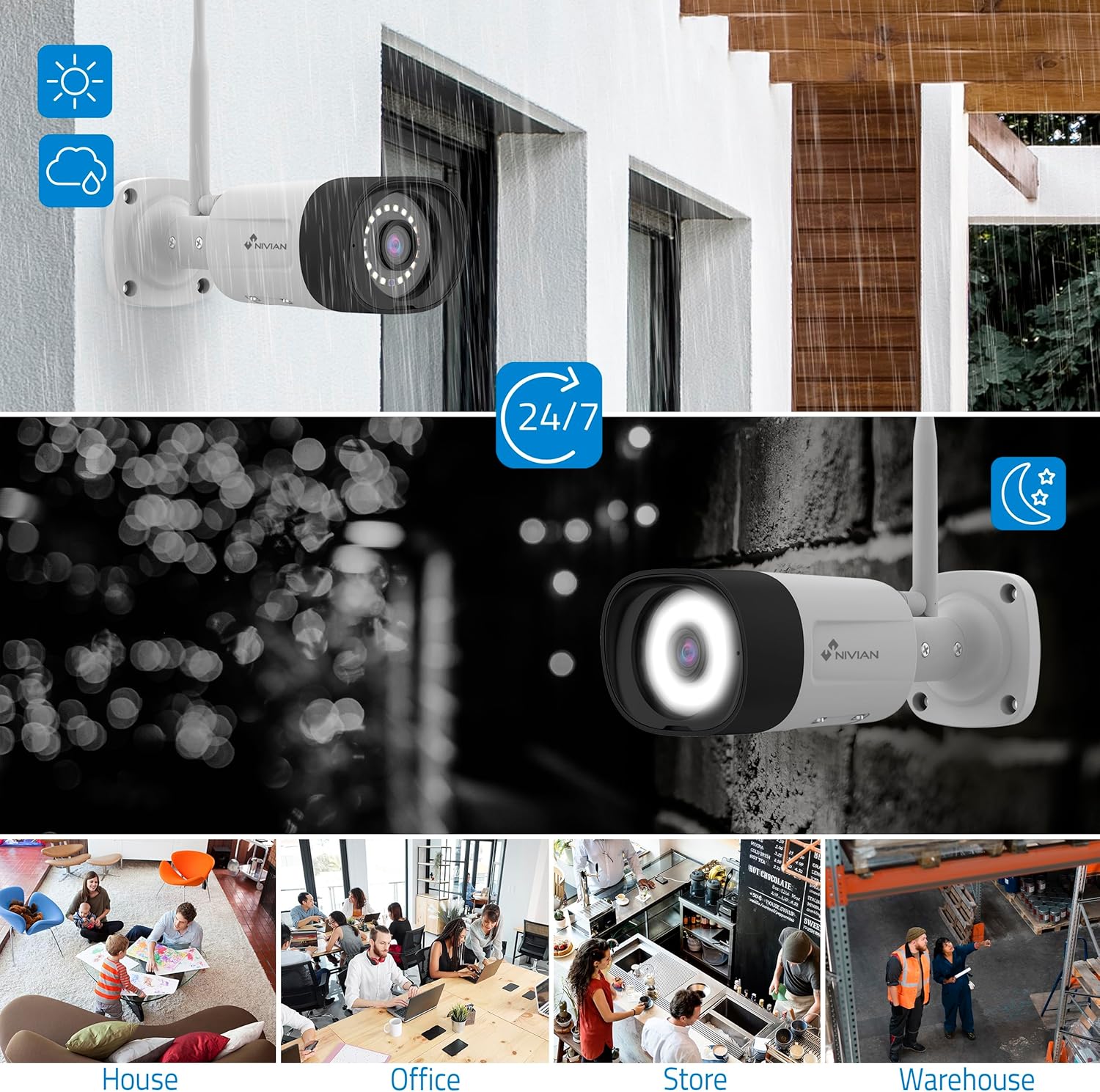
Image: NIVIAN CCTV Camera with day and night vision capabilities, showing weatherproof design and application in various environments like house, office, store, and warehouse.

Image: Comparison of 1080p Full HD video quality versus 2K Super HD video quality, demonstrating enhanced detail with 2K resolution.
3. Obsah balení
Ověřte, zda jsou v balení přítomny všechny položky:
- 1x 10-Channel NVR (Network Video Recorder) with 1TB Hard Drive
- 6x NIVIAN 2K SuperHD WiFi IP Cameras
- Napájecí adaptéry pro NVR a kamery
- USB myš
- Ethernetový kabel
- Montážní šrouby a hmoždinky
- Stručný průvodce (podrobné pokyny naleznete v tomto návodu)
4. Nastavení
4.1. Instalace NVR
- Připojte NVR:
- Připojte NVR k elektrické zásuvce pomocí dodaného napájecího adaptéru.
- Connect the NVR to a monitor or TV via the HDMI port for local viewIng.
- Připojte USB myš k USB portu NVR.
- For internet access, connect the NVR to your router using the Ethernet cable.
- Zapnutí: Turn on the NVR. Follow the on-screen prompts for initial setup, including language selection and network configuration.
4.2. Instalace kamery
- Místo montáže: Vyberte vhodná místa pro kamery a ujistěte se, že mají volný výhled view and are within range of the NVR's WiFi signal. The IP66 rating allows for outdoor installation.
- Napájení kamer: Connect each camera to a power outlet using its dedicated power adapter.
- Párování (automatické): The cameras are pre-paired with the NVR. Once powered on, they should automatically connect to the NVR's WiFi network. You will see the camera feeds appear on the connected monitor.
- Signal Repetition Function: If a camera is too far from the NVR, you can use another camera as a repeater to extend the WiFi range up to 250m. Refer to the NVR's on-screen menu for configuring this feature.

Image: Diagram illustrating various connection options for the NIVIAN CCTV system, including direct WiFi-6 connection to NVR, HDMI output to a monitor, and NVR connection to a router via LAN for remote access via Eseecloud app. Also shows signal repetition function.
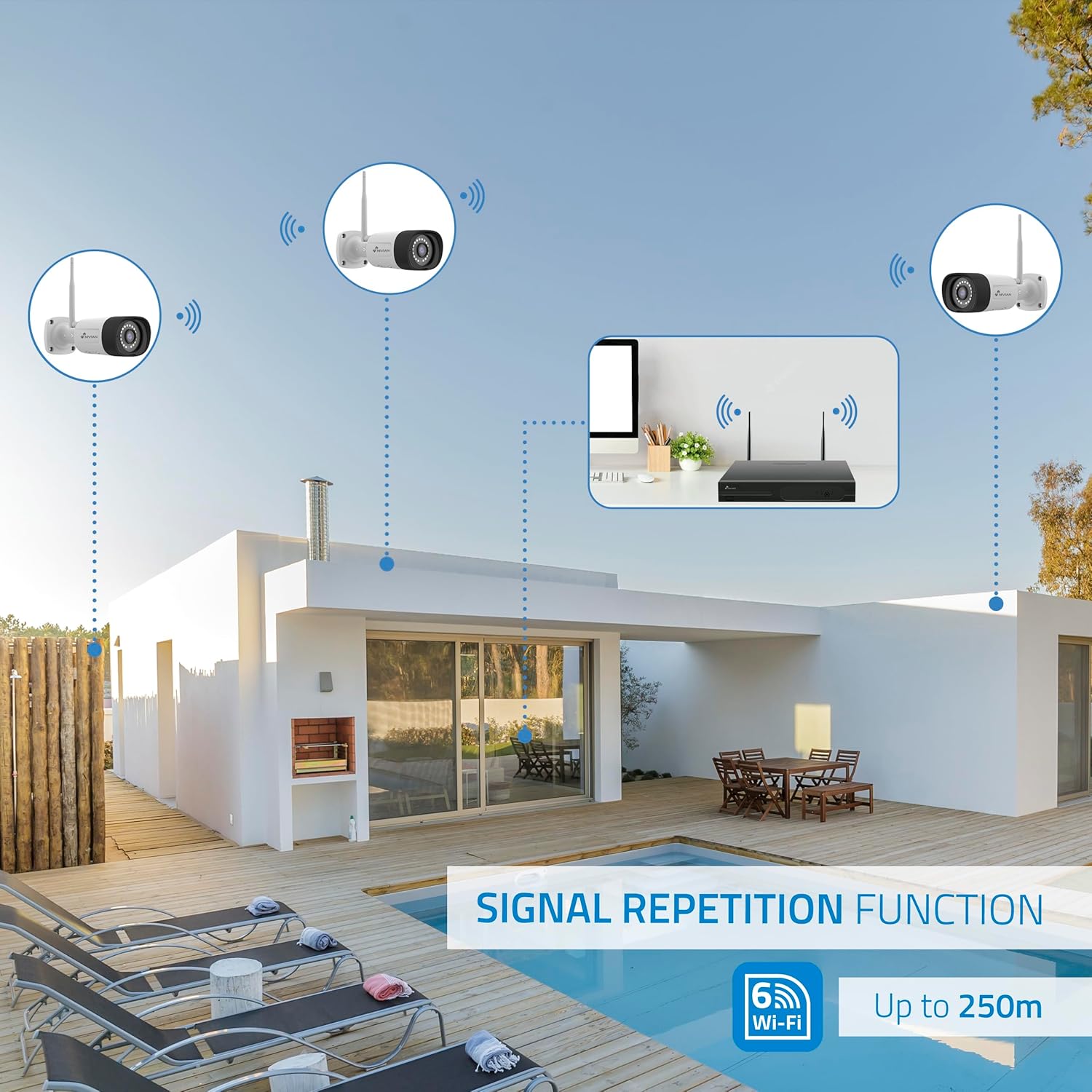
Image: Diagram showing the signal repetition function of the NIVIAN WiFi CCTV system, where cameras can extend the WiFi range up to 250 meters from the NVR.
4.3. EseeCloud App Setup
- Stáhnout aplikaci: Download the "EseeCloud" app from your mobile device's app store (available for iOS, Android).
- Vytvořit účet: Otevřete aplikaci a zaregistrujte si nový účet, nebo se přihlaste, pokud již nějaký máte.
- Přidat zařízení: Follow the in-app instructions to add your NVR system. This typically involves scanning a QR code displayed on the NVR's monitor or entering the device ID manually.
- Vzdálený Viewing: Po přidání můžete view live feeds, access recordings, and configure settings remotely.

Image: Smartphone screen displaying the EseeCloud app interface for managing the security system, showing live camera feeds and control options, with NIVIAN cameras and a laptop in the background.
5. Návod k obsluze
5.1. Živě View
Access live camera feeds through the NVR connected to a monitor or via the EseeCloud mobile app. The NVR interface allows you to switch between single-camera view a mřížka s více kamerami view.
5.2. Nahrávání
- Nepřetržité nahrávání: The system is configured for continuous recording by default to the 1TB hard drive.
- Záznam detekce pohybu: Configure cameras to record only when motion is detected. This can be scheduled via the NVR settings or EseeCloud app.
- H.265+ Codec: The system uses H.265+ video compression to optimize storage space while maintaining video quality.
5.3. Přehrávání
Přístup zaznamenán footage through the NVR's playback menu or the EseeCloud app. You can search recordings by date, time, and event type (e.g., motion detection).
5.4. Detekce lidí pomocí umělé inteligence
The cameras feature advanced AI human detection to differentiate human movement from other objects, significantly reducing false alarms. When human motion is detected, the system can trigger recordings, send notifications, and activate the white LED night vision for color footage.

Image: NIVIAN camera detecting a person at night, with the white LED light activated for color night vision, and a mobile notification indicating motion detection.
5.5. Obousměrný zvuk
Use the EseeCloud app to utilize the two-way audio feature. This allows you to listen to audio from the camera's location and speak through the camera's built-in speaker.
5.6. Režimy nočního vidění
- Infračervený (IR) režim: Provides black and white video in low-light conditions for discreet surveillance.
- Režim bílé LED: When motion is detected in low light, the camera's white LEDs activate, providing full-color video and acting as a deterrent.
6. Údržba
- Čištění fotoaparátu: Pravidelně čistěte objektivy fotoaparátu měkkým hadříkemamp hadříkem, abyste zajistili ostrý a kvalitní obraz. Nepoužívejte agresivní chemikálie.
- Aktualizace firmwaru: Check for firmware updates for the NVR and cameras through the EseeCloud app or NVR settings. Keep your system updated for optimal performance and security.
- Správa pevných disků: The 1TB hard drive will automatically overwrite the oldest recordings when full. If you need to preserve specific footage, back it up to an external device.
- Kontrola napájení: Ujistěte se, že všechny napájecí adaptéry jsou bezpečně připojeny a nejsou poškozené.
7. Řešení problémů
7.1. No Camera Feed
- Zkontrolujte napájení: Ensure the camera is powered on and its adapter is working.
- Signál WiFi: Verify the camera is within the NVR's WiFi range. Use the signal repetition function if necessary.
- Oprava spárování kamery: If issues persist, try re-pairing the camera with the NVR through the NVR's menu.
7.2. Špatná kvalita obrazu
- Čistá čočka: Očistěte objektiv fotoaparátu od nečistot nebo šmouh.
- Osvětlení: Pro optimální kvalitu obrazu zajistěte dostatečné osvětlení, zejména v noci.
- Rušení WiFi: Reduce potential WiFi interference by moving the camera or NVR, or by using the signal repetition function.
7.3. Remote Access Issues (EseeCloud App)
- Připojení k internetu: Ensure both your NVR and mobile device have a stable internet connection.
- Nastavení sítě NVR: Verify the NVR is correctly connected to your router and has internet access.
- Verze aplikace: Ensure your EseeCloud app is updated to the latest version.
7.4. Hard Drive Full / Recording Issues
- Zkontrolujte úložiště: Verify the hard drive status in the NVR settings.
- Plán nahrávání: Ujistěte se, že jsou plány nahrávání správně nakonfigurovány.
- Stav pevného disku: If issues persist, the hard drive may need to be checked or replaced.
8. Specifikace
| Značka | NIVIAN |
| Číslo modelu | NV-KIT830W-8CAM |
| Rozměry produktu (D x Š x V) | 23 x 12 x 8 cm; 6.2 kilogramů |
| Technologie připojení | Wireless (WiFi-6) |
| Rozlišení záznamu videa | 2K (3MP) |
| Počet kanálů | 10 (NVR) |
| Počet kamer | 6 |
| Kapacita úložiště | 1 TB Hard Drive (included) |
| Vlastnosti fotoaparátu | IP Cameras SuperHD with PTZ, Night Vision, AI Human Detection, Two-Way Audio |
| Snímková frekvence | 15 fps, 24 fps, 30 fps |
| Kompatibilní zařízení | Television (via HDMI) |
| Typ napájecí zástrčky | Držák na zeď |
| Země původu | Čína |
9. Záruka a podpora
NIVIAN offers technical support to all customers. If you have any questions, suggestions, or encounter any issues with your WiFi surveillance camera kit, please do not hesitate to contact us.
You can reach us through Amazon messages or via any official NIVIAN brand channel. Please refer to your purchase documentation for specific warranty terms and contact details.


