
1. Úvod
Thank you for choosing the MONODEAL 707-Black Portable CD Player. This device is designed to provide a versatile audio experience, supporting various formats including CD, CD-R, CD-RW, MP3, and WMA. It features built-in high-fidelity speakers, a 2.0-inch TFT color display, Bluetooth 5.3 for wireless connections, TF card support for expanded music options and recording, and AUX input for wired connections. Its compact and portable design makes it ideal for use at home, in the car, or on the go.

Image 1.1: The MONODEAL 707-Black Portable CD Player, showcasing its compact design and TFT color display.
2. Obsah balení
Zkontrolujte prosím balení, zda neobsahuje následující položky:
- MONODEAL 707-Black Portable CD Player
- Nabíjecí kabel USB typu C.
- 3.5 mm AUX kabel
- Kabelová náhlavní souprava
- Uživatelská příručka (tento dokument)
- Registrační karta

Image 2.1: All items included in the MONODEAL 707-Black Portable CD Player package.
3. Konec produktuview
The MONODEAL 707-Black features a user-friendly interface with clearly labeled buttons and a vibrant TFT color display. Key components include:
- 2.0palcový barevný TFT displej: Provides clear and colorful information.
- Vestavěné reproduktory: High-fidelity audio output without external headphones.
- Ovládací tlačítka: Play/Pause, Skip/Fast Forward/Rewind, Mode, Repeat, Program, Function, Volume Up/Down.
- Porty: USB-C for charging, 3.5mm Headphone Jack, AUX In, TF Card Slot.
- Vypínač: Located on the side for easy on/off control.

Image 3.1: The 2.0-inch TFT color display offers vibrant colors and sharp details compared to older LCD screens.
4. Nastavení
4.1 Nabíjení zařízení
The CD player has a built-in 2000mAh rechargeable battery. Before first use, fully charge the device using the provided USB Type-C cable.
- Připojte kabel USB typu C k nabíjecímu portu na zařízení.
- Druhý konec kabelu připojte k napájecímu adaptéru USB (není součástí balení) nebo k portu USB počítače.
- The charging indicator on the display will show charging status. A full charge typically takes 3-4 hours and provides 7-10 hours of continuous playback.

Image 4.1: The CD player being charged via its USB-C port, indicating its large capacity battery.
4.2 Vložení CD
- Posuňte vypínač do polohy „ON“.
- Opatrně otevřete kryt přihrádky na CD.
- Place the CD with the label side facing up onto the spindle.
- Pevně zavřete kryt přihrádky na CD, dokud nezaklapne.
- The player will automatically read the disc.

Image 4.2: Proper method for inserting a CD into the player.
5. Návod k obsluze
5.1 Základní přehrávání CD
- After inserting a CD, the player will automatically begin playback.
- Stiskněte tlačítko [Přehrát/Pozastavit] tlačítko pro pozastavení nebo obnovení přehrávání.
- Stiskněte tlačítko [Předchozí další] tlačítka pro přeskočení na předchozí nebo další skladbu.
- Dlouze stiskněte [Předchozí další] tlačítka pro rychlé převíjení vpřed nebo vzad v rámci skladby.
- Upravte hlasitost pomocí vyhrazených ovladačů hlasitosti.

Image 5.1: The player supports various playback modes for CDs.
5.2 Připojení Bluetooth (BT 5.3)
The player supports both Bluetooth receiving (RX) and transmitting (TX) modes. Note: Car Bluetooth connection is not supported for direct audio streaming from the player to the car's Bluetooth system. Use AUX or FM transmission for car audio.
- Bluetooth Receiving (RX): Connect your smartphone or tablet to the CD player to use its built-in speakers.
- Bluetooth Transmitting (TX): Connect the CD player to Bluetooth headphones or speakers for wireless audio output.
- To activate Bluetooth mode, press the [BT] button. The Bluetooth icon on the display will flash.
- On your external Bluetooth device (headphones/speaker), search for "CD Player" or similar and pair.

Image 5.2: The CD player supports both receiving and transmitting Bluetooth signals.
For a visual guide on connecting to Bluetooth in a car (via FM transmission), refer to the video below:
Video 5.1: Demonstration of connecting the CD player to a car's audio system, likely via FM transmission, as direct Bluetooth car connection is not supported by the player itself.
5.3 TF Card Playback and Recording
The CD player supports TF card music playback and can transcribe CD contents to a TF card (up to 32GB).
- Vložte TF kartu do určeného slotu.
- To play music from the TF card, select the TF card mode using the [režim] tlačítko.
- To transcribe a CD to the TF card, ensure a CD is playing and a TF card is inserted. Follow the on-screen prompts or refer to the full function demonstration video for specific steps.

Image 5.3: The CD player supports TF card functionality for playback and direct recording from CDs.
5.4 FM vysílač
Use the FM transmitter function to broadcast audio from the CD player to an FM radio, useful for car audio systems without an AUX input.
- Stiskněte tlačítko [FM] button to activate the FM transmitter.
- Tune your car's FM radio to the same frequency displayed on the CD player's screen.
- Adjust the volume on both the CD player and your car stereo for optimal sound.

Image 5.4: The CD player can connect to car audio systems via AUX cable or FM transmission.
5.5 Připojení AUX
Connect the CD player to external audio devices, such as car stereos or home audio systems, using the provided 3.5mm AUX cable.
- Připojte jeden konec 3.5mm AUX kabelu k [AUX In] port on the CD player.
- Connect the other end to the AUX input of your external audio system.
- Select the AUX input on your external audio system to hear the CD player's audio.
5.6 Repeat Modes and Song Programming
The player offers various repeat modes and the ability to program a sequence of songs.
- Režimy opakování: Stiskněte tlačítko [Opakovat] button to cycle through repeat options (e.g., repeat one, repeat all, random play, A-B repeat).
- Song Programming: V režimu zastavení stiskněte [PROG] tlačítko. Použijte [Předchozí další] buttons to select tracks, then press [PROG] again to add them to the program list. Press [Hrát si] pro spuštění naprogramovaného přehrávání.
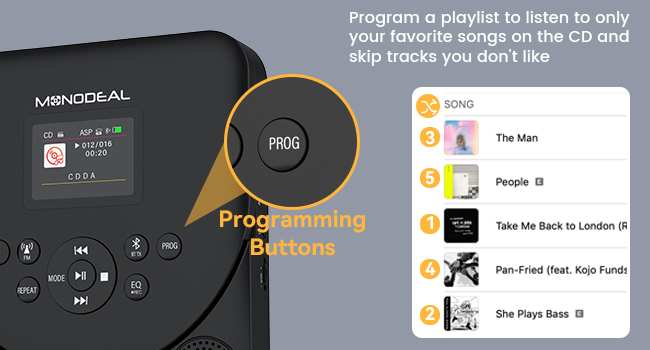
Image 5.5: The programming buttons allow users to create custom playlists.
5.7 Časovač vypnutí
Set a sleep timer to automatically turn off the player after a specified duration.
- Dlouze stiskněte [SPÁT] tlačítko.
- Použijte [Předchozí další] buttons to select a sleep time from 10 to 90 minutes.
- The player will automatically power off after the set time.
For a comprehensive demonstration of various functions including CD mode, repeat, programming, sleep timer, Bluetooth receiver, Bluetooth transmitter, and FM transmitter, please watch the video below:
Video 5.2: Detailed function operation demonstration for the CD player, covering various playback and connectivity features.
6. Údržba
- Udržujte zařízení čisté otíráním měkkým, suchým hadříkem. Nepoužívejte abrazivní čisticí prostředky ani rozpouštědla.
- Ensure the CD compartment is free of dust and debris.
- Handle CDs by their edges to prevent scratches and fingerprints.
- Přehrávač skladujte na chladném a suchém místě mimo dosah přímého slunečního záření a extrémních teplot.
7. Řešení problémů
7.1 Disc Not Reading / Skipping
- Ensure the CD is clean and free of scratches. Wipe gently from the center outwards with a soft cloth.
- Zkontrolujte, zda je CD správně vloženo potištěnou stranou nahoru.
- Check if the disc format is supported (CD/CD-R/CD-RW/MP3/WMA).
- The player features advanced anti-skip protection, but severe shocks may still cause skipping.
7.2 Žádný zvuk
- Adjust the volume on the CD player and any connected external devices.
- Pokud používáte sluchátka, ujistěte se, že jsou správně zapojena do 3.5mm jacku.
- If using Bluetooth, ensure the player is correctly paired and connected to the desired output device.
- If using AUX, ensure the cable is securely connected and the correct input is selected on the external device.
7.3 Problémy s připojením Bluetooth
- Ensure the CD player is in the correct Bluetooth mode (RX or TX).
- Make sure the external Bluetooth device is in pairing mode and within range.
- Forget previous pairings on both devices and attempt to re-pair.
- Restart both the CD player and the external Bluetooth device.
8. Specifikace
| Funkce | Detail |
|---|---|
| Značka | MONODEAL |
| Číslo modelu | 707-Černá |
| Kompatibilní zařízení | Smartphone (for Bluetooth RX) |
| Podporované zvukové formáty | CD/CD-R/CD-RW/MP3/WMA |
| Technologie připojení | Bluetooth 5.3, AUX, TF Card, FM Transmitter |
| Jack pro sluchátka | 3.5mm Jack |
| Kapacita baterie | 2000 XNUMX mAh |
| Doba přehrávání (při plném nabití) | 7-10 hodin |
| Doba nabíjení | 3-4 hodin |
| Zobrazit | 2.0palcový barevný TFT displej |
| Podpora TF karet | Až 32 GB |
| Rozměry | 22.9 x 18.5 x 5.4 cm |
| Hmotnost | 560 g |
9. Záruka a podpora
MONODEAL is committed to providing high-quality products and excellent customer service. Your MONODEAL 707-Black Portable CD Player comes with:
- 12 Months Replacement: For any manufacturing defects or issues within the first year of purchase.
- Doživotní podpora: Dedicated customer support to assist you with any questions or problems you may encounter throughout the product's lifespan.
For assistance, please refer to the contact information provided on your Registration Card or visit the official MONODEAL webmísto.