
1. Úvod
Welcome to the user manual for your new DOOGEE Tab G6 Android 15 Tablet. This guide provides comprehensive instructions on setting up, operating, maintaining, and troubleshooting your device. Please read this manual carefully to ensure optimal performance and longevity of your tablet.
2. Co je v krabici
Your DOOGEE Tab G6 Android 15 Tablet comes with a complete accessory kit to enhance your experience and protect your device. Please verify all items are present upon unboxing.
- 1 x DOOGEE TAB G6 VIP Tablet
- 1 x kabel USB Type-C
- 1x Nabíječka
- 1 x Stylus (VIP Edition)
- 1 x Předem nanesená ochranná fólie
- 1 x Bluetooth Mouse (VIP Edition)
- 1 x Leather Protective Case (VIP Edition)
- 1 x Bluetooth Keyboard (VIP Edition)
- 1 x SIM Card Tool
- 1 x balení
- 1 x Uživatelská příručka
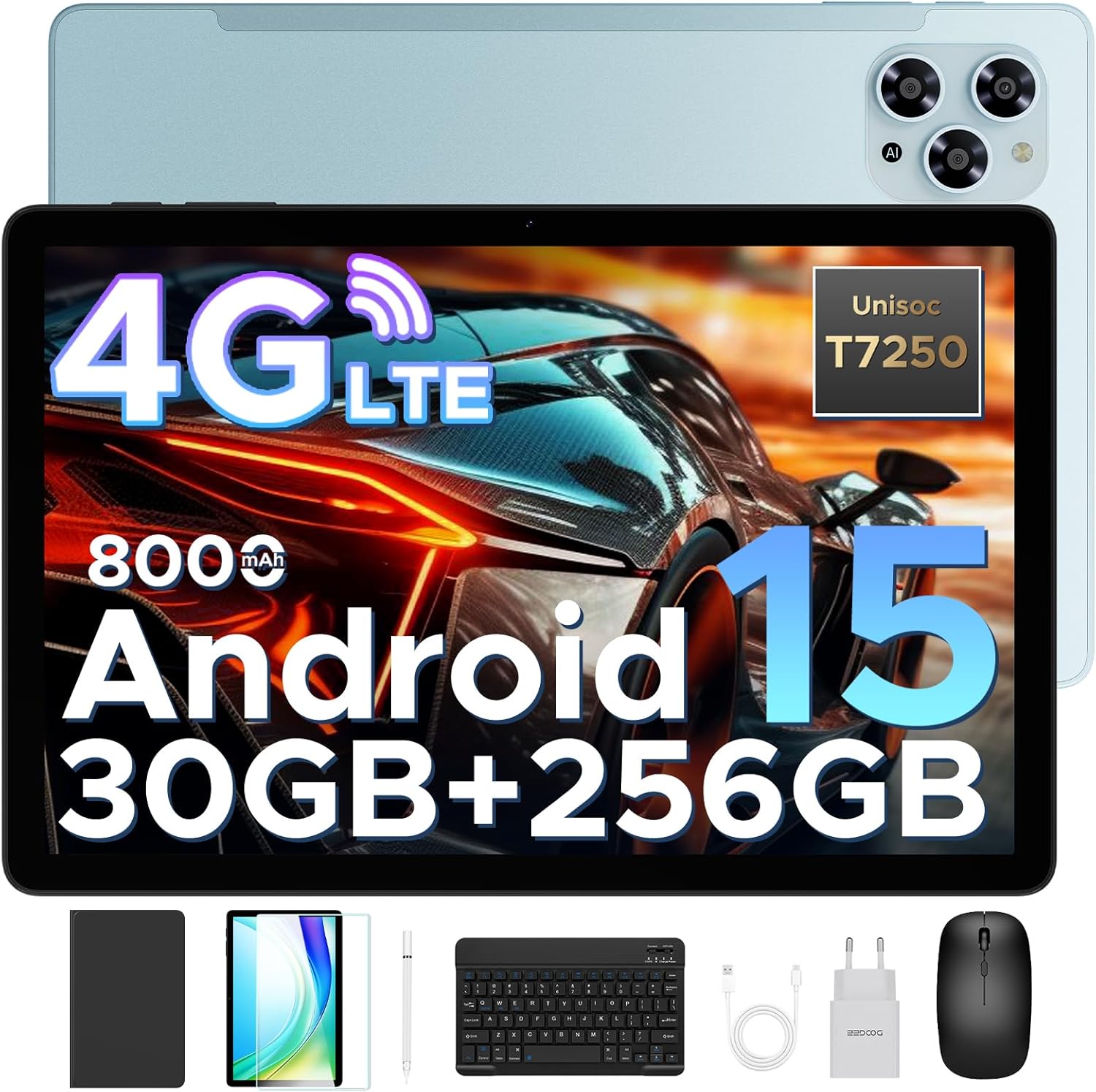
Image: The DOOGEE Tab G6 tablet displayed with all its included accessories, such as the keyboard, mouse, stylus, charger, cables, and protective case.
3. Nastavení
3.1 Počáteční nabíjení
Before first use, fully charge your DOOGEE Tab G6 tablet using the provided USB Type-C cable and charger. Connect the cable to the tablet's charging port and the charger to a power outlet. The battery indicator on the screen will show charging progress.
3.2 Vložení SIM a TF karet
The DOOGEE Tab G6 supports dual SIM cards and a TF (microSD) card for expandable storage. Use the provided SIM card tool to open the SIM tray.
- Vyhledejte držák SIM karty na boku tabletu.
- Insert the SIM card tool into the small hole next to the tray and gently push until the tray ejects.
- Vložte karty Nano-SIM a/nebo TF do určených slotů v zásobníku a dbejte na správnou orientaci.
- Opatrně zatlačte zásobník zpět do tabletu, dokud nezacvakne na místo.

Image: A visual representation of the tablet's dual SIM and TF card slots, illustrating how to insert the cards for 4G LTE connectivity.
3.3 Zapnutí/vypnutí
- Zapnutí: Stiskněte a podržte tlačítko napájení, dokud se na obrazovce nezobrazí logo DOOGEE.
- Vypnutí: Stiskněte a podržte tlačítko Napájení, dokud se nezobrazí nabídka možností napájení, poté vyberte „Vypnout“.
- Restartovat: Stiskněte a podržte tlačítko Napájení, dokud se nezobrazí nabídka možností napájení, a poté vyberte „Restartovat“.
3.4 Průvodce počátečním nastavením
Upon first power-on, the tablet will guide you through an initial setup process. Follow the on-screen prompts to select your language, connect to Wi-Fi, set up your Google account, and configure basic settings.
4. Návod k obsluze
4.1 Základní navigace
The DOOGEE Tab G6 features an intuitive touchscreen interface. Use the following gestures for navigation:
- Klepněte na: Výběr položky nebo otevření aplikace.
- Výpad: Pro procházení stránek nebo nabídek.
- Přiblížení roztažením/roztažením prstů: Pro přiblížení nebo oddálení obrázků nebo web stránky.
- Dlouhý stisk: Pro přístup k kontextovým nabídkám nebo přesun ikon.
4.2 Připojení příslušenství
Your tablet comes with a Bluetooth keyboard, mouse, and a stylus for enhanced productivity.
- Bluetooth klávesnice/myš: Turn on the keyboard/mouse and put it into pairing mode (refer to their respective manuals). On your tablet, go to Nastavení > Připojená zařízení > Bluetooth, turn on Bluetooth, and select the device from the list to pair.
- Stylus: The stylus is pressure-sensitive and does not require Bluetooth pairing. Simply use it directly on the screen for writing or drawing.
4.3 Funkce systému Android 15
The DOOGEE Tab G6 runs on the latest Android 15 operating system, offering improved security, smoother performance, and smart multitasking capabilities.
- Systém pro více uživatelů: Vytvořte samostatného uživatele profiles for different family members, each with their own apps, settings, and data. Access this feature in Nastavení > Systém > Více uživatelů.
- Rodičovská kontrola: Manage app usage, screen time, and content access for children through Google Family Link, integrated with Android 15.
- Režim před spaním: Schedule a time for your screen to turn grayscale and silence notifications for a better night's sleep. Configure this in Digitální rovnováha a rodičovská kontrola.
- ID obličeje: Unlock your tablet quickly and securely using facial recognition. Set up Face ID in Nastavení > Zabezpečení a soukromí > Odemknutí obličejem.
- Kancelář WPS: The tablet comes with built-in WPS Office, allowing you to view and edit documents, spreadsheets, and presentations.

Image: An illustration highlighting the key features of the Android 15 system, including Bedtime Mode, Multi-User System, and Parental Control.
5. Konektivita
5.1 Dual SIM 4G LTE
With dual SIM card slots, the DOOGEE Tab G6 supports common 4G LTE networks, allowing you to make calls and access high-speed internet even without Wi-Fi. This ensures network freedom and faster data transfer.
5.2 Wi-Fi
Connect to available Wi-Fi networks for internet access. Go to Nastavení > Síť a internet > Wi-Fi, zapněte Wi-Fi a vyberte požadovanou síť. V případě potřeby zadejte heslo.
5.3 Bluetooth
Enable Bluetooth to connect to wireless headphones, speakers, or other Bluetooth-enabled devices. Go to Nastavení > Připojená zařízení > Bluetooth.
5.4 GPS navigace
The tablet supports GPS, Glonass, Galileo, and Beidou navigation systems, ensuring accurate positioning for maps and location-based services.

Image: A tablet screen showing a navigation map, with icons representing GPS, Glonass, Galileo, and Beidou navigation systems, indicating precise location tracking.
6. Funkce displeje
The DOOGEE Tab G6 features an 11-inch HD IPS display with a 90Hz refresh rate, providing vibrant colors and smooth visuals for all your content.
- 11palcový HD IPS displej: Enjoy clear and vivid images with a resolution of 1280 x 800 pixels and a 16:10 aspect ratio.
- Obnovovací frekvence 90Hz: Experience fluid scrolling and responsive touch control, ideal for gaming and video playback.
- Podpora Widevine L1: Stream 1080p HD content from popular platforms like Netflix, Hulu, and Amazon Prime Video.
- Režim péče o zrak: Snižuje vyzařování modrého světla pro ochranu očí při delším používání.
- Tmavý režim: Provides a darker color scheme for the user interface, reducing eye strain in low-light conditions.
- Rozdělená obrazovka: Multitask efficiently by running two applications side-by-side on the screen.

Image: The tablet's 11-inch HD IPS display with a 90Hz refresh rate, showcasinjeho vizuální jasnost a plynulý výkon.
7. Výkon
7.1 procesor
The DOOGEE Tab G6 is powered by the Unisoc T7250 Octa-Core processor, ensuring smooth and efficient performance for various tasks, from browsing to gaming.

Image: A detailed diagram of the Unisoc T7250 Octa-Core processor, highlighting its 1.8GHz clock speed and 12nm manufacturing process for enhanced speed and efficiency.
7.2 Paměť a úložiště
The tablet offers ample memory and storage for all your applications, media, and documents.
- 30 GB RAM: Comprising 6GB base RAM and 24GB extended RAM, providing smooth multitasking.
- 256GB ROM: Generous internal storage for your files.
- 2TB TF Card Expansion: Expand storage further with a TF (microSD) card (sold separately) up to 2TB.
- LPDDR4X: Utilizes advanced LPDDR4X memory technology for efficient performance.

Image: The tablet screen displaying numerous app icons, emphasizing the massive storage capacity with 30GB RAM, 256GB ROM, and 2TB expandable storage for videos and music.
8. Správa baterií
The DOOGEE Tab G6 is equipped with a large 8000mAh battery for extended usage throughout the day.
- Baterie 8000 mAh: Provides long-lasting power for work, entertainment, and study.
- Rychlé nabíjení 10 W: Quickly recharge your tablet to minimize downtime.
- 5W zpětné nabíjení (OTG): Use your tablet as a power bank to charge other devices in emergencies via an OTG cable (not included).

Obrázek: Interní view of the tablet highlighting the 8000mAh battery, with icons indicating 10W fast charging and 5W reverse charging capabilities.
9. Funkce fotoaparátu
Capture clear photos and videos with the tablet's dual cameras.
- 13MP hlavní fotoaparát: For capturing high-resolution images.
- 5MP přední fotoaparát: Ideální pro videohovory a selfie.

Obrázek: Detailní záběr view of the tablet's rear and front cameras, indicating the 13MP main camera and 5MP front camera for capturing vivid moments.
10. Zvukové funkce
- Duální reproduktory: Enjoy immersive audio with high-quality dual speakers.
- FM rádio: Connect wired headphones to use the built-in FM radio feature.
11. Údržba
To ensure the longevity and optimal performance of your DOOGEE Tab G6, follow these maintenance guidelines:
- Čištění: K čištění obrazovky a těla tabletu používejte měkký hadřík, který nepouští vlákna. Nepoužívejte agresivní chemikálie ani abrazivní materiály.
- Ochrana: Always use the provided protective case and screen protector to guard against scratches and minor impacts.
- Teplota: Nevystavujte tablet extrémním teplotám (horkým nebo nízkým) ani přímému slunečnímu záření po delší dobu.
- Vystavení vodě: The tablet is not waterproof. Keep it away from water and high humidity.
- Aktualizace softwaru: Pravidelně kontrolujte a instalujte aktualizace systému, abyste zajistili, že váš tablet má nejnovější funkce a bezpečnostní záplaty. Přejděte na Nastavení > Systém > Aktualizace systému.
12. Řešení problémů
If you encounter any issues with your DOOGEE Tab G6, refer to the following common troubleshooting steps:
12.1 Tablet se nezapíná
- Ujistěte se, že je baterie nabitá. Připojte nabíječku a před zapnutím počkejte několik minut.
- Stiskněte a podržte tlačítko napájení po dobu alespoň 10–15 sekund, abyste vynutili restart.
12.2 Obrazovka nereaguje
- Restartujte tablet.
- Ujistěte se, že máte čisté a suché ruce.
- Pokud je nainstalována ochranná fólie na displej, ujistěte se, že je správně nalepena a neomezuje citlivost dotyku.
12.3 Problémy s připojením k Wi-Fi/4G
- Toggle Wi-Fi/Mobile Data off and on in Quick Settings or Nastavení > Síť a internet.
- Restart your Wi-Fi router (for Wi-Fi issues).
- Ensure your SIM card is correctly inserted and activated (for 4G issues).
- Check your data plan with your mobile carrier.
12.4 Pády nebo zamrzání aplikací
- Zavřete aplikaci a znovu ji otevřete.
- Vymažte mezipaměť a data aplikace v Nastavení > Aplikace > [Název aplikace] > Úložiště a mezipaměť.
- Ujistěte se, že je aplikace aktualizována na nejnovější verzi z Obchodu Google Play.
- Free up storage space if your tablet is running low on memory.
12.5 Pomalý výkon
- Zavřete nepotřebné aplikace na pozadí.
- Pravidelně mazejte data z mezipaměti.
- Tablet pravidelně restartujte.
- Zajistěte dostatek volného úložného prostoru.
Pokud problémy přetrvávají, zvažte provedení obnovení továrního nastavení (nejprve si zálohujte data) nebo kontaktujte zákaznickou podporu.
13. Specifikace
Detailed technical specifications for your DOOGEE Tab G6 Android 15 Tablet:
| Funkce | Specifikace |
|---|---|
| Značka | DOOGEE |
| Název modelu | TABG6 VIP |
| Číslo modelu | DOOGEE TABG6-V |
| Operační systém | Android 15 |
| Procesor | Osmijádrový Unisoc T7250 (1.8 GHz) |
| Grafický koprocesor | Mali-G57 MC2 |
| BERAN | 30 GB (6 GB + 24 GB rozšířitelná paměť) |
| Interní úložiště (ROM) | 256 GB |
| Rozšiřitelné úložiště | Až 2 TB (TF karta) |
| Velikost displeje | 11 palce |
| Rozlišení displeje | 1280 x 800 pixelů |
| Obnovovací frekvence | 90 Hz |
| Kapacita baterie | 8000 XNUMX mAh |
| Nabíjení | 10W Fast Charging, 5W Reverse Charging (OTG) |
| Zadní WebRozlišení vačky | 13 MP |
| Přední WebRozlišení vačky | 5 MP |
| Konektivita | 4G LTE, Wi-Fi (Dual Band 2.4G/5G), Bluetooth |
| Navigace | GPS, Glonass, Galileo, Beidou |
| Zvuk | Dual Speakers, FM Radio |
| Rozměry | 28.16 x 17.22 x 0.79 cm |
| Hmotnost položky | 500 g |
| Barva | TABG6-V(Blue) |
14. Záruka a podpora
DOOGEE is committed to providing excellent customer service and product quality.
- 30denní záruka vrácení peněz: Využijte 30denní záruku vrácení peněz a možnost bezplatného vrácení zboží.
- 2letá omezená záruka: Your DOOGEE Tab G6 is covered by a 2-year limited warranty from the date of purchase. This warranty covers manufacturing defects and workmanship. Please retain your proof of purchase for warranty claims.
- Nepřetržitá online podpora: For any technical assistance or inquiries, please contact our customer support team available 24/7. Refer to the contact information provided in the packaging or on the official DOOGEE webmísto.