
1. Úvod
This manual provides comprehensive instructions for the installation, operation, and maintenance of your PGST A107F-EU-F Home Alarm System. Please read this manual carefully before using the product to ensure proper functionality and safety. This system is designed to provide reliable security for your home or business with its advanced 4G and WiFi connectivity, real-time alerts, and user-friendly interface.
2. Bezpečnostní informace
- Ensure the alarm system is installed in a dry environment, away from direct sunlight, high temperatures, and humidity.
- Nepokoušejte se zařízení rozebírat ani opravovat sami. O servis se obraťte na kvalifikovaný personál.
- Udržujte zařízení mimo dosah dětí.
- Use only the power adapter supplied with the system.
- Ensure all sensors are securely mounted to prevent false alarms or dislodgement.
- Pravidelně testujte systém, abyste se ujistili, že všechny jeho komponenty fungují správně.
3. Obsah balení
Upon opening your PGST A107F-EU-F Home Alarm System package, please verify that all the following components are included:
- 1 x Alarm Host Panel (Main Unit)
- 4 x PIR detektory pohybu
- 10 x Door/Window Contact Sensors
- 3x Dálkové ovladače
- 2x RFID Tags
- 1 x Drátová siréna
- 1 x napájecí adaptér
- Mounting Hardware (screws, 3M adhesives)
- Uživatelská příručka

Obrázek 3.1: Přesview of the PGST A107F-EU-F Home Alarm System and its included components.
4. Konec produktuview
The PGST A107F-EU-F alarm system features a central control panel with a 4.3-inch TFT color screen, a numeric keypad, and an RFID reader. It supports both WiFi and 4G connectivity for reliable communication. The system can be expanded with up to 100 wireless devices, including motion sensors, door/window sensors, and remote controls.

Figure 4.1: The main alarm panel display, showing key information and menu navigation.
5. Nastavení
5.1 Initial Panel Setup
- Připojení napájení: Connect the provided power adapter to the alarm host panel and plug it into a standard wall outlet.
- Instalace SIM karty: If you intend to use 4G connectivity, insert a valid 4G SIM card into the designated slot on the back of the main unit. Ensure the SIM card is correctly oriented.
- Zapnutí: Locate the ON/OFF switch on the back of the panel and switch it to the 'ON' position. The panel will power on and initiate its startup sequence.
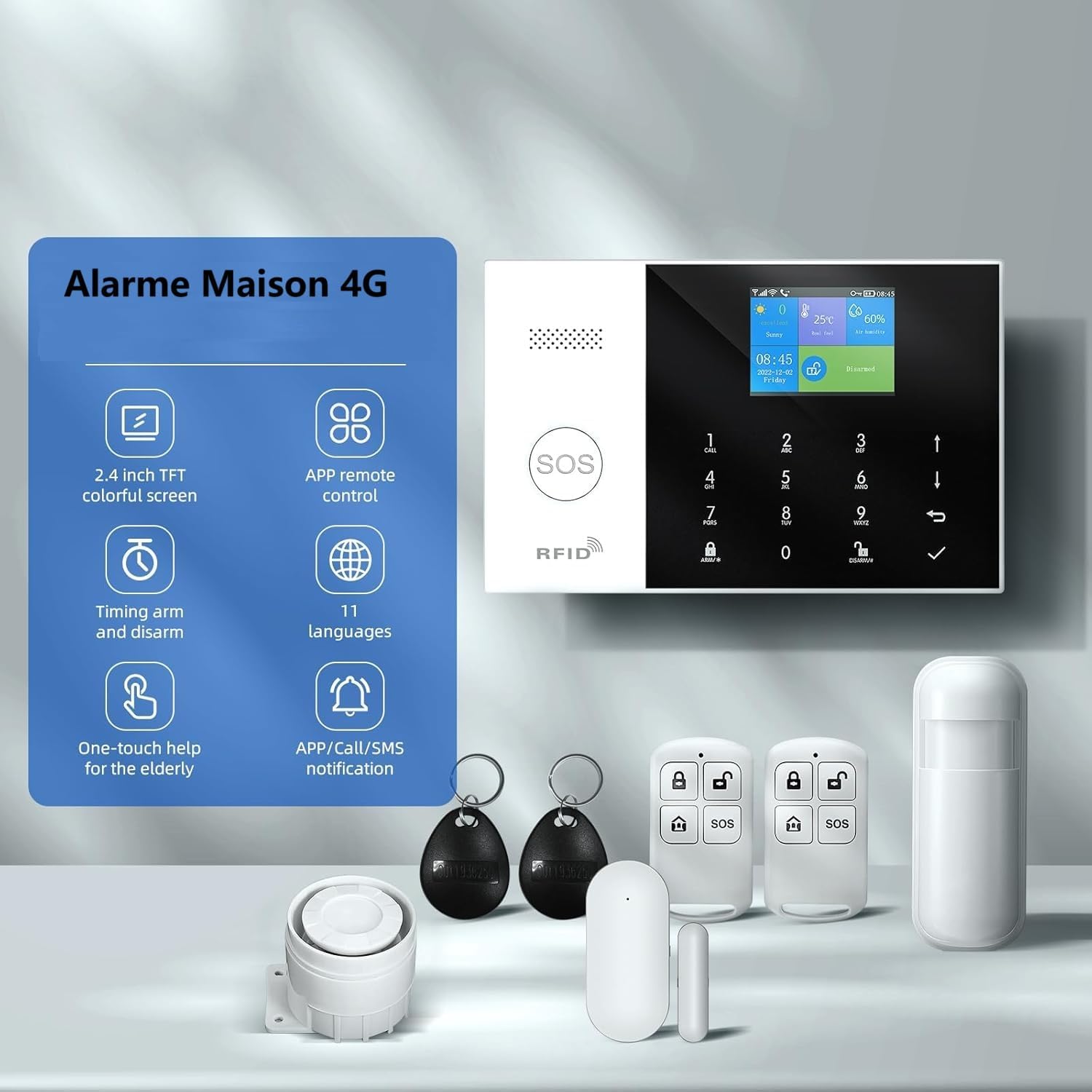
Figure 5.1: Location of the SIM card slot and power switch on the back of the alarm panel.
5.2 Instalace a párování aplikace
- Stáhněte si Tuya Smart or Chytrý život aplikaci z obchodu s aplikacemi ve vašem chytrém telefonu (iOS nebo Android).
- Zaregistrujte si nový účet nebo se přihlaste, pokud již nějaký máte.
- Follow the in-app instructions to add a new device. Select 'Security & Sensor' > 'Alarm (Wi-Fi)'.
- Enter your 2.4GHz Wi-Fi network credentials when prompted.
- The app will guide you through pairing the alarm panel. Ensure the panel is in pairing mode (refer to the panel's display or manual for specific instructions).
5.3 Instalace senzoru
All sensors are pre-paired with the main unit. For optimal performance, install them in strategic locations:
- Kontaktní senzory dveří/oken: Mount the two parts of the sensor on the door/window frame and the moving part, ensuring they are aligned and within 1 cm of each other when the door/window is closed. Use the provided 3M adhesives for easy installation.

Figure 5.2: Proper installation of a door/window contact sensor.
- PIR Motion Detectors: Install motion detectors in corners of rooms, approximately 2-2.5 meters (6.5-8 feet) above the floor, ensuring a clear line of sight to the area you wish to monitor. Avoid placing them near heat sources or direct sunlight.
- Drátová siréna: Connect the wired siren to the designated siren port on the main unit. Place it in a location where its sound can be clearly heard.
6. Návod k obsluze
6.1 Aktivace a deaktivace
- Zapnutí (režim Pryč): Press the 'Arm' button on the panel, remote control, or via the mobile app. All sensors will be active.
- Stay Arm (Home Mode): Press the 'Stay Arm' button on the panel, remote control, or via the mobile app. Typically, perimeter sensors (doors/windows) are active, while internal motion sensors are inactive, allowing free movement inside.
- Odzbrojit: Enter your password on the panel, press the 'Disarm' button on the remote control, or use the mobile app. The system will be disarmed, and all sensors will be inactive.
6.2 Funkce SOS
In case of an emergency, press the 'SOS' button on the alarm panel or the remote control. The system will immediately trigger an alarm and send alerts to pre-programmed emergency contacts.

Figure 6.1: The remote control featuring the dedicated SOS button for emergencies.
6.3 Mobile App Control and Notifications
The Tuya Smart/Smart Life app allows full control of your alarm system from anywhere. You can arm/disarm, check system status, add/remove devices, and receive real-time notifications.
- Push oznámení: Receive instant alerts on your smartphone when an alarm is triggered or system status changes.
- SMS and Call Alerts: The system can send SMS messages and make phone calls to up to 5 pre-set emergency numbers in the event of an alarm.

Obrázek 6.2: Přample of an alarm notification received on a smartphone via the app.

Figure 6.3: Flowchart demonstrating how the alarm system sends alerts to multiple contacts.
6.4 Nastavení jazyka
The alarm panel supports multiple languages. To change the language, navigate through the system settings menu on the panel's display. Refer to the on-screen prompts for specific language selection options.
6.5 Integrace chytré domácnosti
The PGST A107F-EU-F system is compatible with Amazon Alexa and Google Assistant, allowing for voice control of arming and disarming functions. Follow the instructions within the Tuya Smart/Smart Life app to link your alarm system with your preferred smart assistant.

Figure 6.4: The alarm system's compatibility with voice assistants like Amazon Alexa.
7. Údržba
7.1 Výměna baterie
- Senzory: The door/window contact sensors and PIR motion detectors are powered by CR2032 batteries, which typically last up to 2 years. When a sensor's battery is low, the system will notify you via the app or panel. To replace, open the sensor casing, remove the old battery, and insert a new CR2032 battery, observing polarity.
- Hlavní jednotka: The main unit has a built-in rechargeable lithium-polymer battery that provides backup power during outages. If the main unit's battery needs replacement, it is recommended to contact customer support.
7.2 Čištění
To maintain the appearance and functionality of your alarm system, regularly wipe the surfaces of the main unit and sensors with a soft, dry cloth. Do not use abrasive cleaners or solvents.
8. Řešení problémů
| Problém | Možná příčina | Řešení |
|---|---|---|
| Panel se nezapíná | Napájecí adaptér není připojen; hlavní vypínač je vypnutý. | Ensure power adapter is securely connected and plugged in. Flip the ON/OFF switch to 'ON'. |
| Sensors not triggering alarm | Low battery; sensor out of range; improper installation. | Replace sensor battery. Relocate sensor closer to the main unit. Re-install sensor ensuring proper alignment (for door/window) or clear line of sight (for motion). |
| Žádná oznámení aplikací | No internet connection (WiFi/4G); app permissions not granted; incorrect app settings. | Check WiFi and 4G signal strength. Ensure app has notification permissions. Verify notification settings within the app. |
| Falešné poplachy | Improper sensor placement; environmental factors (pets, drafts). | Adjust sensor sensitivity or relocate. Ensure motion sensors are not facing windows or heat sources. |
| Nelze se připojit k WiFi | Incorrect WiFi password; 5GHz network (system supports 2.4GHz only); weak signal. | Double-check WiFi password. Ensure you are connecting to a 2.4GHz network. Move panel closer to router. |
9. Specifikace
- Model: A107F-EU-F
- Rozměry (D x Š x V): 22 x 15 x 10 cm
- Hmotnost: 1.28 kg
- Konektivita: WiFi 2.4GHz, 4G
- Zobrazit: 4.3palcový TFT barevný displej
- Zdroj napájení: AC Adapter (included), Li-ion backup battery
- Typ baterie senzoru: CR2032 (for wireless sensors)
- Způsob ovládání: Application (Tuya Smart/Smart Life), Keypad, Remote Control
- Typ upozornění: Audio (Siren), Push Notification, SMS, Phone Call
- Způsob instalace: Self-adhesive / Wall-mounted
- certifikace: NF EN 50131, RoHS, IP65 (for certain components)
- Rozšiřitelnost: Supports over 100 wireless devices
- UPC: 704444493762
10. Záruka a podpora
PGST provides technical assistance and customer support for your alarm system. For any issues or inquiries, please refer to the contact information provided with your product packaging or visit the official PGST website. Support is available via WhatsApp and phone calls, with typical response times under 5 minutes.
This product is covered by a standard manufacturer's warranty. Please retain your proof of purchase for warranty claims. The warranty covers defects in materials and workmanship under normal use. It does not cover damage caused by misuse, accidents, unauthorized modifications, or natural disasters.
For further assistance, please contact PGST customer service.