EA-DYN-16D-100 Dynamic Series Class-D Amplifier Uživatelská příručka
Model: EA-DYN-16D-100 | Brand: Generic
1. Úvod
This manual provides essential information for the proper installation, operation, and maintenance of your EA-DYN-16D-100 Dynamic Series Class-D Amplifier. This powerful Class-D amplifier is designed to deliver high-quality sound across multiple channels. The EA-DYN-16D-100 model features a robust 100W output per channel, making it an ideal choice for complex audio setups requiring reliable and efficient ampzvedání.
Klíčové vlastnosti:
Snadná instalace zajišťuje rychlé nastavení, takže je vhodná jak pro profesionální, tak i pro domácí audio nadšence.
The EA-DYN-16D-100 model features a compact design, allowing for easy integration into various audio setups.
Designed with 16 channels, it offers extensive connectivity options for a wide range of audio configurations.
Tento amplifier is engineered to provide consistent and powerful sound, enhancing the performance of your audio system.
2. Co je v krabici
Please verify that all components listed below are present in your product packaging:
EA-DYN-16D-100 AmpLifikační jednotka
Instalační nástroje
Napájecí kabel
Montážní držáky
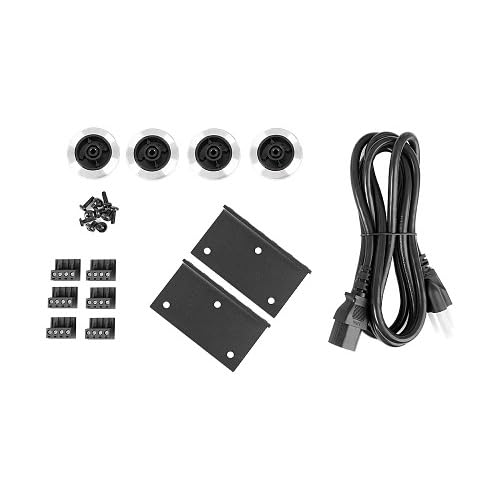
Terminal Blocks for Speaker Connections
Gumové nohy
Figure 2.1: Included accessories for the EA-DYN-16D-100 amplifier, showing the power cord, mounting hardware, and various connectors.
3. Nastavení
Při úvodním nastavení vašeho zařízení postupujte podle těchto kroků amplifier. The compact design allows for easy integration into various audio setups.
3.1 AmpUmístění čističe
Umístěte amplifier on a stable, flat surface or mount it using appropriate brackets. Ensure adequate ventilation around the unit to prevent overheating. Avoid placing it near heat sources or in direct sunlight.
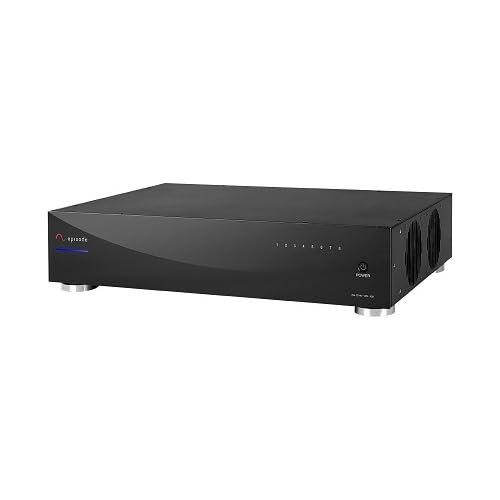
Obrázek 3.1: Přední úhel view of the EA-DYN-16D-100 amplifier, highlighting its compact form factor.
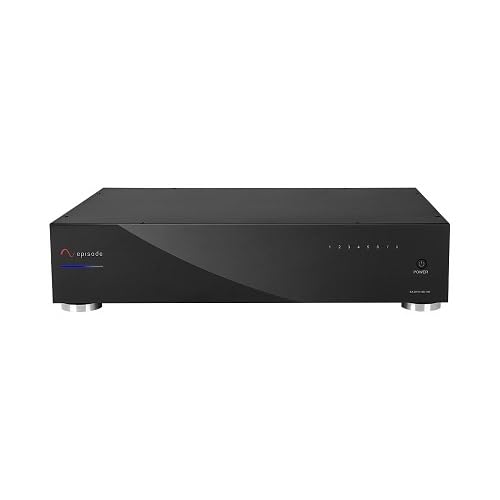
Figure 3.2: Front panel of the EA-DYN-16D-100 amplifier, showing the power indicator and channel status lights.
3.2 Připojení reproduktorů
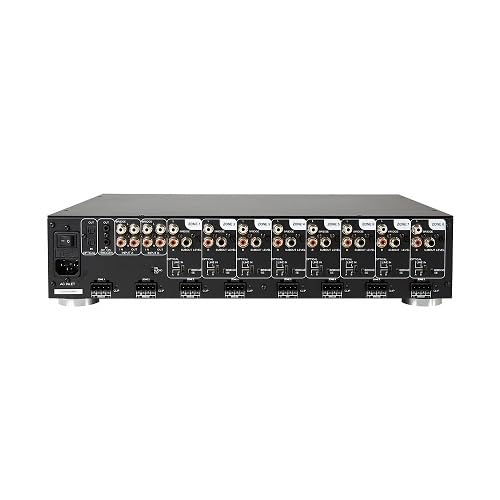
The EA-DYN-16D-100 features 16 channels for extensive connectivity. Connect your speakers to the appropriate output terminals on the rear panel. Ensure correct polarity (+ to + and - to -) for optimal sound performance. Use the provided terminal blocks for secure connections.
Figure 3.3: Rear panel of the EA-DYN-16D-100 amplifier, detailing the 16 channel outputs and various input connections.
3.3 Připojení napájení
Připojte dodaný napájecí kabel k portu AC IN na zadní straně amplifier and then to a suitable wall outlet. Ensure the ampPřed připojením k napájení se ujistěte, že je vypínač zařízení Liferier v poloze VYPNUTO.
4. Návod k obsluze
This section outlines the basic operation of your EA-DYN-16D-100 ampživější.
4.1 Zapnutí/vypnutí
Chcete-li zapnout amplifier, press the power button located on the front panel. The indicator lights for each channel will illuminate, indicating the unit is active. To power off, press the power button again.
4.2 Zvukový vstup a výstup
Connect your audio source (e.g., pre-amplifier, receiver) to the input ports on the rear panel. The amplifier will then distribute the audio signal to the connected speakers across its 16 channels. Adjust volume levels from your audio source or pre-ampživější.
5. Údržba
Správná údržba zajistí dlouhou životnost a optimální výkon vašeho ampživější.
Čištění: K čištění vnějších částí používejte měkký, suchý hadřík ampNepoužívejte tekuté čisticí prostředky ani abrazivní materiály.
Větrání: Ensure that the ventilation openings are clear of dust and obstructions. Periodically clean dust from vents using a soft brush or compressed air.
Skladování: Pokud uchováváte ampPokud přístroj nepoužíváte delší dobu, odpojte jej od napájení a skladujte jej na chladném a suchém místě mimo dosah přímého slunečního záření a extrémních teplot.
6. Řešení problémů
Tato část se zabývá běžnými problémy, se kterými se můžete setkat při práci s vaším ampživější.
Problém
Možná příčina
Řešení
Žádná síla
Power cable not connected; Power outlet not active; Ampvypněte napájení záchranáře.
Ensure power cable is securely connected. Check power outlet with another device. Press the power button on the front panel.
Žádný zvukový výstup
Incorrect speaker connections; Audio source not connected or active; Volume too low.
Verify speaker wire polarity and secure connections. Ensure audio source is connected and playing. Increase volume on the audio source.
Reduce input signal level. Check speaker cables for damage. Ensure speaker impedance matches ampspecifikace lifikátoru.
7. Specifikace
Detailed technical specifications for the EA-DYN-16D-100 ampživější:
Specifikace
Detail
Číslo modelu
EA-DYN-16D-100
ASIN
B0DY899V2Q
Výrobce
Epizoda
Země původu
USA
Datum první dostupnosti
24. února 2025
Kanály
16
Výkon
100W x 16 Channel
8. Záruka a podpora
For technical assistance, warranty claims, or product support, please refer to the manufacturer's official webnebo se obraťte na jejich oddělení zákaznických služeb. Pro rychlejší vyřízení mějte po ruce účtenku o koupi a sériové číslo produktu.
Extended protection plans may be available for this product:
Dvouletý ochranný plán (ASIN: B07PBD887Z)
Dvouletý ochranný plán (ASIN: B08F7ZGNLW)
Complete Protect: One plan covers all eligible past and future purchases (ASINB07RZ3LSHM)
Note: Protection plan availability and terms are subject to change. Please check the latest information from the seller or service provider.
Ask a question about this manual
Ask about setup, troubleshooting, compatibility, parts, safety, or missing instructions. Manuals+ will review the question and use this page’s manual context to help answer it.