
1. Úvod
The Reyee RG-EG1510XS is a powerful and intelligent business router engineered to meet the rigorous demands of enterprise networking environments. It supports up to 1500 concurrent clients, ensuring robust and seamless connectivity in high-density settings. This router serves as a central management hub, offering effortless integration with third-party authentication systems for flexible access control. It simplifies device management through easy intranet connection and terminal recognition, while advanced bandwidth control optimizes network performance. For enhanced security, it includes a 2.5” SATA HDD extension bay for local syslog storage. Furthermore, its cloud-based management capabilities allow businesses to monitor and configure their networks remotely, providing convenience and flexibility.
2. Konec produktuview
The RG-EG1510XS features a comprehensive front panel designed for easy connectivity and status monitoring.
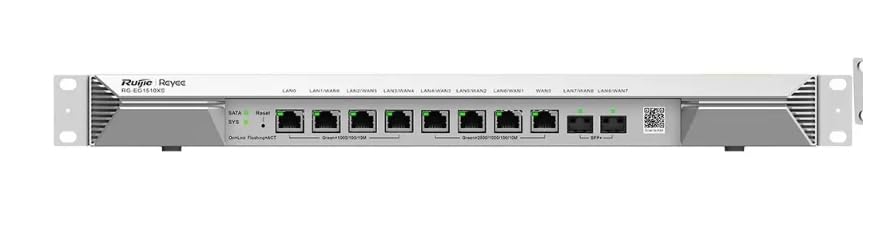
The image displays the front panel of the RG-EG1510XS router. From left to right, it features LED indicators for SATA and System status, a Reset button, and multiple Ethernet ports. These include LAN0, LAN1/WAN1, LAN2/WAN2, LAN3/WAN3, LAN4/WAN4, LAN5/WAN5, WAN6, LAN7/WAN7, and LAN8/WAN8. The ports are labeled for Gigabit Ethernet (1000/100/10M) and SFP+ (10G) connectivity. A QR code for device setup is also visible on the right side.
3. Nastavení
3.1 Obsah balení
Ověřte, zda jsou v balení přítomny všechny položky:
- RG-EG1510XS Router Unit
- Napájecí adaptér/kabel
- Ethernetový kabel
- Sada pro montáž do racku (pokud je k dispozici)
- Rychlý průvodce
3.2 Fyzická instalace
- Unpack the router and all accessories from the box.
- Mount the router in a standard 19-inch rack using the provided rack mount kit, or place it on a stable, flat surface with adequate ventilation.
- Connect the power adapter to the router's power input port and then plug it into a suitable power outlet.
- Connect your Internet Service Provider's (ISP) modem or Optical Network Terminal (ONT) to one of the WAN ports (e.g., WAN6 or a LAN/WAN port configured as WAN) using an Ethernet cable.
- Connect your local network devices, such as computers, switches, or access points, to the available LAN ports on the router.
4. Návod k obsluze
4.1 Počáteční konfigurace
To configure your RG-EG1510XS router:
- Connect a computer directly to one of the router's LAN ports using an Ethernet cable.
- Otevřete a web browser (e.g., Chrome, Firefox) and enter the default IP address of the router (commonly
192.168.1.1nebo jak je uvedeno v Stručné úvodní příručce). - Log in using the default username and password. Refer to the Quick Start Guide or the label on the device for these credentials.
- Follow the on-screen setup wizard to configure your internet connection, Wi-Fi settings (if applicable), and other basic network parameters.
4.2 Klíčové vlastnosti
The RG-EG1510XS offers a range of advanced features for business networking:
- Obrovská kapacita: Supports up to 1500 concurrent clients, ideal for large-scale deployments and high-density environments.
- Pokročilá správa sítě: Provides smart control capabilities with seamless integration for third-party authentication systems.
- Seamless Intranet Connectivity: Simplifies internal network access and communication for connected devices.
- Terminal & Bandwidth Management: Efficiently monitor and control connected devices and optimize bandwidth usage.
- Easy VPN Configuration: Facilitates secure remote access with simplified Virtual Private Network (VPN) setup.
- Local Syslog Storage: Equipped with a 2.5” SATA HDD extension bay for on-site log retention, enhancing security and compliance.
- Cloud-Based Management: Allows for remote monitoring, configuration, and optimization of your network from anywhere, anytime.
5. Údržba
To ensure optimal performance and longevity of your RG-EG1510XS router, regular maintenance is recommended:
- Aktualizace firmwaru: Periodically check the Reyee official website for the latest firmware updates. Installing updates can improve performance, add new features, and enhance security.
- Čištění: Udržujte router čistý a bez prachu. K otření vnějšího povrchu používejte měkký, suchý hadřík. Ujistěte se, že ventilační otvory nejsou zablokované.
- Větrání: Ensure the router is placed in a well-ventilated area to prevent overheating. Do not cover the ventilation holes.
- Systémové protokoly: Pravidelně znovuview system logs for any unusual activity or error messages that may indicate potential issues.
- Bezpečná hesla: Change default login passwords for the router's web interface and Wi-Fi (if applicable) to strong, unique passwords.
6. Řešení problémů
Tato část obsahuje řešení běžných problémů, se kterými se můžete setkat:
| Problém | Možná příčina | Řešení |
|---|---|---|
| Žádná kontrolka napájení | Odpojený napájecí kabel; problém se zásuvkou. | Ensure power cable is securely connected to the router and a working power outlet. Try a different outlet. |
| Žádný přístup k internetu | WAN cable disconnected; ISP issue; incorrect WAN settings. | Check the WAN cable connection to your modem/ONT. Verify your ISP service status. Review WAN settings in the router's web rozhraní. |
| Nelze přistupovat k routerům web rozhraní | Incorrect IP address; network cable issue; firewall blocking access. | Verify you are using the correct default IP address. Ensure your computer is connected to a LAN port. Temporarily disable computer firewall to test. |
| Nízká rychlost sítě | High network traffic; outdated firmware; faulty cables. | Check bandwidth usage by connected devices. Update router firmware. Replace old or damaged Ethernet cables. |
| Device not recognized by router | Incorrect cable; device driver issue; port malfunction. | Ensure correct cable type (e.g., Ethernet). Update device drivers on the connected client. Try a different LAN port. |
7. Specifikace
Key technical specifications for the RG-EG1510XS router:
| Atribut | Hodnota |
|---|---|
| Model | RG-EG1510XS |
| ASIN | B0DY83Q9CD |
| Výrobce | Reyee |
| Značka (jak je uvedena) | Obecný |
| Datum první dostupnosti | 24. února 2025 |
| Zahrnuté komponenty | ENS (Refer to Section 3.1 for detailed package contents) |
| Concurrent Clients Support | Až do 1500 |
| Rozšíření úložiště | 2.5” SATA HDD extension bay for local syslog storage |
| Řízení | Cloud-Based Management |
8. Záruka a podpora
The RG-EG1510XS router comes with a standard limited warranty. For specific warranty terms and conditions, please refer to the warranty card included with your product or visit the official Reyee webmísto.
For technical support, troubleshooting assistance, or to inquire about product services, please contact Reyee customer support through their official webwebu nebo kontaktní informace uvedené v dokumentaci k produktu. Před kontaktováním podpory mějte prosím připravený model produktu a sériové číslo.
Poznámka: Specifikace a funkce produktu se mohou změnit bez předchozího upozornění.