
Zavedení
Thank you for choosing the Alomejor Wireless Translation Earbuds. These earbuds are designed to provide real-time language translation, enabling seamless communication across different languages. Featuring noise-canceling technology and a comfortable design, they are suitable for various environments, from business meetings to travel. This manual provides essential information for the proper setup, operation, maintenance, and troubleshooting of your device.

Image: Alomejor Wireless Translation Earbuds and their charging case, shown with individuals engaged in conversation in the background, illustrating their use in communication settings.
Nastavení
1. Nabíjení sluchátek a pouzdra
Before first use, fully charge the earbuds and the charging case. Place the earbuds into the charging case. Connect the charging case to a power source using the provided USB cable. The indicator lights on the case will show the charging status. A full charge typically takes approximately 1-2 hours.

Image: The Alomejor Wireless Translation Earbuds securely placed within their open charging case, ready for charging or storage.
2. Párování Bluetooth
- Ujistěte se, že jsou sluchátka nabitá a vyjmutá z nabíjecího pouzdra. Automaticky se přepnou do režimu párování.
- Na svém mobilním zařízení povolte Bluetooth a vyhledejte dostupná zařízení.
- Select "Alomejor Earbuds" (or similar name) from the list to connect.
- Po připojení hlasový pokyn potvrdí úspěšné spárování.
3. Translation App Installation
For real-time translation functionality, download and install the dedicated translation application on your smartphone. Refer to the separate software manual included in your package for specific app details and setup instructions. Ensure your phone has an active internet connection for optimal translation performance.
Návod k obsluze
1. Zapnutí/vypnutí
- Zapnutí: Vyjměte sluchátka z nabíjecího pouzdra. Automaticky se zapnou.
- Vypnout: Vložte sluchátka zpět do nabíjecího pouzdra. Automaticky se vypnou a začnou se nabíjet.
2. Real-Time Translation
Once paired with your device and the translation app is running:
- Open the translation application on your smartphone.
- Select the desired translation mode (e.g., conversation mode, simultaneous interpretation).
- Speak into the earbud's microphone, and the translated audio will be played through the other earbud or your connected device, depending on the app's settings.
- Ensure clear speech and a stable internet connection for accurate translation.

Obrázek: Podrobný view of an earbud positioned on an ear, highlighting the directional sound transfer technology designed for clear audio and privacy.
3. Audio Playback and Calls
The earbuds can also be used for standard audio playback and phone calls:
- Přehrát/pozastavit: Jednou klepněte na oblast dotykového ovládání na kterémkoli sluchátku.
- Přijmout/ukončit hovor: Během příchozího hovoru jednou klepněte na dotykovou ovládací oblast na kterémkoli ze sluchátek.
- Odmítnout hovor: Stiskněte a podržte dotykovou oblast na kterémkoli sluchátku po dobu 2 sekund.
- Noise-Canceling: The earbuds feature integrated noise-canceling technology to enhance audio clarity during calls and translation. This feature is typically active by default or managed through the connected app.
Údržba
1. Čištění
- Jemně otřete sluchátka a nabíjecí pouzdro měkkým, suchým hadříkem, který nepouští vlákna.
- Nepoužívejte abrazivní čisticí prostředky, rozpouštědla ani aerosolové spreje.
- Zabraňte vniknutí vlhkosti do jakýchkoli otvorů.

Image: A detailed close-up of the Alomejor Wireless Translation Earbuds, highlighting their ergonomic design and the various components.
2. Péče o baterie
- Chcete-li prodloužit životnost baterie, vyhněte se častému úplnému vybíjení sluchátek a nabíjecího pouzdra.
- Pokud zařízení nepoužíváte, skladujte jej na chladném a suchém místě.
- Nevystavujte extrémním teplotám.
3. Skladování
Always store the earbuds in their charging case to protect them from dust, damage, and to keep them charged.
Odstraňování problémů
- Earbuds not turning on/charging: Ensure the charging case is charged. Check that the earbuds are correctly seated in the case. Clean the charging contacts if necessary.
- Problémy s párováním Bluetooth: Make sure Bluetooth is enabled on your device. Turn off and on the earbuds. Forget the device in your phone's Bluetooth settings and try pairing again. Ensure earbuds are not connected to another device.
- No sound/poor sound quality: Check the volume levels on both your device and the earbuds. Ensure the earbuds are properly seated in your ears. If using for translation, verify internet connection and app settings.
- Překlad nefunguje: Confirm the translation app is open and correctly configured. Check your internet connection. Ensure the correct languages are selected in the app. Speak clearly and at a moderate pace.
- Časté odpojování sluchátek: Ujistěte se, že se vaše zařízení nachází v dosahu Bluetooth (obvykle 10 metrů/33 stop) a že se v jeho dosahu nenacházejí žádné významné překážky.
Specifikace
| Funkce | Specifikace |
|---|---|
| Typ položky | Překladová sluchátka |
| Materiál | Akrylonitrilbutadienstyren (ABS) |
| Nabíjecí pouzdro Typ baterie | Li baterie |
| Kapacita baterie nabíjecího pouzdra | 300 XNUMX mAh |
| Kapacita baterie jednoho sluchátka | 90 XNUMX mAh |
| Verze Bluetooth | V5.3+EDR |
| Bezdrátová frekvence | 2.4 GHz |
| Podporované protokoly | HFP, HSP, AVRCP, A2DP, AVTCP |
| Pracovní teplota | -10-45 °C |
| Rozměry balení | 4.72 x 3.94 x 1.57 palce |
| Hmotnost položky | 4.1 unce |
| Číslo modelu | Alomejor613a7dbh4g-12 |
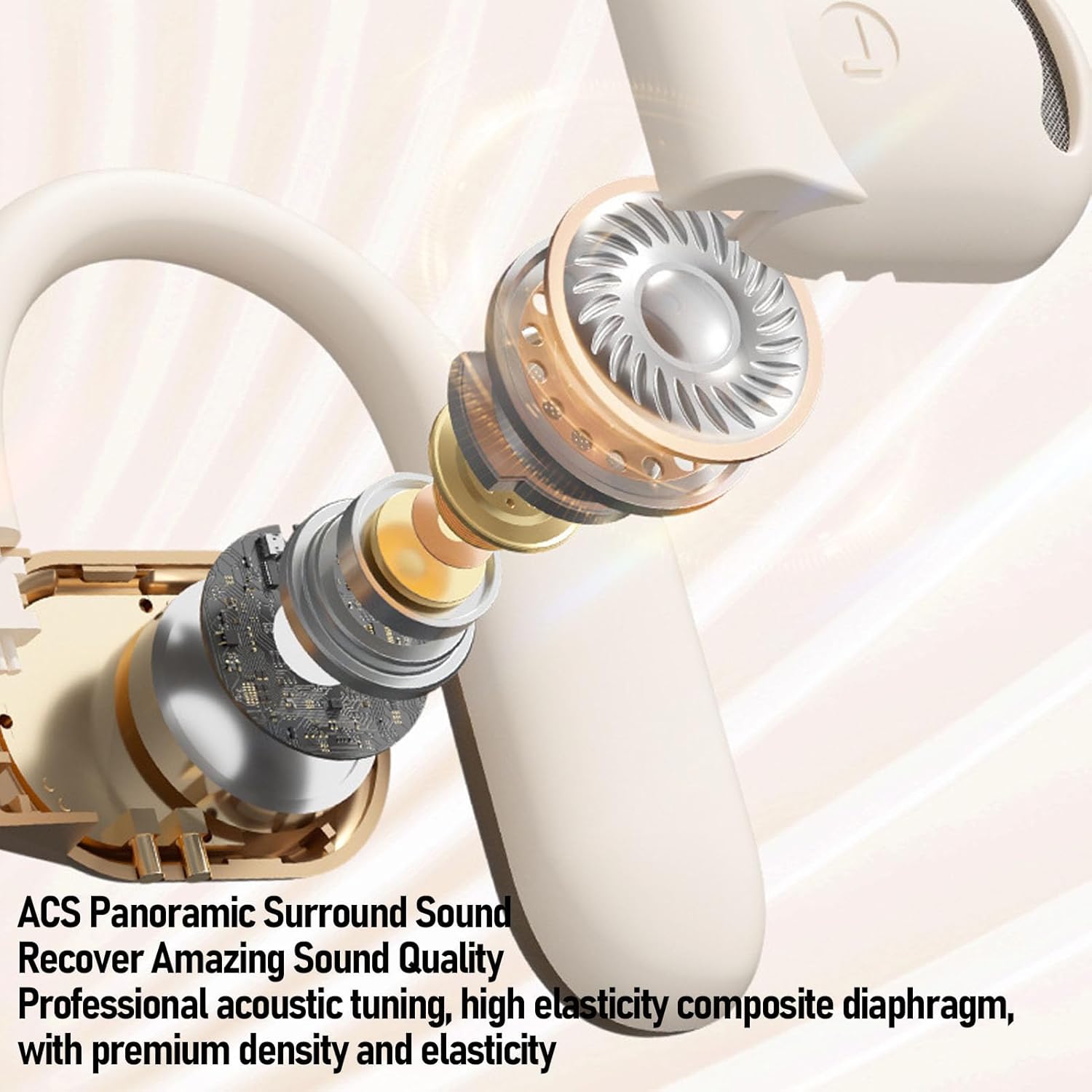
Obrázek: Explodoval view of an Alomejor earbud, showcasing its internal acoustic components and the "ACS Panoramic Surround Sound" technology.
Záruka a podpora
For warranty information, please refer to the documentation provided at the time of purchase or contact your retailer. For technical support or further assistance, please visit the official Alomejor webnebo kontaktujte jejich oddělení zákaznických služeb pomocí kontaktních údajů uvedených na obalu produktu.