
Zavedení
Thank you for choosing the TELE System TS9019HEVC Satellite Decoder. This device is designed to provide stable and seamless reception of Tivùsat digital satellite channels, including over 70 free HD channels. This manual will guide you through the setup, operation, and maintenance of your new decoder to ensure an optimal viewzkušenosti.
Obsah balení
Ověřte prosím, zda jsou ve vašem balení obsaženy všechny níže uvedené položky:
- TELE System TS9019HEVC Satellite Decoder
- Tivùsat HD Smartcard (Merlin)
- Externí napájecí zdroj
- Dálkové ovládání
- 2x AAA baterie
- HDMI kabel

Image: The TELE System TS9019HEVC decoder, its remote control, and the included Tivùsat Smartcard.
Nastavení
1. Připojení dekodéru
- Připojení satelitní antény: Connect your satellite dish cable to the "RF IN" port on the back of the decoder.
- Připojení HDMI: Connect one end of the supplied HDMI cable to the "HDMI" port on the decoder and the other end to an available HDMI input on your television.
- Připojení napájení: Connect the external power supply to the "12V DC" port on the decoder, then plug the power adapter into a wall outlet.
- Optional AV Connection: If your TV does not have an HDMI input, you can use an AV cable (not included) to connect to the "AV" port.
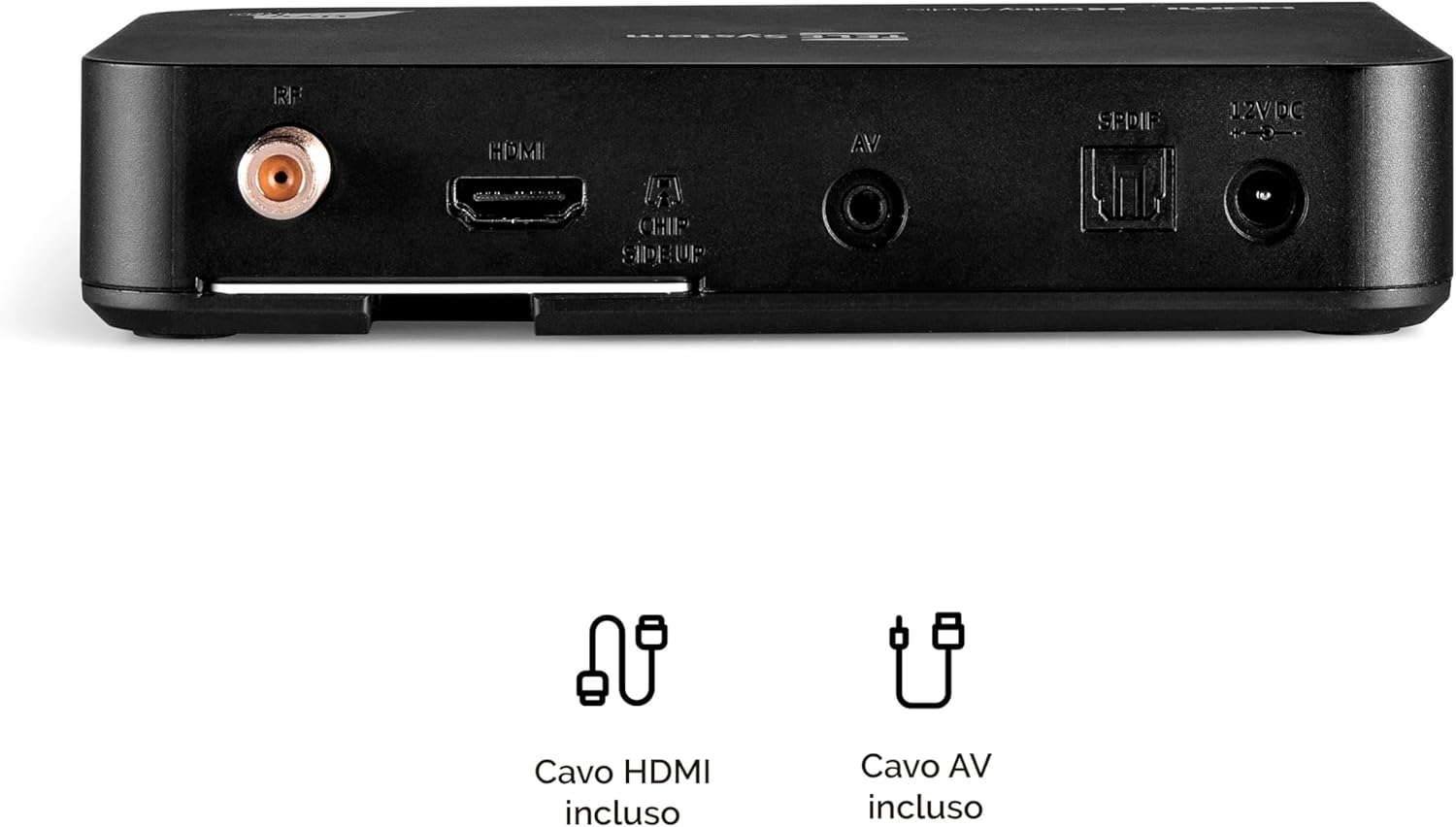
Image: Rear panel connections of the decoder, including RF IN, HDMI, AV, SPDIF, and 12V DC power input.
2. Inserting the Tivùsat Smartcard
The Tivùsat Smartcard is essential for accessing encrypted channels. Ensure it is inserted correctly:
- Locate the smartcard slot on the side of the decoder.
- Insert the Tivùsat Smartcard with the chip facing upwards and the arrow pointing into the slot. Push it gently until it clicks into place.
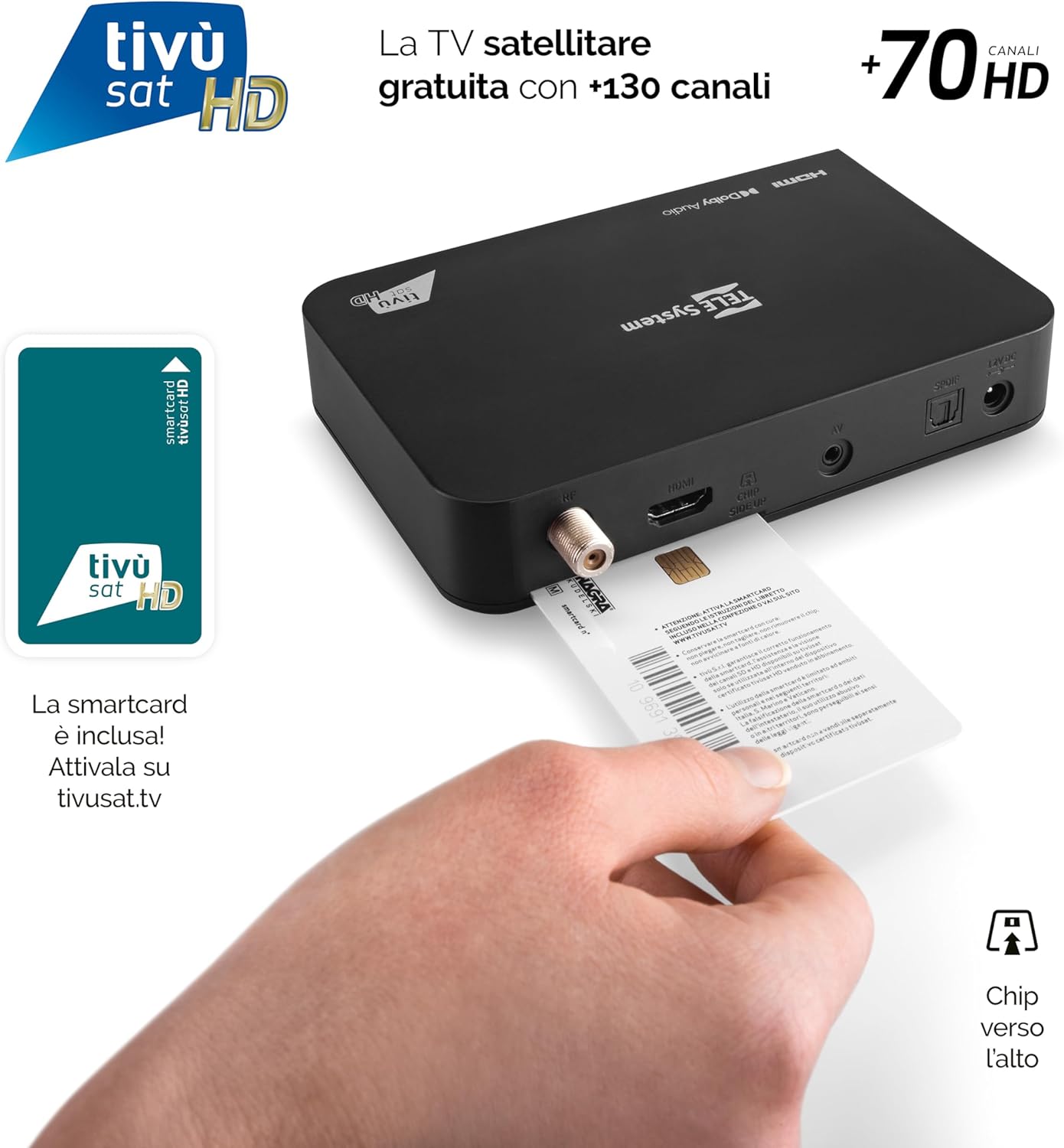
Image: Proper insertion of the Tivùsat Smartcard into the decoder's side slot.
3. Průvodce počátečním nastavením
After connecting all cables and inserting the smartcard, turn on your TV and select the correct HDMI input. Power on the decoder. The initial setup wizard will guide you through:
- Výběr jazyka
- Satellite dish configuration
- Automatic channel scan (EASY HD)
4. Activating the Tivùsat Smartcard
To access all Tivùsat channels, your smartcard must be activated. You can activate it easily on the official Tivùsat webweb (www.tivusat.tv). Follow the instructions provided on the website for activation. Note that older Tivùsat Tiger smartcards may be obsolete and require replacement with a Merlin card.
Návod k obsluze
Základní funkce
- Zapnutí/vypnutí: Použijte MOC button on the remote control or the front panel of the decoder.
- Výběr kanálu: Použijte P+ / P- tlačítky pro postupné přepínání kanálů nebo zadejte číslo kanálu přímo pomocí numerické klávesnice.
- Ovládání hlasitosti: Použijte VOL+ / VOL- tlačítka pro nastavení hlasitosti.
- Menu: Stiskněte tlačítko MENU tlačítko pro přístup do hlavní nabídky s nastaveními a funkcemi.
- Tlačítko OK: Confirms selections in menus or displays the channel list during live TV.
- Východ/Zpět: Návrat na předchozí obrazovku nebo opuštění nabídky.

Image: The remote control for the TELE System TS9019HEVC decoder, highlighting key function buttons.
Pokročilé funkce
- Elektronický programový průvodce (EPG): Stiskněte tlačítko EPG button on the remote to view the program schedule for upcoming broadcasts.
- Seznamy oblíbených: Create and manage personalized lists of your preferred channels for quick access. Refer to the on-screen menu for instructions.
- TV Pause (Timeshift): Connect a USB storage device (not included) to the USB port on the decoder. This feature allows you to pause live TV and resume viewpozději.
- Automatic Channel Update: The decoder automatically updates Tivùsat channels, ensuring you always have access to the latest channel lineup.
- Funkce časovače: Set timers to automatically switch to a specific channel at a scheduled time.

Obrázek: Přample of the channel list interface, displaying various Tivùsat channels.
Údržba
Aktualizace softwaru
To ensure your decoder always has the latest features, improvements, and security updates, regularly check for software updates. Updates can be performed via:
- Over-The-Air (OTA): The decoder may receive updates automatically via satellite. You will be prompted on-screen if an update is available.
- USB: Download the latest firmware from the TELE System official website to a USB stick and follow the instructions provided with the firmware file for a manual update.
Always ensure the decoder remains powered on during a software update to prevent damage.
Obecná péče
- Keep the decoder in a well-ventilated area to prevent overheating.
- Vnější povrch čistěte měkkým, suchým hadříkem. Nepoužívejte tekuté čisticí prostředky ani abrazivní materiály.
- Avoid exposing the decoder to direct sunlight, high temperatures, or humidity.
Odstraňování problémů
| Problém | Možná příčina | Řešení |
|---|---|---|
| Žádný signál / Černá obrazovka | Incorrect HDMI input selected on TV; Satellite cable disconnected; Dish misalignment. |
|
| "Smartcard Error" Message | Smartcard incorrectly inserted; Smartcard not activated; Obsolete smartcard. |
|
| Žádný zvuk | TV or decoder volume muted; Incorrect audio settings. |
|
| Dálkové ovládání nefunguje | Dead batteries; Obstruction between remote and decoder; Remote not paired (if applicable). |
|
Specifikace
| Funkce | Detail |
|---|---|
| Značka | TELE systém |
| Číslo modelu | 58010100 |
| Barva | Černý |
| Technologie připojení | USB |
| Režim zvukového výstupu | Stereo |
| Celkový počet portů HDMI | 1 |
| Kompatibilní zařízení | Televize |
| Podporované zvukové formáty | Dolby Digital, DTS, AAC, MP3, PCM |
| Popis satelitní služby | Tivùsat HD Classic and DAZN |
| Total Video Output Ports | 1 |
| Rozlišení výstupu videa | 1080p |
| Podporované standardy | DVB-S, H.264, MP2, MP3, AAC, HD |
| Formát obrazovky | 16:9 |
| Země původu | Čína |
Informace o záruce
The TELE System TS9019HEVC Satellite Decoder comes with a 2letá záruka na produkt from the date of purchase. This warranty covers manufacturing defects and malfunctions under normal use. Please retain your proof of purchase for warranty claims. For detailed terms and conditions, please refer to the warranty card included in your package or visit the official TELE System webmísto.
Podpora
For further assistance, technical support, or frequently asked questions, please visit:
- TELE System Official Webmísto: www.telesystem.it
- Tivùsat Support: For smartcard activation and Tivùsat specific inquiries, visit www.tivusat.tv
Než kontaktujete podporu, ujistěte se, že máteviewed the troubleshooting section of this manual.