
Důležité bezpečnostní informace
Před montáží a použitím si prosím pečlivě přečtěte tento návod. Uschovejte si jej pro budoucí použití.
- Always ensure the desk is properly anchored to the wall or floor to prevent tipping. Use appropriate anchoring hardware for your wall type.
- Do not place heavy objects on the desk that could cause it to tip or become unstable. Distribute weight evenly.
- Exercise caution during assembly to avoid injuries from heavy or sharp components. It is recommended to assemble with two people.
- Udržujte děti a domácí zvířata mimo oblast montáže.
- Před použitím se ujistěte, že jsou všechny šrouby a spojovací prvky bezpečně utažené. Pravidelně kontrolujte a v případě potřeby dotahujte.
- Do not overload the integrated power outlets. Refer to the specifications for maximum load.
Nastavení a montáž
This Grandder L-Shaped Gaming Desk (Model E109-40T) requires assembly. The package includes detailed assembly instructions. While all necessary tools are not included, standard household tools may be required.
Obsah balení
Verify that all components listed in the included assembly guide are present before beginning assembly.
- Desk panels (carbon fiber surface, MDF)
- Kovové rámové komponenty
- Stojan na monitor
- Integrated power strip (2 AC outlets, 1 USB, 1 Type-C)
- LED světelný pásek s ovladačem
- Montážní materiál (šrouby, vruty atd.)
- Návod k montáži
Montážní kroky
- Rozbalte a identifikujte: Carefully unpack all components and lay them out on a clean, soft surface to prevent scratches. Identify each part using the provided assembly diagram.
- Sestava rámu: Assemble the main metal frame according to the instructions. Ensure all connections are secure but do not fully tighten screws until the entire frame is assembled.
- Oboustranný design: Decide whether you want the L-shaped corner on the left or right side of the desk. The design is reversible, allowing for flexible placement. Follow the specific instructions for your chosen orientation.
- Připevnění panelů stolu: Secure the carbon fiber desk panels to the assembled frame.
- Instalace stojanu na monitor: Připevněte stojan monitoru k hlavní desce stolu.
- Integrace prodlužovacího kabelu: Install the recessed power strip into its designated slot. Connect the power cable.
- Použití LED světelného pásku: Adhere the LED light strip to the underside of the monitor stand or as indicated in the manual. Connect it to the power source.
- Instalace úložné police: Attach the adjustable storage shelf to the side frame. This shelf is also removable.
- Konečné utažení: Jakmile jsou všechny součásti na svém místě a zarovnané, zcela utáhněte všechny šrouby a upevňovací prvky.
- Placement and Anchoring: Position the desk in its desired location. For safety, anchor the desk to a wall using appropriate hardware (not included) to prevent tipping, especially if heavy equipment is placed on it.

Figure 1: Dimensions and reversible design of the Grandder L-shaped gaming desk. The corner section can be installed on either the left or right side.
Návod k obsluze
Integrovaný prodlužovací kabel
The desk features a recessed power strip for convenient access to power and charging.
- AC zásuvky: Two 125V/12A AC outlets are provided for powering devices such as monitors, computers, or other peripherals.
- USB porty: One 5V/3A USB-A port and one 5V/3A USB-C port are available for charging smartphones, tablets, and other USB-powered devices.
- Napájecí kabel: The integrated power strip is connected via a 1.5m power cable. Plug this cable into a standard wall outlet.
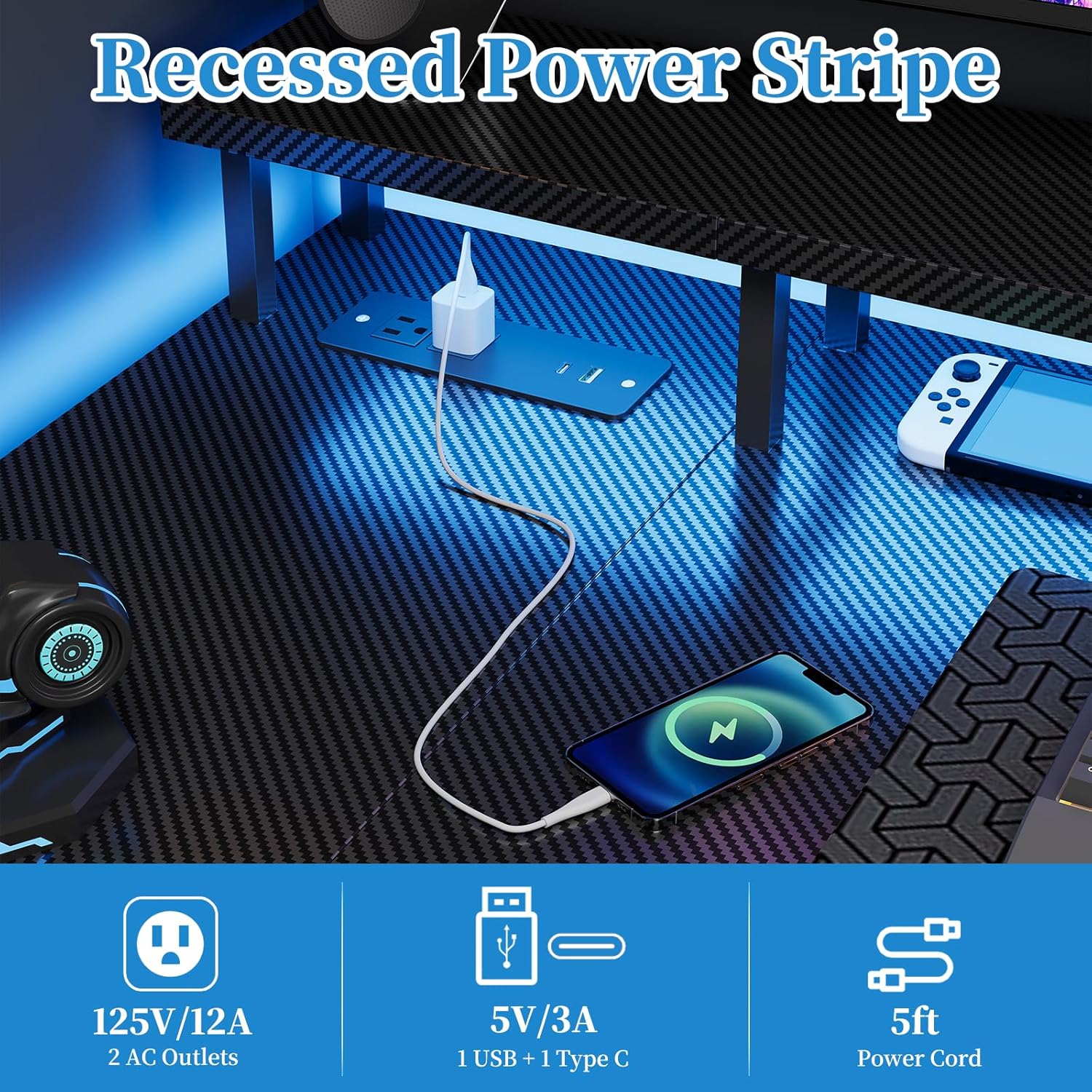
Figure 2: Recessed power strip with AC, USB-A, and USB-C outlets.
Provoz LED světelného pásku
The desk includes a multi-functional LED light strip to enhance your environment. It is controlled via an inline controller.
- Zapnutí/vypnutí: Use the power button on the controller to turn the LED strip on or off.
- Výběr barvy: Cycle through various colors using the color selection button. The strip offers 20 color change options.
- Nastavení jasu: Adjust the brightness levels to your preference using the dedicated brightness buttons.
- Ovládání rychlosti: For dynamic lighting modes, adjust the speed of color transitions or effects.
- Predefined Modes: The controller may offer several predefined lighting modes for different atmospheres.

Figure 3: LED light strip with controller for color, brightness, and speed adjustments.
Monitor Stand and Storage Shelf
- Stojan na monitor: The elevated monitor stand promotes ergonomic viewing posture, reducing neck and eye strain. Place your monitor(s) directly on this stand.
- Nastavitelná úložná police: The side storage shelf can be adjusted or removed to accommodate various items, such as a computer tower, books, or accessories.

Figure 4: Ergonomic design of the monitor stand for improved posture.

Figure 5: Adjustable storage shelf for flexible organization.
Údržba
- Čištění: Otřete povrch stolu měkkým hadříkemamp cloth. Avoid abrasive cleaners or harsh chemicals that could damage the carbon fiber finish or MDF.
- Spojovací materiál: Pravidelně kontrolujte všechny šrouby a upevňovací prvky, zda jsou pevně utažené. V případě potřeby je dotáhněte pro zachování stability.
- Elektrické komponenty: Ensure the power strip and LED light strip connections are secure. Do not attempt to repair electrical components yourself. If damage occurs, discontinue use and contact customer support.
- Rozložení hmotnosti: Avoid concentrating heavy loads on one area of the desk. Distribute weight evenly across the surface and shelves.
Odstraňování problémů
Desk Instability
- Problém: Stůl se třese nebo působí nestabilně.
- Řešení:
- Zkontrolujte všechny montážní šrouby a matice. Utáhněte všechny uvolněné upevňovací prvky.
- Ensure the desk is on a level surface. Use leveling feet (if included) or shims to stabilize.
- Verify that the desk is properly anchored to the wall if heavy items are placed on it.
Elektrické zásuvky nefungují
- Problém: Devices plugged into the AC or USB ports are not receiving power.
- Řešení:
- Ujistěte se, že je hlavní napájecí kabel stolu bezpečně zapojený do funkční zásuvky.
- Zkontrolujte, zda zásuvka funguje, zapojením jiného zařízení.
- Avoid overloading the power strip. Disconnect some devices to see if power is restored.
- If the issue persists, contact customer support. Do not attempt to disassemble the power strip.
LED Light Strip Not Functioning
- Problém: The LED light strip does not turn on or is not responding to the controller.
- Řešení:
- Ensure the LED strip is properly connected to its power source and the controller.
- Check if the main power cable for the desk is plugged in.
- Verify that the controller's battery (if applicable) is functional or that it is receiving power.
- Try pressing the power button on the controller firmly.
- Pokud problém přetrvává, kontaktujte zákaznickou podporu.
Specifikace produktu
| Číslo modelu | E109-40T |
| Značka | Grander |
| Typ | Reversible L-Shaped Gaming Desk |
| Rozměry (D x Š x V) | 100 x 50 x 75 cm (main section), 70 x 100 x 75 cm (overall L-shape) |
| Hmotnost | 12.8 kg |
| Barva | Carbon Black Aspect |
| Materiál | Carbon Fiber Surface, Engineered Wood (MDF) |
| Elektrické zásuvky | 2 x AC (125V/12A), 1 x USB-A (5V/3A), 1 x USB-C (5V/3A) |
| Délka napájecího kabelu | 1.5 metrů |
| Speciální funkce | Integrated LED Lights, Recessed Power Strip, Monitor Stand, Reversible L-Shape, Adjustable Storage Shelf |
| Montáž Vyžadována | Ano |
Informace o záruce
The Grandder L-Shaped Gaming Desk (Model E109-40T) comes with a Doživotní zárukaTato záruka se vztahuje na výrobní vady a vady materiálu při běžném používání. Nevztahuje se na škody způsobené nesprávným použitím, nehodami, neoprávněnými úpravami nebo běžným opotřebením.
To make a warranty claim, please retain your proof of purchase and contact Grandder customer support.
Zákaznická podpora
If you have any questions, require assistance with assembly, or encounter any issues with your Grandder L-Shaped Gaming Desk, please do not hesitate to contact our professional customer service team.
Our team is available 24/7 to provide prompt and reliable assistance.
Kontaktní údaje: Please refer to the contact details provided on your purchase receipt or the Grandder official webweb s nejaktuálnějšími kanály podpory.


