
1. Úvod
This manual provides comprehensive instructions for the installation, operation, and maintenance of your FalconEye Electronics Pinnacle Mini 4K Dash Cam with GPS. Please read this manual thoroughly before using the device to ensure proper functionality and to maximize its performance.
2. Obsah balení
Ověřte, zda jsou v balení přítomny všechny níže uvedené položky:
- FalconEye Electronics Pinnacle Mini 4K Dash Cam
- Nabíječka do auta
- 128GB Micro SD Card (if purchased with this variant)
- Montážní konzola

Image: Contents of the FalconEye Pinnacle Mini 4K Dash Cam package, including the dash cam, car charger, and a Micro SD card.
3. Konec produktuview
The FalconEye Electronics Pinnacle Mini 4K Dash Cam is designed to record high-quality video footage of your journeys. Key features include 4K Ultra HD recording, a 170-degree wide-angle view, built-in GPS, G-Sensor, Wi-Fi connectivity, and enhanced night vision.
3.1 Součásti zařízení
- 4K Ultra HD Lens: Captures video at 2160p@30fps with a 170-degree field of view.
- 2" IPS displej: Pro živé vystoupení view, přehrávání a navigace v nabídce.
- GPS modul: Zaznamenává rychlost a polohu vozidla.
- G-senzor: Automatically detects impacts and locks video files.
- Wi-Fi modul: Enables connection to a smartphone app for control and file převod.
- Slot pro kartu Micro SD: Supports up to 256GB for continuous loop recording.
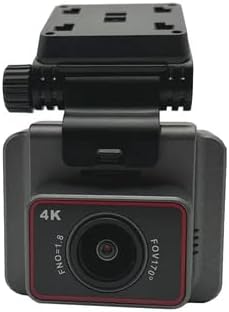
Obrázek: Přední strana view of the dash cam, showing the 4K lens and FOV 170° marking.

Obrázek: Zadní view of the dash cam, displaying the 2-inch IPS screen.

Obrázek: Boční view of the dash cam, showing the adjustable mounting bracket.
4. Nastavení a instalace
4.1 Vložení Micro SD karty
- Ujistěte se, že je palubní kamera vypnutá.
- Vyhledejte slot pro kartu Micro SD na boku zařízení.
- Insert the Micro SD card (up to 256GB, Class 10 or higher recommended) into the slot until it clicks into place.
- Chcete-li kartu vyjmout, jemně ji zatlačte, dokud nevyskočí.
4.2 Montáž palubní kamery
- Vyčistěte oblast čelního skla, kam chcete namontovat palubní kameru.
- Připevněte montážní držák k palubní kameře.
- Secure the dash cam with its bracket to the windshield, ensuring it does not obstruct your view.
- Upravte úhel kamery tak, aby jasně zachytila silnici před vámi.
4.3 Připojení napájení
- Připojte nabíječku do auta ke vstupnímu portu napájení palubní kamery.
- Zapojte druhý konec autonabíječky do 12V zásuvky ve vozidle (zásuvka zapalovače cigaret).
- Palubní kamera se obvykle automaticky zapne při nastartování vozidla a vypne se při jeho vypnutí.
5. Návod k obsluze
5.1 Základní nahrávání
Once powered on, the dash cam will automatically begin continuous loop recording. Video files are saved to the Micro SD card. When the card is full, the oldest unprotected files budou přepsány.
5.2 Funkce GPS
The built-in GPS module records your vehicle's speed and location data, embedding this information into the video files. Tato data mohou být viewed during playback using compatible software on a computer or via the smartphone app.
- Disabling GPS: If you wish to disable GPS recording, navigate to the settings menu on the dash cam and turn off the GPS option.
5.3 G-senzor (nouzové nahrávání)
The G-Sensor detects sudden impacts, hard braking, or collisions. When triggered, it automatically locks the current video file, preventing it from being overwritten by loop recording. These emergency files are stored in a separate folder on the Micro SD card.
5.4 Wi-Fi and Smartphone App Control
The dash cam features built-in Wi-Fi, allowing you to connect it to your smartphone via a dedicated app (available for Apple and Android devices). This app enables:
- Žít view zdroje fotoaparátu.
- Playback and download of recorded videos.
- Adjustment of dash cam settings.
Refer to the app's instructions for detailed connection and usage procedures.
Image: The dash cam's screen showing a live view of the road, indicating active recording.
6. Údržba
6.1 Čištění zařízení
- K čištění těla palubní kamery použijte měkký, suchý hadřík.
- Na čočky použijte speciální hadřík a roztok na čištění čoček, abyste zabránili poškrábání.
- Nepoužívejte abrazivní čisticí prostředky nebo rozpouštědla.
6.2 Správa karet Micro SD
- Regularly format the Micro SD card (e.g., once a month) within the dash cam's settings to ensure optimal performance and prevent data corruption.
- Back up any important video filedo počítače nebo cloudového úložiště před formátováním.
7. Řešení problémů
| Problém | Možná příčina / řešení |
|---|---|
| Palubní kamera se nezapne. |
|
| Nahrávání se zastaví nebo zamrzne. |
|
| GPS not recording location/speed. |
|
| Problémy s připojením k Wi-Fi. |
|
8. Specifikace
| Funkce | Detail |
|---|---|
| Rozlišení videa | 4K Ultra HD (2160p@30fps) |
| Úhel objektivu | Širokoúhlý 170 stupňů |
| Zobrazit | 2" IPS displej |
| GPS | Built-in (records speed & location) |
| G-senzor | Yes (emergency recording) |
| Wi-Fi | Built-in (smartphone app control) |
| Noční vidění | Enhanced with Sony Sensor |
| Nahrávání ve smyčce | Continuous, 24-hour protection |
| Podpora paměti | Micro SD karta až 256 GB |
| Konektivita | USB |
| Speciální funkce | Dotyková obrazovka |
| Rozměry produktu | 5 x 3 x 4 palce |
| Hmotnost položky | 15.47 libry |
| Výrobce | Elektronika FalconEye |
9. Záruka a podpora
For warranty information and technical support, please refer to the official FalconEye Electronics webnebo se obraťte přímo na jejich zákaznický servis. Uschovejte si účtenku jako doklad o koupi pro případ reklamace.
Výrobce: Elektronika FalconEye
Značka: Falcon Electronics