
Zavedení
This manual provides detailed instructions for the installation, operation, and maintenance of your FalconEye Electronics Dual Pinnacle Pro 4K Dash Cam with GPS. Please read this manual thoroughly before using the device to ensure proper functionality and safety.
The FalconEye Dual Pinnacle Pro is a high-performance dash camera system designed to record vehicle activity. It features a 4K Ultra HD front camera and a 1080P waterproof secondary camera, offering comprehensive coverage. Key features include built-in Wi-Fi, continuous loop recording, G-Sensor incident detection, enhanced night vision, and GPS for speed and location tracking.
Obsah balení
Before proceeding with installation, verify that all items are present in the package:
- FalconEye Dual Pinnacle Pro 4K Dash Cam (Main Unit)
- Secondary 1080P Camera
- Nabíječka do auta
- Montážní konzola
- GPS Module (integrated or separate, depending on model)
- Uživatelská příručka (tento dokument)

Image: The FalconEye Dual Pinnacle Pro 4K Dash Cam main unit, secondary camera, car charger, and other included accessories.
Nastavení
- Vložte paměťovou kartu: Ensure the dash cam is powered off. Insert a compatible microSD card (up to 256GB, not included with this model) into the designated slot until it clicks into place.
- Namontujte hlavní jednotku: Attach the main dash cam unit to the windshield using the provided mounting bracket. Position it to ensure a clear view of the road ahead without obstructing the driver's vision.
- Connect Secondary Camera: Connect the secondary 1080P camera to the main unit using the provided cable. Mount the secondary camera in the desired location (e.g., rear window) ensuring it has a clear view.
- Připojení napájení: Connect the car charger to the dash cam's power input and then into your vehicle's 12V power outlet. The device will typically power on automatically when the vehicle starts.
- Počáteční nastavení: Upon first power-on, the device may prompt you to set the date, time, and language. Follow the on-screen instructions using the 3-inch IPS touchscreen.
- Funkce GPS: The integrated GPS module will automatically begin tracking speed and location. If you wish to disable GPS recording, navigate to the settings menu on the device.
- Wi-Fi and App Connection:
- Download the FalconEye smartphone application from the Apple App Store or Google Play Store.
- Enable Wi-Fi on your dash cam via the settings menu.
- Na smartphonu se připojte k Wi-Fi síti palubní kamery (SSID a heslo se zobrazí na obrazovce palubní kamery).
- Open the FalconEye app to view živé footage, manage settings, and download recorded videos.

Image: The FalconEye Dual Pinnacle Pro 4K Dash Cam main unit and its detachable secondary camera, ready for installation.
Návod k obsluze
- Automatické nahrávání: Once powered on, the dash cam will automatically begin recording. The front camera records in 4K Ultra HD (2160p@30fps) with a 170° wide-angle lens, and the secondary camera records in 1080P with a 150° wide-angle lens.
- Nahrávání ve smyčce: The device utilizes continuous loop recording. When the memory card is full, the oldest unlocked video files will be overwritten by new recordings. This ensures continuous protection without manual memory management.
- G-Sensor Functionality: The built-in G-Sensor detects sudden impacts, hard braking, or collisions. When such an event occurs, the current video file is automatically locked and saved to prevent it from being overwritten by loop recording.
- Ovládání dotykové obrazovky: Use the 3-inch IPS touchscreen to navigate menus, adjust settings, and playback recorded footage přímo na zařízení.
- Vylepšené noční vidění: The dash cam features enhanced night vision with a Sony Sensor, improving video clarity in low-light conditions.
- ViewNahrané Footage:
- Na zařízení: Access the playback menu on the touchscreen to review videa.
- Via Smartphone App: Connect your smartphone to the dash cam's Wi-Fi and use the app to stream or download recordings.
- V počítači: Remove the microSD card and insert it into a computer's card reader. Use a compatible video player to view a files. GPS data can be viewed using dedicated player software (often available for download from the manufacturer's webstránky).
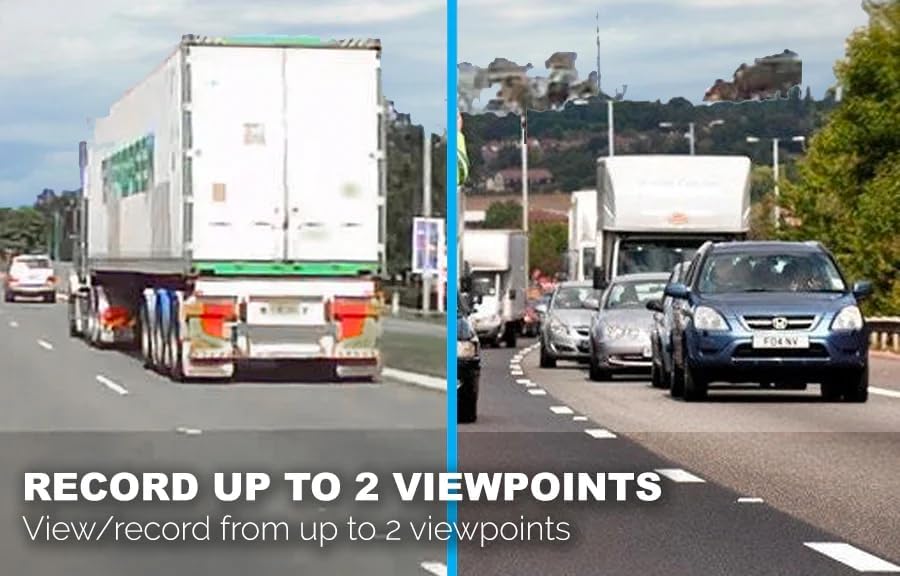
Obrázek: Rozdělená obrazovka view demonstrating the dash cam's ability to record from two viewpoints simultaneously, capturing both front and rear perspectives.

Image: An illustration of the loop recording function, showing how the dash cam automatically overwrites older, unlocked files when the memory card reaches its capacity.
Údržba
- Správa paměťových karet:
- Regularly format the microSD card (at least once a month) to maintain optimal performance and prevent data corruption. This can usually be done through the dash cam's settings menu.
- Replace the microSD card if you experience frequent recording errors or data loss, as memory cards have a limited lifespan due to continuous overwriting.
- Čištění zařízení:
- Use a soft, dry cloth to clean the dash cam's lenses and screen. Avoid abrasive materials or chemical cleaners.
- Ensure the mounting area on the windshield is clean and free of debris for secure attachment.
- Aktualizace firmwaru: Periodically check the FalconEye Electronics website for available firmware updates. Updates can improve performance, add features, or resolve issues. Follow the provided instructions carefully when performing updates.
Odstraňování problémů
- Palubní kamera se nezapíná:
- Check the car charger connection to both the dash cam and the vehicle's power outlet.
- Ujistěte se, že je elektrická zásuvka ve vozidle funkční.
- Zkontrolujte, zda je pojistka autonabíječky neporušená.
- Recording Errors / Footage Neukládá se:
- Ensure a compatible microSD card is properly inserted.
- Naformátujte kartu microSD.
- Zkuste jinou, vysoce kvalitní microSD kartu.
- Check if the card is full (though loop recording should prevent this for unlocked files).
- Špatná kvalita videa:
- Vyčistěte čočky fotoaparátu.
- Ujistěte se, že z čoček byla odstraněna ochranná fólie.
- Zkontrolujte nastavení rozlišení videa v nabídce.
- GPS nefunguje:
- Ensure the GPS function is enabled in the settings.
- Verify the dash cam has a clear view oblohy pro satelitní příjem.
- Problémy s připojením Wi-Fi:
- Ujistěte se, že je na palubní kameře povolena Wi-Fi.
- Restartujte palubní kameru i chytrý telefon.
- Confirm you are connecting to the correct Wi-Fi network provided by the dash cam.
Specifikace
| Rozlišení předního fotoaparátu | 4K Ultra HD (2160p@30fps) |
| Úhel přední kamery | 170° Ultra Wide Angle Lens |
| Secondary Camera Resolution | 1080P |
| Secondary Camera Angle | 150° Wide Angle HD Camera |
| Zobrazit | 3" IPS dotyková obrazovka |
| Podpora paměťových karet | Až 256GB SD karta |
| Konektivita | Vestavěné Wi-Fi, USB |
| Speciální funkce | GPS, G-Sensor, Loop Recording, Enhanced Night Vision (Sony Sensor), Smartphone App Control |
| Rozměry produktu | 5 x 3 x 4 palce |
| Hmotnost položky | 1.2 libry |
| Baterie | 1 lithium-polymerová baterie (součástí balení) |
| Typ montáže | Držák na čelní sklo |
Záruka a podpora
For warranty information, technical support, or service inquiries, please contact FalconEye Electronics directly. Refer to the product packaging or the official FalconEye Electronics webNejnovější kontaktní údaje a záruční podmínky naleznete na webových stránkách.
Manufacturer: FalconEye Electronics