
LENRUE A39PRO
LENRUE A39PRO Computer Speakers Instruction Manual
Model: A39PRO | Brand: LENRUE
1. Úvod
Thank you for choosing the LENRUE A39PRO Computer Speakers. This wired USB-powered soundbar is designed to deliver clear 10W stereo sound for your PC desktop, laptops, and other compatible devices. Its plug-and-play functionality and convenient controls make it an ideal audio solution for various computing environments. Please read this manual carefully to ensure proper setup, operation, and maintenance of your new speakers.

Figure 1.1: LENRUE A39PRO Computer Speaker (White)
2. Klíčové vlastnosti
- Široká kompatibilita: Works with any device featuring a standard 3.5mm headphone jack (PC, laptops, tablets, phones, MP3 players). The USB plug is solely for power.
- Stereo and Noiseless Sound: Utilizes upgraded 2x5W technology to provide clear and crystal-clear audio, enhancing your experience for movies, videos, music, and games.
- Snadné ovládání hlasitosti: Features a conveniently located volume knob on the top of the speaker for instant and effortless adjustments.
- Colorful Breathlight Design: Integrated RGB LED lights create an enhanced atmosphere for your home or office. The lights can be turned on or off via a dedicated control button on the soundbar.
- Plug and Play: No drivers are needed, ensuring a hassle-free setup without sound delay. The 3.5mm audio interface and 47-inch (1.2m) cable provide ample connectivity.

Figure 2.1: Internal components highlighting HiFi Stereo Sound Technology

Figure 2.2: Wide compatibility with various devices and operating systems
3. Průvodce nastavením
3.1 Vybalení
Carefully remove the speaker from its packaging. Ensure all components listed in the 'Included Components' section (see Specifications) are present and undamaged.
3.2 Připojení reproduktoru
- Locate the USB power cable and the 3.5mm audio cable attached to the speaker.
- Plug the USB cable into a powered USB-A port on your computer, laptop, power bank, or a 5V 2A USB adapter (recommended for optimal performance). This cable provides power to the speaker.
- Plug the 3.5mm audio jack into the headphone or audio output port of your computer, laptop, tablet, or other audio source.
- Ensure both cables are securely connected.
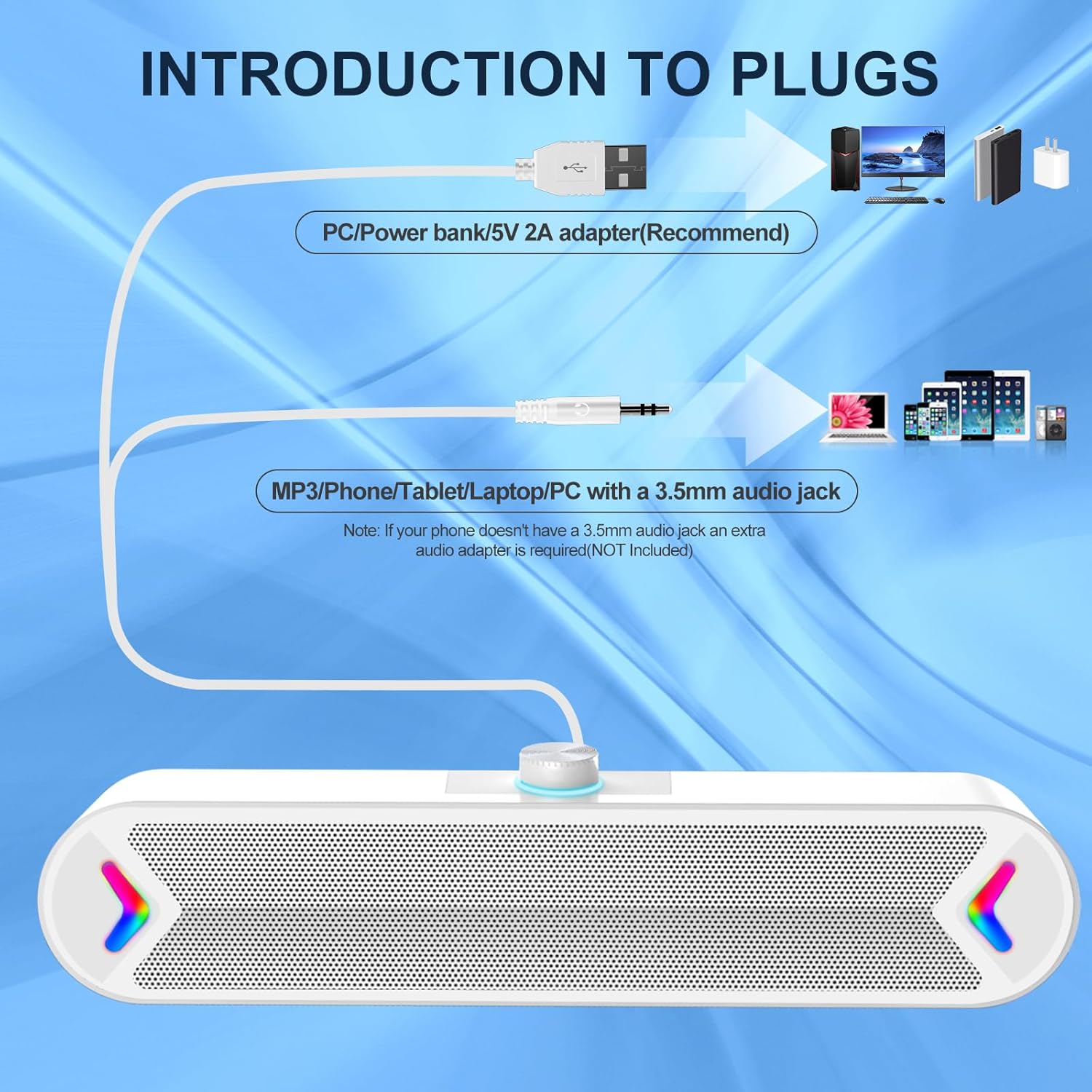
Figure 3.1: Connection Diagram for Power and Audio

Figure 3.2: Speaker in a typical desktop setup, ready for use
4. Návod k obsluze
4.1 Power On/Off and LED Control
The speaker features a multi-function switch on the back for power and LED light control:
- SVĚTLO: Turns on both the speaker power and the colorful RGB LED lights.
- NA: Powers on the speaker, but keeps the LED lights off.
- OFF: Completely powers off both the speaker and the LED lights.

Figure 4.1: Power/Light Button and Volume Knob Location
4.2 Nastavení hlasitosti
The volume knob is located on the top of the speaker for easy access:
- Otáčením knoflíku ve směru hodinových ručiček zvýšíte hlasitost.
- Otočením knoflíku proti směru hodinových ručiček snížíte hlasitost.

Figure 4.2: Adjusting the Volume Knob
5. Údržba
To ensure the longevity and optimal performance of your LENRUE A39PRO speakers, follow these simple maintenance guidelines:
- Čištění: Use a soft, dry cloth to wipe down the speaker's exterior. Avoid using abrasive cleaners, solvents, or strong chemicals, as these can damage the surface.
- Odstranění prachu: Gently use a soft brush or compressed air to remove dust from the speaker grille and around the volume knob.
- Skladování: Pokud reproduktor delší dobu nepoužíváte, skladujte jej na chladném a suchém místě mimo dosah přímého slunečního záření a extrémních teplot.
- Zacházení: Zabraňte pádu reproduktoru ani jeho vystavování silným nárazům, které by mohly poškodit vnitřní součásti.
6. Řešení problémů
If you encounter any issues with your LENRUE A39PRO speakers, please refer to the following common problems and solutions:
| Problém | Možná příčina | Řešení |
|---|---|---|
| Žádný zvuk nebo nízká hlasitost |
|
|
| LED světla nefungují |
|
|
| Zkreslený zvuk |
|
|

Figure 6.1: Checking Audio Output Settings on Your Computer
7. Specifikace
| Funkce | Detail |
|---|---|
| Značka | DÉLKA |
| Název modelu | A39PRO |
| Typ reproduktoru | Computer Speaker |
| Technologie připojení | USB (for power), 3.5mm Audio Jack (for sound) |
| Režim zvukového výstupu | Stereo |
| Maximální výstupní výkon reproduktoru | 10 wattů (2x5 W) |
| Frekvenční odezva | 20 Hz |
| Typ ovladače | Ovládání knoflíkem |
| Barva | Bílý |
| Rozměry produktu | 2.17"H x 12.6"Š x 2.56"V |
| Hmotnost položky | 1.37 libry |
| Typ montáže | Stolní držák |
| Doporučená použití | For Computers (PC, Laptops, Tablets) |
| Zahrnuté komponenty | A39PRO Computer Speaker |
8. Záruka a podpora
8.1 Informace o záruce
The LENRUE A39PRO Computer Speakers come with a limited warranty. Please refer to the product packaging or contact your retailer for specific details regarding the warranty period and terms.
8.2 Zákaznická podpora
For any questions, technical assistance, or support inquiries not covered in this manual, please contact LENRUE customer service through the retailer's platform or the official LENRUE website. Please have your product model number (A39PRO) and purchase information ready when contacting support.
Ask a question about this manual
Ask about setup, troubleshooting, compatibility, parts, safety, or missing instructions. Manuals+ will review the question and use this page’s manual context to help answer it.