
1. Úvod
Thank you for choosing the Sunffice Wireless Bluetooth 5.3 Earbuds. This manual provides essential information for setting up, operating, and maintaining your new earbuds and charging case. Please read it carefully to ensure optimal performance and longevity of your device.
2. Obsah balení
Zkontrolujte prosím, zda jsou ve vašem balení přítomny všechny níže uvedené položky:
- Sunffice Wireless Bluetooth Earbuds (Left and Right)
- LED Touch Screen Charging Case
- Nabíjecí kabel USB (typu C)
- Uživatelská příručka

Image: Contents of the Sunffice Earbuds package, including the earbuds, charging case, USB cable, and user manual.
3. Konec produktuview
Familiarize yourself with the components of your Sunffice Wireless Earbuds and Charging Case.

Image: The Sunffice Wireless Earbuds placed in their charging case, showcasing the LED touch screen.
Image: Detailed diagram illustrating the various components of the earbuds and charging case, including the flashlight, USB interface, Type-C port, earplug, charging port, left/right charging compartments, magnetic edge, charging compartment cover, screen off button, multi-functional screen, time display, and battery levels for both earbuds and the charging case.
- Sluchátka: In-ear design with touch control.
- Nabíjecí pouzdro: Features a full-color LED touch screen, USB-A output for phone charging, and a Type-C input for charging the case.
- Dotyková LED obrazovka: Displays date, time, battery levels, Bluetooth connection status, and provides access to various functions like music control, equalizer, illumination, camera trigger, alarm, volume adjustment, and games.
4. Nastavení
4.1 Charging the Charging Case and Earbuds
Před prvním použitím plně nabijte nabíjecí pouzdro a sluchátka.
- Connect the provided Type-C USB cable to the charging port on the case and a power source.
- The LED screen will indicate the charging status.
- Place the earbuds into their respective slots in the charging case. They will automatically begin charging.
The 5000mAh charging case can charge the earbuds approximately 4-5 times, providing extended listening time. The case can also be used as a power bank to charge your phone.

Image: The Sunffice charging case connected to a laptop, illustrating the charging process for the case itself.
4.2 Párování Bluetooth
Sluchátka využívají Bluetooth 5.3 pro rychlé a stabilní připojení.
- Otevřete nabíjecí pouzdro. Sluchátka se automaticky přepnou do režimu párování.
- Na svém zařízení (chytrý telefon, tablet, notebook) povolte Bluetooth a vyhledejte dostupná zařízení.
- Select "Bluetooth Earbuds" (or similar name) from the list to connect.
- Jakmile se sluchátka spárují, automaticky se připojí k vašemu zařízení, když je v budoucnu vyjmete z pouzdra.

Image: A smartphone displaying its Bluetooth settings, showing a successful connection to the earbuds, labeled as 'A98 TWS'.
5. Návod k obsluze
5.1 LED Touch Screen Functions
The charging case features an intelligent LED touch screen for various controls and information.

Image: The LED touch screen of the charging case displaying various functions, including music control, system settings, calculator, stopwatch, equalizer, and lock screen wallpaper options.
- Čas a datum: Check current date and time.
- Úroveň baterie: View battery status of both earbuds and the charging case.
- Ovládání hudby: Play, pause, skip tracks, and adjust volume directly from the screen.
- Ekvalizér: Select different audio profiles (e.g., Pop, Rock, Class, Jazz, Rural, Normal).
- Osvětlení: Control lighting features (if applicable).
- Spouštěč fotoaparátu: Používejte jako dálkové ovládání spouště pro fotoaparát telefonu.
- Poplach: Nastavte budíky.
- Hry: Access built-in games.
- Svítilna: Aktivujte vestavěnou svítilnu.
5.2 Dotykové ovládání sluchátek
The earbuds feature touch-sensitive areas for controlling playback and calls. Specific functions can often be customized via a mobile application (if available).
- Jedno klepnutí: Přehrát/Pozastavit hudbu, Přijmout/Ukončit hovor.
- Dvojí poklepání: Next track (Right earbud), Previous track (Left earbud).
- Trojité klepnutí: Aktivujte hlasového asistenta.
- Dlouhé stisknutí: Reject call, Switch between Noise Cancellation/Transparency modes (if applicable).
5.3 Charging Your Phone with the Case
The charging case can act as a portable power bank for your mobile phone.
- Connect your phone's charging cable to the USB-A output port on the charging case.
- The charging case will begin to charge your phone.
Video: This video demonstrates the various features of the Sunffice Wireless Earbuds and Charging Case, including unboxing, navigating the touch screen for games and calculators, and using the charging case to charge a smartphone. It also shows the flashlight function.
6. Údržba
Abyste zajistili dlouhou životnost a optimální výkon vašich sluchátek, dodržujte tyto pokyny pro údržbu:
- Čištění: Pravidelně čistěte sluchátka a nabíjecí pouzdro měkkým, suchým hadříkem, který nepouští vlákna. Nepoužívejte agresivní chemikálie ani abrazivní materiály.
- Voděodolnost: The earbuds feature IPX waterproof coating technology, protecting them from sweat and rain. However, they are not designed for submersion in water. Do not use them while swimming or showering.
- Skladování: Pokud sluchátka nepoužíváte, uložte je do nabíjecího pouzdra, aby byla chráněna a nabitá. Skladujte na chladném a suchém místě mimo dosah extrémních teplot.
- Nabíjení: Používejte pouze dodaný nabíjecí kabel nebo jeho certifikovaný ekvivalent. Zabraňte přebíjení.

Image: Sunffice earbuds with water droplets, illustrating their water-resistant design suitable for sports activities.
7. Řešení problémů
Pokud narazíte na problémy se sluchátky, podívejte se na následující běžná řešení:
- Žádný zvuk: Ujistěte se, že jsou sluchátka nabitá, správně spárovaná a že je na sluchátkách i na připojeném zařízení nastavená hlasitost.
- Nelze spárovat: Make sure Bluetooth is enabled on your device and the earbuds are in pairing mode. Try turning Bluetooth off and on again on your device, or resetting the earbuds (refer to manufacturer's webwebu, kde v případě potřeby najdete konkrétní pokyny k resetování).
- Přerušované připojení: Ensure you are within the Bluetooth range (up to 10 meters) and there are no significant obstructions between the earbuds and your device.
- Problémy s nabíjením: Check that the charging cable is securely connected and the power source is active. Clean the charging contacts on both the earbuds and the case.
- Dotyková obrazovka nereaguje: Ensure the screen is clean and dry. Try restarting the charging case by holding the screen off button (if available) or allowing the battery to drain and recharge.
8. Specifikace
| Funkce | Specifikace |
|---|---|
| Název modelu | Wireless Bluetooth Earbuds with charging case |
| Verze Bluetooth | 5.3 |
| Dosah Bluetooth | 10 metrů |
| Životnost baterie sluchátek | Přibl. 5 hodin |
| Kapacita nabíjecího pouzdra | 5000mAh (approx. 4-5 earbud charges) |
| Úroveň odolnosti proti vodě | Water Resistant (IPX) |
| Typ ovládání | Dotykové ovládání |
| Kompatibilní zařízení | Cellphones, Laptops, Music Production Equipment, Smart Speaker, Tablets |
| Hmotnost položky | 100 gramů (3.53 unce) |
| Materiál | Plast |
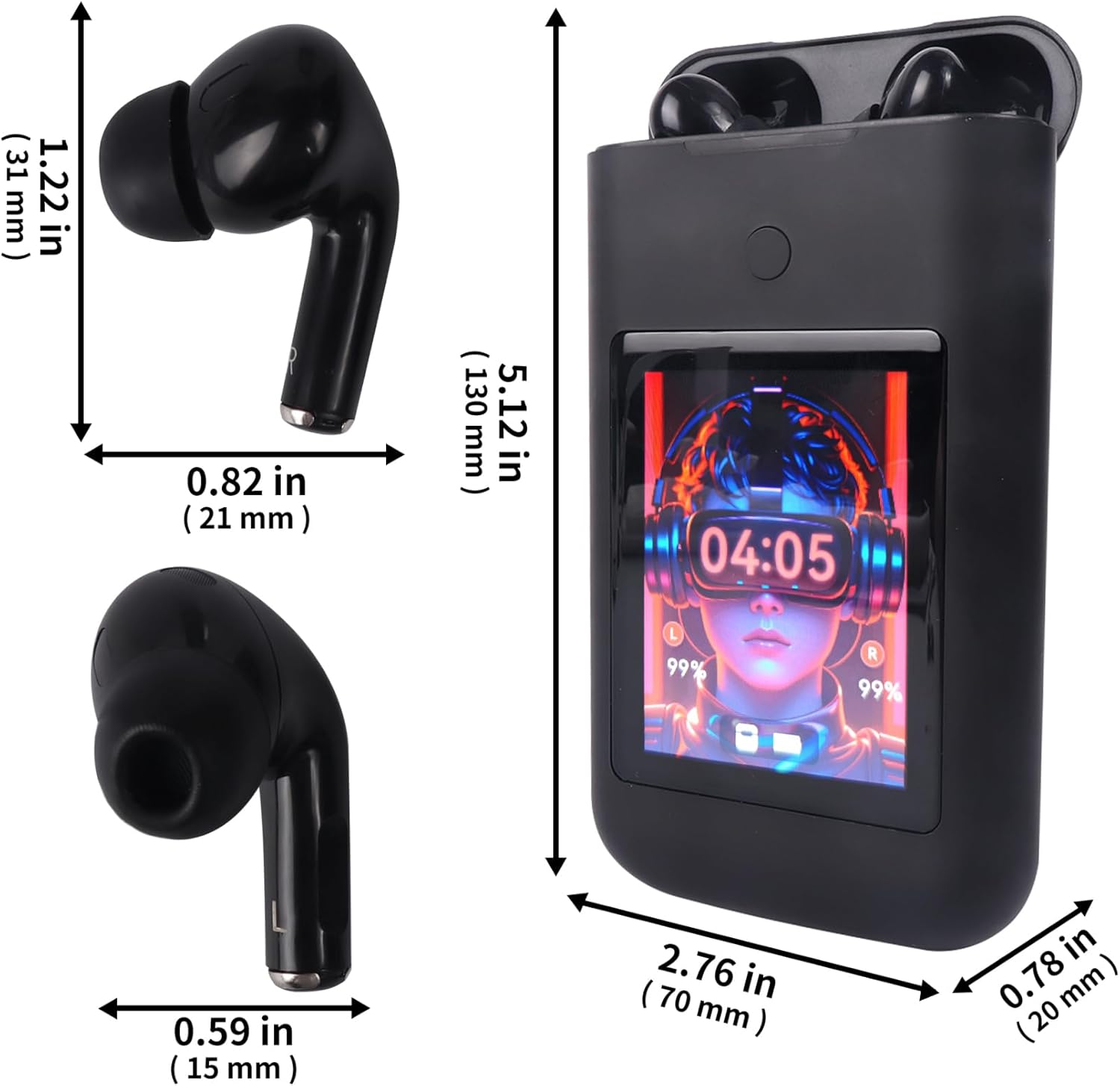
Image: Diagram showing the dimensions of the Sunffice Wireless Earbuds and their charging case in inches and millimeters.
9. Bezpečnostní informace
- Produkt nerozebírejte, neopravujte ani neupravujte.
- Chraňte výrobek před extrémními teplotami, přímým slunečním zářením a otevřeným ohněm.
- Avoid exposing the product to excessive moisture or liquids beyond its water resistance rating.
- Nepoužívejte sluchátka delší dobu při vysoké hlasitosti, abyste předešli poškození sluchu.
- Uchovávejte mimo dosah dětí a domácích zvířat.
10. Záruka a podpora
Informace o záruce a zákaznické podpoře naleznete v dokumentaci dodané s vaším nákupem nebo se obraťte přímo na prodejce. Uschovejte si doklad o koupi pro případné reklamace.