
Lamicall K36
Lamicall Frozen Pad Handheld Fan K36 User Manual
Model: K36 | Brand: Lamicall
Zavedení
Thank you for choosing the Lamicall Frozen Pad Handheld Fan K36. This portable fan is designed to provide instant cooling with its innovative refrigerating plate and versatile functionality. Please read this manual carefully before use to ensure proper operation and maintenance.
Konec produktuview
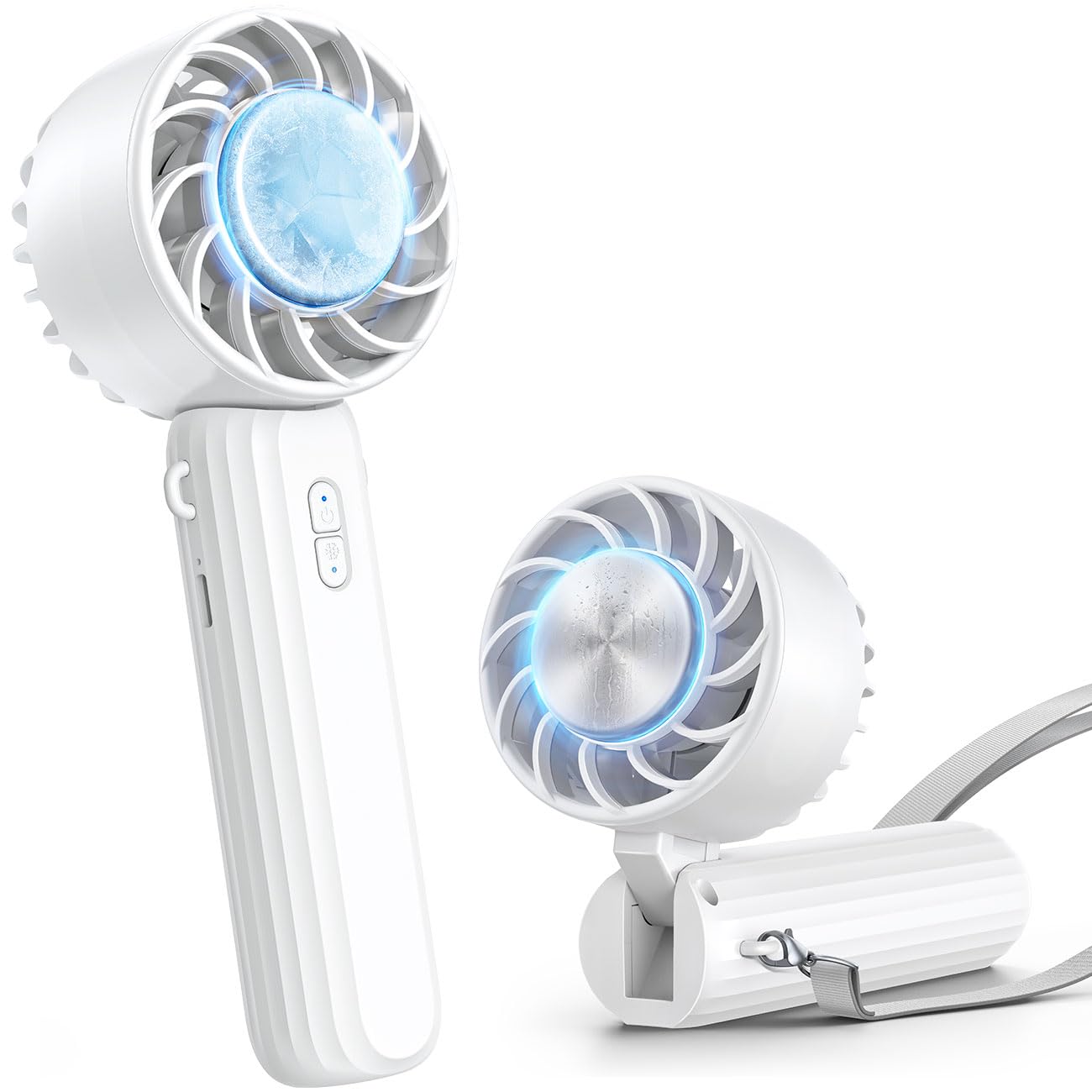
Image: The Lamicall Frozen Pad Handheld Fan K36 in white, showcasinjeho kompaktní design.
Klíčové vlastnosti:
- Instant Cooling Plate: Built-in semiconductor refrigerating pad cools to 10°C in 5 seconds for direct skin cooling.
- Všestrannost 3 v 1: Functions as a handheld fan, neck fan (with included lanyard), and desk fan.
- Nastavitelná rychlost větru: Three levels of wind adjustment (Slight, Cool, Strong) for personalized comfort.
- Vysokokapacitní baterie: 2000mAh battery provides up to 8.5 hours of operation on slight wind.
- Nabíjení typu C: Convenient and widely compatible USB Type-C charging port.
- Kompaktní a lehký: Weighs only 170 grams, making it easy to carry for travel, commuting, or outdoor activities.
- Tichý provoz: Designed for low noise levels, suitable for various environments.

Image: The Lamicall K36 fan positioned on a desk, illustrating its quiet operation.
Obsah balení
- Lamicall Frozen Pad Handheld Fan K36
- Nabíjecí kabel USB typu C.
- Šňůrka
- Uživatelská příručka
Nastavení
Počáteční nabíjení:
- Před prvním použitím ventilátor plně nabijte.
- Connect the provided USB Type-C cable to the fan's charging port.
- Connect the other end of the cable to a USB power source (e.g., computer, wall adapter, power bank).
- The charging indicator light will illuminate. It will change or turn off once fully charged.

Image: The Lamicall K36 fan showing its internal 2000mAh battery and Type-C charging port connected to a cable.
Připevnění šňůrky:
Locate the small loop on the fan's handle. Thread the lanyard through this loop and secure it according to the lanyard's instructions. This allows for hands-free use as a neck fan.
Návod k obsluze
Power On/Off and Wind Speed Adjustment:
- To turn on the fan, press the power button once. It will start at the lowest wind speed (Slight).
- Press the power button again to cycle through wind speeds: Slight → Cool → Strong.
- To turn off the fan, press the power button after the Strong speed setting, or press and hold the power button for 2 seconds at any speed.

Image: Diagram illustrating the three adjustable wind speeds of the Lamicall K36 fan.
Activating the Cooling Plate:
- Ujistěte se, že je ventilátor zapnutý.
- Press the dedicated cooling button (usually indicated by a snowflake icon) to activate the semiconductor refrigerating pad.
- The cooling plate will rapidly cool down. Place the cooling plate directly on your skin (face, neck, wrist) for instant relief.
- To deactivate the cooling function, press the cooling button again.
Poznámka: The cooling function operates only when the fan is running. Deactivating the cooling function when not needed can extend battery life.

Image: The Lamicall K36 fan's cooling plate, demonstrating its ability to reach 10°C for instant cooling on face, wrist, or neck.
Všestranné použití:
- Handheld: Hold the fan by its handle for direct airflow.
- Ventilátor na krk: Use the lanyard to hang the fan around your neck. The fan head can be adjusted 90° to direct airflow towards your face.
- Stolní ventilátor: Složte rukojeť a vytvořte stabilní základnu, která umožní ventilátoru stát na rovném povrchu.

Image: The Lamicall K36 fan demonstrating its multi-functional use as a handheld, neck-worn, and desktop fan.
Údržba
Čištění:
- Před čištěním se ujistěte, že je ventilátor vypnutý a odpojený od zdroje napájení.
- Vnější část ventilátoru otřete měkkým, suchým hadříkem.
- For dust accumulation on the fan blades or grille, use a soft brush or compressed air. Do not use water or harsh cleaning agents.
Skladování:
Ventilátor skladujte na chladném a suchém místě mimo dosah přímého slunečního záření a extrémních teplot. Pokud jej skladujete delší dobu, nabijte baterii přibližně na 50 %, abyste prodloužili její životnost.
Odstraňování problémů
| Problém | Možná příčina | Řešení |
|---|---|---|
| Ventilátor se nezapne. | Baterie je vybitá. | Nabíjejte ventilátor pomocí dodaného kabelu USB typu C. |
| Cooling plate is not cold. | Cooling function not activated or fan not running. | Ensure the fan is on and press the cooling button. Check battery level. |
| Krátká výdrž baterie. | Continuous use of high speed or cooling function. | Reduce wind speed or deactivate cooling when not needed. Ensure full charge before use. |
| Ventilátor vydává neobvyklý zvuk. | Ucpání lopatek ventilátoru. | Turn off the fan and carefully check for any foreign objects. Clean if necessary. |
Specifikace
| Funkce | Detail |
|---|---|
| Název modelu | K36 |
| Značka | Lamicall |
| Barva | Bílý |
| Zdroj napájení | Napájení z baterie (2000 mAh) |
| Počet rychlostí | 3 |
| Speciální funkce | Portable, Hand Free, Pocket Friendly, Foldable, Adjustable, Cooling Plate |
| Materiál | Plast |
| Rozměry produktu | 120 H x 40 Š x 80 V milimetrů |
| Kontrolní metoda | Stiskněte tlačítko |
| Zahrnuté komponenty | Lamicall Portable Foldable Handheld Fan, USB Type-C Cable, Lanyard |
Bezpečnostní informace
- Do not insert fingers or any objects into the fan grille when operating.
- Uchovávejte mimo dosah dětí.
- Do not expose the fan to water or excessive humidity.
- Zabraňte pádu ventilátoru na zem nebo jeho vystavení silným nárazům.
- K nabíjení používejte pouze dodaný nabíjecí kabel nebo certifikovaný kabel USB typu C.
- Nepokoušejte se ventilátor rozebírat ani opravovat sami. Požádejte o pomoc zákaznickou podporu.
- Do not use the fan in environments with flammable gases or liquids.
Záruka a podpora
Lamicall products come with a standard manufacturer's warranty. For detailed warranty information, product support, or any inquiries, please visit the official Lamicall webwebu nebo se přímo obraťte na jejich zákaznický servis.
Official Lamicall Webmísto: www.lamicall.com
Ask a question about this manual
Ask about setup, troubleshooting, compatibility, parts, safety, or missing instructions. Manuals+ will review the question and use this page’s manual context to help answer it.