
1. Úvod
This manual provides essential information for the safe and efficient operation, setup, and maintenance of your YARDCARE N1600 Pro Wireless Robot Lawn Mower. Please read this manual thoroughly before using the product and retain it for future reference.
2. Bezpečnostní informace
Observe all safety precautions to prevent injury or damage. The N1600 Pro is equipped with sharp blades and moving parts. Keep hands, feet, and clothing away from the cutting deck. Ensure children and pets are not in the mowing area during operation. Do not operate the mower on excessively steep slopes or during heavy rain. Always turn off the mower and remove the battery before performing any maintenance or cleaning.
3. Obsah balení
Ověřte, zda jsou v balení přítomny všechny položky:
- N1600 Pro Lawn Mower (x1)
- Nabíjecí stanice (x1)
- RTK Mounting Pole (x2)
- Trident Ground Stake (x1)
- RTK Reference Station Module (x1)
- Hexový klíč (x1)
- RTK Base Station Extension Cable (x1)
- Charging Station Fixing Screw (x6)
- M4*10 Blade Screws (x3)
- Cutting Blade (x3)
- Napájecí adaptér (x1)
- Baterie (1x)
- Návod k použití (x1)
4. Konec produktuview
4.1 Klíčové vlastnosti
- RTK+AI Vision Dual Positioning: Utilizes RTK and AI vision sensors for precise lawn mapping and centimeter-level positioning.
- Wireless Boundary & Multi-Zone Management: Allows setting virtual boundaries and managing multiple mowing zones via the YARDCARE App, supporting areas up to 0.4 acres.
- Smart APP Control & Real-Time Monitoring: Customize mowing schedules, adjust cutting modes, and track mower progress from a smartphone. Features intelligent auto-resume after charging.
- 3D Obstacle Avoidance & AI Safety Detection: Equipped with a 3D obstacle detection system and intelligent sensors to recognize over 300 types of obstacles, ensuring safe operation.
- Precise Trimming & Efficient Performance: Achieves precise trimming with an arched cutting path. Powered by a high-efficiency brushless motor, it operates on 20° slopes and supports grass heights from 0.8 to 2.4 inches.
4.2 Komponenty
The YARDCARE N1600 Pro includes the main robotic mower unit, a charging station, and an RTK reference station for precise navigation.
5. Nastavení
5.1 Choose RTK Location
Select an open, unobstructed spot for the RTK base station to ensure stable GPS reception. This is crucial for accurate positioning.

Image: The N1600 Pro utilizing RTK+3D Vision for precise navigation.
5.2 Connect & Install
Set up your network, mount the RTK base station, and place the charging dock in a shaded, level area. Ensure the charging station is connected to power.

Image: Connecting the mower and installing the base station.
5.3 Map Your Lawn
Use the YARDCARE app to draw your mowing area for precise coverage. This allows for virtual boundaries without physical wires.

Image: Custom mapping of the lawn using the app.
5.4 Start Full-Lawn Mowing
After mapping, press the start button in the app to initiate automatic mowing of the entire lawn.

Image: Starting full-lawn mowing via the app.
6. Návod k obsluze
6.1 Režimy sečení
The N1600 Pro uses a systematic U-shaped mowing pattern for efficient and precise cuts. It also supports a spiral mowing mode for specific areas.

Image: Breakpoint resume cutting and spiral mowing mode.
6.2 Nastavitelná výška sečení
Adjust the cutting height from 0.8 to 2.4 inches (20 to 60 mm) directly through the YARDCARE app to suit your lawn's needs.
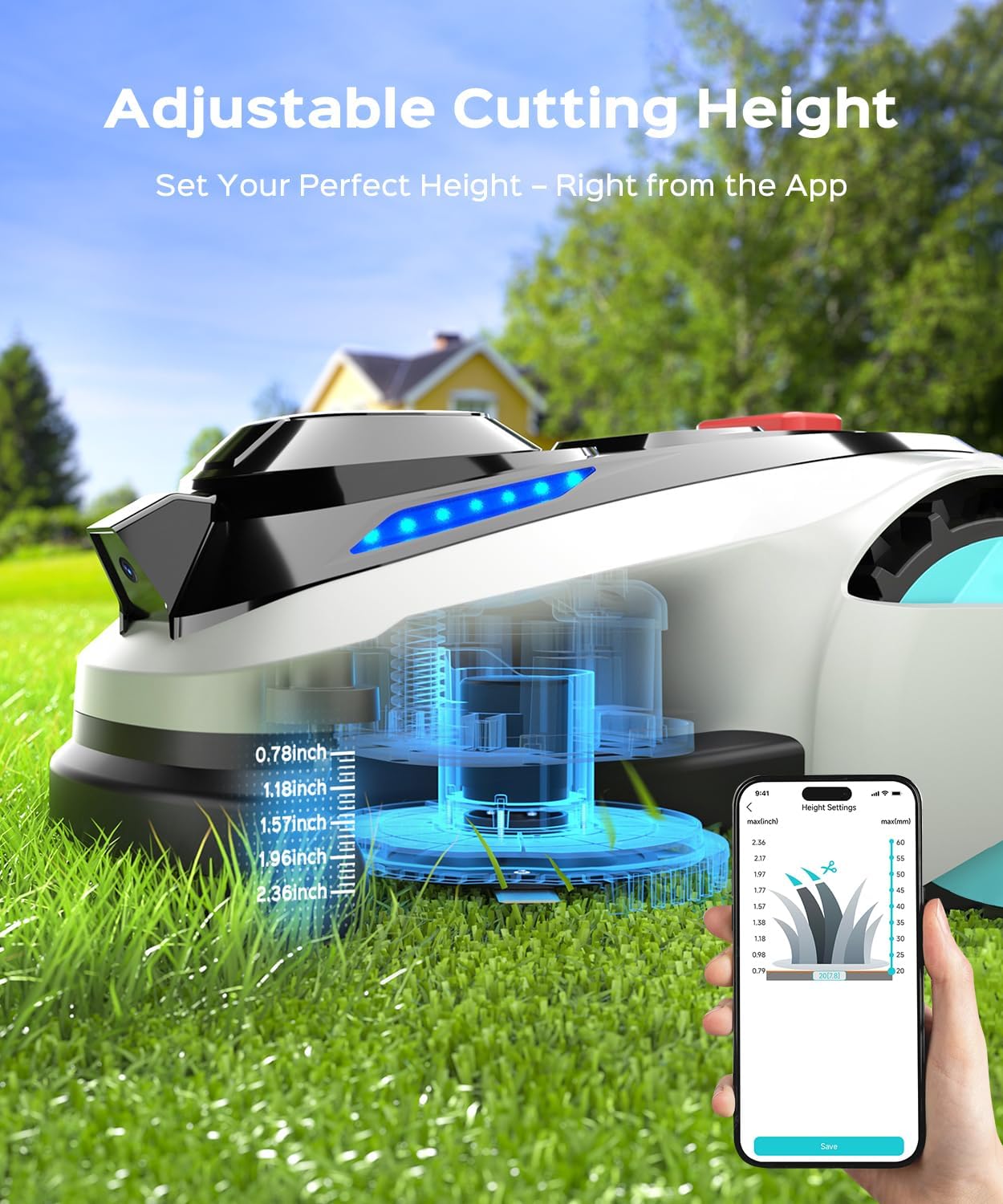
Image: Adjustable cutting height settings via the app.
6.3 Plánování
Customize mowing schedules for different zones and times using the YARDCARE app.
6.4 Automatic Recharging and Breakpoint Continuation
The mower automatically returns to its charging station when the battery level drops below 20%. After recharging, it resumes mowing from where it left off, ensuring complete lawn coverage.

Image: Mower returning to charging station and built-in rain sensor.
6.5 dešťový senzor
The built-in rain sensor detects precipitation, prompting the mower to return to its charging station to protect it from adverse weather conditions.
6.6 Vyhýbání se překážkám
The AI Vision system detects over 300 types of obstacles, including trees, people, pets, toys, and tools, allowing the mower to navigate safely around them.

Image: Mower identifying and avoiding obstacles.
6.7 Ořezávání okrajů
The mower performs precise edge trimming with a 7.09-inch cutting width, ensuring clean edges around your lawn.

Image: Clean edge cutting performance.
6.8 Slope Climbing Capability
The N1600 Pro can handle slopes up to 36.4% (20°), maintaining consistent mowing performance on varied terrain.
Video: Konecview of the YARDCARE N1600 Pro Robot Lawn Mower's features, including efficient mowing, RTK positioning, automatic mapping, multi-zone management, multi-level cutting height adjustment, lawn edge trimming, AI vision obstacle recognition, U-shaped mowing path, automatic recharging, breakpoint continuation, rain sensor, and 20-degree climbing ability.
7. Ovládání aplikací
The YARDCARE app provides comprehensive control over your N1600 Pro mower. Functions include:
- Aktualizace OTA
- Správa více zón
- Set Mowing Schedule
- Polohování
- Připojení Bluetooth
- Wi-Fi připojení

Image: App control interface for the N1600 Pro.
7.1 Aktualizace online
The mower supports Over-The-Air (OTA) updates to ensure the device is always running with the latest features and improvements.

Image: OTA updates for the robot mower.
8. Údržba
8.1 Čištění
The N1600 Pro features an IPX4 waterproof system, allowing for easy cleaning with low-pressure water flow. Ensure the mower is powered off and the battery is removed before cleaning.

Image: Easy cleaning with IPX4 waterproof system.
8.2 Výměna čepele
Regularly inspect the cutting blades for wear and tear. Replace dull or damaged blades using the provided M4*10 blade screws and hex key. Always ensure the mower is powered off and the battery is removed before replacing blades.
9. Řešení problémů
If you encounter issues with your YARDCARE N1600 Pro, refer to the following general troubleshooting steps:
- Sekačka se nestartuje: Check battery level and ensure it is properly charged. Verify the mower is correctly placed on the charging station.
- Poor navigation or mapping issues: Ensure the RTK base station has a clear, unobstructed view of the sky. Check Wi-Fi and Bluetooth connections to the app.
- Mower stopping unexpectedly: Check for obstacles in the mowing path. Ensure the cutting deck is not clogged with grass clippings. Verify the rain sensor is not activated if it is not raining.
- Kódy chyb: If specific error codes appear on the mower display or app, consult the YARDCARE support website or contact customer service for detailed solutions.
10. Specifikace
| Atribut | Hodnota |
|---|---|
| Značka | PÉČE O ZAHRADU |
| Zdroj napájení | Napájení z baterie |
| Materiál | Plast |
| Barva | Světle šedá |
| Styl | Sekačka na trávu |
| Šířka řezu | 7.09 palce |
| Provozní režim | Automatický |
| Rozměry produktu | 10.43"H x 15.75"Š x 22.43"V |
| Montáž Vyžadována | Žádný |
| Maximální nastavitelná výška sečení | 2.4 palce |
| Minimální nastavitelná výška sečení | 0.8 palce |
| Výrobce | PÉČE O ZAHRADU |
| Hmotnost položky | 41.1 libry |
| Číslo modelu položky | N1600 Pro |
| Baterie | Vyžaduje 1 12V baterii (součástí balení) |
11. Záruka a podpora
For warranty information, technical support, or service inquiries, please refer to the warranty card included with your product or visit the official YARDCARE website. Contact customer support for assistance with any product-related issues.