
1. Úvod
Welcome to the MCHOSE ACE68 Magnetic Gaming Keyboard user manual. This guide provides detailed instructions for setting up, operating, maintaining, and troubleshooting your new keyboard. The ACE68 is designed for high-performance gaming, featuring magnetic switches, rapid trigger technology, and a compact 65% layout.
2. Konec produktuview
2.1 Obsah balení
- MCHOSE ACE68 Magnetic Gaming Keyboard
- USB-C kabel
- Uživatelská příručka (tento dokument)
2.2 Klíčové vlastnosti
- 0.01mm Rapid Trigger Accuracy: Adjustable actuation from 0.005mm to 3.4mm for precise and fast key resets.
- Frekvence dotazování 8000 Hz: Ultra-fast 0.1ms report rate for minimal latency.
- Snap Tap & Dynamic Typing: Assign up to four actions to a single key press for complex maneuvers.
- 65% kompaktní rozvržení: Space-saving design with 68 keys, ideal for gaming setups.
- PBT klávesy s dvojitým řezem: Durable keycaps with an ergonomic Cherry profile.
- StellarVision 2.0 Magnetic Adjustable Switches: Hot-swappable switches with a lifespan of 100 million clicks.
- M HUB Web Řidič: Web-based software for easy configuration and advanced features like RS (Rappy Snappy), DKS (Double KeyStroke), MT (Multi-Tap), TGL (Toggle), and Berserk mode.
- RGB podsvícení: 16 million customizable colors with 22+ preset lighting effects.
2.3 Rozložení klávesnice
The MCHOSE ACE68 features a 65% layout with 68 keys. This compact design optimizes desk space while retaining essential keys for gaming and general use.

Image: MCHOSE ACE68 Keyboard Layout and Dimensions. This image illustrates the compact 65% layout of the keyboard, showing its dimensions (32cm length, 11.7cm width, 3.5cm height) and the ergonomic Cherry profile of the PBT keycaps.
3. Nastavení
3.1 Připojení klávesnice
- Locate the USB-C port on the MCHOSE ACE68 keyboard.
- Připojte jeden konec dodaného kabelu USB-C ke klávesnici.
- Připojte druhý konec konektoru USB-A k volnému portu USB v počítači.
- Klávesnici automaticky detekuje váš operační systém. Pro základní funkce obvykle nejsou vyžadovány žádné další ovladače.
For advanced customization and features, refer to the "Customization" section for instructions on using the M HUB Web Řidič.
4. Návod k obsluze
4.1 Základní použití
Once connected, the MCHOSE ACE68 functions as a standard QWERTY keyboard. You can begin typing and using it for general computer tasks and gaming.
4.2 Kombinace funkčních kláves (vrstva Fn)
Due to its compact 65% layout, some functions are accessed via the Fn key in combination with other keys. Specific combinations may vary or be customizable via the M HUB Web Řidič.
- Fn + [klávesa]: Access secondary functions printed on keycaps (e.g., F1-F12, Home, End, Page Up, Page Down, media controls).
- Fn + klávesy se šipkami: Often used for navigation or RGB lighting adjustments.
Refer to the keycap legends for specific Fn combinations.
5. Přizpůsobení
The MCHOSE ACE68 offers extensive customization options through its web-based M HUB driver.
5.1 M HUB Web Řidič
The M HUB Web Driver allows you to configure various settings without installing desktop software.
- Ujistěte se, že je klávesnice připojena k počítači.
- Otevřete kompatibilní web browser (e.g., Opera, Chrome, Firefox) and navigate to the official MCHOSE M HUB webweb (konkrétní URL not provided, refer to product packaging or official MCHOSE website for the exact link).
- The web interface will detect your keyboard, allowing you to adjust settings.
Through the M HUB, you can configure:
- Akční bod: Adjust the actuation distance for each key from 0.005mm to 3.4mm in 0.005mm increments.
- Rychlé spouštění: Enable and fine-tune the rapid trigger function for faster key resets, especially useful in FPS games.
- Snap Tap / Dynamic Typing: Program up to four distinct actions per key press based on pressure or depth.
- Přemapování klíčů: Reassign key functions, create macros, and set advanced features like RS (Rappy Snappy), DKS (Double KeyStroke), MT (Multi-Tap), and TGL (Toggle).
- RGB osvětlení: Customize lighting effects, colors, brightness, and speed.
- Profiles: Create, save, and export multiple configuration profilepro různé hry nebo aplikace.
- Aktualizace firmwaru: Perform firmware updates directly through the web rozhraní.

Image: Rapid Trigger Accuracy and Low Latency. This graphic illustrates the 0.01mm RT accuracy and ultra-low latency features, showing how key presses are registered and reset almost simultaneously compared to fixed actuation points.

Image: 4-In-1 Action Keys. This image demonstrates the "Snap Tap" or "4-In-1 Action Keys" feature, allowing users to assign up to four distinct actions to a single key press based on the depth of the press.
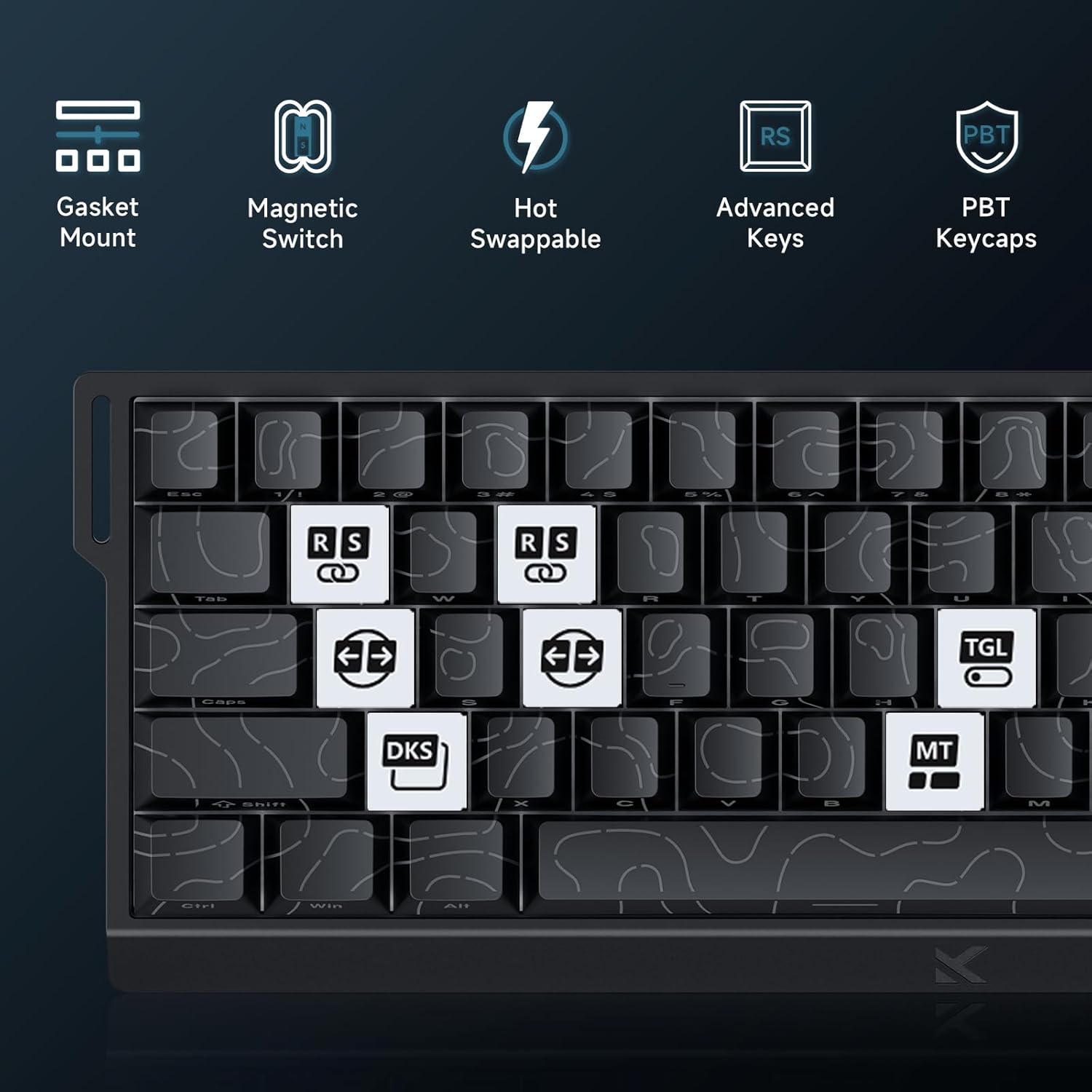
Image: Advanced Key Features. This image highlights various advanced features such as Gasket Mount, Magnetic Switches, Hot-Swappable design, and specific key functions like RS (Rappy Snappy), DKS (Double KeyStroke), MT (Multi-Tap), and TGL (Toggle).
5.2 RGB osvětlení
The keyboard features per-key RGB backlighting with 16 million colors and over 22 preset lighting effects.
- Ovládání na palubě: Some basic lighting adjustments (e.g., changing effects, brightness) can be done directly on the keyboard using Fn key combinations. Refer to the keyboard's keycap legends for these shortcuts.
- M HUB Control: For full customization, including per-key lighting, custom effects, and color palettes, use the M HUB Web Řidič.

Image: RGB Lighting Effects. This image showcases the vibrant RGB backlighting of the MCHOSE ACE68 keyboard, highlighting its 22+ preset light effects.
6. Údržba
6.1 Čištění klávesnice
- Generální úklid: Použijte měkký hadřík, který nepouští vlákna dampKlávesy a šasi otřete vodou nebo jemným čisticím roztokem. Zabraňte nadměrné vlhkosti.
- Odstranění prachu: K odstranění prachu a nečistot z prostoru mezi klávesami použijte stlačený vzduch.
- Hloubkové čištění: For thorough cleaning, you can remove the keycaps using a keycap puller. Clean the keycaps separately with mild soap and water, ensuring they are completely dry before reattaching.
6.2 Výměna kláves a spínačů
The MCHOSE ACE68 features hot-swappable switches, allowing you to easily replace switches without soldering.
- Odstranění krytek kláves: Use a keycap puller to gently pull keycaps straight up.
- Odstranění spínačů: Use a switch puller to carefully grip the top and bottom clips of the switch and pull it straight out.
- Instalace přepínačů: Align the pins of the new switch with the holes on the PCB. Gently press the switch down until it clicks into place. Ensure the switch is seated correctly and not bent.
- Instalace kláves: Align the keycap with the switch stem and press down firmly until it is securely attached.

Image: Keyboard Internal Structure and Hot-Swappable Switches. This image provides an exploded view of the keyboard's internal components, including the precision pre-lubricated switches, stability switch plate, and PORON sound dampening, illustrating its hot-swappable design.

Image: Uranus Magnetic eSports Switches. This image details the specifications of the Uranus Magnetic eSports switches, including their actuation range (0.1-3.4mm), total travel (3.4mm), sensitivity (0.005mm), trigger pressure (32 ± 5 gf), and lifespan (100 million clicks).
7. Řešení problémů
7.1 Běžné problémy a řešení
| Problém | Možná příčina | Řešení |
|---|---|---|
| Klávesnice nereaguje | Uvolněné kabelové připojení, vadný USB port, problém s ovladačem. |
|
| Klávesy se neregistrují nebo se píší dvakrát | Dust/debris under keycap, switch malfunction, incorrect actuation settings. |
|
| RGB osvětlení nefunguje nebo je nesprávné | Software glitch, incorrect settings, power issue. |
|
| M HUB Web Driver not detecting keyboard | Browser incompatibility, connection issue, firewall. |
|
8. Specifikace
| Funkce | Detail |
|---|---|
| Značka | MCHOSE |
| Model | ACE68 |
| Rozložení | 65% (68 keys), QWERTY |
| Typ přepínače | Uranus Magnetic Standard (StellarVision 2.0 Magnetic Adjustable Switches) |
| Rozsah ovládání | 0.005 mm to 3.4 mm (adjustable) |
| Míra hlasování | 8000 Hz |
| Nahlásit sazbu | 0.1 ms |
| Klíčenky | PBT Double-Shot, Cherry Profile |
| Podsvícení | RGB (16 million colors, 22+ preset effects) |
| Konektivita | Kabelové (USB-C) |
| Kompatibilní zařízení | Počítač |
| Rozměry (D x Š x V) | 32 cm x 15 cm x 3.5 cm (12.6 palce x 5.9 palce x 1.4 palce) |
| Vnitřní materiál | Hliník, Plast |
| Speciální funkce | Ergonomic, Backlit, Customizable Keys, Programmable Keys, Hot-Swappable |

Image: 8000 Hz Polling Rate. This image highlights the keyboard's 8000 Hz polling rate, indicating ultra-fast 0.01ms report rate and significantly faster actuation and response times.
9. Záruka a podpora
9.1 Záruka výrobce
The MCHOSE ACE68 Magnetic Gaming Keyboard comes with a 2letá záruka výrobceTato záruka se vztahuje na vady materiálu a zpracování při běžném používání. Uschovejte si prosím doklad o koupi pro případ uplatnění záruky.
9.2 Zákaznická podpora
For technical assistance, troubleshooting, or warranty inquiries, please contact MCHOSE customer support.
- Webmísto: Visit the official MCHOSE website for support resources, FAQs, and contact information. (Konkrétní URL not provided, refer to product packaging or official MCHOSE webmísto)
- Online zdroje: Check for updated drivers, firmware, and user guides on the MCHOSE support page.
10. Video zdroje
No official product videos from the seller were provided in the product data to embed in this manual. Please refer to the manufacturer's official website or YouTube channel for any available video guides or demonstrations.