
1. Úvod
This manual provides essential information for the safe and efficient use of your AT&T Cingular Flex 2 Smart Flip Phone (Model 6723D). Please read these instructions carefully before operating your device to ensure optimal performance and longevity.
The Cingular Flex 2 is a compact flip phone designed for reliable communication. It features a vibrant display, a built-in camera for capturing moments, and 4GB of internal storage for essential files and applications. The device operates on KaiOS, offering a streamlined user experience.
2. Co je v krabici
Ověřte, zda jsou v balení produktu přítomny všechny položky:
- AT&T Cingular Flex 2 Smart Flip Phone
- Napájecí adaptér
- Lithium-iontová baterie (předinstalovaná nebo samostatná)
3. Zařízení skončiloview
Familiarize yourself with the physical components of your AT&T Cingular Flex 2 phone.
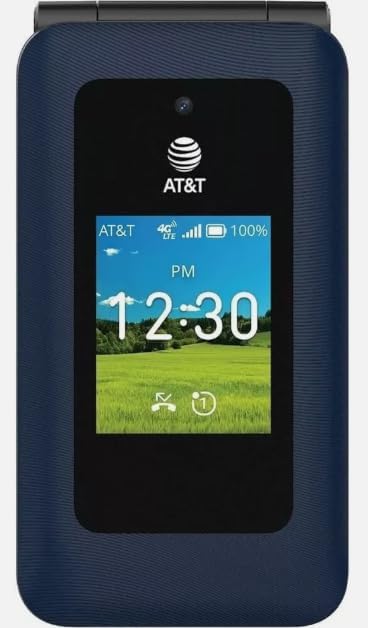
Obrázek 3.1: Přední view of the AT&T Cingular Flex 2 Smart Flip Phone, showing the main display with time, network signal, and battery indicator.

Obrázek 3.2: Zadní view of the AT&T Cingular Flex 2 Smart Flip Phone, highlighting the textured back cover and the speaker grille at the top.
Klíčové komponenty:
- Externí displej: Shows notifications, time, and caller ID when closed.
- Hlavní displej: Internal screen for navigation and content.
- Klávesnice: Numeric and navigation buttons for input.
- Fotoaparát: Located on the device for capturing photos and videos.
- Tlačítka hlasitosti: Upravte úrovně zvuku.
- Power/End Call Button: Turns the device on/off and ends calls.
- Nabíjecí port: Pro připojení napájecího adaptéru.
4. Nastavení
4.1. Vložení SIM karty a baterie
- Ujistěte se, že je telefon vypnutý.
- Opatrně sejměte zadní kryt telefonu.
- If the battery is installed, remove it by gently lifting it from the notch.
- Locate the SIM card slot, typically beneath the battery compartment. Insert your SIM card with the gold contacts facing down and the notched corner aligned correctly.
- Insert the battery, ensuring the contacts align with those in the phone.
- Nasaďte zadní kryt zpět, dokud bezpečně nezacvakne na místo.
4.2. Nabíjení zařízení
- Připojte napájecí adaptér k nabíjecímu portu na telefonu.
- Zapojte napájecí adaptér do standardní elektrické zásuvky.
- Před prvním použitím nechte telefon zcela nabít. Stav nabíjení bude zobrazovat indikátor baterie na obrazovce.
4.3. Zapnutí/vypnutí
- Zapnutí: Stiskněte a podržte tlačítko Napájení/Ukončení hovoru, dokud se nerozsvítí obrazovka.
- Vypnutí: Stiskněte a podržte tlačítko Napájení/Ukončení hovoru a poté z možností na obrazovce vyberte možnost „Vypnout“.
5. Ovládání telefonu
5.1. Základní navigace
The Cingular Flex 2 uses a physical keypad for navigation. Use the directional pad (D-pad) to move between menu items and the center button to select. The left and right soft keys perform actions indicated on the screen above them.
5.2. Uskutečňování a přijímání hovorů
- Chcete-li zavolat: Enter the phone number using the keypad and press the Call button (usually the green button).
- Chcete-li přijmout hovor: Když telefon zvoní, stiskněte tlačítko Volat.
- Ukončení hovoru: Press the Power/End Call button (usually the red button).
5.3. Odesílání a přijímání zpráv
V hlavní nabídce přejděte do aplikace „Zprávy“.
- To Send a New Message: Select 'New Message', enter the recipient's number or select from contacts, then type your message using the keypad.
- Note on Multimedia Messaging: Sending photos via text message may not be consistently supported. Receiving multimedia messages can also be intermittent.
- Voice to Text: This device does not support voice-to-text input for messaging.
5.4. Použití fotoaparátu
The phone includes a built-in camera. You can access it via the main menu or by pressing the dedicated camera shortcut button on the side of the device.
- Fotit: Open the camera app, frame your shot, and press the center button or camera button to capture.
- Záznam videa: Switch to video mode within the camera app and press the record button.
5.5. Internet a aplikace
The Cingular Flex 2 runs on KaiOS. Access the KaiOS store for additional applications. Pre-installed apps include YouTube and a feature-reduced version of Google Maps. Be aware that some utility apps downloaded from the store may display advertisements.
6. Údržba
6.1. Péče o baterie
- Nevystavujte baterii extrémním teplotám.
- Charge the battery using only the provided power adapter.
- Unplug the charger once the battery is fully charged to conserve energy.
6.2. Čištění zařízení
K čištění obrazovky a těla telefonu používejte měkký, suchý hadřík, který nepouští vlákna. Nepoužívejte agresivní chemikálie ani abrazivní materiály.
6.3. Aktualizace softwaru
Periodically check for software updates in the phone's settings menu to ensure your device has the latest features and security enhancements.
7. Řešení problémů
If you encounter issues with your Cingular Flex 2, refer to the following common problems and solutions:
| Problém | Možné řešení |
|---|---|
| Slow interface or app loading | Close unused applications. Restart the phone. Consider uninstalling less frequently used apps to free up resources. |
| Operating System crashes | Restart the device. Ensure the software is up to date. If persistent, a factory reset may be necessary (back up data first). |
| Wi-Fi or network connectivity issues | Toggle Wi-Fi/Mobile Data off and on. Restart the phone. Check router or network settings. Ensure notifications for network disconnections are managed in settings to avoid excessive alerts. |
| Keyboard input errors (e.g., double key strokes) | Ensure you are pressing keys firmly and deliberately. If the issue persists, contact customer support. |
| Cannot send photos via text message | This is a known limitation for some devices. Try alternative methods for sharing images if available, or reduce image size if an option. |
| Slabá výdrž baterie | Reduce screen brightness. Close background apps. Limit use of power-intensive features like GPS. Ensure the battery is fully charged. |
7.1. Obnovení továrního nastavení
Obnovení továrního nastavení vymaže všechna data z telefonu a obnoví jeho původní tovární nastavení. Tím se mohou vyřešit přetrvávající problémy se softwarem. Back up all important data before performing a factory reset. Consult your phone's settings menu for the 'Reset' or 'Erase all data' option.
8. Specifikace
Detailed technical specifications for the AT&T Cingular Flex 2 Smart Flip Phone (Model 6723D):
| Funkce | Specifikace |
|---|---|
| Název modelu | Cingular Flex 2 |
| Číslo modelu položky | 6723D |
| Značka | AT&T |
| Operační systém | KaiOS |
| Kapacita paměti | 4 GB |
| Velikost nainstalované paměti RAM | 512 MB |
| Model CPU | Mediatek Dimensity 1100 |
| Rezoluce | 720 x 1520 |
| Technologie připojení | 4G LTE |
| Buněčná technologie | 4G |
| Bezdrátový nosič | Odemčený |
| GPS | Věrný |
| Form Factor | Překlopit |
| Barva | Klasické námořnictvo |
| Kapacita baterie | 1400 miliamp hodiny |
| Výkon baterie | 2800 Amp hodiny |
| Hmotnost položky | 7.4 unce (0.21 kilogramů) |
| Rozměry balení | 4.69 x 2.91 x 2.13 palce |
| Výrobce | AT&T |
| Datum první dostupnosti | 11. února 2025 |
9. Záruka a podpora
For warranty information, please refer to the documentation provided with your purchase or visit the official AT&T support website. If you require technical assistance or have questions not covered in this manual, please contact AT&T customer support.
Další zdroje podpory a kontaktní informace naleznete na AT&T Store on Amazon.