
1. Úvod
The ALIENTEK HP15 Soldering Hot Plate is a compact and portable heating platform designed for precise temperature control in soldering and desoldering applications. It supports both constant temperature heating and reflow soldering modes, offering versatility for various electronic repair and assembly tasks. This manual provides essential information for safe and effective operation of your device.

Figure 1: ALIENTEK HP15 Soldering Hot Plate
2. Bezpečnostní informace
Please read and understand all safety instructions before operating the ALIENTEK HP15 Soldering Hot Plate. Failure to follow these instructions may result in electric shock, fire, or serious personal injury.
- Horké povrchy: The heating plate reaches high temperatures. Avoid direct contact with the heating surface during and immediately after operation. Always allow the device to cool completely before handling.
- Napájení: Use only compatible DC 12-24V or PD 20V (Type-C) power supplies. WARNING: Do not connect both DC and USB-C ports simultaneously. Use only one input at a time to prevent damage to the device.
- Větrání: Operate the device in a well-ventilated area to dissipate heat and fumes from soldering.
- Stabilita: Place the hot plate on a stable, heat-resistant, and non-flammable surface. The device features dumping detection and will automatically shut off if it tips over.
- Ochrana proti přehřátí: The device includes built-in over-temperature protection to prevent overheating.
- Děti a domácí mazlíčci: Udržujte zařízení mimo dosah dětí a domácích zvířat.

Figure 2: Tipping Detection Feature
3. Konec produktuview
3.1 Komponenty
- Heating Surface: The primary area for placing components or PCBs for heating.
- IPS obrazovka: Digital display showing temperature, power, and operational status.
- Levé tlačítko: Používá se pro navigaci a výběr v menu.
- Pravý klíč: Používá se pro navigaci a výběr v menu.
- Port DC: Input for DC 12-24V power supply.
- Port typu C: Input for PD 20V power supply.
- RGB LED světlo: Provides visual temperature prompts, changing color with increasinteplota g.
3.2 Klíčové vlastnosti
- Vysoký výkon a rychlé ohřev: Supports 150W heating power for quick temperature attainment.
- Široký teplotní rozsah: Operates within an 80℃ to 350℃ heating temperature range.
- Duální pracovní režimy: Offers both constant temperature heating and reflow soldering modes.
- Visual Temperature Indication: RGB LED light changes color to indicate temperature status.
- Bezpečnostní funkce: Includes dumping detection (tip-over protection), anti-reverse connection protection, and over-temperature protection.
- Flexibilní možnosti napájení: Compatible with DC 12-24V and PD 20V (Type-C) power supplies.
- Compact & Modular Design: Small footprint for portability and a split design for easy maintenance and heating plate replacement.
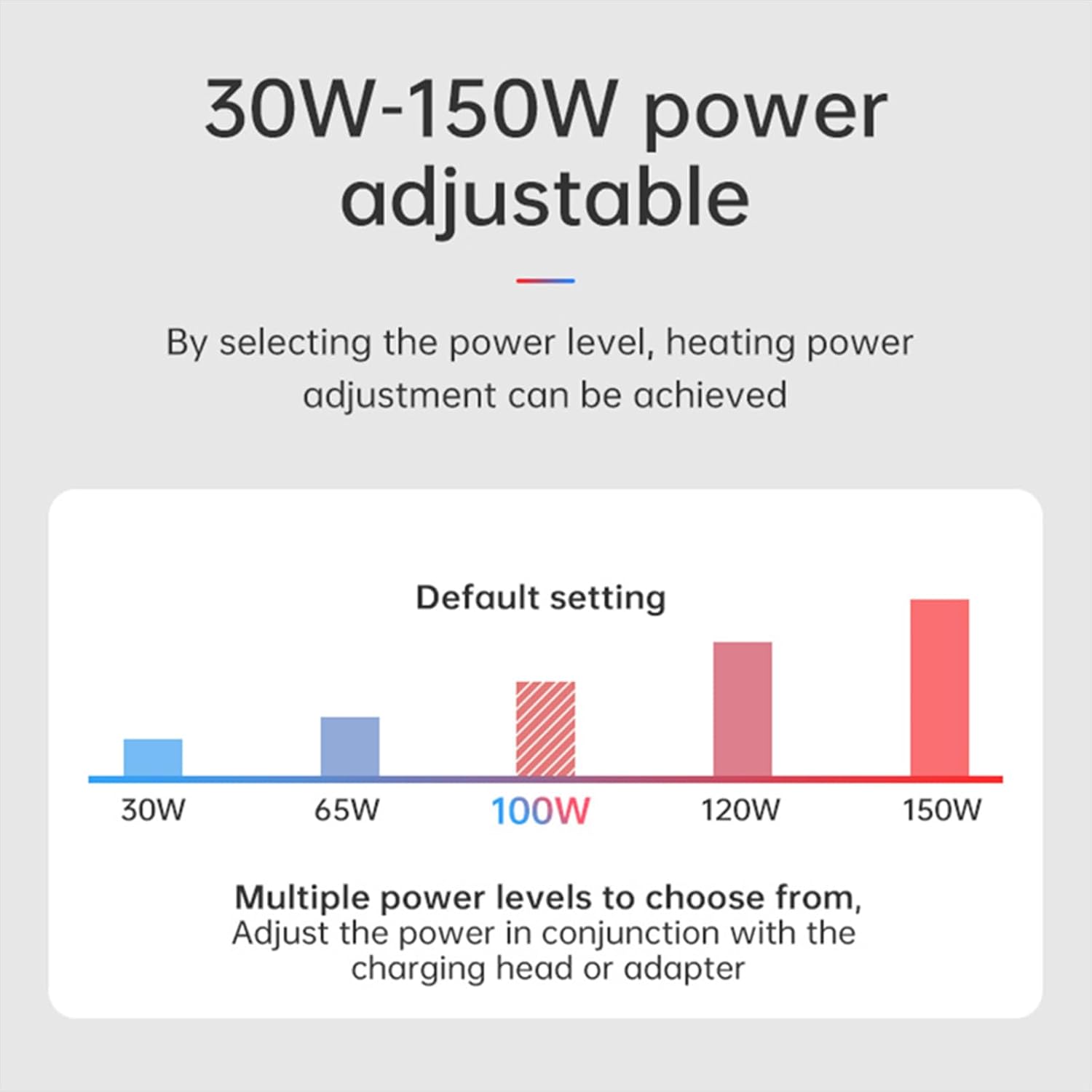
Figure 3: Compact Size of HP15

Figure 4: Modular Design for Heating Plate Replacement
4. Nastavení
Follow these steps to set up your ALIENTEK HP15 Soldering Hot Plate:
- Umístění: Place the hot plate on a flat, stable, and heat-resistant surface. Ensure there is adequate space around the device for ventilation.
- Připojení napájení: Connect a compatible power supply to either the DC port (12-24V) or the Type-C port (PD 20V). Important: Only connect one power source at a time. Connecting both simultaneously can damage the device.
- Počáteční zapnutí: Once connected, the device will power on, and the LCD screen will display the current status.

Figure 5: Power Input Ports (DC and Type-C)
Video 1: Product Feature Introduction + Product Usage Instructions. This video provides a visual guide to the ALIENTEK HP15 Soldering Hot Plate, demonstrating its key features, components, and operational modes including thermostatic heating and reflow soldering, along with safety features like tip-over protection.
5. Návod k obsluze
5.1 Thermostatic Heating Mode
This mode allows the hot plate to maintain a constant, user-defined temperature for desoldering components or preheating PCBs.
- Vyberte režim: Use the Left/Right keys to navigate the menu and select the Thermostatic Heating mode.
- Nastavit teplotu: Adjust the target temperature using the keys. The HP15 supports a range of 80℃ to 350℃.
- Vytápění monitoru: The RGB LED light will change color gradually as the temperature increases, providing a visual cue:
- ~50℃: Green
- 50℃-90℃: Light Green
- 90℃-125℃: Yellow
- 125℃-165℃: Pink
- 165℃-200℃+: Red
- Odpájení: Once the desired temperature is reached, place the PCB or component on the heating surface. For small components, metal clips can be used to hold the PCB in place for easier desoldering.

Figure 6: Constant Temperature Heating Capability

Figure 7: Rapid Heating Performance
5.2 Reflow Soldering Mode
This mode executes a pre-programmed temperature profile suitable for reflow soldering surface-mount components.
- Vyberte režim: Use the Left/Right keys to navigate the menu and select the Reflow Soldering mode.
- Place Component: Carefully place the PCB with components and solder paste onto the heating surface.
- Počáteční cyklus: Initiate the reflow cycle. The device will follow a specific temperature profile, typically consisting of four stages:
- Topení Stage: The device rapidly heats up according to the preset temperature and time.
- Holding Stage: The device slowly heats up according to the preset temperature and time, allowing solder paste to melt.
- Soldering Stage: The device heats up quickly and then maintains a constant temperature until the countdown ends, ensuring proper solder joint formation.
- Chlazení S.tage: The heating stops, and the fan may activate to cool the PCB. Once the temperature reaches the preset level, the device returns to the main screen.

Figure 8: Reflow Soldering Temperature Profile
6. Údržba
Regular maintenance ensures the longevity and optimal performance of your ALIENTEK HP15 Soldering Hot Plate.
- Čištění topné desky: After the device has cooled completely, gently wipe the heating surface with a soft, dry cloth to remove any solder residue or debris. For stubborn residue, use a small amount of isopropyl alcohol on a cloth.
- Modulární design: The HP15 features a split, modular design, which facilitates easier cleaning and potential replacement of the heating element if necessary.
- Skladování: Pokud zařízení nepoužíváte, skladujte ho v suchém a bezprašném prostředí.
7. Řešení problémů
If you encounter issues with your ALIENTEK HP15, refer to the following common troubleshooting tips:
- Zařízení se nezapíná:
- Ensure the power supply is correctly connected to either the DC or Type-C port.
- Verify that only one power source is connected at a time.
- Check if the power adapter is functioning correctly and providing the required voltage (DC 12-24V or PD 20V).
- Temperature Not Reaching Target:
- Confirm that the power supply can deliver sufficient wattage (up to 150W). Lower wattage power supplies may limit maximum temperature.
- Ensure the ambient temperature is not excessively low, which can affect heating efficiency.
- Zařízení se neočekávaně vypne:
- The HP15 has a dumping detection feature. If the device is tipped over, it will automatically shut off for safety. Place it on a stable surface.
- Over-temperature protection may activate if the device detects excessive heat. Allow it to cool down before restarting.
- Nepřesné údaje o teplotě:
- Ensure the heating surface is clean and free of debris that might interfere with temperature sensing.
8. Specifikace
| Funkce | Specifikace |
|---|---|
| Číslo modelu | HP15 |
| Typ zobrazení | LCD |
| Topný výkon | 150W (adjustable) |
| Teplotní rozsah | 80℃ ~ 350℃ (176-662°F) |
| Teplotní stabilita | 0-20 stupňů Celsia |
| Zdroj napájení | PD/DC (DC 12-24V, PD 20V) |
| Rozměry produktu | 72.5 mm (D) x 55.6 mm (Š) x 41.5 mm (V) / 2.8 x 2.2 x 1.6 palce |
| Hmotnost položky | 3.52 unce / 0.1 kilogramu |
| Zahrnuté komponenty | HP15, c2cS data cable |
| Výrobce | ALIENTEK |
| UPC | 717225382094 |

Figure 9: Adjustable Power Levels
9. Záruka a podpora
For warranty information, please refer to the documentation included with your product or contact ALIENTEK customer support directly. Protection plans may be available for extended coverage.
If you require technical assistance or have questions not covered in this manual, please contact ALIENTEK customer service through their official channels. When contacting support, please have your product model (HP15) and any relevant purchase information ready.