
1. Konec produktuview
The NJTY T21L is a high-precision digital multimeter designed for electricians, DIY enthusiasts, and anyone requiring accurate electrical measurements. This versatile tool offers a wide range of functions, including voltage, current, resistance, capacitance, inductance, frequency, temperature, diode, and continuity testing.
Mezi klíčové vlastnosti patří:
- Velký HD displej: A 6000-count display provides clear, easy-to-read measurements without parallax issues.
- Multifunkční měření: Capable of measuring DC/AC Voltage, DC/AC Current, Resistance, Capacitance, Inductance, Temperature, Diode, and Circuit Continuity.
- Bezkontaktní svtagDetekce e (NCV): Safely detect AC voltage without direct contact, indicated by a light and buzzer alarm.
- Secure Test Lead Jacks: Designed for smooth and tight insertion of test leads, ensuring accurate and reliable connections.
- Podsvícení a svítilna: Equipped with a display backlight and a built-in flashlight for convenient operation in low-light environments.

Přední view of the NJTY T21L Digital Multimeter, showcasing its large display and rotary switch.
2. Nastavení a příprava
2.1 Instalace baterie
The NJTY T21L multimeter requires three (3) 1.5V AAA batteries (not included) for operation.
- Najděte kryt přihrádky na baterie na zadní straně multimetru.
- Pomocí šroubováku otevřete kryt prostoru pro baterie.
- Vložte tři 1.5V baterie AAA a dbejte na správnou polaritu (+ a -).
- Nasaďte kryt prostoru pro baterie a zajistěte jej šroubem.
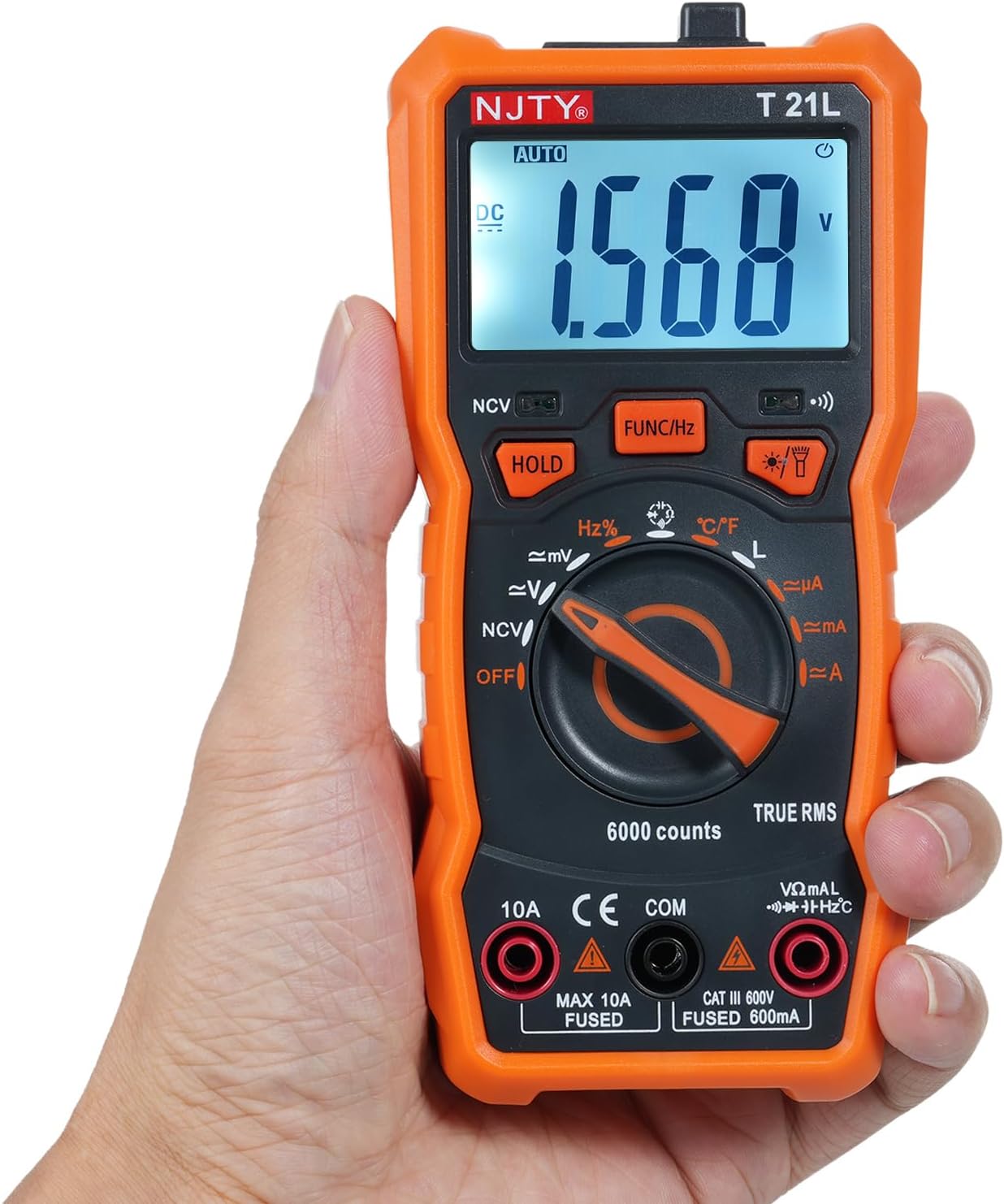
Image showing the open battery compartment for installing 3 AAA batteries.
2.2 Připojení měřicích kabelů
Always ensure test leads are securely connected before taking measurements.
- Vložte černý měřicí kabel do COM (Common) input terminal.
- Pro většinu měření (objemtage, resistance, capacitance, frequency, temperature, diode, continuity, and current up to 600mA), insert the červený měřicí kabel do VΩmA vstupní svorka.
- For high current measurements (up to 10A), insert the červený měřicí kabel do 10A vstupní svorka.

The included red and black test leads used for making electrical measurements.

The multimeter with its test leads properly connected to the input terminals.
3. Návod k obsluze
3.1 Multimeter Components
Familiarize yourself with the various parts of the NJTY T21L multimeter:

This diagram identifies all key components and controls of the NJTY T21L digital multimeter.
- Svítilna: Located at the top, provides illumination for work areas.
- Oblast snímání NCV: Top-front area for non-contact voltage detekce.
- LED displej: Zobrazuje naměřené hodnoty a indikátory.
- Buzzer Indicator Light: Illuminates and buzzes for NCV and continuity.
- Tlačítko svítilny/podsvícení: Activates the flashlight and display backlight.
- Gear Rotary Switch: Vybere primární měřicí funkci.
- Odpor/objemtage Input Terminal (VΩmA): Za svtage, resistance, capacitance, frequency, temperature, diode, continuity, and low current measurements.
- Common Terminal (COM): Pro černý měřicí kabel.
- Current Input Terminal (10A): Pro měření vysokého proudu (až 10 A).
- Data Hold Button (HOLD): Zmrazí aktuální údaj na displeji.
- Function Switch/Frequency Button (FUNC/Hz): Toggles between sub-functions within a rotary switch setting (e.g., AC/DC voltage, diode/continuity) or activates frequency measurement.
- Kontrolka NCV: Illuminates during NCV detection.
3.2 Základní postupy měření
Always ensure the multimeter is set to the correct function and range before connecting to a circuit. Start with a higher range if the expected value is unknown.
3.2.1 DC/AC Voltage Measurement (V~, V=)
- Nastavte otočný přepínač do polohy V~ (AC objemtage) nebo V= (DC svtage) pozice.
- Připojte červený testovací kabel k VΩmA terminálu a černého testovacího kabelu k COM terminál.
- Zapojte měřicí sondy paralelně k měřené součástce nebo obvodu.
- Přečtěte si svtage hodnota na displeji.
3.2.2 Měření odporu (Ω)
- Nastavte otočný přepínač do polohy Ω (Odpor) pozice.
- Připojte červený testovací kabel k VΩmA terminálu a černého testovacího kabelu k COM terminál.
- Před měřením odporu se ujistěte, že je obvod bez napětí.
- Připojte měřicí sondy napříč součástkou.
- Odečtěte hodnotu odporu na displeji.
3.2.3 Continuity Test and Diode Test
- Nastavte otočný přepínač do polohy Dioda/Kontinuita pozice.
- Připojte červený testovací kabel k VΩmA terminálu a černého testovacího kabelu k COM terminál.
- Stiskněte tlačítko FUNC/Hz tlačítko pro přepínání mezi testem diod a testem kontinuity.
- For Continuity: Touch the probes to the ends of the circuit. A continuous beep indicates continuity.
- For Diode: Connect the red probe to the anode and the black probe to the cathode. The display shows the forward voltage drop. Reverse the probes; an open circuit (OL) indicates a good diode.
3.2.4 Měření kapacity (F)
- Nastavte otočný přepínač do polohy Kapacita pozice.
- Připojte červený testovací kabel k VΩmA terminálu a černého testovacího kabelu k COM terminál.
- Před měřením se ujistěte, že je kondenzátor zcela vybitý.
- Připojte měřicí sondy na svorky kondenzátoru.
- Odečtěte hodnotu kapacity na displeji.
3.2.5 DC/AC Current Measurement (µA, mA, A)
Pozor: Always connect the multimeter in series with the circuit. Never connect it in parallel across a voltage source when measuring current, as this can damage the meter and the circuit.
- Set the rotary switch to the appropriate current range (µA, mA, or A).
- Pro proudy do 600 mA připojte červený měřicí vodič k VΩmA terminal. For currents up to 10A, connect the red test lead to the 10A terminal. The black test lead always goes to COM.
- Open the circuit where current is to be measured and insert the multimeter in series.
- Odečtěte aktuální hodnotu na displeji.
3.2.6 Nekontaktní svtage (NCV) Detekce
- Nastavte otočný přepínač do polohy NCV pozice.
- Move the NCV sensing area (top of the meter) close to the AC voltage zdroj.
- The NCV indicator light will illuminate, and the buzzer will sound, with increasinfrekvence g, jak se měřič blíží k objemutage zdroj.
3.2.7 Měření teploty (°C/°F)
- Nastavte otočný přepínač do polohy ° C / ° F pozice.
- Connect the temperature probe (if included) to the VΩmA a COM terminals, observing polarity.
- Place the tip of the temperature probe on the object or area whose temperature is to be measured.
- Odečtěte hodnotu teploty na displeji. Stiskněte FUNC/Hz pro přepínání mezi stupni Celsia a Fahrenheita.
3.3 Speciální funkce
- Pozastavení dat: Stiskněte tlačítko DRŽET button to freeze the current reading on the display. Press it again to release.
- Podsvícení/Svítilna: Stiskněte tlačítko Flashlight/Backlight Button to turn on the display backlight. Press and hold to activate the top flashlight. Press again to turn off.
- Automatické vypnutí: Multimetr se po určité době nečinnosti automaticky vypne, aby se šetřila baterie.
4. Údržba
4.1 Čištění
Chcete-li multimetr vyčistit, otřete jeho pouzdro čisticím prostředkem.amp hadříkem a jemným čisticím prostředkem. Nepoužívejte abrazivní prostředky ani rozpouštědla. Před čištěním se ujistěte, že je zařízení vypnuté a odpojené od všech obvodů.
4.2 Výměna baterie
Pokud se na displeji zobrazí indikátor slabé baterie, neprodleně vyměňte baterie, aby byly zajištěny přesné údaje. Postupujte podle kroků pro instalaci baterií v části 2.1.
4.3 Bezpečnostní opatření
- Always turn off the multimeter and disconnect test leads before opening the case for battery replacement or fuse inspection.
- Nepoužívejte měřič, pokud není kryt baterie správně uzavřen.
- Nepoužívejte měřicí přístroj, pokud se jeví poškozený nebo pokud je narušena izolace měřicích vodičů.
5. Řešení problémů
- Bez displeje: Zkontrolujte, zda jsou baterie správně vloženy a zda jsou dostatečně nabité. V případě potřeby je vyměňte.
- Nesprávné čtení: Ensure the rotary switch is set to the correct function and range. Check test lead connections. Verify the circuit is properly connected.
- „OL“ na displeji: This usually indicates an over-range condition (measurement exceeds the selected range) or an open circuit (e.g., when measuring resistance of an open circuit).
- Indikátor slabé baterie: Replace the batteries as soon as possible to maintain accuracy.
6. Specifikace
The following table details the technical specifications and measurement ranges for the NJTY T21L Digital Multimeter:

This table details the measurement ranges and accuracies for all functions of the NJTY T21L multimeter.
| Parametr | Specifikace |
|---|---|
| Model | T21L |
| DC svtage | 60mV, 600mV, 6V, 60V, 600V; ±(0.5% reading + 5 digits) |
| AC svtage | 60mV, 600mV, 6V, 60V, 600V; ±(1% reading + 4 digits) |
| Stejnosměrný proud | 600µA, 6000µA, 60mA, 600mA, 6A, 10A; ±(1.2% reading + 5 digits) for µA/mA, ±(3% reading + 5 digits) for A |
| AC proud | 600µA, 6100µA, 60mA, 600mA, 6A, 10A; ±(1.2% reading + 5 digits) for µA/mA, ±(3% reading + 5 digits) for A |
| Odpor | 600Ω, 6kΩ, 60kΩ, 600kΩ, 6MΩ, 60MΩ; ±(0.8% reading + 5 digits) |
| Frekvence | 9.999Hz, 99.99Hz, 999.9Hz, 9.999KHz, 99.99KHz, 999.9KHz, 9.999MHz; ±(1.5% reading + 5 digits) |
| Kapacita | 6000pF, 60nF, 600nF, 6µF, 60µF, 600µF, 6mF, 60mF, 100mF; ±(4.0% reading + 5 digits) |
| Teplota | -20 ℃ ~ 1000 ℃ / -4 ℉ ~ 1832 ℉ |
| Indukčnost | 600µH, 6mH, 60mH, 600mH, 6H, 60H; ±(4.0% reading + 5 digits) |
| Test diod | Ano |
| ON-OFF Buzzing (Continuity) | Ano |
| NCV (bezkontaktní svtage) | Ano |
| Uchovávání dat | Ano |
| Podsvícení / Svítilna | Ano |
| Automatické vypnutí | Ano |
| Nízký objemtage Indikátor | Ano |
| Zobrazit | 6000 počítá |
| Napájení | 3 * 1.5V AAA batteries (Not included) |
| Velikost | 147 * 71 * 45 mm |
| Výrobce | EVTSCAN |
| Manufacturer Reference Number | EVTSCANgfqdsmt5na |
7. Záruka a podpora
Specific warranty information for the NJTY T21L Digital Multimeter is not provided in the product details. For warranty claims, technical support, or service inquiries, please contact your retailer or the manufacturer, EVTSCAN, directly. Retain your proof of purchase for any warranty-related requests.