
1. Úvod
Thank you for choosing the ELISWEEN Wireless PC Gaming Controller. This controller is designed to provide a superior gaming experience across multiple platforms, including PC, Nintendo Switch, Android, and iOS devices. Featuring advanced Hall Effect joysticks, programmable back buttons, and customizable vibration, this manual will guide you through its setup, operation, and maintenance to ensure optimal performance.
2. Obsah balení
- ELISWEEN Wireless PC Gaming Controller
- Nabíjecí kabel USB-C (1.5m)
- 2.4GHz USB dongle
- Uživatelská příručka
3. Konec produktuview
Familiarize yourself with the controller's components:
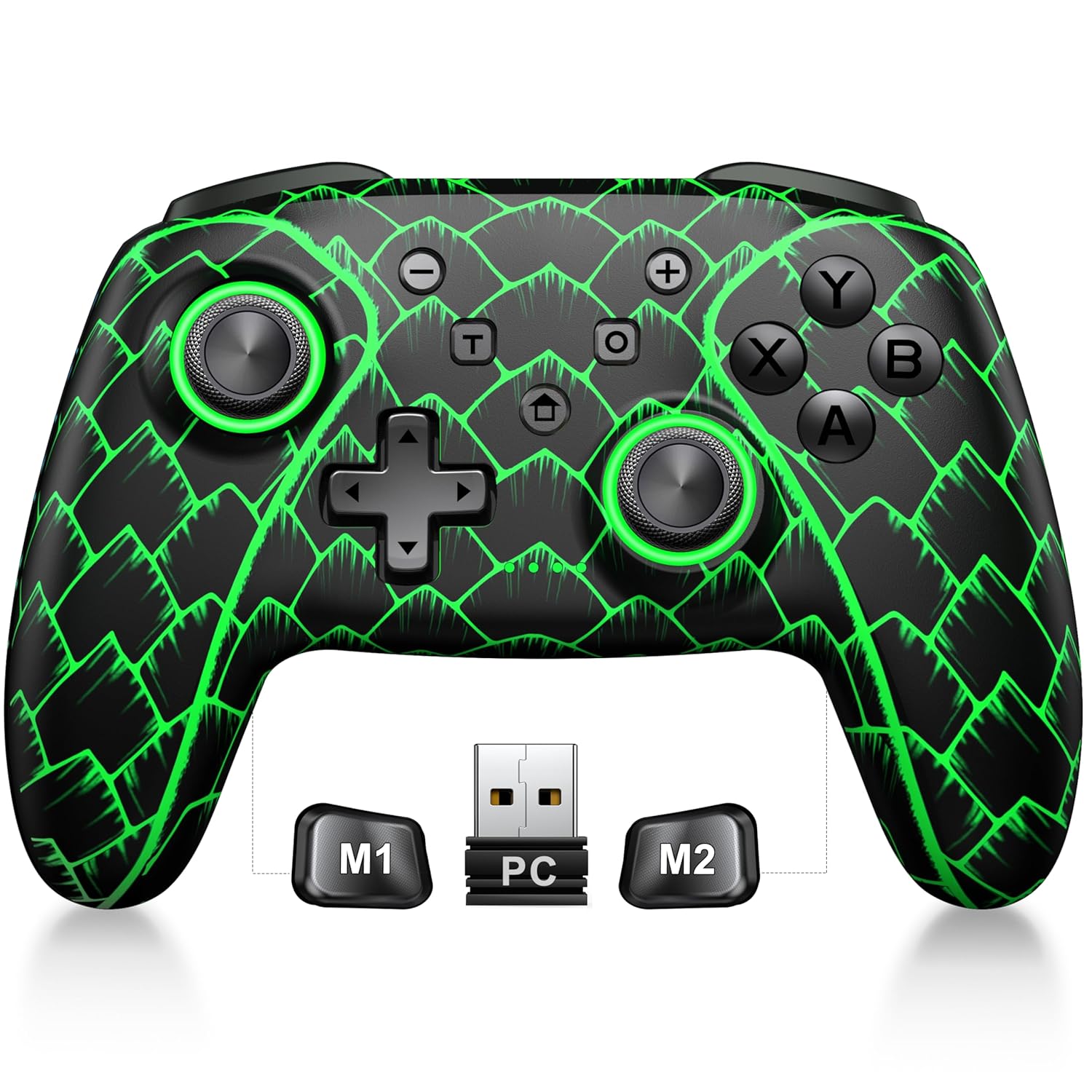
Figure 3.1: ELISWEEN Wireless PC Gaming Controller with its 2.4GHz USB dongle and highlighted M1/M2 programmable buttons.
- Levé/pravé analogové páčky: Hall Effect joysticks for precise movement.
- D-Pad: Směrový vstup.
- Akční tlačítka (A/B/X/Y): Standardní herní vstupní tlačítka.
- Ramenní knoflíky (L/P): Tlačítka namontovaná nahoře.
- Trigger Buttons (ZL/ZR): Analogové spouštěče s Hallovým efektem.
- Tlačítka M1/M2: Programovatelná tlačítka zpět.
- Tlačítko Domů: Powers on/off and returns to system home screen.
- +/- tlačítka: System navigation/menu buttons.
- Tlačítko pro snímek obrazovky: Pořizuje snímky obrazovky.
- Tlačítko Turbo: Activates/deactivates turbo function.
- Port USB-C: Pro nabíjení a kabelové připojení.
4. Nastavení a připojení
4.1 Nabíjení ovladače
Before first use, fully charge the controller. Connect the USB-C cable to the controller's USB-C port and the other end to a USB power source (e.g., PC, USB wall adapter). The charging indicator will show status and turn off when fully charged. A full charge takes approximately 3 hours.
4.2 Connecting to PC (Wireless 2.4GHz)

Figure 4.1: Multi-platform compatibility of the ELISWEEN controller, including PC, Switch, Android, and iOS.
- Insert the 2.4GHz USB dongle into an available USB port on your PC.
- Stiskněte tlačítko Domů na ovladači pro jeho zapnutí.
- The controller will automatically connect to the dongle. The indicator lights will stabilize once connected.
4.3 Connecting to PC (Wired USB-C)
- Connect the USB-C cable to the controller and the other end to your PC.
- The controller will be recognized as a plug-and-play device.
4.4 Připojení k konzoli Nintendo Switch
- On your Nintendo Switch, go to System Settings > Controllers and Sensors > Disconnect Controllers.
- Pak přejděte do sekce Ovladače a senzory > Změnit úchop/pořadí.
- Press and hold the Home button on the ELISWEEN controller until the indicator lights begin to flash rapidly.
- Once paired, the indicator light(s) corresponding to the player number will remain solid.
4.5 Connecting to Android/iOS (Bluetooth)
- Ujistěte se, že je na vašem zařízení Android nebo iOS povoleno Bluetooth.
- On the controller, press and hold the X + Home buttons simultaneously until the indicator lights flash rapidly, indicating pairing mode.
- On your device, search for Bluetooth devices and select "STK-7040RG" (or similar) to pair.
- Once connected, the indicator light will stabilize. Supports iOS 13+ MFi titles.
5. Návod k obsluze
5.1 Joysticky s Hallovým efektem
The controller features precision Hall Effect joysticks and triggers, designed to prevent stick drift and provide accurate, responsive control. These magnetic, contactless sensors ensure long-term durability and precision.

Obrázek 5.1: Vnitřní view of Hall Effect joystick technology, highlighting its magnetic, contactless design for enhanced accuracy and durability.
Zero Deadzone Mode: For competitive gaming, activate a temporary 0 deadzone mode by holding the T tlačítko + R3 (right stick click) or L3 (left stick click). A green light confirms activation. To revert to default calibration, press the same combo (blue light indicator). The controller automatically resets to factory default settings upon restart for consistent anti-drift performance.
5.2 Programovatelná tlačítka zpět (M1/M2)
The M1 and M2 back buttons can be programmed to map up to 21 different key combinations, allowing for quick execution of complex actions.

Figure 5.2: The M1 and M2 programmable back buttons, capable of mapping up to 21 different actions for enhanced control.
Refer to the Keylinker App (search "NC300") for detailed instructions on programming and customizing these buttons.
5.3 Funkce Turbo
The controller supports Turbo fire functionality for 10 action buttons with adjustable speeds (5, 12, or 20 presses per second).
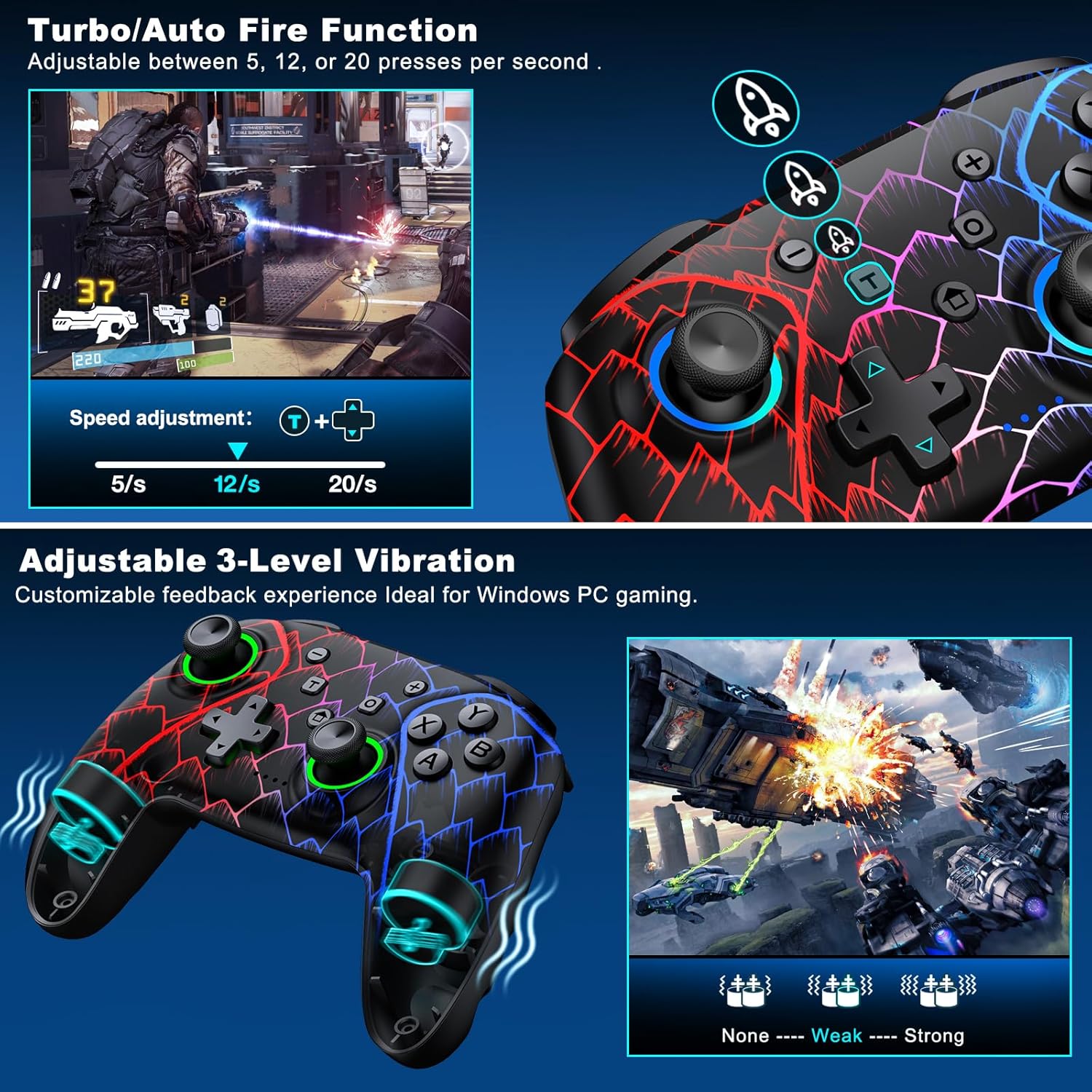
Figure 5.3: Visual representation of the Turbo/Auto Fire function and the adjustable 3-level vibration feature.
- Aktivace Turba: Stiskněte tlačítko Turbo button + the desired action button.
- Upravit rychlost: Stiskněte Turbo + Up arrow (increase) or Dolů arrow (decrease) on the D-pad.
- Clear Turbo: Podržte Mínus tlačítko + Dolů arrow on the D-pad to instantly clear all Turbo binds.
5.4 Nastavení vibrací
Experience immersive feedback with dual vibration motors offering 3 intensity levels.
- Adjust intensity by pressing L + R + ZL + ZR simultaneously. Cycle through levels: None, Weak, Strong.
- Note: Vibration is disabled on mobile platforms. Gyro functionality works only with Nintendo systems.
5.5 Hair Trigger Locks
Shorten trigger pulls for faster response times in games requiring quick inputs, such as first-person shooters.
5.6 Správa životnosti baterie
The controller is equipped with a 1000mAh battery, providing over 20 hours of continuous gameplay on a single charge. Charging takes approximately 3 hours via USB-C.

Figure 5.4: The ELISWEEN controller's 1000mAh battery provides extended playtime with quick charging capabilities.
5.7 Dynamické světelné efekty
Customize the controller's lighting effects via the Keylinker App (search "NC300").
5.8 Automatic Power-off
To conserve battery, the controller will automatically power off after 20 minutes of inactivity.
6. Údržba
- Čištění: K čištění ovladače používejte měkký, suchý hadřík. Nepoužívejte abrazivní čisticí prostředky ani rozpouštědla.
- Skladování: Regulátor skladujte na chladném a suchém místě mimo dosah přímého slunečního záření a extrémních teplot.
- Péče o baterie: Vyhněte se častému úplnému vybíjení baterie. Pravidelně ji nabíjejte, abyste prodloužili její životnost.
7. Řešení problémů
- Ovladač se nepřipojuje:
- Ujistěte se, že je ovladač nabitý.
- Verify the correct connection method for your device (2.4GHz dongle for PC, Bluetooth for mobile, pairing for Switch).
- Try restarting the controller and the device you are connecting to.
- For PC, try a different USB port for the dongle or wired connection.
- Stick drift or inaccurate input:
- Activate the 0 deadzone mode (T + R3/L3) to recalibrate.
- Ensure the controller firmware is up to date via the Keylinker App.
- Tlačítka nereagují:
- Zkontrolujte, zda je ovladač správně připojen.
- Ujistěte se, že se pod tlačítky nezdržují žádné nečistoty.
- Perform a factory reset if issues persist (refer to Keylinker App or contact support).
- Problémy s nabíjením:
- Zkuste jiný kabel USB-C a zdroj napájení.
- Ensure the USB-C port on the controller is clean and free of obstructions.
8. Specifikace
| Konektivita | Bluetooth 5.2, bezdrátové připojení 2.4 GHz, kabelové připojení USB-C |
| Kompatibilita | PC, Nintendo Switch, Android, iOS (iOS 13+ MFi) |
| Kapacita baterie | 1000 XNUMX mAh |
| Prázdno | 20+ hodiny (cca) |
| Doba nabíjení | 3 hodin (přibližně) |
| Joysticky | Hall Effect (Drift-Proof) |
| Programovatelná tlačítka | 4 Back Buttons (M1/M2) |
| Vibrace | Dual Motors, 3 Adjustable Levels |
| Rozměry | 6.38 x 4.72 x 2.64 palce |
| Hmotnost | 11.99 unce (přibližně 340 g) |
| Výrobce | Qixun Tech |
| Země původu | Čína |
9. Záruka a podpora
The ELISWEEN Wireless PC Gaming Controller comes with a standard manufacturer's warranty. For specific warranty terms and conditions, please refer to the product packaging or contact our customer support.
For any technical assistance, troubleshooting, or inquiries, our 24/7 Expert Support team is available to help. Please refer to the contact information provided on the product packaging or our official webmísto.