
1. Úvod
1.1 Konec produktuview
The Rraycom 5MP Wireless Security Camera is a battery-powered, outdoor-ready surveillance device designed for home security. It features 5MP ultra-HD video, a 130° wide field of view, and dual light source night vision for both full-color and infrared options. Equipped with AI motion detection, two-way audio, a siren alarm, and spotlight, it provides comprehensive monitoring and deterrence. The camera supports both cloud and local SD card storage and is compatible with Amazon Alexa.
1.2 Klíčové vlastnosti
- 2.5K (5MP) Ultra-HD Video: Poskytuje jasný a detailní dohledtage.
- 130° široké pole View: Minimizes blind spots for broader coverage.
- Full-Color & Infrared Night Vision: Offers versatile night monitoring options.
- Dobíjecí baterie: Ensures wire-free operation and flexible placement.
- IP65 voděodolný: Navrženo tak, aby odolalo různým povětrnostním podmínkám pro venkovní použití.
- Detekce pohybu PIR s analýzou AI: Accurately detects human movement and sends real-time notifications.
- Obousměrný zvuk: Allows for remote communication with visitors or intruders.
- Siren Alarm & Spotlight: Deters unwanted visitors with audible and visual alerts.
- Cloud/SD Card Storage: Offers flexible options for video recording storage.
- Integrace Alexa: Enables voice control for live view přístup.

Obrázek: Overview of the Rraycom 5MP Wireless Security Camera and its main features.
1.3 Co je v krabici?
Zkontrolujte prosím obsah balení. Pokud některé položky chybí nebo jsou poškozené, kontaktujte zákaznickou podporu.
- Rraycom 5MP Wireless Security Camera (x1)
- Montážní držák (x1)
- Mounting Screws and Wall Anchors (x1 set)
- USB nabíjecí kabel (x1)
- Uživatelská příručka (x1)
2. Začínáme: Nastavení
2.1 Nabíjení fotoaparátu
Before initial use, fully charge the camera battery. Connect the provided USB charging cable to the camera's charging port and to a standard 5V USB power adapter (not included). The indicator light will show charging status and turn solid when fully charged.
2.2 Instalace aplikace
Download the companion app, VistaFlow, from your mobile device's app store.
- Pro zařízení iOS: Hledat "VistaFlow" in the Apple App Store.
- Pro zařízení Android: Hledat "VistaFlow" in the Google Play Store.
Follow the on-screen instructions to create an account and log in.
2.3 Device Pairing (Wi-Fi Connection)
- Ujistěte se, že je vaše mobilní zařízení připojeno k Síť Wi-Fi 2.4 GHzFotoaparát nepodporuje 5GHz Wi-Fi.
- Open the VistaFlow app and tap the "Add Device" or "+" icon.
- Vyberte model fotoaparátu ze seznamu.
- Follow the in-app instructions to power on the camera and put it into pairing mode (usually indicated by a flashing LED).
- Naskenujte QR kód zobrazený na obrazovce telefonu objektivem fotoaparátu nebo v případě potřeby použijte alternativní metody párování.
- Po připojení pojmenujte kameru a dokončete proces nastavení.
2.4 Montáž fotoaparátu
Choose a suitable location for your camera, considering Wi-Fi signal strength, desired viewing angle, and power access for occasional recharging. The camera is IP65 waterproof, making it suitable for outdoor installation.
- Označte si otvory pro vrtání pomocí montážního držáku jako šablony.
- Drill holes and insert wall anchors if mounting on masonry or drywall.
- Připevněte montážní konzolu ke zdi nebo stropu pomocí šroubů.
- Attach the camera to the mounting bracket and adjust the angle for optimal coverage.
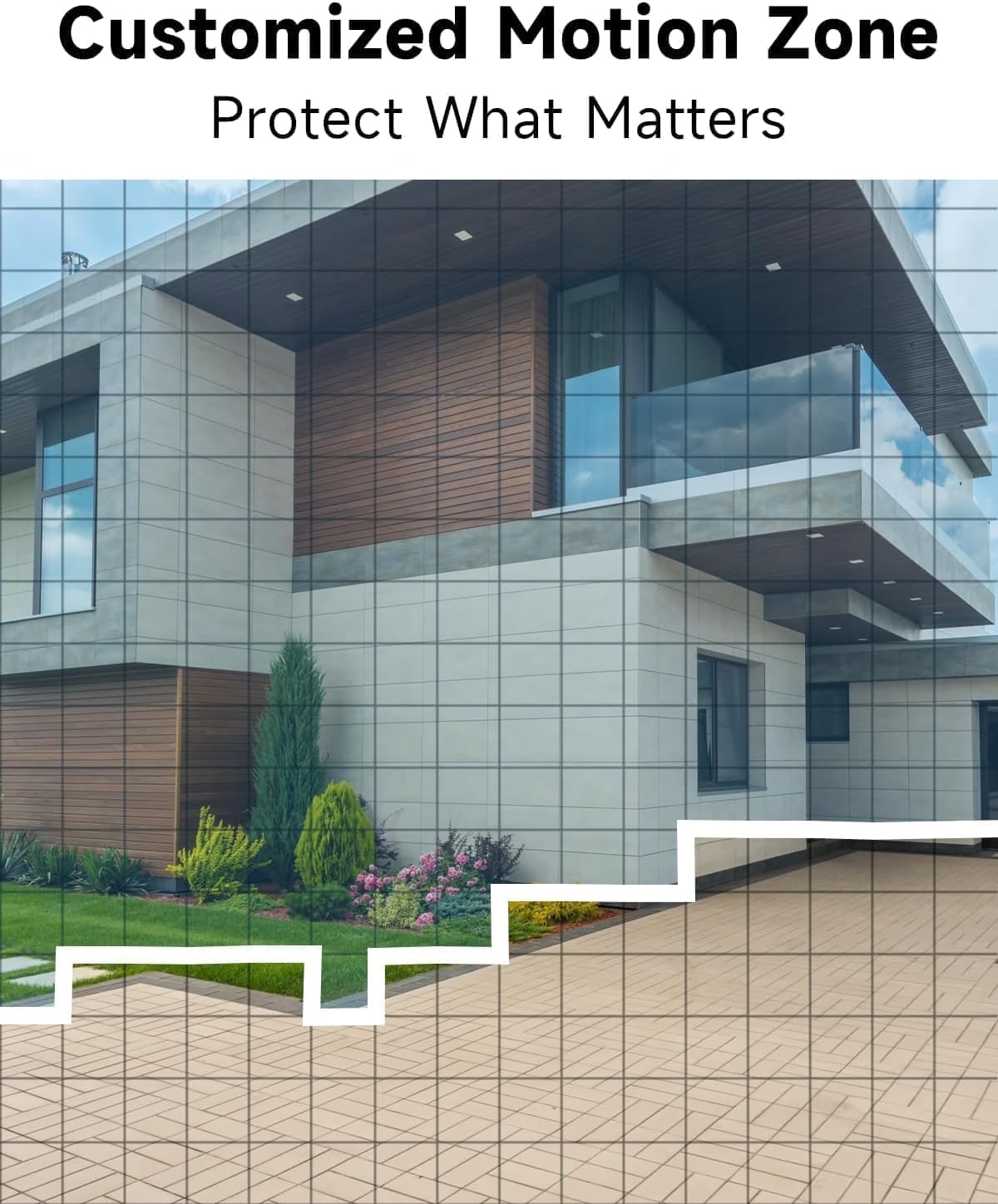
Obrázek: Přample of camera placement and customized motion zone setup.
3. Návod k obsluze
3.1 Živě View
Access the VistaFlow app and select your camera to view the live feed. You can pinch to zoom and pan across the 130° wide-angle view. The 5MP resolution provides clear details.

Image: Visual comparison of 5MP versus 1080P video resolution.
3.2 Detekce pohybu a analýza pomocí umělé inteligence
The camera uses a PIR sensor and AI analysis to detect motion, specifically identifying persons to reduce false alarms. When motion is detected, you will receive a notification on your phone.
- Přizpůsobené zóny aktivit: In the app settings, you can define specific areas within the camera's view kde by měla být aktivní detekce pohybu, ignoruje ostatní oblasti.
- Nastavení citlivosti: Adjust the motion detection sensitivity to suit your environment and reduce unwanted alerts.

Image: AI Motion Detection in action, highlighting alert options.
3.3 Obousměrný zvuk
The built-in microphone and speaker allow for real-time two-way communication. Tap the microphone icon in the live view mluvit skrz kameru a poslouchat zvuk z místa, kde se kamera nachází.

Image: Demonstrating two-way audio communication.
3.4 Noční vidění
Kamera nabízí dva režimy nočního vidění:
- Plně barevné noční vidění: Utilizes the built-in spotlight to provide color images in low-light conditions.
- Infračervené noční vidění: Používá infračervené LED diody pro černobílý obraz v naprosté tmě.
You can switch between these modes or set them to automatic in the app settings.

Image: Comparison of color and infrared night vision modes.
3.5 Siren Alarm & Spotlight
In response to motion detection, or manually activated via the app, the camera can trigger a siren alarm and turn on its spotlight to deter intruders. You can customize the siren sound with pre-recorded messages.
3.6 Možnosti úložiště
Kamera podporuje dva způsoby ukládání nahraného videa:
- Cloudové úložiště: A free rolling 3-day cycled cloud storage service is provided. Optional subscription plans may be available for extended cloud storage.
- Micro SD karta: Insert a micro SD card (up to 256GB, not included) into the camera's SD card slot for local storage.
3.7 Integrace s Alexou
The Rraycom camera is compatible with Amazon Alexa. To enable this feature:
- Open the Alexa app on your mobile device.
- Go to "Skills & Games" and search for "VistaFlow".
- Enable the skill and link your VistaFlow account.
- Objevte zařízení.
You can then use voice commands such as: "Alexa, show me the [camera name]" to view živý přenos na kompatibilních zařízeních Alexa (např. Echo Show).
4. Údržba
4.1 Správa baterie
The camera is powered by a rechargeable battery. Battery life varies based on usage, motion detection frequency, and environmental factors.
- Dobíjení: When the battery level is low, you will receive a notification via the app. Disconnect the camera from its mount and charge it using the provided USB cable.
- Optimalizace výdrže baterie: Reduce motion detection sensitivity, shorten recording duration, and minimize live view access to extend battery life.
4.2 Čištění
Periodically clean the camera lens and body to ensure optimal performance.
- Use a soft, dry, lint-free cloth to wipe the lens. For stubborn smudges, a slightly damp Lze použít hadřík a poté suchý.
- Otřete tělo fotoaparátuamp tkanina. Vyhněte se používání agresivních chemikálií nebo abrazivních čisticích prostředků.
5. Řešení problémů
5.1 Běžné problémy a řešení
| Problém | Možné řešení |
|---|---|
| Kamera se nepřipojuje k Wi-Fi | Ensure your Wi-Fi is 2.4GHz. Check Wi-Fi signal strength at the camera's location. Restart your router and the camera. Re-attempt pairing in the app. |
| Detekce pohybu nefunguje nebo je příliš mnoho falešných poplachů | Check motion detection settings in the app. Adjust sensitivity. Define activity zones to exclude irrelevant areas. Ensure camera lens is clean. |
| Špatná kvalita obrazu | Ensure the camera lens is clean. Check Wi-Fi signal strength. Ensure the camera is set to 5MP resolution in app settings if available. |
| Baterie se nenabíjí | Ensure the USB cable is securely connected. Try a different USB power adapter. Check if the charging port is clean and free of debris. |
| Cannot hear or speak through two-way audio | Check volume settings on your phone and in the app. Ensure microphone and speaker permissions are granted to the app. |
6. Technické specifikace
| Funkce | Specifikace |
|---|---|
| Rezoluce | 5MP (2.5K QHD) |
| Pole View | 130° |
| Konektivita | Wi-Fi (pouze 2.4 GHz) |
| Zdroj napájení | Napájení z baterie |
| Odolnost vůči povětrnostním vlivům | IP65 Vodotěsný |
| Noční vidění | Full-Color, Infrared |
| Zvuk | 2-pásmový zvuk |
| Detekce pohybu | PIR with AI Analysis (Person Detection) |
| Možnosti úložiště | Cloud (3-day free rolling), Micro SD Card (up to 256GB) |
| Integrace chytré domácnosti | Amazon Alexa |
| Kompatibilní zařízení | iOS, Android |
| Vnitřní/venkovní použití | Venkovní |
7. Záruka a zákaznická podpora
7.1 Informace o záruce
Rraycom products come with a limited warranty. Please refer to the warranty card included in your package or visit the official Rraycom webpodrobné záruční podmínky naleznete na webu.
7.2 Zákaznická podpora
If you encounter any issues or have questions regarding your Rraycom 5MP Wireless Security Camera, please contact our customer support team. Contact information can be found on the Rraycom webmístě nebo na obalu produktu.