
1. Úvod
This user manual provides comprehensive instructions for the safe and effective operation, maintenance, and troubleshooting of your AGM Global Vision UNVG 3APW Ultralight Night Vision Goggle/Binocular. This advanced optical device is designed for enhanced visibility in low-light and total darkness conditions, featuring Gen 3 Auto-Gated, P45-White Phosphor Image Intensifier Tubes (IIT).
Před použitím zařízení si prosím pečlivě přečtěte tento návod k obsluze, abyste zajistili optimální výkon a dlouhou životnost.
2. Klíčové vlastnosti
- Low Power Consumption Design: Utilizes a single AA battery or an external battery pack for extended operational periods.
- Flip-Up Auto Off Feature: Each image intensifier tube automatically deactivates when the goggle is flipped up, conserving battery life.
- Corrosion and Impact-Resistant Housing: Constructed with PEEK+Glass fiber material and a matte black finish for durability and longevity in various environments.
- Quick Attachment Design: Features a dovetail base support for strong compatibility and secure mounting.
- PVS-14-style Compatible: Objective and eyepiece lenses are designed for compatibility with PVS-14 style components and attachments.
- Independent Pod Movement: Individual optical pods can roll up and down, allowing for quick configuration changes and improved operational flexibility.
- Single/Double Eye Configuration: Pods are independently adjustable, enabling use in either monocular or binocular modes.
- IR Complement Function: Integrated infrared illuminator enhances visibility in complete darkness and close-quarters environments.
- Manual Gain Control: Allows the user to adjust the image intensifier gain for optimal vision preferences based on ambient light conditions.
- New Simplified IP Stop Design: Improved interpupillary (IP) stop design allows for comfortable and precise adjustment of tube positions.
3. Součásti a ovládací prvky
Familiarize yourself with the various components and controls of your night vision goggle for proper operation.

Obrázek 3.1: Přední levý view of the UNVG 3APW Night Vision Goggle, showing the objective lenses and eyepiece assemblies.
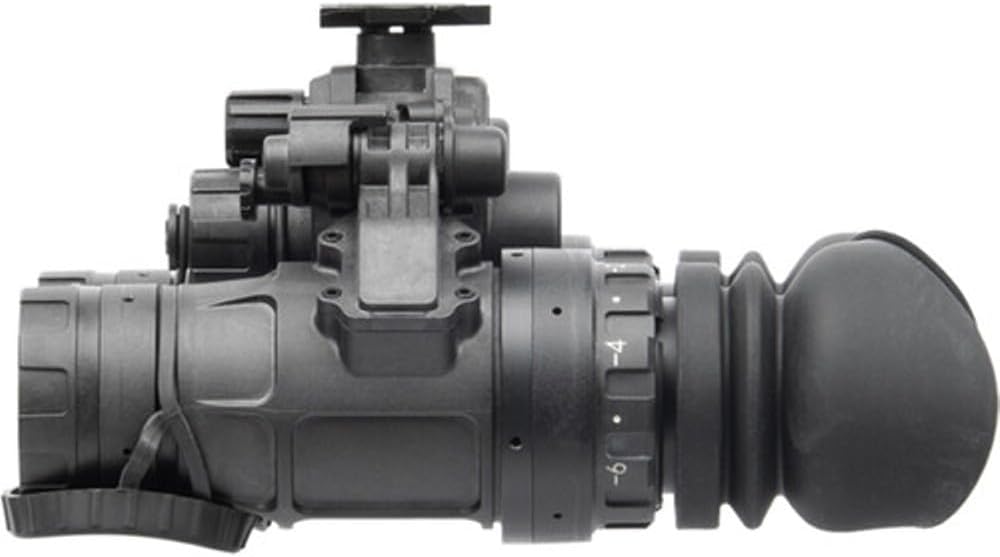
Obrázek 3.2: Strana view of the UNVG 3APW, highlighting the compact profile and mounting interface.

Obrázek 3.3: Přední strana view of the UNVG 3APW, showing the objective lenses and the central bridge.

Figure 3.4: The UNVG 3APW Night Vision Goggle displayed alongside its carrying case and external battery pack.
Klíčové ovládací prvky:
- Power/Gain Control Knob: Used to turn the device on/off and adjust image brightness.
- Kroužek pro nastavení dioptrií: Located on the eyepiece, used to adjust focus for individual eye sight.
- Objective Lens Focus Ring: Used to focus the image for varying distances.
- Tlačítko IR přísvitu: Activates the built-in infrared illuminator.
- Úprava mezipupilární vzdálenosti (IPD): Allows adjustment of the distance between the two optical pods to match the user's eye spacing.
4. Nastavení a první použití
4.1 Instalace baterie
- Najděte přihrádku na baterie na zařízení.
- Otevřete kryt bateriového prostoru.
- Insert one AA (1.5V) battery, ensuring correct polarity (+/-). Alternatively, connect the external battery pack (four AA or two CR123A batteries) if desired.
- Bezpečně zavřete kryt prostoru pro baterie.
4.2 Montáž
The UNVG 3APW features a dovetail base for quick and secure attachment to compatible helmet mounts or head harnesses.
- Align the dovetail base of the goggle with the corresponding slot on your mounting system.
- Slide the goggle into place until it clicks securely.
- Ensure the goggle is firmly attached and does not wobble.
4.3 Úpravy
- Interpupillary Distance (IPD): Adjust the distance between the two optical pods (56 to 72 mm) until you see a single, clear circular image. Use the simplified IP stop design to set your preferred tube positions.
- Dioptrická korekce: While looking through the eyepiece, rotate the diopter adjustment ring (-6 to +2 diopters) until the reticle or image appears sharp for your individual eyesight.
- Zaostření objektivu: Rotate the objective lens focus ring to bring distant or close objects into sharp focus (focus range: 0.25m to Infinity).
5. Návod k obsluze
5.1 Zapnutí/vypnutí
- To power on the device, rotate the Power/Gain Control Knob clockwise from the OFF position.
- To power off, rotate the knob counter-clockwise to the OFF position.
- Zařízení je vybaveno Flip-Up Auto Off function: when the goggle is flipped up and out of the line of sight on a compatible mount, the image intensifier tubes will automatically turn off to conserve battery. Flipping it back down will reactivate the tubes.
5.2 Manual Gain Control
After powering on, continue rotating the Power/Gain Control Knob to adjust the brightness (gain) of the image. Increase gain in very dark conditions and decrease it in brighter low-light environments to achieve optimal image clarity and contrast.
5.3 IR Illuminator Use
The built-in IR illuminator provides additional illumination in conditions of absolute darkness or when observing objects at very close range.
- Press the IR Illuminator Button to activate the infrared illuminator.
- Press the button again to deactivate it.
- Note: The IR illuminator is invisible to the naked eye but can be detected by other night vision devices. Use judiciously.
6. Údržba a péče
Proper maintenance ensures the longevity and optimal performance of your night vision goggle.
6.1 Čištění
- Objektivy: Použijte měkký hadřík bez žmolků, který je speciálně určen pro optické čočky. Jemně otřete povrch čočky. V případě odolných šmouh použijte malé množství čisticího roztoku na čočky naneseného na hadřík, nikoli přímo na čočku.
- Bydlení: Otřete vnější kryt měkkým hadříkemamp hadříkem. Nepoužívejte abrazivní čisticí prostředky ani rozpouštědla.
- Do not immerse the device in water, despite its IP67 rating, unless specifically instructed for cleaning.
6.2 Skladování
- Remove batteries if storing the device for extended periods to prevent leakage and damage.
- Store the goggle in its protective carrying case in a cool, dry place, away from direct sunlight and extreme temperatures.
- Neskladujte v prostorách s vysokou vlhkostí.
7. Řešení problémů
If you encounter issues with your night vision goggle, refer to the table below for common problems and their solutions.
| Problém | Možná příčina | Řešení |
|---|---|---|
| Zařízení se nezapne. | Baterie jsou vybité nebo nesprávně nainstalované. | Replace batteries or ensure correct polarity. Check external battery pack connection if used. |
| Obraz je tmavý nebo matný. | Gain control set too low; insufficient ambient light; bright light cut-off activated. | Increase gain using the control knob. If in extremely dark conditions, activate IR illuminator. Move away from bright light sources. |
| Obraz je rozmazaný nebo nezaostřený. | Diopter or objective lens focus not adjusted correctly. | Adjust the diopter ring for your eyesight and the objective lens focus ring for the viewvzdálenost. |
| IR Illuminator not working. | IR illuminator not activated; low battery. | Press the IR illuminator button. Ensure batteries have sufficient charge. |
| Device powers off when flipped up. | This is the intended "Flip-Up Auto Off" feature. | No action required. Flip the device back down to reactivate. |
8. Technické specifikace
| Parametr | Hodnota |
|---|---|
| Interpupilární vzdálenost | 56 až 72 mm |
| Image Intensifier Tube | Gen 3 Auto-Gated "White Phosphor 3APW" |
| Rezoluce | 64-72 lp/mm |
| Zvětšení | 1x |
| Systém objektivů | 25 mm; F / 1.23 |
| Pole View (FOV) | 40° |
| Rozsah zaostření | 0.25m to Infinity |
| Dioptrická korekce | -6 až +2 dioptrie |
| Infračervený iluminátor | Ano (vestavěný) |
| Odříznutí jasného světla | Ano |
| Typ baterie | One AA (1.5V) or External Battery Pack (four AA or two CR123A) |
| Ukončete průměr žáka | 14 mm |
| Hodnocení prostředí | IP67 |
| Rozsah provozních teplot | -40°C až +50°C |
| Rozsah skladovacích teplot | -50°C až +70°C |
| Rozměry | 4" × 4.6" × 3.3" |
| Hmotnost | 1.1 lb |
| Materiál | PEEK+Glass fiber |
| Barva | Černý |
9. Záruka a podpora
Information regarding a specific warranty for this product is not provided in the product details. For any warranty claims, technical support, or service inquiries, please contact the manufacturer or your point of purchase directly.
Always refer to the official manufacturer's webNejnovější informace o podpoře získáte na webových stránkách nebo se obraťte na jejich zákaznický servis.